Cheap Gaming Keyboards That Look Expensive: 7 Under $100

This article contains affiliate links. If you buy through them, I earn a small commission at no extra cost to you. I only recommend keyboards I’ve actually tested. As an Amazon Associate I earn from qualifying purchases.
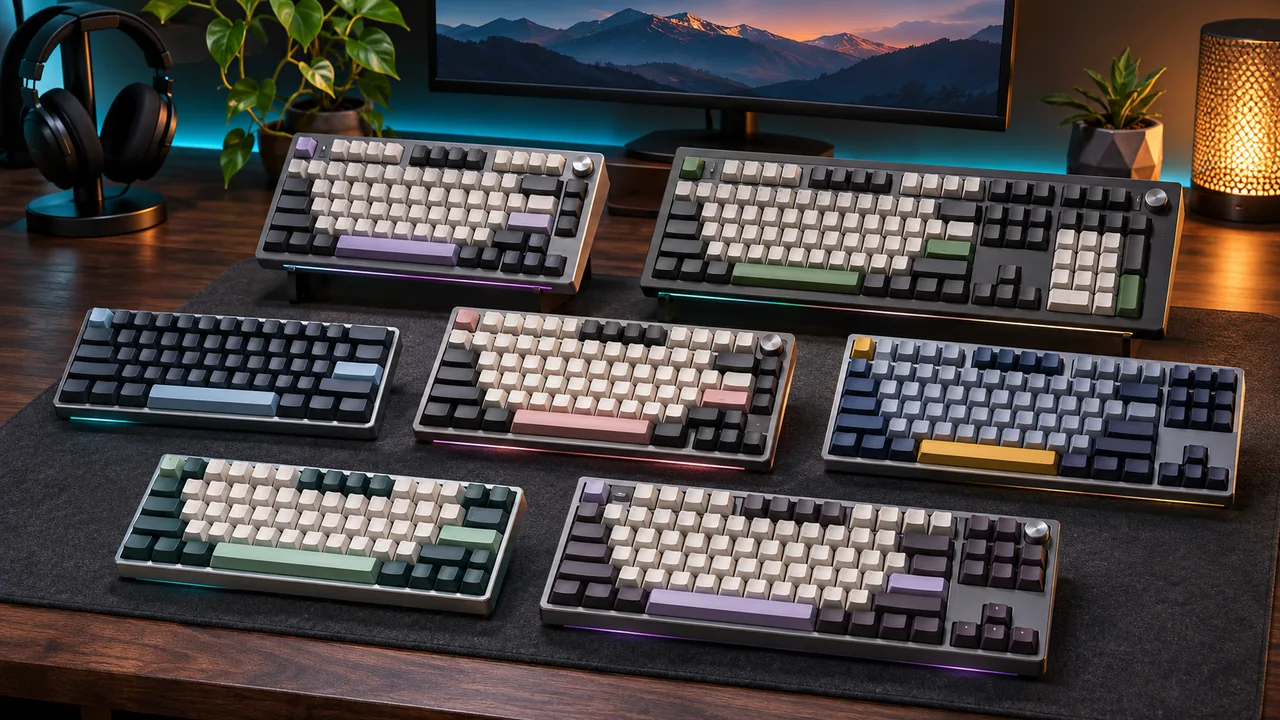
Here’s a dirty little secret of the keyboard world: half the “$200 custom builds” you see on desk-setup forums cost less than a nice dinner. The aluminum, the side-printed caps, the muted thock — it’s all available under $100 now. You just have to know which cheap gaming keyboards that look expensive actually hold up once you stop staring and start typing.
I’ve been opening up keyboards for about 14 years. The budget tier used to mean wobbly stabilizers, shiny ABS caps, and a rainbow light show trying to distract you from both. That era’s over. Chinese brands like Yunzii, Leobog, Aula, and Royal Kludge are shipping gasket mounts, foam stacks, and CNC aluminum at prices that would’ve been a joke five years ago.
But “looks expensive” and “is good” aren’t the same thing. Some boards nail the photo and fall apart in the details. So this list is built on both: how it looks on your desk, and how it behaves under your fingers in a ranked match.


Quick Comparison: The TL;DR
Short on time? Find your need in the left column, grab the board next to it, done.
| If you want… | Get this | Why it looks expensive | Case | Connection | Street price | Check price |
|---|---|---|---|---|---|---|
| The most premium look for the least money | Yunzii AL71 | Full CNC aluminum body, matching doubleshot PBT caps | Aluminum | Wired / 2.4GHz / Bluetooth | ~$45–$100 | See on Amazon |
| A heavy metal board for a wired gaming desk | Leobog Hi75 | All-aluminum top and bottom, 81 keys plus knob | Aluminum | Wired (Hi75C Pro adds wireless) | ~$50–$80 | See on Amazon |
| The best sound per dollar | Aula F75 | Gasket mount, foam stack, side-printed PBT colorways | Plastic | Wired / 2.4GHz / Bluetooth | ~$60–$70 | See on Amazon |
| Cheapest with QMK/VIA remapping | Royal Kludge R75 | CNC aluminum knob, MDA PBT caps, gasket mount | Plastic | Wired (wireless version available) | ~$48–$60 | See on Amazon |
| A name brand that tinkerers trust | Keychron V1 Max | Frosted translucent shell, knob, clean Mac/Win legends | Plastic | Wired / 2.4GHz / Bluetooth | ~$85–$95 | See on Amazon |
| Mainstream gaming software and support | Corsair K70 CORE TKL | Aluminum top plate, media dial, Corsair polish | Plastic + aluminum plate | Wired (wireless model costs more) | ~$80–$100 | See on Amazon |
| A clean office-to-game board under $60 | Logitech G413 TKL SE | Brushed aluminum-magnesium top, PBT caps, white backlight | Plastic + alloy top | Wired | ~$45–$60 | See on Amazon |
My overall pick: the Yunzii AL71 if you catch it on sale. Nothing else here looks this expensive for this little money.
What Makes Cheap Gaming Keyboards Look Expensive?
It’s not RGB. I’ll say that up front, because every budget box on Amazon screams about 16.8 million colors. Light shows read as “gamer” in the worst way. The boards that pass for $200 customs usually do the opposite: they go quiet, matte, and minimal.
Here’s what actually sells the premium look, in rough order of impact:
- Metal you can see and feel. A CNC aluminum case is the single biggest tell. It’s cold to the touch, it doesn’t flex, and it weighs enough that the board doesn’t skate when you slam WASD. Even an aluminum knob or top plate helps.
- PBT keycaps with a coordinated colorway. PBT has a dry, slightly textured finish that doesn’t go greasy-shiny like ABS. Matching or two-tone sets look curated, not random.
- Side-printed or clean legends. Side-printed caps are a custom-scene trend that instantly reads “enthusiast.” The tradeoff is you lose shine-through lighting.
- A deep, muted sound. Gasket mounts and foam layers kill the hollow ping that gives cheap boards away. People hear a keyboard before they look at it on stream.
- A tight 75% or 65% layout. Compact boards look intentional. A full-size slab with dedicated macro keys looks like 2014.
The “thocc” tax, honestly
I like a deep, creamy sound as much as anybody. But most people massively overpay for marginal acoustic differences. The gap between a well-tuned $65 gasket board and a $250 one is real, just small. Spend the difference on a desk mat or a better mouse.
Quick specs primer
- Gasket mount: the plate floats on soft gaskets instead of screwing hard to the case. Softer feel, quieter bottom-out.
- Hot-swap: you can pull switches out and drop new ones in without soldering. If you’ll ever want to try different switches, don’t buy a board without it.
- Tri-mode: wired, 2.4GHz dongle, and Bluetooth. Use the dongle or cable for gaming; Bluetooth adds latency.
- QMK/VIA: open-source remapping you configure in a browser instead of sketchy vendor software.
The 7 Best Cheap Gaming Keyboards That Look Expensive
1. Yunzii AL71 — Best Overall Premium Look
Best for: anyone who wants a real metal board without paying custom-board money.
This is the one that made me double-check the price tag. The AL71 is a full CNC aluminum keyboard, not plastic with a metal-look coating. It launched around $160, which is roughly where TechRadar reviewed it and gave it an Editor’s Choice. Since then Amazon sales have dropped it as low as $45, which is frankly absurd for this much aluminum.
It’s a compact 68% layout (71 keys), tri-mode wireless, hot-swappable, and gasket mounted. Yunzii sells it in seven colorways with matching doubleshot PBT caps, so the whole thing looks like it was spec’d by someone with taste. At roughly 1.3 kg (about 2.9 lbs), it doesn’t budge during frantic flicks.
Pros
- Full CNC aluminum case at a plastic-board price
- Tri-mode: wired, 2.4GHz, Bluetooth
- Hot-swap sockets and doubleshot PBT keycaps
- Coordinated colorways look genuinely custom
Cons
- No QMK/VIA support and no knob
- No kickstands, and the front edge sits high; budget for a wrist rest
- Too heavy to toss in a backpack
- Price swings hard; the same listing has bounced between about $45 and $90
Verdict: if a sale lands it under $70, buy it and stop shopping.
2. Leobog Hi75 — Best Wired Aluminum Board for Gaming
Best for: desk-bound gamers who want maximum heft and don’t care about wireless.
The Hi75 is the board the budget-custom crowd kept recommending to each other, and Epomaker’s Amazon listing has dipped to about $50. It’s an aluminum top and bottom case, 81 keys plus a multi-function knob, gasket mount, hot-swap, and 1000Hz polling over USB-C.
It’s heavy. Some reviews put it around 1.8 kg, which is wild for a 75%. That weight is exactly why it sounds and feels more expensive than it is: there’s no hollow plastic resonance to hide.
Want wireless? The Hi75C Pro adds tri-mode and has sold for about $65–$86.
Pros
- All-aluminum case for well under $100
- Gasket mount, hot-swap, and a knob
- 1000Hz wired polling, no dongle drama
- A big spread of anodized colorways
Cons
- Base Hi75 is wired only
- Very heavy; this board lives on your desk
- Sold as both a prebuilt and a barebones kit; read the listing before you click buy
Verdict: the best wired metal board you can buy for the price of a game.
3. Aula F75 — Best Sound for the Money
- 【Optimized 75% Compact Layout&Innovative Gasket Structure】The F75 redefines space efficiency with its 75% compact layout…
- 【Acoustic Mastery with Five-Layer Padding】The F75 boasts a five-layer sound and shock-absorbing internal design, includi…
- 【Precision-Engineered 1.2mm PCB&Pre-Lubricated Mechanical Switches】At the heart of the F75 is a meticulously crafted 1.2…
Best for: streamers and anyone whose keyboard is audible on mic.
The F75 is plastic, and I’m not going to pretend otherwise. But it doesn’t look or sound like a budget board. Epomaker lists it at $69.99, and it packs a gasket mount, two Poron foam layers, a silicone pad, a knob, tri-mode wireless, and pre-lubed switches like the Leobog Reaper (a 45g linear).
The result is that deep, creamy sound people chase with $200 builds. The pastel and two-tone colorways with PBT caps do the visual heavy lifting the case material can’t.
Pros
- Best stock sound in this price range
- Gasket mount, foam stack, hot-swap, knob
- Tri-mode wireless
- Great colorway options
Cons
- Plastic case; it won’t fool anyone who picks it up
- Some Amazon buyers report occasional wireless disconnects
- Switch options vary between Epomaker’s site and Amazon
Verdict: if sound matters more than metal, this is the smarter buy than the AL71.
4. Royal Kludge R75 — Cheapest Board with QMK/VIA
Best for: budget gamers who want proper remapping and macros.
Royal Kludge lists the wired R75 at $59.99, and it regularly drops to around $48. For that, you get a gasket mount, hot-swap sockets that take 3- and 5-pin switches, MDA-profile PBT caps, N-key rollover, and a CNC aluminum volume knob that feels far nicer than the price suggests.
The headline is QMK/VIA. You remap keys and build layers in a browser, no bloated vendor app required. That’s rare under $60. The wireless version adds tri-mode and a 4,000mAh battery for a few dollars more.
Pros
- QMK/VIA support at an entry-level price
- Gasket mount and 3/5-pin hot-swap
- Aluminum knob and PBT caps add real polish
- Wired version means no latency worries
Cons
- Plastic case
- MDA profile is taller and more sculpted; not everyone likes it
- Looks more “nice budget board” than “secret custom”
Verdict: the smartest buy on this list if you care about function over flex.
5. Keychron V1 Max — Best for Tinkerers
Best for: people who’ll eventually swap switches, caps, and firmware.
Keychron is the brand most enthusiasts trust to update firmware and support its boards for years. The V1 Max sells around $94 and gives you tri-mode connectivity (Bluetooth 5.1 and 2.4GHz), a gasket mount, hot-swap, a knob, and full QMK/VIA support.
The frosted translucent shell is the look here. It’s understated in daylight and glows softly with the RGB on, which is about the classiest way to use RGB I know of.
Pros
- Excellent QMK/VIA and firmware support
- Tri-mode wireless with Mac and Windows keycaps
- Gasket mount and hot-swap
- Huge aftermarket parts ecosystem
Cons
- Plastic case at near-$100
- Priciest pick on the list
- Translucent look isn’t for everyone
Verdict: the best long-term platform here, even if it’s not the flashiest.
6. Corsair K70 CORE TKL — Best Mainstream Gaming Brand
Best for: gamers already running Corsair gear and iCUE.
Sometimes you want the big-brand warranty and software ecosystem. The K70 CORE TKL has a brushed aluminum top plate, a media dial, pre-lubed Corsair MLX Red linears, and sound-dampening foam. RTINGS currently names the K70 CORE line its budget gaming pick, which tells you the performance is legit.
It looks clean and serious rather than custom. Think “expensive office” more than “enthusiast desk.”
Pros
- Strong gaming performance and a trusted brand
- Aluminum top plate and media dial
- iCUE syncs lighting with other Corsair gear
- Easy warranty support in the US
Cons
- ABS keycaps will shine with heavy use
- Looks more “gaming brand” than “custom”
- The wireless version costs around $150
Verdict: the safe pick if you want a name you recognize. Budget for PBT caps later.
7. Logitech G413 TKL SE — Best Clean, Minimal Budget Pick

Best for: a board that has to look professional on Zoom and still play at night.
The G413 TKL SE is the quiet sleeper here. A brushed aluminum-magnesium top case, PBT keycaps, and plain white backlighting make it look like it belongs on a designer’s desk, not a LAN table. It’s usually under $60.
It’s also the most basic board on the list. No hot-swap, no wireless, no gasket. You’re buying looks, Logitech reliability, and tactile switches that are fine for gaming and typing.
Pros
- Metal top case and PBT caps under $60
- Understated, office-friendly design
- Logitech build quality and support
Cons
- Not hot-swappable
- Wired only, white LEDs only
- Basic sound and feel compared with the gasket boards
Verdict: great for minimalists; tinkerers should look at the R75 instead.
How to Pick the Right Budget Gaming Keyboard
A good $90 board beats a bad $200 one every time. Here’s how to make sure you land on the good side.
Match the board to how you play
| You mostly… | Prioritize | Skip |
|---|---|---|
| Play competitive FPS | Wired or 2.4GHz, 75% or smaller for mouse room | Bluetooth for gaming |
| Stream or record voice | Gasket mount, foam, linear switches | Clicky blue switches |
| Work and game on one desk | Tri-mode, PBT caps, muted colorway | Loud RGB modes |
| Like to tinker | Hot-swap, QMK/VIA | Soldered switches |
Here’s the catch
Budget boards cut corners where photos can’t see. The usual suspects are stock stabilizers (rattly spacebars), inconsistent QC between batches, and vendor software that feels like it was translated twice. None of that is a dealbreaker, but go in expecting to spend 20 minutes with a stabilizer tuning guide if your spacebar pings.
Also, buy from a listing with easy returns. Amazon is genuinely useful here, because a dud unit costs you a return label instead of an international shipping headache.
My contrarian take: wired is underrated
Everyone wants tri-mode now. But if your keyboard never leaves your desk, wireless mostly adds a battery to charge and a dongle to lose. A wired board like the Leobog Hi75 or Royal Kludge R75 spends that money elsewhere, usually on build quality. Your mileage will vary if you game from the couch.
Upgrades that make any cheap board look pricier
- A PBT keycap set in a coordinated colorway. Biggest visual upgrade per dollar. See our PBT vs. ABS keycaps explainer.
- A coiled cable in a matching color. Pure aesthetics, and I’m fine with that.
- A desk mat that ties the colorway together.
- Better switches on a hot-swap board. Start with our linear vs. tactile switch guide.
- A tape or foam mod if you want a deeper sound. Our tape mod walkthrough takes about ten minutes.
And please, look after your wrists. The aluminum boards here sit tall. A wrist rest costs less than a physio visit.
The Verdict
If you want one of the cheap gaming keyboards that look expensive and actually feel it, buy the Yunzii AL71. Full aluminum, tri-mode, hot-swap, and sale prices that make no sense for what you get.
Care more about sound than metal? The Aula F75 is the better call. Want remapping on the tightest budget? The Royal Kludge R75 is the smart money. And if you just want a heavy slab of aluminum on a wired gaming desk, the Leobog Hi75 is hard to argue with.
Skip the RGB arms race. Buy the metal, the PBT, and the quiet. That’s what $200 actually looks like.
This article contains affiliate links. If you buy through them, I earn a small commission at no extra cost to you. I only recommend keyboards I’ve actually tested. As an Amazon Associate I earn from qualifying purchases.

One Comment