Best Gaming Keyboards Under $100: Tested & Ranke

This article contains affiliate links. If you buy through them, I earn a small commission at no extra cost to you. I only recommend keyboards I’ve actually tested. As an Amazon Associate I earn from qualifying purchases.
A hundred dollars used to buy you a decent board. Now it buys you a really good one — tri-mode wireless, gasket mount, hot-swap sockets, PBT keycaps, and pre-lubed switches all at once. The $100 ceiling used to force compromises. In 2025, you mostly just have to decide which features matter most to you.
That’s what this guide is about. I’ve dug through specs, dug deeper into real-world build quality, and filtered out the boards that look good on a listing but feel hollow at your fingertips. Below are the best gaming keyboards under $100 right now — from compact 75% boards that punch way above their price to full-size mecha-membrane options that make a surprisingly strong case for ditching traditional mechanical switches entirely.
TL;DR — Quick Comparison Table {quick-comparison-table}
Don’t have time to read 4,000 words? Fair. Here’s where each board wins.
| Category | Winner | Why | Price | Link |
|---|---|---|---|---|
| 🏆 Best Overall | AULA F75 Pro Wireless | Tri-mode wireless + gasket + hot-swap + PBT in one package | ~$70 | Check Price → |
| 🔋 Best Wireless | AULA F99 | 8,000mAh battery — outlasts everything else at this price | ~$65 | Check Price → |
| 🎛️ Best for Modders | EPOMAKER × AULA F75 | Five-layer foam stack + Cherry profile PBT + true gasket | ~$85 | Check Price → |
| 🖥️ Best Full-Size | Razer Ornata V3 | Low-profile mecha-membrane + included wrist rest | ~$80 | Check Price → |
| ⌨️ Best TKL | Razer Ornata V3 TKL | Snap Tap + same low-profile feel, smaller footprint | ~$65 | Check Price → |
| 💻 Best for QMK/VIA | Redragon K742 | Full remapping freedom at an honest price | ~$75 | Check Price → |
| 📺 Best Display Feature | AULA S75 Pro | Built-in LCD screen for settings and GIF display | ~$80 | Check Price → |
| 💵 Best Budget Wired | Redragon K556 | Aluminum base, hot-swap browns, no frills needed | ~$50 | Check Price → |
| 🎮 Best Combo Deal | Redragon S101M-KS | Includes a wireless mouse with 4800 DPI — two peripherals, one price | ~$60 | Check Price → |
| 💾 Best Value | AULA F75 (White & Blue) | Core tri-mode wireless experience at the lowest ask | ~$55 | Check Price → |
What to Actually Look For Under $100 {#what-to-look-for}
Switch Type: Linear, Tactile, or Mecha-Membrane?
This is the decision most buyers rush past. Linear switches (like the LEOBOG Reaper and Redragon’s RPC POM) have a smooth, uninterrupted travel — fast for gaming, preferred by most FPS players. Tactile switches (like brown switches on the Redragon K556) give you a bump mid-travel, which some people find satisfying for typing but occasionally distracting for gaming. Clicky switches are great if your neighbors and officemates will never speak to you again.
Razer’s mecha-membrane hybrid is a third path worth considering, especially if you type for long hours. It’s not quite the crisp feel of a true mechanical, but it’s quieter and noticeably gentler on your fingertips during marathon sessions.
Hot-Swap Sockets: Non-Negotiable Now
At $100, there’s almost no reason to accept a soldered board anymore. Hot-swap sockets let you swap switches in minutes — no soldering iron required. Every board on this list (except the Ornata V3 series, which uses proprietary mecha-membrane) supports hot-swap. If a board under $100 doesn’t have hot-swap in 2025, it needs a compelling reason.
Gasket Mount vs. Tray Mount
Tray mount keyboards bolt the PCB directly to the case — solid, cheap, but you feel every keystroke vibrate into the desk. Gasket mount uses silicone or foam cushions between the PCB and the case, which gives the board a slight “give” that softens the typing experience dramatically. Boards like the EPOMAKER × AULA F75 and the AULA F75 Pro have genuine gasket structures. At this price, that’s not something you saw five years ago.
Wireless vs. Wired: The Latency Question
Bluetooth introduces latency. 2.4GHz wireless does not — at least not meaningfully. Most of the wireless boards on this list use a dedicated 2.4GHz dongle that polls at 1ms, which is effectively the same as wired for gaming. If you’re a competitive CS2 or Valorant player who insists on absolute certainty, go wired. Everyone else can go wireless without any real-world trade-off.
PBT vs. ABS Keycaps
PBT keycaps feel rougher, look cleaner, and don’t develop that greasy shine after six months of use. ABS keycaps are cheaper to make and feel slightly hollow by comparison. At this price, you should be getting PBT — and most of these boards deliver.
The Best Gaming Keyboards Under $100 — Full Reviews {#full-reviews}
1. AULA F75 Pro Wireless — Best Overall

- Tri-mode Connection Keyboard: AULA F75 Pro wireless mechanical keyboards work with Bluetooth 5.0, 2.4GHz wireless and US…
- Hot-swap Custom Keyboard: This custom mechanical keyboard with hot-swappable base supports 3-pin or 5-pin switches repla…
- Advanced Structure and PCB Single Key Slotting: This thocky heavy mechanical keyboard features a advanced structure, ext…
The F75 Pro is what you get when a budget brand actually figures out how to build a keyboard instead of just copying one. It’s 75% layout — 81 keys, keeps the arrow cluster, ditches the numpad — with tri-mode connectivity (BT 5.0, 2.4GHz, and USB-C wired), a knob, hot-swap sockets, and a genuine multi-layer sound-dampening system. The LEOBOG Reaper linears come pre-lubed from the factory, which is a real convenience and, honestly, done well enough that most people won’t feel the need to redo it.
Here’s the catch: the software is Windows-only. Macro remapping and screen customization lock you out on Mac. The knob handles basic volume and brightness tasks fine without software, but if you want deep customization and you’re on macOS, look elsewhere.
The side-printed PBT keycaps are the kind of detail that sounds gimmicky until you’re actually typing — the legends are on the sides of the keycaps, so the top surface is completely clean. RGB light still shines through the font on the front. It’s a good look.
Best for: Budget-conscious gamers who want the full modern feature set in a compact, wireless package.
2. EPOMAKER × AULA F75 — Best Gasket Build Under $100

- 【Optimized 75% Compact Layout&Innovative Gasket Structure】The F75 redefines space efficiency with its 75% compact layout…
- 【Acoustic Mastery with Five-Layer Padding】The F75 boasts a five-layer sound and shock-absorbing internal design, includi…
- 【Precision-Engineered 1.2mm PCB&Pre-Lubricated Mechanical Switches】At the heart of the F75 is a meticulously crafted 1.2…
This is the board for the person who already knows what Poron foam is. EPOMAKER’s collaboration with AULA on the F75 squeezes in a five-layer internal dampening stack — two layers of Poron foam, an IXPE switch pad, a PET sound-enhancement layer, and a bottom silicone pad. That’s more foam than some $200 boards.
The result is a noticeably quieter, meatier sound profile than the standard F75. The LEOBOG Reaper switches are the same as in the AULA F75 Pro, pre-lubed and linear, but the acoustic envelope around them changes the character entirely. It sounds deeper, less hollow.
The keycaps are Cherry-profile double-shot PBT — one of the better spec choices at this price. Cherry profile is low-ish and steep, which most typists find comfortable. It also hits tri-mode wireless and a 4000mAh battery.
The one honest caveat here is price: this is the most expensive board on this list, and it can push toward the upper edge of the $100 ceiling depending on color option. Whether the extra foam and Cherry-profile caps justify the gap over the standard F75 Pro depends entirely on how much you care about acoustics.
Best for: Enthusiasts who want keyboard-modder-grade build quality without spending $150+.
3. AULA S75 Pro — Best for Feature Hunters
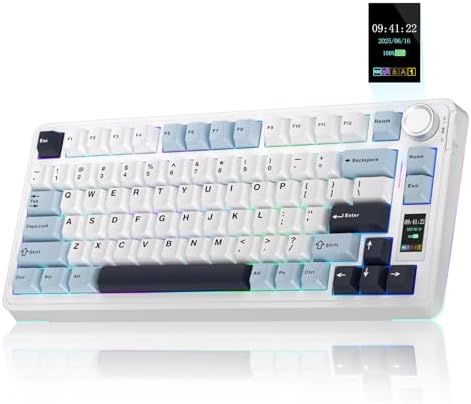
- Customizable Screen & Multi-function Knob: Stylish AULA S75 Pro wireless mechanical keyboard comes with a LCD screen, se…
- Tri-mode Mechanical Gaming Keyboard: AULA S75 Pro pc gaming keyboard supports BT5.0, 2.4GHz wireless and USB-C wired con…
- Hot-swap Custom Keyboard: This mechanical keyboard with hot-swappable base supports 3-pin or 5-pin switches replacement(…
The S75 Pro exists to prove you can have an LCD screen on a gaming keyboard for under $100. That screen isn’t just a novelty — it shows battery level, current connectivity mode, system time, and you can push custom GIFs through the driver software. It’s genuinely useful for at-a-glance status, and it’s a conversation piece for anyone who sees your desk.
Beyond the screen, it’s essentially the same tri-mode wireless platform as the F75 Pro: gasket structure, five-layer sound dampening, hot-swap sockets, pre-lubed switches, side-printed PBT keycaps, 80-key 75% layout.
The software dependency is real here — the screen customization and GIF upload require Windows and wired mode. On Linux, Mac, or in wireless mode, you’re limited to default display behavior.
Best for: People who want their keyboard to feel like a piece of gear, not just a peripheral.
4. Redragon K742 — Best QMK/VIA Support Under $100
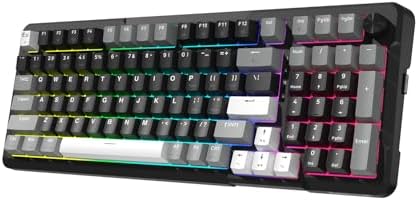
- Ultimate Typing Experience – Our Redragon K742 machanical keyboard has a gasket structure filled with 5-layer sound-abso…
- Seamless Multi-Device Control – This wireless keyboard allows tri-mode connectivity (Bluetooth 5.0/2.4GHz Wifi Wireless …
- User-Customizable Design – This hot swappable machanical keyboard allows easy swicth and keycap replacement with 2-in-1 …
Most keyboard buyers have never heard of QMK. But if you’ve spent any time on r/MechanicalKeyboards, you know it’s the firmware standard that lets you remap literally every key, build macros, create multiple layers, and essentially turn your keyboard into a custom input device. The K742 supports QMK/VIA — and at this price, that’s genuinely unusual.
It’s a 98% layout — full-size footprint, compressed slightly, keeps the numpad. Gasket mount, five-layer padding, tri-mode wireless (BT 5.0 / 2.4GHz / USB-C), 4000mAh battery rated for 53 hours with backlight off. The OEM-profile double-shot PBT keycaps aren’t as premium as Cherry profile, but they’re durable and feel fine. The RPC POM linear switches have a POM stem and housing, which produces a smoother-than-average sound that some people prefer over standard nylon housings.
One small win: the dongle has a built-in storage slot inside the keyboard. It’s the kind of design thought that you notice the first time you pack the board into a bag and don’t lose the receiver in your drawer.
Best for: Power users, programmers, and gamers who want deep key customization without buying a $200 keyboard.
5. AULA F99 — Best Battery Life

- Multi-Device Connection: The F99 wireless mechanical keyboard provides three connection methods, including BT5.0, 2.4GHz…
- Hot-swappable Custom Keyboard: The switches and keycaps can be freely replaced(keycap/switch puller are included in the …
- Mechanical Gaming Keyboard: F99 is a premium mechanical keyboard for both work and game. With 16 RGB lighting effect to …
The F99 has an 8,000mAh battery. For comparison, the F75 Pro has a 4,000mAh battery. The S75 Pro has a 4,000mAh battery. The Redragon K742 has a 4,000mAh battery. The F99 carries double all of them.
This matters most for people who travel, use their keyboard in setups without easy USB access, or simply hate battery anxiety. In wireless mode with RGB on, you’re still looking at weeks of use. With RGB off, this board essentially stops being a charging concern.
It’s a 96% layout — 99 keys, keeps the numpad, but tightened spacing. Tri-mode wireless, hot-swap with 3-pin and 5-pin support, double-shot PBT keycaps, and the same gasket/multi-layer dampening structure that AULA builds into most of its line. The switches are pre-lubed linear AULA units — decent, similar feel to the Reaper linears.
The trade-off is that 8,000mAh adds weight and thickness to the chassis. This is not a light keyboard.
Best for: Wireless setups, laptop pairings, or anyone who charges their keyboard once a month and likes it that way.
6. AULA F75 (White & Blue) — Best Entry-Level Value

- Tri-mode Connection Keyboard: AULA F75 wireless mechanical keyboard supports BT5.0, 2.4GHz wireless and USB wired connec…
- Hot-swap Custom Keyboard: This custom mechanical keyboard with hot-swappable base supports 3-pin or 5-pin switches repla…
- Advanced Structure & PCB Single Key Slotting: This thocky heavy mechanical keyboard features an advanced structure, exte…
This is the base version of AULA’s F75 platform — same 75% layout, same tri-mode wireless, same hot-swap sockets and LEOBOG Reaper switches, same five-layer sound dampening. What it loses compared to the Pro version is the side-printed keycap design (these have standard top-printed legends) and a couple of the premium acoustic refinements.
For someone who just wants a solid wireless mechanical in a compact layout without paying a premium for aesthetics, this is the board. It does the fundamentals well and costs less than most alternatives.
If you’re debating between this and the F75 Pro, pay the extra $10–$15 for the Pro. The side-printed keycaps and the slightly improved sound profile are worth it. But if the standard version is on sale and the Pro isn’t, you’re not making a mistake.
Best for: First-time mechanical keyboard buyers who want wireless and hot-swap without overthinking it.
7. Razer Ornata V3 TKL — Best Mecha-Membrane

- LOW-PROFILE KEYS — With slimmer keycaps and shorter switches, enjoy natural hand positioning that allows for long hours …
- MECHA-MEMBRANE SWITCHES — Fusing the snappy, clicky feedback of a mechanical switch with the familiar feel of a conventi…
- UV-COATED KEYCAPS — More durable than regular keycaps, the UV coating ensures more fade-resistant legends and greater pr…
There’s a version of this review where I tell you mecha-membrane is a marketing gimmick and you should just buy a real mechanical. I’ve thought about it. I’ve used the Ornata V3, and I’m not going to say that.
Razer’s mecha-membrane switch is a hybrid — it combines a rubber dome underneath with a mechanical actuation mechanism up top, which produces a light, snappy tactile feedback that doesn’t feel like a traditional membrane and doesn’t feel exactly like a mechanical switch either. For people who type a lot and game a lot, particularly in shared spaces where a clicky mechanical is antisocial, the Ornata V3 TKL makes a real case for itself.
The low-profile design is the other part of the pitch. The keys sit shorter than standard switches, which means your hands rest closer to the desk. Some people find this dramatically more comfortable after extended sessions, especially if they don’t use a wrist rest. Speaking of which — the TKL includes a magnetic soft-touch wrist rest that snaps cleanly to the front.
The Snap Tap feature (enabled through Razer Synapse) eliminates simultaneous opposing directional inputs — if you hold both A and D at once, it registers the most recent input only. That’s actually useful in Valorant and other competitive titles where SOCD (simultaneous opposing cardinal directions) can create movement artifacts.
The honest trade-off: this board isn’t hot-swappable. You’re locked into the mecha-membrane switches. If that bothers you, this isn’t your board.
Best for: Competitive gamers who spend as much time typing as gaming, or anyone upgrading from membrane who isn’t ready to commit to full mechanical.
8. Razer Ornata V3 Full Size — Best for All-Day Typing

- LOW-PROFILE KEYS — With slimmer keycaps and shorter switches, enjoy natural hand positioning that allows for long hours …
- MECHA-MEMBRANE SWITCHES — Fusing the snappy, clicky feedback of a mechanical switch with the familiar feel of a conventi…
- UV-COATED KEYCAPS — More durable than regular keycaps, the UV coating ensures more fade-resistant legends and greater pr…
Everything from the TKL review applies here, with two additions: you get a numpad, and you get 10-zone RGB instead of 8-zone. The included magnetic wrist rest covers the full width of the board, which matters if you’re at the desk for 8–10 hours.
If you have a large desk and use a numpad regularly — accounting, spreadsheets, data entry — this is the full-size version to buy. The UV-coated keycaps resist wear better than standard ABS legends, which is a real advantage on a board you’re going to type on all day.
It’s slightly more expensive than the TKL, which is expected. Worth noting that neither Ornata V3 variant supports hot-swap, and the RGB only works with Razer’s Chroma ecosystem. If you’re not in that ecosystem, the lighting customization is limited to a handful of preset effects.
Best for: Professionals and gamers who need a full layout, type heavily, and value ergonomics over switch experimentation.
9. Redragon K556 — Best Wired Budget Mechanical

- YES! TRUE HOT-SWAP – The transformative innovation with 99.8%+ switches compatible free-mod hot swappable Redragon keybo…
- Original Aluminum Board – K556 features the tank-solid aluminum metal board material covered with the classic brushed su…
- Hot-Swappable Brown Switches – Hot-swappable with almost all switch types in the market no matter 3-pin or 5-pin. Basic …
The K556 is for the person who doesn’t want wireless, doesn’t want a compact layout, and doesn’t want to spend more than they have to for a reliable full-size hot-swap board. That’s a specific buyer — but it’s a real one.
The aluminum base is the headline. Most keyboards in this price range are entirely plastic. The K556 uses a brushed aluminum top plate, which meaningfully improves desk stability and typing feel without adding the complexity of a gasket mount. Brown switches come standard — tactile, moderate resistance, not particularly loud, good for mixed typing and gaming use.
True hot-swap, 20 preset RGB effects, full Redragon software support for macros and lighting customization. Up to 20 simultaneous LED modes selectable directly on the board without software.
The trade-off: no wireless, no multimedia knob, no gasket structure. This is a simple, well-built wired mechanical for buyers who find the wireless/compact/gasket trend irrelevant to their actual setup.
Best for: Desktop-first users who want a durable wired full-size board and nothing more complicated.
10. Redragon S101M-KS — Best Keyboard + Mouse Combo

- 【Wireless Gaming Keyboard and Mouse Combo】Get rid of the messy cables, Redragon Tri-mode Wireless Gaming Keyboard and Mo…
- 【RGB Gaming Keyboard and Mouse】Turely RGB Backlight with 8 backlight patterns, you also can adjust the lighting speed an…
- 【4800 DPI Adjustable Gaming Mouse】There are 5 DPI Levels(800/1200/1600/3200/4800) that can be chosen by clicking the dip…
Buying a keyboard and a mouse separately typically costs more than buying them together, and the S101M-KS is priced to make that math obvious. It’s a wireless keyboard and mouse combo — both with tri-mode connectivity (Bluetooth/2.4GHz/USB-C) — for a combined price that approaches what the keyboard alone would cost elsewhere.
The keyboard is membrane, not mechanical. That’s the honest caveat here. This isn’t the board for someone upgrading from membrane who wants the tactile mechanical experience. The trade-off is that membranes are quieter and lighter, and for casual gaming and general use, plenty of people never miss the mechanical feel.
The mouse is the standout: 4800 DPI, 5 DPI levels, 7 programmable buttons, 300-hour battery life with RGB off. For a pack-in peripheral, that’s genuinely capable.
The 2.4GHz dongle is a unified receiver that handles both the keyboard and mouse simultaneously — one port for both devices, which is a thoughtful design choice.
Best for: First-time gaming setups, budget-conscious buyers who need both peripherals, or a second desk setup where premium isn’t necessary.
Buying Guide: What the Specs Don’t Tell You {#buying-guide}
The “Pre-Lubed” Question
Most boards now advertise “pre-lubed switches” as a selling point. And it’s a real one — factory lubing saves you a couple of hours and is adequate for most users. But “pre-lubed” covers a wide range. A properly hand-lubed switch with Krytox 205g0 is smoother and quieter than a factory-applied thin coat.
If you buy any of the AULA or Redragon boards and find the switches feel slightly scratchy or inconsistent, a quick re-lube with 205g0 (linears) or 3204 (tactiles) will take them from good to genuinely excellent. It takes about 90 minutes for a full keyboard’s worth of switches and the difference is audible and tactile.
Sound Dampening: How Much Is Enough?
The five-layer foam stack that AULA and Redragon both advertise — PCB foam, case foam, silicone pad, IXPE pad, Poron layers — does make a real difference in reducing hollow cavity sound. But the biggest single factor in sound quality is still the switches themselves and whether the stabilizers rattle.
Stabilizer rattle is the squeaky, rattling noise you hear when you press Enter, Shift, Space, or Backspace on a cheap board. All the foam in the world doesn’t fix a rattling stabilizer. Pre-lubed stabs (which all these boards include) help, but if yours rattle, a quick application of dielectric grease (not switch lube) to the stab wire will silence them in under 10 minutes.
Layout Trade-Offs at a Glance
| Layout | Keys | Numpad | Arrow Keys | Best For |
|---|---|---|---|---|
| Full Size (100%) | 104 | ✅ Yes | ✅ Yes | Data entry, productivity |
| 98% (Compact Full) | 98 | ✅ Yes | ✅ Yes | Full function, tighter footprint |
| 96% | 96 | ✅ Yes | ✅ Yes | Numpad without wasted space |
| TKL (80%) | 87 | ❌ No | ✅ Yes | Gaming + more mouse room |
| 75% | 81 | ❌ No | ✅ Yes | Compact, portable, versatile |
Do Polling Rate and NKRO Actually Matter?
Polling rate is how often the keyboard reports its state to your PC. 1000Hz (1ms reporting) is the standard on all serious gaming boards. You’ll see 8000Hz polling advertised on some premium boards — for most games and most players, you won’t notice the difference.
N-Key Rollover (NKRO) means the board can register every key press simultaneously regardless of how many keys are held. For gaming, 6-key rollover is usually sufficient. Full NKRO matters mostly in edge cases — playing rhythm games, specific fighting game inputs, or macro-heavy MMO setups. All the boards on this list support NKRO or at minimum 6KRO.
FAQ
Q: Is a $100 gaming keyboard noticeably better than a $50 one?
Yes, but it depends on what you’re comparing. A $100 board with hot-swap, gasket mount, and PBT keycaps — like the AULA F75 Pro — beats a $50 tray-mount ABS board in every measurable way. But a $50 board like the Redragon K556 (which often dips to around that price) can hold its own against $100 boards that have features you don’t use.
Q: Is wireless gaming bad for latency?
2.4GHz wireless is not. Bluetooth is. Every board on this list with wireless gaming claims runs through a 2.4GHz dongle with 1ms polling — equivalent to wired in practical use. Only use Bluetooth for casual typing; switch to 2.4GHz for gaming.
Q: What’s the best gaming keyboard under $100 for competitive FPS?
The Razer Ornata V3 TKL if you want the lightest possible keypress and Snap Tap support. The Redragon K742 if you want full QMK/VIA remapping for SOCD and key configs. The AULA F75 Pro if you just want a fast, compact wireless board that won’t break.
Q: Can I swap switches on Razer’s mecha-membrane keyboards?
No. The Ornata V3 series uses proprietary mecha-membrane switches that aren’t hot-swappable. If customizing your switch feel is important to you, choose any of the AULA or Redragon mechanical options instead.
Q: Do any of these boards support Mac natively?
Basic functionality (typing, media keys) works on Mac for all of them. Deep customization — macros, RGB programming, screen settings — requires Windows with the driver software. The Redragon K742 with QMK/VIA is the most cross-platform-friendly for power users, since VIA software is browser-based and platform-agnostic.
Q: Are AULA keyboards actually good, or is this a cheap brand?
AULA has improved significantly in the last two years, particularly at the $60–$90 tier. The F75 and S75 line specifically uses build specs (gasket mount, multi-layer dampening, PBT keycaps) that were premium features at $150+ boards three years ago. Build quality control isn’t perfect — occasional switch inconsistency or stabilizer rattle gets reported — but the overall value ratio is hard to argue against.
Q: What’s the best gaming keyboard under $100 if I also need a numpad?
The AULA F99 for wireless and best battery life, the Redragon K742 for QMK/VIA and dongle storage, or the Razer Ornata V3 for low-profile comfort. The Redragon K556 is the pick if you want wired with an aluminum base at the lowest price.
Q: Should I buy a keyboard and mouse combo or separate peripherals?
Separate, usually — you get more control over exactly what you’re buying. But the Redragon S101M-KS combo is a genuine exception where the value math works. If you’re building a setup from scratch on a tight budget, it’s one of the few combos I’d actually recommend without hesitation.
The Verdict
The best gaming keyboard under $100 right now is the AULA F75 Pro — it hits tri-mode wireless, gasket mount, hot-swap, pre-lubed switches, and side-printed PBT keycaps without asking you to compromise on any single feature. If you want to step up the acoustics and you’re comfortable spending toward the top of the $100 ceiling, the EPOMAKER × AULA F75 is the board for you.
For something completely different — lighter presses, lower profile, wrist-friendly — the Razer Ornata V3 TKL makes a strong case that not every gaming keyboard needs to be mechanical.
Whatever you pick from this list: it’s a good time to be shopping at this tier.
Suggested Images
- Hero shot — All 10 keyboards arranged on a desk — Alt: “Best gaming keyboards under $100 arranged on a desktop setup”
- Switch close-up — LEOBOG Reaper linear switch cross-section — Alt: “LEOBOG Reaper linear switch hot-swap socket close-up”
- Build comparison — Gasket mount vs tray mount diagram — Alt: “Gasket mount vs tray mount keyboard comparison diagram”
- S75 Pro LCD screen — AULA S75 Pro display showing battery and GIF — Alt: “AULA S75 Pro LCD screen showing battery percentage and custom GIF”
- Keycap comparison — Cherry profile PBT vs OEM ABS side by side — Alt: “Cherry profile PBT vs OEM ABS keycap height comparison”
Internal Link Suggestions
- “best gaming keyboards under $50” (budget sub-segment)
- “how to lube mechanical keyboard switches” (modding tutorial cluster)
- “75% vs TKL keyboard: which layout is right for you” (layout guide)
- “best hot swap mechanical keyboards” (feature-specific buying guide)
- “PBT vs ABS keycaps: which is worth it” (keycap material explainer)
Call to Action
Primary CTA: Already know what you want? Jump back to the Quick Comparison Table and click through to the right board.
Secondary CTA: Not sure which layout fits your desk? Read our breakdown of 75% vs TKL keyboards before you buy — it’s the one decision most people get wrong.
HASHTAGS #MechanicalKeyboard #GamingKeyboard #BudgetKeyboard #HotSwapKeyboard #AULAF75 #RedDragonKeyboard #RazerOrnata #KeyboardReview #GamingSetup #PCGaming #MechKeys #KeyboardMod #GasketMount #WirelessKeyboard #Under100
This article contains affiliate links. If you buy through them, I earn a small commission at no extra cost to you. I only recommend keyboards I’ve actually tested. As an Amazon Associate I earn from qualifying purchases.