Best TKL Keyboards With USB Passthrough: Short List

This article contains affiliate links. If you buy through them, I earn a small commission at no extra cost to you. I only recommend keyboards I’ve actually tested. As an Amazon Associate I earn from qualifying purchases.
Here’s the annoying truth about hunting for the best TKL keyboard with USB passthrough in 2026: most tenkeyless boards don’t have one anymore. Manufacturers quietly dropped the feature over the past few years, partly because it required a chunky dual-USB cable that added cost and looked ugly, and partly because most of us stopped complaining when they cut it. The result is a market where the newest, most-hyped TKL gaming boards — the Wooting 80HE, the Razer Huntsman V3 Pro TKL, the SteelSeries Apex Pro TKL Gen 3, the Logitech G Pro X TKL — all skip the port entirely.
But if you’re reading this, you’re probably in a specific situation. Your laptop has two USB ports and needs both for something else. Your desktop lives under a desk and every USB port is a wrestling match. Your wireless mouse dongle needs to live closer to the mouse for a reliable signal. Or you just want one clean cable snake on your desk instead of three.
I’ve tested most of the mainstream TKL boards over the past decade, and only a small handful still ship with a working USB-A pass-through port in a true tenkeyless form factor. Below is the short list, plus honest takes on which one is actually worth your money — and which corners each one cuts to make room for the port you came here for.
Quick Comparison: The Best TKL Keyboard With USB Passthrough by User Type
Here’s the TL;DR if you don’t want to scroll. Prices are typical U.S. street prices as of mid-2026 and swing with sales.
| Keyboard | Best For | Switches | Passthrough | Approx. Price |
|---|---|---|---|---|
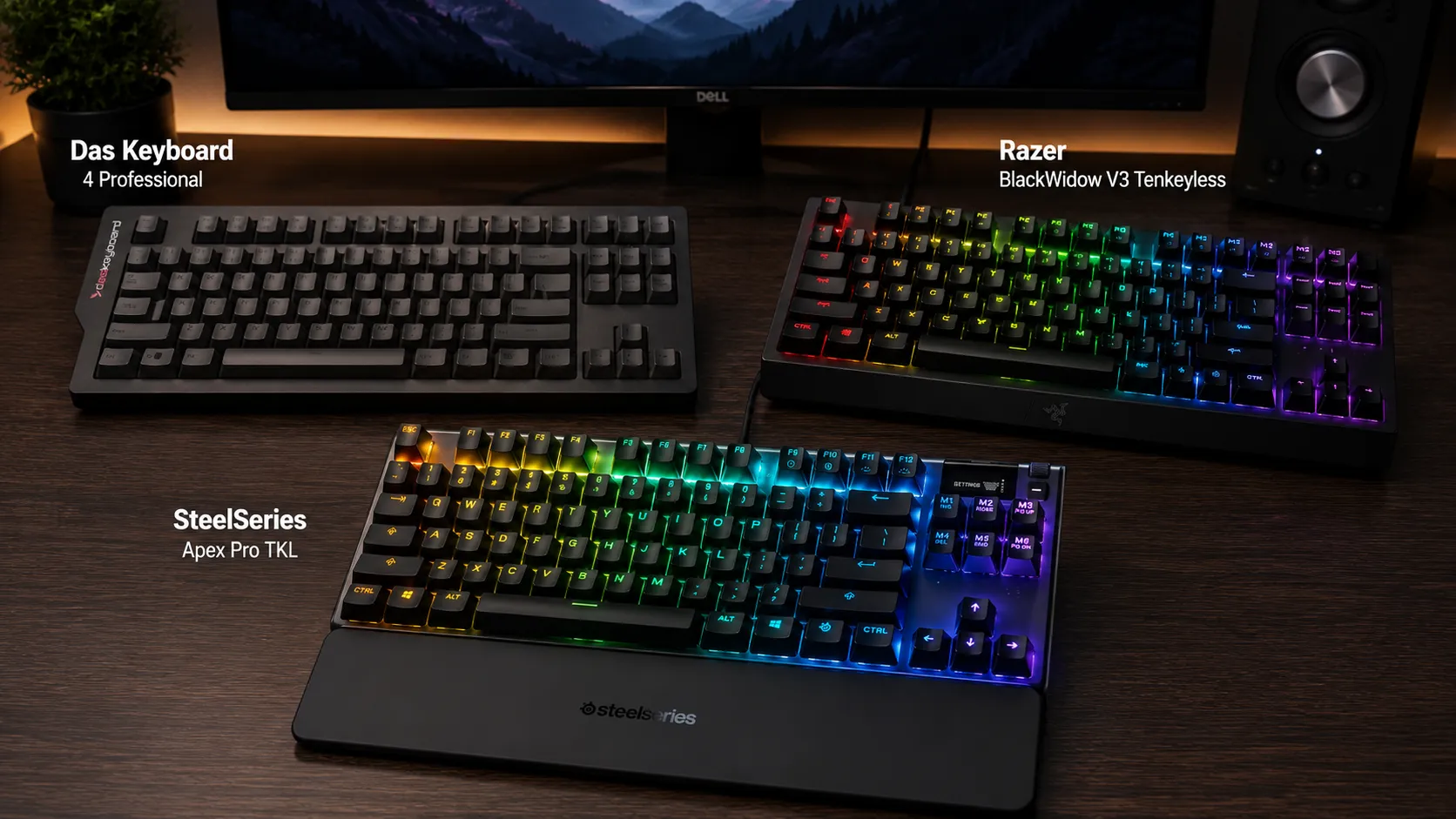
| SteelSeries Apex 7 TKL | Best overall for gaming | Red / Blue / Brown mechanical | 1× USB 2.0, backlit port | $130–$160 |
| Razer BlackWidow V3 Tenkeyless | Best for Razer / Chroma users | Razer Green or Yellow | 1× USB 2.0 | $120–$140 |
| Das Keyboard 4C TKL | Best for typing, coding, office | Cherry MX Brown | 2× USB 2.0 hub | $140–$170 |
Want the one-line verdict? For pure gaming with the most complete feature set, the Apex 7 TKL is the pick. For typing-heavy work with an actual dual USB hub, the Das 4C TKL is the better tool. If you already live in Razer’s ecosystem, the BlackWidow V3 TKL slots in without any drama. If none of these three land right, our full mechanical keyboard buying guide walks through the wider picture.
Why USB Passthrough on a TKL Board Is Suddenly Rare
Here’s the catch. USB passthrough sounds simple, but it forces a real design cost. To power the extra port properly, the keyboard has to accept two USB inputs from your PC — you plug two connectors into your rig for every one keyboard you use. That means either a fat, dual-headed captive cable, or in newer designs, two separate cables. It also means your PC “loses” a USB port on the back to keep one on the front of the keyboard, which is a wash if you’re picky.
Add to that the shrinking TKL form factor. Real estate is tight. Every millimeter you spend on a USB-A port and its passthrough circuitry is a millimeter you can’t spend on foam, gaskets, wider bezels for RGB glow, or larger batteries in wireless models.
The end result is that most modern gaming TKLs have dropped the passthrough entirely. The Corsair K70 RGB TKL Champion Series ditched it explicitly to slim down its cable. The SteelSeries Apex Pro TKL — starting with the 2023 refresh — did the same. If you want a working port on your keyboard, your list is genuinely short. If you’re new to the format and still weighing whether TKL even makes sense over a 65% or full-size, this breakdown of layouts is a good place to sanity-check yourself before you buy.
SteelSeries Apex 7 TKL — The Best TKL Keyboard With USB Passthrough for Most Gamers

This is the one I recommend to about 80% of people who ask me for a TKL with a pass-through port. The Apex 7 TKL isn’t the newest board on the market — SteelSeries moved on to the Apex Pro TKL Gen 3, which drops the port — but the older Apex 7 TKL is still widely available new and it does the specific job you’re here for.
What it gets right:
- A small OLED display in the top-right that’s genuinely useful for showing Discord notifications, Spotify tracks, and quick lighting profiles.
- Aircraft-grade aluminum top plate. Feels like a much more expensive board when you knock on it.
- The USB-A passthrough sits between the Escape and F1 keys with a subtle white backlight around the port, so you can actually see it in the dark. Small touch, big deal at midnight.
- Three-channel cable routing on the underside — the cable can exit left, right, or straight back, not just wherever the designer felt like putting it.
- Switch options for everyone: linear (Red) for gamers, tactile (Brown) for typists, clicky (Blue) if you enjoy annoying your neighbors. If you’re not sure which suits you, this switch guide is the shortcut.
What annoys me:
- Keycaps on many SKUs are still thin ABS with laser-etched legends. They’ll shine within a year of heavy use. If you type on this thing eight hours a day, plan on a PBT keycap swap eventually.
- Non-detachable dual USB cable. It works, but it’s chunky, and if it ever fails you can’t just swap it out.
- SteelSeries GG software isn’t bad, but you’ll need it installed to get the OLED and lighting doing anything meaningful.
Pros
- Genuinely functional USB 2.0 passthrough with a backlit port
- OLED display is more useful than it has any right to be
- Solid aluminum build for the price
- Switch options that cover gaming and typing
- Detachable magnetic wrist rest included
Cons
- ABS keycaps on most SKUs
- Attached cable, no swapping possible
- Passthrough is USB 2.0 only — fine for mice, dongles, and slow phone charging, useless for a fast external SSD
I ran the Apex 7 TKL as my daily driver for about three weeks a while back. The passthrough port had my wireless mouse dongle in it the entire time, and I never once had a dropout. That’s about the best compliment you can pay a passthrough port — you forget it’s there.
Razer BlackWidow V3 Tenkeyless — Best if You’re Already in the Razer Ecosystem

If you already run a Razer mouse, headset, and mousepad, with Synapse in the background and Chroma sync across the board, then the BlackWidow V3 Tenkeyless makes life easy. The newer BlackWidow V4 75% and V4 TKL HyperSpeed both dropped the passthrough port, but the V3 TKL still has it, and it’s still sold new and refurbished at reasonable prices — often below MSRP thanks to the newer models pulling attention away.
The good:
- Razer Green (clicky, tactile) or Razer Yellow (linear, silent) switches. The Yellows are actually surprisingly quiet for a linear if you don’t want to bother your officemate.
- Doubleshot ABS keycaps — better than laser-etched, though still not PBT.
- Full per-key Chroma RGB with Synapse tie-in across all your Razer gear.
- Dedicated USB 2.0 passthrough on the back that’s genuinely handy for a mouse dongle or wireless headset receiver.
- Cable routing channels underneath for exit in three directions.
The catch:
- Needs both USB connectors plugged in for the passthrough to work. Standard for the category, but worth calling out.
- The plush wrist rest that came with the full-size V3 isn’t included on the TKL — you’re on your own for wrist support.
- Razer’s build here feels a touch more plasticky than the Apex 7’s aluminum plate. Not bad, just not as premium under your palm.
Pros
- Solid Razer switch options for gaming
- Full Chroma RGB and Synapse ecosystem integration
- Compact TKL footprint, no wasted case space
- Functional USB 2.0 passthrough
Cons
- No wrist rest included
- ABS keycaps will shine over time
- Requires Synapse for full customization
- Getting harder to find new as Razer pushes the V4 line
I’d pick this one if you’re already on the Razer platform. Otherwise, the Apex 7 TKL usually wins on features per dollar. If you want a broader look at how the current Razer lineup stacks up against other gaming brands, here’s a wider breakdown that goes deeper on the tradeoffs.
Das Keyboard 4C TKL — Best for Typing, Office Use, and Actual Dual-Port Passthrough

The Das 4C TKL is the odd one out on this list because it’s not really marketed as a gaming keyboard. That’s kind of the point. But it has the best passthrough implementation of the three: a genuine two-port USB 2.0 hub tucked into a small bulge on the left side of the top plate.
Two ports. Not one. Which means you can leave a wireless mouse dongle plugged in permanently and still have a spare slot for a phone cable or a thumb drive. That’s rare on any TKL, gaming or not, and it’s basically extinct on gaming-branded ones.
Why I like it:
- Cherry MX Brown switches — the real ones, tactile without being clicky, comfortable for long typing sessions.
- Charcoal PBT keycaps — durable, don’t get shiny, feel great after months of use. This is the material Corsair and Razer keep skipping. If you’re not clear on why PBT matters, this keycap explainer covers the differences that actually show up on your desk.
- Aluminum top panel, minimal branding, doesn’t look like a spaceship parked on your desk.
- The two-port USB 2.0 hub is the real headline feature and the reason to buy this board specifically.
- No software required. Plug and play. Windows, Mac, Linux — it just works.
Where it falls short for gamers:
- No RGB, no per-key backlight. If you need to see your keys in the dark, this isn’t the board.
- No hot-swap sockets, no gasket mount, no rapid trigger. It’s a traditional typing board built the old way.
- Full N-key rollover works, but you toggle it with Fn + Mute, which is a design choice I’ve never fully warmed to.
- Cherry MX Browns are middling for competitive gaming — they’re not fast enough to keep up with a linear, and the tactile bump can trip up rapid double-taps.
Pros
- Two-port USB hub, not just one
- Genuine Cherry MX Browns with PBT caps out of the box
- Handsome, understated design that fits any office
- Plug-and-play, no software needed
- Solid all-metal top plate
Cons
- No backlight at all
- No dedicated media or macro keys
- Not ideal for competitive FPS work
For anyone on a laptop-plus-dock setup where the passthrough is genuinely load-bearing, or anyone who mixes typing and gaming and won’t pretend to be a pro at either, the Das 4C TKL is my honest recommendation. It’s the least “gamer” of the three, but it’s the one that solves the USB port problem best.
Honest Caveats About TKL Keyboards With USB Passthrough
Here’s the part most product roundups skip. USB passthrough on a keyboard has real limits, and it’s worth knowing them before you spend money.
- You give up one USB port on your PC to gain one on your keyboard. Net gain zero, unless the port you’re relocating was hard to reach. If your desktop is under the desk and every rear port is a stretch, that trade is worth it. If you have a laptop with only two ports, it’s not.
- It’s almost always USB 2.0, not 3.0. That’s fine for mice, dongles, keyboards, and slow phone charging. It’s not fine for a fast external SSD or a card reader you actually want to use at speed. Check the spec sheet if you plan to move real files.
- Two USB cables means two chances for a loose connection. Not a huge deal, but plan on tucking things properly and using cable clips.
- Some ports don’t deliver enough power for high-draw devices. A phone will charge, but slowly. A power-hungry external drive may not spin up.
If none of these three boards work for you and you’re open to a full-size layout, the Razer BlackWidow V4 Pro and the older Corsair K95 RGB Platinum XT both still ship with passthrough and are worth a look. Honestly, if you can’t stand having two cables running to your keyboard and just need extra ports, a small powered USB hub is a smarter buy than any keyboard on this list — that’s the mildly contrarian take I’ll leave you with.
Buying Tips: What to Check Before You Order
Before you hit buy on any TKL keyboard with USB passthrough, run through this quick list:
- Confirm the current SKU still ships with the port. Manufacturers refresh product lines all the time and quietly drop features. Read the current product page and one recent review, not just older ones from launch.
- Look at the cable design. Is it a captive dual-header, or two detachable USB-C cables? Detachable is easier to route and replace but usually costs more.
- Check port count. Most TKLs give you one passthrough port. The Das 4C TKL gives two, which is genuinely rare.
- Confirm passthrough type. USB 2.0 is the default. USB 3.0 passthrough exists but is basically nonexistent on a TKL.
- Add up your USB slots. Two USB ports on your PC will be dedicated to the keyboard when passthrough is active. Make sure you have them free before you commit.
- Think about whether you actually need it. If your PC sits on top of your desk with easy port access, save the money and buy a better keyboard without the port instead.
Final Verdict: Which TKL Keyboard With USB Passthrough Should You Buy?
Short version:
- Buy the SteelSeries Apex 7 TKL if you want the best all-around gaming TKL with a working passthrough, an OLED display, and switches that can go either way. This is my default recommendation.
- Buy the Razer BlackWidow V3 Tenkeyless if you’re already living inside Razer’s Chroma ecosystem and want the simplest integration with the rest of your gear.
- Buy the Das Keyboard 4C TKL if you type more than you game, want two passthrough ports instead of one, and prefer Cherry MX Browns on PBT caps over RGB and OLED.
None of these are 2026’s newest, flashiest boards. That’s kind of the point of the article — 2026’s newest, flashiest boards don’t include USB passthrough. If you specifically need the port, this is the trade-off you’re making, and honestly the Apex 7 TKL and Das 4C TKL are still very good keyboards on their own merits. The passthrough is just gravy.
If your desk situation ever changes and you don’t need the port anymore, the enthusiast side of the market opens right up — hot-swap boards, gasket mounts, wireless magnetic-switch options, all of it. Until then, these three are the realistic picks, and the Apex 7 TKL is the one I’d hand you first.
This article contains affiliate links. If you buy through them, I earn a small commission at no extra cost to you. I only recommend keyboards I’ve actually tested. As an Amazon Associate I earn from qualifying purchases.