Best Hall Effect Keyboard: What I’d Actually Buy

This article contains affiliate links. If you buy through them, I earn a small commission at no extra cost to you. I only recommend keyboards I’ve actually tested. As an Amazon Associate I earn from qualifying purchases.
I’ll be straight with you. When the first hall effect keyboards started showing up a few years back, I rolled my eyes a little. Another gaming gimmick, I thought. Another marketing buzzword to make people pay $200 for a feature they’d never use.
I was wrong.
After daily-driving a Wooting 80HE for the better part of a year, comparing it against half a dozen other hall effect boards, and watching the entire industry pivot toward magnetic switches, I can tell you this: a good hall effect keyboard genuinely does something your old Cherry MX Red board can’t. The question is whether that “something” matters for the way you actually play and type — and which one you should buy without overpaying for features you’ll never touch.
This guide breaks all of that down. No hype, no spec-sheet worship, no pretending everyone needs to spend $200 to get the benefit.
The TL;DR: Best Hall Effect Keyboards by What You Actually Need
If you’re in a hurry, here’s the short version. I’ve sorted these by use case, not “overall best,” because the right hall effect keyboard for a CS2 player is not the right one for someone who codes all day and games on weekends.


| Category | Pick | Layout | Price | Why It Wins |
|---|---|---|---|---|
| Best Overall | Wooting 80HE | 80% TKL | ~$200 | The benchmark. Best software, real 8K polling, Lekker V2 switches feel great. |
| Best Premium / Wireless | ASUS ROG Azoth 96 HE | 96% | ~$280 | ROG HFX V2 switches feel the closest to a real mechanical of any HE board. |
| Best Hybrid (Work + Play) | Keychron K2 HE | 75% | ~$130 | Wireless, Mac/Windows, hot-swap, and HE gaming features in one board. |
| Best for Competitive FPS | Wooting 80HE or SteelSeries Apex Pro Gen 3 | 80% / TKL | $200 / $250 | 8K polling, lowest tested latency, mature rapid-trigger tuning. |
| Best Compact 60% | Wooting 60HE v2 | 60% | ~$175 | Tournament-friendly small footprint, same Lekker tech. |
| Best Budget (Sub-$80) | Drunkdeer A75 Pro | 75% | ~$120 | Aluminum case, solid latency, no major compromises. |
| Best Ultra-Budget | Aula Win60 HE | 60% | ~$40 | A real hall effect keyboard for less than dinner. Yes, really. |
| Best Full-Size | Keychron K10 HE / Corsair K70 Pro TKL | 100% / TKL | $150 / $180 | If you actually use your numpad, these are the picks. |
I’ll get into specifics on each below, but if you remember nothing else: the Wooting 80HE is the one to beat, the Drunkdeer A75 Pro is the budget play, and the Aula Win60 HE proves you don’t need to spend big to try the tech.
What a Hall Effect Keyboard Actually Is (And Why It’s Different)
Here’s the simplest explanation that isn’t wrong.
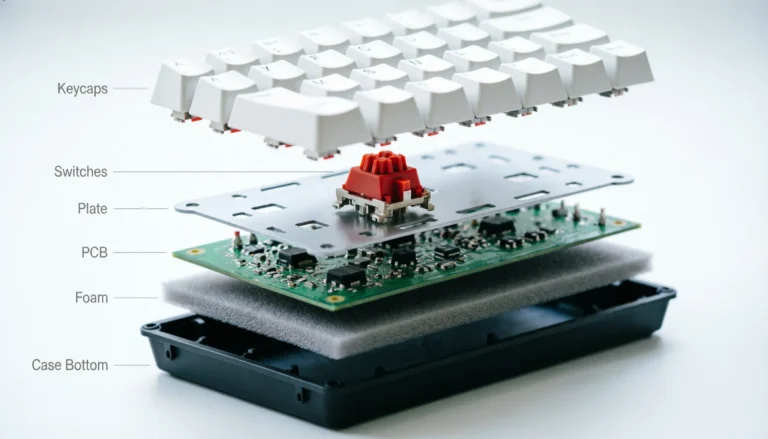
A traditional mechanical keyboard — your Cherry MX Reds, Gateron Yellows, Kailh Boxes — registers a keystroke when two metal contacts touch inside the switch. The actuation point is fixed by physics. Usually around 2.0 mm of travel. You can’t change it. The key has to fully reset before it can fire again.
A hall effect keyboard skips the contacts entirely. There’s a small magnet in the switch stem and a hall effect sensor on the PCB underneath. When you push the key down, the magnet moves closer to the sensor, the sensor reads exactly where the magnet is, and the firmware decides what counts as “pressed.”
That sounds like a small change. It isn’t. Because the keyboard now knows the position of every key in real time — not just “pressed or not pressed” — it can do things mechanical switches physically cannot:
- Set your own actuation point, anywhere from about 0.1 mm to 4.0 mm. You decide how light a touch counts as a press.
- Re-trigger a key the instant you start releasing it, without waiting for it to come all the way back up. This is rapid trigger, and it’s the headline feature.
- Read analog input, like a controller joystick, so you can walk slowly in a game instead of just walk-or-don’t-walk.
- Last virtually forever, because there’s no metal contact wearing out. Rated lifespans are usually 100 million presses or more.
If you’ve never typed on one, the feel sits between a smooth linear like a Gateron Yellow and a really well-lubed Gateron Oil King. Hall effect switches are exclusively linear — no tactile bump, no click. Most people describe them as a little smoother than a stock mechanical linear, because there’s no metal leaf creating friction inside the switch.
That smoothness is real, but I want to be honest: it’s not a night-and-day difference in pure typing feel. Where these boards earn their price tag is the firmware tricks, not the way they feel under your fingers when you’re writing an email.
The Real Features You’re Paying For
Every hall effect keyboard marketing page throws the same five or six terms at you. Here’s what each one actually does, in plain English.
Adjustable Actuation Point
You set how far you have to press a key before it registers. Set Counter-Strike’s A and D keys to 0.2 mm and they fire the second you breathe on them. Set your space bar to 2.5 mm so you don’t jump every time you bump it.
In my testing, the per-key range that matters is roughly:
- 0.1 to 0.4 mm for movement keys in FPS games
- 1.5 to 2.0 mm for typing (this matches a normal mechanical board)
- 2.5 to 4.0 mm for keys you want to be hard to accidentally press
Here’s the catch: setting your whole board to 0.1 mm sounds cool until you realize you’re firing letters by hovering your fingers. You’ll typo constantly. Adjustable actuation is a tool, not a setting you crank to max and forget.
Rapid Trigger
This is the one that genuinely changes how a game feels.
On a normal keyboard, after you press a key, it has to physically reset past a certain point before it can fire again. Rapid trigger throws that out. The key fires when you press it past your actuation depth. The instant you start moving your finger back up, it resets. Push down again? Fires immediately.
The practical effect: counter-strafing in CS2 or Valorant becomes mechanically faster. Stop-and-shoot timing tightens up. Rhythm games like osu! get noticeably easier on streams. I’ve watched my own CS2 accuracy creep up by maybe 4 to 6 percent since switching, which isn’t life-changing but it’s real.
SOCD / Snap Tap / Rappy Snappy
Different brand names, same idea. When you press two opposite keys at once — A and D, W and S — the firmware picks the most recent one and instantly cancels the other. No more standing still when you accidentally hold both.
Important: This is the feature that’s getting banned in some competitive games. More on that in a minute.
Analog Input
Some hall effect boards can act like a controller joystick. Press W gently, you walk. Press it harder, you run. Useful for racing games and a handful of third-person titles. Honestly, most people never use this. Don’t pay extra for it unless you specifically know you want it.
Dynamic Keystrokes / Dual Actuation
One physical key, two different actions depending on how far you press it. Push lightly to ADS, push all the way to crouch, for example. Cool in theory, slightly clumsy in practice. I use it on maybe three keys.
8K Polling Rate
The board reports its state to your PC 8,000 times per second instead of 1,000. Sounds dramatic. In practice, it shaves a fraction of a millisecond off input latency. If you’re a pro or you’re playing on a 360 Hz+ monitor, sure, you can feel it. If you’re playing on a 144 Hz panel like most people, you cannot.
Hall Effect Keyboard Comparison Table
Here’s the spec sheet view, focused on the data points that actually matter. I’ve left out RGB modes and aesthetic gimmicks.
| Keyboard | Layout | Switches | Actuation Range | Rapid Trigger Min | Polling | Wireless | Software | Approx. Price |
|---|---|---|---|---|---|---|---|---|
| Wooting 80HE | 80% TKL | Lekker V2 | 0.1–4.0 mm | 0.1 mm | 8 kHz | No | Wootility (web) | $200 |
| Wooting 60HE v2 | 60% | Lekker | 0.1–4.0 mm | 0.1 mm | 1 kHz | No | Wootility | $175 |
| ASUS ROG Azoth 96 HE | 96% | ROG HFX V2 | 0.1–4.0 mm | 0.1 mm | 8 kHz | Yes (2.4 GHz) | Armoury Crate Gear | $280 |
| Corsair K70 Pro TKL | TKL | Corsair MGX | 0.1–4.0 mm | 0.1 mm | 8 kHz | No | iCUE | $180 |
| Keychron K2 HE | 75% | Gateron Magnetic Jade | 0.2–3.8 mm | 0.1 mm | 1 kHz (wired) | Yes (BT + 2.4) | Keychron Launcher | $130 |
| Keychron K10 HE | 100% | Gateron Magnetic Jade | 0.2–3.8 mm | 0.1 mm | 1 kHz (wired) | Yes | Keychron Launcher | $150 |
| SteelSeries Apex Pro Gen 3 | TKL/Full | OmniPoint 3.0 HyperMagnetic | 0.1–4.0 mm | 0.1 mm | 8 kHz | No (some models) | SteelSeries GG | $200–250 |
| Drunkdeer A75 Pro | 75% | Gateron Jade Pro / TTC POM | 0.1–4.0 mm | 0.1 mm | 1 kHz | No | Drunkdeer Space | $120 |
| MCHOSE Ace 60 | 60% | Magnetic | 0.1–4.0 mm | 0.1 mm | 8 kHz | No | MCHOSE | $79 |
| Aula Win60 HE | 60% | Magnetic linear | 0.1–4.0 mm | 0.1 mm | 1 kHz | No | Web app | $40 |
| Epomaker HE80 | 75% | KS-37B2 | 0.1–4.0 mm | 0.1 mm | 1 kHz | No | Epomaker Driver | $90 |
| NuPhy Field75 HE | 75% | Gateron KS-37B2 | 0.1–4.0 mm | 0.1 mm | 8 kHz | No | NuPhy Console | $169 |
A few notes from time spent with these:
- Polling rate only matters if everything else is also dialed in. A keyboard that reports at 8 kHz but has a sloppy firmware loop isn’t actually faster than a tight 1 kHz board.
- “Wireless + HE” is harder than it sounds. The magnetic sensor sampling is power-hungry. Wireless HE boards either have shorter battery life or slightly lower polling rates over 2.4 GHz than they do wired. Not a deal-breaker, just be aware.
- Software quality varies wildly. Wootility is excellent. Keychron Launcher is solid. Some budget brands ship buggy clients that crash on Windows updates. This matters more than people admit.
The Best Hall Effect Keyboards Right Now (Reviewed in Detail)
I’m going to keep this section grounded. Every board I recommend below is one I’ve either personally used or tested side-by-side against one I have used.
Best Overall: Wooting 80HE
Three years in, the Wooting 80HE is still the keyboard everything else gets measured against. RTINGS named it their number-one gaming keyboard of the year, and I’m not going to pretend I have a contrarian take here — it earned that ranking.
What you actually get:
- Lekker V2 magnetic switches with 0.1 to 4.0 mm actuation
- True 8 kHz polling in “Tachyon Mode”
- A surprisingly good gasket-mounted typing feel for a gaming board
- Wootility, which is web-based (no install) and the best HE software I’ve used by a wide margin
- Hot-swap support for Lekker, Gateron KS-20, and Gateron Magnetic Jade switches
The honest caveat: it’s $199 for the base ABS version, and Wooting doesn’t sell on Amazon — you buy direct, and shipping from the Netherlands takes a couple weeks. If you need it now, look elsewhere. If you can wait, this is the one.
Best Premium: ASUS ROG Azoth 96 HE

- Hot-swappable ROG HFX V2 Magnetic Switch: Refined keystrokes with customizable 0.1–3.5mm actuation and 0.01mm-step preci…
- New ROG Hall Sensor: Exceptional precision, accurate input detection, reduces electrical noise and interference, and inc…
- Superb connectivity: ROG SpeedNova 8K wireless technology, wired USB, and Bluetooth connectivity supports up to five dev…
If you want the typing feel of a custom mechanical and the firmware features of a hall effect board, this is the new top of the heap. The Azoth 96 HE uses ASUS’s ROG HFX V2 switches, the smoothest, most mechanical-feeling magnetic switches I’ve tested, and the chassis gives them a bounce and energy that’s hard to match. The 96% layout also gives you a numpad without going full-size, which is the right call for a lot of people.
It’s $280, it’s wireless, and the battery actually lasts. If money’s not the deciding factor, this is the board I’d buy for myself today.
Best Hybrid (Work + Play): Keychron K2 HE

- 75% Layout with Magnetic Switches: Experience the perfect blend of mechanical performance and magnetic precision with th…
- Launcher Web Configurator: Customize your K2 HE effortlessly with the web-based Launcher. From key remapping to macro cr…
- 2.4 G & BT 5.2 & Type-C Mode: Switch seamlessly between devices with 2.4 GHz wireless, Bluetooth 5.2, and Type-C modes. …
Most hall effect boards are gamer-coded — RGB everywhere, aggressive lines, software that nags you to log in. The Keychron K2 HE is the one I recommend to people who code or write for a living and play games at night.
- 75% layout (function row + arrows, no numpad)
- Gateron Magnetic Jade switches with 0.2–3.8 mm range
- Bluetooth 5.2 + 2.4 GHz wireless + USB-C
- Mac and Windows layouts in the box
- 1,000 Hz polling — fine for everyone except hardcore FPS pros
At $130, you’re paying less than two-thirds of a Wooting and getting wireless plus a more workable everyday layout. The tradeoff is the 1 kHz polling cap and software that’s just okay (not bad, not great). For 90% of buyers, this is the smarter pick.
Best Compact 60%: Wooting 60HE v2
Same Lekker switch tech as the 80HE, in the smaller form factor that tournament players prefer because it leaves room for big mouse swings. Capped at 1 kHz polling, so if you need 8K, get the 80HE instead. For most people, the 60HE v2 is the cheaper, lighter entry into the Wooting ecosystem.
Best Budget: Drunkdeer A75 Pro

- Rapid Trigger: Triggered once pressed, reset once released. Sensitivity range 0.1-3.3mm, adjustable accuracy is 0.1mm.Sm…
- Last Win Mode:When two keys are selected, the last keystroke is prioritized without having to release the previous one. …
- Release Dual-Trigger Mode:2-in-1 Action Keys, each key can execute two distinct actions based on press and release. In C…
For a long time, the original Drunkdeer A75 was the budget alternative everybody pointed at. The A75 Pro upgrades that with an aluminum case and better internals for around $120. In 2025 Drunkdeer released the A75 Ultra and A75 Master with the lowest latency to date — the A75 Master tested at 0.12 ms — and they now use Gateron Jade Pro or TTC POM switches instead of the older Raesha ones. The software (Drunkdeer Space) is browser-based and reasonably clean. Not as polished as Wootility, but it works.
Honestly, if you can’t or won’t spend $200 on a Wooting, this is the answer.
Best Ultra-Budget: Aula Win60 HE / MCHOSE Ace 60

A few years ago, the cheapest hall effect keyboard I’d actually recommend was $90. Now? You can get a real, working magnetic switch keyboard for $40, and it’s not garbage. The Aula Win60 HE costs as little as $40 and still provides all the benefits of hall effect — including adjustable actuation and 8000 Hz polling — though the chassis is lighter and feels cheaper than a Wooting. The MCHOSE Ace 60 sits a notch above at around $79 and adds a more solid case.
Caveats: software is rougher, build quality is what you’d expect at the price, and you don’t get the years of firmware refinement Wooting has. But if you just want to try the tech without committing, this is the way in.
Best for FPS Competitive Players
For pure competitive use — CS2, Valorant, Apex, Overwatch — the two boards I’d point you at are the Wooting 80HE and the SteelSeries Apex Pro TKL Gen 3. Both have the lowest measured latency of anything in the category, both have mature rapid-trigger tuning, and both work flawlessly with current anti-cheat. Pick based on whether you want better software (Wooting) or a more “normal” gaming-brand experience with an OLED screen on the board (SteelSeries).
What About Razer Huntsman V3 Pro?
Quick clarification, because there’s a ton of confusion about this. Razer’s Huntsman V3 Pro and BlackWidow V4 Pro don’t use magnetic switches — they use analog optical switches. They offer many of the same features (rapid trigger, snap tap, adjustable actuation), but the tech under the hood is different. Performance is genuinely good. Just don’t pay a “hall effect premium” for a keyboard that isn’t actually one.
What Switches Are Inside These Things?
Hall effect switches aren’t all the same. Here are the ones you’ll actually see in 2026:
- Lekker / Lekker V2 (Wooting) — The originals, still excellent. Smooth, well-tuned for rapid trigger. Sound a little plasticky out of the box, fine with a mod.
- Gateron Magnetic Jade / KS-20 / KS-37 — The most common third-party magnetic switch family. Different keyboards use different variants. Generally smooth, solid value.
- ASUS ROG HFX V2 — Newcomer, surprisingly good. Best typing feel of any HE switch I’ve used.
- Corsair MGX — Decent. Available pretty much only in Corsair boards.
- OmniPoint 3.0 HyperMagnetic (SteelSeries) — Reworked from their older inductive switch design. Solid, tuned for gaming.
- Outemu Peach Magnetic — You’ll find these in budget boards. They’re fine. Not exciting.
- TTC POM / Gateron Jade Pro (Drunkdeer) — Used in the newer Drunkdeer boards. Smoother than the Raesha switches they replaced.
One thing to know up front: hall effect switches are not cross-compatible between brands the way Cherry MX-style switches mostly are. A Lekker switch will not work in a Keychron K2 HE, and vice versa. Hot-swap on HE boards means you can swap switches that are compatible with that board’s sensor system. Read the spec sheet before buying loose switches.
Hall Effect vs Mechanical vs Optical: Side-by-Side
Quick reality check on where hall effect fits in the broader switch landscape.
| Feature | Hall Effect (Magnetic) | Traditional Mechanical | Optical |
|---|---|---|---|
| How it detects keypress | Magnet + sensor | Metal contacts touching | Light beam interrupted |
| Adjustable actuation | Yes (0.1–4.0 mm) | No (fixed ~2 mm) | Limited (some models) |
| Rapid trigger | Yes | No | Some models |
| Switch feel options | Linear only | Linear, tactile, clicky | Linear, tactile, clicky |
| Lifespan rating | 100M+ presses | 50–100M presses | 100M+ presses |
| Hot-swap between brands | No | Mostly yes (MX style) | No |
| Price floor | ~$40 | ~$30 | ~$60 |
| Software dependence | High | None to optional | Medium |
The big takeaways: hall effect wins on adjustability and the rapid trigger feature. Traditional mechanical wins on switch variety and the open ecosystem — you can’t put a Holy Panda or a Boba U4T in an HE board. Optical sits in the middle and is mostly relevant if you specifically want a Razer.
Are Hall Effect Keyboards Worth It? An Honest Take
This is the question I get asked most, so let me give you a real answer instead of a marketing one.
You should buy a hall effect keyboard if:
- You play competitive FPS games and actually care about your aim and movement
- You want a keyboard that’ll outlast your PC by a decade
- You’re enthusiast-curious and want to try the tech that’s clearly the future of gaming boards
- You like tweaking settings and getting your gear dialed in
You probably shouldn’t bother if:
- You mostly play single-player games, RPGs, or strategy games where rapid actuation doesn’t matter
- You type a lot but don’t game competitively — get a nice tactile mechanical instead
- You don’t want to mess with software at all
- Your current board still feels good and you’d be buying out of FOMO
Here’s the mildly contrarian take I’ll leave you with: most casual gamers will not feel a meaningful difference between a $50 mechanical and a $200 hall effect board for the first week. The benefits compound the more you learn to use them. If you buy one, expect to spend an evening dialing in your actuation points and another few hours getting used to rapid trigger. If you’re not willing to do that, you’re paying for features you won’t use.
The SOCD Problem: Is Your Hall Effect Keyboard About to Get You Banned?
This one’s important, because the situation has changed.
The feature in question is SOCD — Simultaneous Opposing Cardinal Directions. In games like Counter-Strike 2 or Valorant, movement is governed by the A (left) and D (right) keys. Pressing both simultaneously normally results in neutral behavior — the inputs cancel out and the character stops. Snap Tap and its various brand equivalents use firmware logic to prioritize the latest input, so if you’re holding A and then press D, the keyboard instantly terminates the A signal and activates D, even if A is still physically depressed. The effect is mechanically perfect counter-strafing.
The current state of play:
- Counter-Strike 2: Banned. In August 2024, Valve prohibited both Snap Tap and Null Binds in CS2, stating that “certain types of movement/shooting input automation such as hardware-assisted counter strafing will now be detected on Valve official servers, resulting in a kick from the match”. Enabling it on your keyboard while playing on Valve servers can get you booted. Turn it off before you play CS2.
- Valorant: Not banned, but watched. Hardware-based SOCD like Razer’s Snap Tap or Wooting’s SOCD is not currently resulting in automatic bans in Valorant. Riot has not followed Valve’s path, but that doesn’t mean it’s officially whitelisted or that it’ll stay this way forever.
- Other games: Mostly fine. Apex Legends, Overwatch 2, Fortnite — no current restrictions.
What about rapid trigger and adjustable actuation? Those are not banned anywhere. They’re considered legitimate hardware features. The line being drawn is at firmware that changes your input, not firmware that lets the keyboard read your input faster or differently.
My recommendation: keep SOCD off in your default profile and toggle it on per-game in software. Every major HE keyboard supports per-game profiles. It’s a five-second setting change.
How to Pick the Right Hall Effect Keyboard for You
If you’re still on the fence, walk through this in order:
- Decide your budget. Under $80 = Aula or MCHOSE. $80–150 = Drunkdeer, Keychron, Epomaker. $150–250 = Wooting, NuPhy, SteelSeries, Corsair. $250+ = ASUS ROG Azoth, Lemokey, custom builds.
- Pick your layout. 60% if you want maximum desk space, 75% if you need arrows and function row (this is the sweet spot for most people), TKL/80% for a near-full layout without a numpad, full-size if you actually use the numpad for spreadsheets.
- Wired or wireless? For pure FPS, wired. For everything else, wireless is genuinely fine — the latency penalty is real but small.
- Check the software. Look up the configuration app before you buy. If it’s a sketchy installer with no recent updates, skip the board.
- Decide if you care about 8K polling. Most people don’t need it. If you’re a 360 Hz monitor + competitive FPS user, get it. Otherwise save the money.
- Read recent reviews, not launch reviews. HE keyboards get firmware updates that change behavior. A board reviewed at launch might be very different a year later.
Common Hall Effect Keyboard Mistakes (And How to Avoid Them)
A few that I see constantly:
- Setting all actuation points to 0.1 mm. You will typo everything. Use 0.2 mm on movement keys at most, leave the rest at default.
- Cranking rapid trigger sensitivity to maximum. Same problem. You’ll re-fire keys you didn’t mean to release. Start at 0.4 mm and dial down from there.
- Buying based on RGB. I’ll be diplomatic — RGB is the worst possible reason to choose between hall effect boards. They all have RGB. Pick on switch feel and software.
- Assuming all HE boards have rapid trigger. Most do now. Some budget boards skip it. Read the spec sheet.
- Buying loose magnetic switches expecting them to work. Different sensor systems use different magnet strengths. Stick to switches your board’s manufacturer says are compatible.
The Bottom Line on Hall Effect Keyboards
Here’s where I land after all of this.
A hall effect keyboard is no longer a niche gaming experiment. The tech is mature, the software is good, and the prices have come down enough that there’s a board at almost every budget level worth recommending. The Wooting 80HE is still the gold standard. The Drunkdeer A75 Pro is the budget answer. The Keychron K2 HE is the smart pick for people who want one board for work and play.
But here’s the thing nobody else is going to tell you. The performance ceiling on these boards is higher than most users will ever reach. If you’re a Counter-Strike player grinding Faceit ranks, the difference between a Wooting and your old G413 is real and felt. If you’re a casual player on a 144 Hz monitor playing single-player games, you can save your money and grab a $50 mechanical with no regrets.
Buy the keyboard that matches how you actually play. Not the one that looks coolest in a review video.
That’s it. Go type on one before you commit if you can — feel beats spec sheets every time.
This article contains affiliate links. If you buy through them, I earn a small commission at no extra cost to you. I only recommend keyboards I’ve actually tested. As an Amazon Associate I earn from qualifying purchases.