Best Budget Gaming Keyboards Under $100 2027 Guide

This article contains affiliate links. If you buy through them, I earn a small commission at no extra cost to you. I only recommend keyboards I’ve actually tested. As an Amazon Associate I earn from qualifying purchases.
A $60 keyboard that’s well built will outlast and outperform a $180 one with a sloppy stabilizer and a mushy bottom-out. I’ve believed that for years, and the current crop of budget gaming keyboards keeps proving it. The sub-$100 category used to mean rattly plastic and a bad RGB controller. Now it means gasket mounts, hot-swap sockets, PBT keycaps, and tri-mode wireless.
The catch: the category is also crowded with boards that look identical in photos and feel nothing alike. So this guide sorts twelve popular options by what you actually need, tells you what’s good and what’s annoying about each, and ends with a straight recommendation. Prices move constantly on Amazon, so check each listing before you buy.
Quick Comparison: Budget Gaming Keyboards by Need
If you just want the short version, start here.
For a closely related buying path, see our best gaming keyboards under $75 guide.
For a closely related buying path, see our tested gaming keyboards under $100 guide.
| If you want… | Pick | Layout | Type | Connection | Standout | Link |
|---|---|---|---|---|---|---|
| The best all-around value | AULA F75 Pro | 75% | Hot-swap mechanical | 2.4GHz / BT / USB-C | Gasket feel, pre-lubed switches, knob | Check Price on Amazon |
| A softer, creamy-sounding typing board | Kisnt KN85 | 75% | Hot-swap linear | 2.4GHz / BT / USB-C | Retro beige looks, linear switches | Check Price on Amazon |
| Gasket mount on a tight budget | Redragon K673 PRO | 81-key | Gasket mechanical | Wireless | Scroll knob, compact | Check Price on Amazon |
| Wireless with a knob | DAREU FLEX75 | 75% | Gasket mechanical | Wireless | Knob, gasket design | Check Price on Amazon |
| Tactile switches and a tenkeyless layout | TECWARE Phantom+ Elite TKL | 87-key TKL | Hot-swap mechanical | 2.4GHz / BT / USB-C | Double-shot PBT, tactile switch | Check Price on Amazon |
| A small, fast esports-style board | Razer Reclusa X Mini | 65% | Hot-swap mechanical | See listing | Compact footprint, hot-swap | Check Price on Amazon |
| A dependable name-brand mechanical | Corsair K70 CORE TKL | TKL | Mechanical | Wired | Software, build quality | Check Price on Amazon |
| A no-nonsense full-size mechanical | Logitech G413 SE | Full-size | Tactile mechanical | Wired | Aluminum top, simple design | Check Price on Amazon |
| Quiet keys for shared spaces | SteelSeries Apex 3 | Full-size | Quiet switches | Wired | Water resistance, wrist rest | Check Price on Amazon |
| Quiet keys, more desk space | SteelSeries Apex 3 TKL | TKL | Quiet switches | Wired | Compact, water resistance | Check Price on Amazon |
| Low-profile typing feel | Razer Ornata V3 | Full-size | Low-profile mecha-membrane | Wired | Low keys, wrist rest | Check Price on Amazon |
| A step-up premium feel | SteelSeries Apex 5 Hybrid | Full-size | Hybrid mechanical | Wired | OLED screen, aluminum frame | Check Price on Amazon |
Specs here come from the product listings, so confirm the exact switch type and connection options on the page before you order. Some of these come in several variants.
What Budget Gaming Keyboards Actually Give You (and What They Don’t)
Let’s clear up the biggest myth first. You don’t need a premium board to play competitively. Polling rate, anti-ghosting, and N-key rollover are not where cheap and expensive boards separate. Nearly every keyboard in this guide handles fast inputs fine.
Where budget gaming keyboards cut corners is in the stuff you notice over weeks, not minutes: stabilizer tuning, case rattle, keycap thickness, and software polish. Spacebar rattle is the classic giveaway. A board can have great switches and a spacebar that sounds like a coin in a tin can.
What you can realistically expect under $100 in 2027:
- Hot-swap sockets on many 65% and 75% boards, so you can change switches without a soldering iron.
- Tri-mode wireless (2.4GHz, Bluetooth, and USB-C wired) on the newer compact boards.
- Gasket-style mounting that softens the typing feel.
- PBT keycaps, which resist that greasy shine ABS gets after a few months.
- Pre-lubed switches, which smooth out scratchiness out of the box.
What you shouldn’t pay extra for: fancy RGB effects, “gaming-grade” marketing language, and extra macro keys most people never bind.
How to Choose Among Budget Gaming Keyboards
Before the individual reviews, here’s the short framework I’d use.
- Pick your layout first. Full-size has a number pad. TKL drops it. 75% and 65% shrink further and free up mouse room. Low-sensitivity FPS players usually appreciate the extra space.
- Pick your switch feel. Linear is smooth and quick, good for gaming. Tactile has a bump, which helps typing accuracy. Clicky is loud and your officemates will hate it.
- Decide on wireless. It’s convenient, but a wired board never needs charging. If you only game at one desk, wired is fine.
- Check hot-swap support. It future-proofs a cheap board, because you can upgrade switches later instead of buying a new keyboard.
- Read the return policy. Feel is subjective. Make sure you can send it back.
The Best Budget Gaming Keyboards Reviewed
1. AULA F75 Pro: The Best Value Pick

- Tri-mode Connection Keyboard: AULA F75 Pro wireless mechanical keyboards work with Bluetooth 5.0, 2.4GHz wireless and US…
- Hot-swap Custom Keyboard: This custom mechanical keyboard with hot-swappable base supports 3-pin or 5-pin switches repla…
- Advanced Structure and PCB Single Key Slotting: This thocky heavy mechanical keyboard features a advanced structure, ext…
The AULA F75 Pro is the board I’d point most people toward first. It’s a 75% layout with a gasket-style design, a volume knob, pre-lubed Reaper switches, and side-printed PBT keycaps. It connects over 2.4GHz, Bluetooth 5.0, or USB-C, so it works for gaming at your desk and for a laptop on the go.
Why does it stand out? Because it ticks nearly every box people actually care about in this price range. The gasket feel is softer than a basic tray-mount board, and the factory lubing takes the rough edge off the switches. The hot-swap sockets mean you’re not locked in if you decide linear isn’t for you.
Pros
- Tri-mode connectivity (2.4GHz, Bluetooth, wired)
- Hot-swappable, so switches are replaceable
- Pre-lubed switches and PBT keycaps
- Handy knob for volume
- Compact 75% layout leaves mouse space
Cons
- Side-printed legends can be harder to read in dim light, depending on the backlight
- Software options are more limited than a Razer or Corsair suite
- Stabilizers may still need a little tuning if you’re picky
Verdict: The smartest all-around purchase on this list.
2. DAREU FLEX75: Gasket Feel With a Knob
The DAREU FLEX75 goes after the same buyer as the AULA: someone who wants a compact wireless board with a gasket mount and a knob. It’s a 75% layout, so you keep arrow keys and a function row without the sprawl.
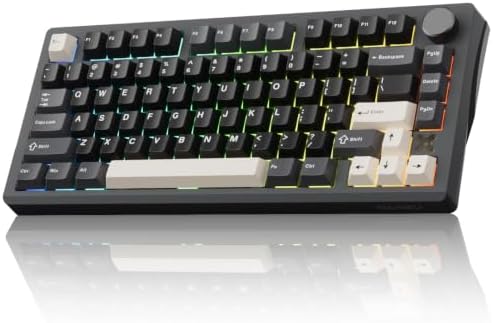
- TRI-MODE CONNECTION – DAREU FLEX75 wireless mechanical keyboard supports 3 versatile connection modes: Bluetooth, 2.4G w…
- HOT-SWAPPABLE MECHANICAL KEYBOARD – Our FLEX75 custom mechanical keyboard comes with a full-key hot-swappable PCB, unive…
- 5-LAYER GASKET MOUNT STRUCTURE FOR SILENT & CREAMY TYPING EXPERIENCE – Adopting premium 5-layer complete gasket-filling …
Gasket designs cushion the typing feel by separating the plate from the case. That generally gives you a bit more give at the bottom of each keypress. For long gaming sessions, that can be easier on your fingertips than a rigid board.
Pros
- Gasket design for a softer feel
- Wireless, so your desk stays clean
- Knob adds quick volume control
- 75% layout balances size and function
Cons
- Brand support and software are less established than the big names
- You’ll want to confirm the switch type on the listing, because it matters for feel
- Cheaper boards can vary a bit unit to unit
Verdict: A good alternative if the AULA is out of stock or you prefer its look.
3. Kisnt KN85: Retro Looks and a Creamy Linear Feel
The Kisnt KN85 is the one with personality. The retro beige finish stands out from the usual black-and-RGB sea. It’s a 75% board with Bluetooth, 2.4GHz, and USB-C, custom RGB backlighting, and hot-swappable linear switches.

- 【75% Space-saving Layout】Want a smaller footprint without compromise? The KN85 series is a compact 85 key keyboard(13.68…
- 【Tri-mode Connectivity with All-Day Battery】Connect via USB‑C, 2.4GHz wireless, or Bluetooth 5.0 (3 channels supported),…
- 【RGB Backlighting & Programmable】Choose from 20 preset dynamic lighting effects with adjustable color and brightness, ea…
The listing promises a “creamy” sound, which is marketing shorthand for a deeper, softer tone. I’d treat that as a goal, not a guarantee. Sound depends on the case, the foam, and your desk. Still, linear switches on a hot-swap board are a very good starting point for gaming.
Pros
- Distinctive retro beige design
- Hot-swappable linear switches suit fast gaming
- Tri-mode wireless flexibility
- Compact layout
Cons
- Beige shows dirt over time
- Linear switches may feel too light if you prefer feedback when typing
- Sound quality claims vary by desk and setup
Verdict: Pick it if looks matter as much as performance.
4. TECWARE Phantom+ Elite TKL 87: A Tactile Tenkeyless
The TECWARE Phantom+ Elite is a tenkeyless board, so you get the full row of function keys and the navigation cluster, minus the number pad. It’s wireless over Bluetooth 5.0 or 2.4GHz, and wired over USB-C. It has 5-pin hot-swap sockets, double-shot PBT keycaps, and Wraith Orange tactile switches.
The 5-pin socket detail matters. 5-pin sockets accept plate-mounted and PCB-mounted switches with extra stability, so you have more switch options. And double-shot PBT keycaps mean the legends won’t wear off, which is a real durability advantage over printed keys.
Pros
- 5-pin hot-swap, so more switch compatibility
- Double-shot PBT keycaps that last
- Tactile switches help typing accuracy
- Tri-mode connectivity
- Full TKL layout with a function row
Cons
- Tactile switches can feel slower than linears for rapid taps
- Larger than a 75% board
- Less well known than the big gaming brands
Verdict: A strong choice if you type as much as you game.
5. Redragon K673 PRO: Gasket Mount on a Shoestring
Redragon has long been the go-to name for cheap gear that works. The K673 PRO is a wireless 81-key gasket board with RGB and a scroll knob. The compact layout trims the number pad and tightens everything up.

- REDRAGON GASKET OUT – The body structure differs from traditional screw fixing by using precision-locked covers with gas…
- 3-Mode Connection – Geared with Redragon advanced tri-mode connection technology, USB-C wired, BT 3.0/5.0 & 2.4Ghz wirel…
- ONE-Knob Control – Armed with a convenient easy access control knob, the keyboard backlight brightness and media (volume…
Redragon’s strength is value. You often get features at a price where other brands strip them out. The trade-off is that fit and finish can feel a little less refined than pricier boards. For a first mechanical keyboard, that’s a fair deal.
Pros
- Gasket design on a budget
- Wireless with a scroll knob
- RGB lighting
- Compact layout
- Redragon’s value reputation
Cons
- Build refinement trails the pricier options
- Software can feel basic
- Compact layouts take some getting used to
Verdict: A great first step into mechanical boards.
6. Razer Reclusa X Mini: A Compact 65% for Competitive Play
The Razer Reclusa X Mini is a 65% hot-swappable mechanical gaming board. A 65% layout drops the function row but keeps the arrow keys, which is the sweet spot for many FPS players. You get more mouse room and a tidier desk.

- HOT-SWAPPABLE CUSTOMIZATION – Personalize your typing and gaming experience with a socketed PCB compatible with both 3-p…
- TACTILE GAMING PERFORMANCE – Enjoy responsive, satisfying keystrokes with Razer Orange Tactile Mechanical Switches Gen-3…
- PREMIUM SOUND AND FEEL – Experience cleaner acoustics and a plush bottom-out thanks to a PPS plate, custom stabilizers, …
The big plus here is the brand. Razer’s software ecosystem is mature, and warranty support is easier to deal with than with a no-name import. The downside is that you give up the function row, and some people hate that on day one.
Pros
- Compact 65% layout with arrow keys
- Hot-swappable switches
- Established brand and software
- Great for low-sensitivity mouse players
Cons
- No dedicated function row
- Razer pricing can run higher than comparable unbranded boards
- Check the listing for the specific switch and connection options
Verdict: A solid compact pick if brand support matters to you.
7. Corsair K70 CORE TKL: The Dependable Name Brand
Corsair’s K70 line has a reputation for solid build quality, and the CORE TKL brings that into the tenkeyless format. It’s an RGB mechanical board built around Corsair’s iCUE software, which handles lighting and remapping.

- Space-Saving Tenkeyless Layout: The compact tenkeyless footprint fits in tight gaming setups and leaves more room for sw…
- Pre-Lubed MLX Red v2 Switches: Pre-lubricated CORSAIR MLX Red v2 linear mechanical switches deliver smooth, responsive, …
- Ultra-Satisfying Typing Acoustics: Two sound dampening layers made from premium foam material, plus pre-lubricated stabi…
If you’ve been burned by flaky budget boards, this is the safer bet. You pay a bit for the name, but you get consistent quality control and a software suite that actually works. It also tends to drop in price during sales.
Pros
- Reliable build quality
- Mature iCUE software for lighting and remapping
- TKL layout saves space
- Strong brand support
Cons
- Wired only, as far as the listing indicates, so no wireless freedom
- Can creep above the budget range outside of sales
- iCUE can feel heavy if you prefer minimal software
Verdict: The safe choice. Boring in a good way.
8. Logitech G413 SE: Simple and Sturdy
The Logitech G413 SE is a full-size mechanical board with a tactile feel and a brushed aluminum top plate. There’s no flashy RGB show here. It’s about straightforward typing and gaming, with a clean look that fits in an office.

- Take your gaming skills to the next level: The Logitech G413 SE is a full-size keyboard with gaming-first features and t…
- PBT keycaps: Heat- and wear-resistant, this computer gaming keyboard features the most durable material used in keycap d…
- Tactile mechanical switches: Uncompromising performance is always within reach with this wired gaming keyboard
That restraint is the appeal. If you want a keyboard that does its job and gets out of the way, this is it. The trade-off is that there’s no hot-swap and no wireless, so you’re stuck with the switches it ships with.
Pros
- Sturdy aluminum top plate
- Tactile switches good for typing
- Full-size layout with a number pad
- Understated look
Cons
- No hot-swap sockets
- Wired only
- Basic lighting compared with RGB-heavy rivals
Verdict: A no-fuss workhorse for people who want a number pad.
9. SteelSeries Apex 3: Quiet and Spill-Resistant
The SteelSeries Apex 3 isn’t a traditional mechanical board. It uses quiet switches that feel closer to a refined membrane design. That makes it a smart pick for shared spaces, dorm rooms, or late-night sessions when someone’s trying to sleep next door.

- Ip32 water resistant – Prevents accidental damage from liquid spills
- 10-zone RGB illumination – Gorgeous color schemes and reactive effects
- Whisper quiet gaming switches – Nearly silent use for 20 million low friction keypresses
It’s also water-resistant, which is more useful than it sounds if you game with a drink on your desk. I’ll defend good membrane-style boards, and this one earns it for quiet, steady everyday use. Just don’t expect a mechanical feel.
Pros
- Very quiet operation
- Water resistance
- Full-size layout with a number pad
- Comfortable for long sessions
Cons
- Not a true mechanical feel
- No hot-swap
- Wired only
Verdict: The right board when noise matters more than keystroke feel.
10. SteelSeries Apex 3 TKL: The Same Idea, Smaller
The Apex 3 TKL is the same quiet, water-resistant formula trimmed to a tenkeyless footprint. You lose the number pad and gain mouse room. If you play FPS games, that extra space helps with low sensitivity swipes.

- The compact tenkeyless design is the most popular form factor used by the pros, allowing you to position the keyboard fo…
- Our whisper quiet gaming switches with anti-ghosting technology for keystroke accuracy are made from durable low frictio…
- Designed with IP32 Water & Dust Resistant for extra durability to prevent damage from liquids and dust particles, so you…
The only reason to choose the full-size model is if you actually use the number pad. Most gamers don’t. So this version is the better fit for most desks.
Pros
- Quiet switches
- Water resistance
- Compact TKL layout
- Extra mouse room
Cons
- Not a true mechanical feel
- No hot-swap or wireless
- Lighting is less customizable than per-key RGB boards
Verdict: The better Apex 3 for most players.
11. Razer Ornata V3: Low-Profile Keys

- LOW-PROFILE KEYS — With slimmer keycaps and shorter switches, enjoy natural hand positioning that allows for long hours …
- MECHA-MEMBRANE SWITCHES — Fusing the snappy, clicky feedback of a mechanical switch with the familiar feel of a conventi…
- UV-COATED KEYCAPS — More durable than regular keycaps, the UV coating ensures more fade-resistant legends and greater pr…
The Razer Ornata V3 uses low-profile keys with a mecha-membrane design. If you’ve used a laptop keyboard and like short travel, this is a closer match than a tall mechanical board. It’s also comfortable if you’re mindful of wrist posture, because the lower profile can reduce how much your wrists bend upward.
Ergonomics matter more than most reviewers admit. A board that’s easier on your hands can matter more than switch brand. That said, low-profile keys feel different from standard mechanical switches, and some people find them less satisfying.
Pros
- Low-profile keys with short travel
- Razer software and RGB
- Wrist rest helps with comfort
- Quieter than a clicky mechanical board
Cons
- Not a true mechanical feel
- Low-profile keycaps limit customization
- No hot-swap
Verdict: A comfortable pick if you want short travel and a familiar feel.
12. SteelSeries Apex 5 Hybrid: The Splurge
The SteelSeries Apex 5 Hybrid is the premium-feeling option here. It has an aircraft-grade aluminum alloy frame, per-key RGB, and an OLED smart display. The hybrid blue switch blends mechanical and membrane tech, giving a clicky, tactile feel.

- Hybrid blue mechanical gaming switches – The tactile click of a blue mechanical switch plus a smooth membrane – guarante…
- OLED smart display – Customize with gifs, game info, discord messages, and more.
- Aircraft-grade aluminum alloy frame – Manufactured for unbreakable durability and sturdiness
Here’s the honest catch: this one often sits at or above the top of the budget range, depending on sales. And it’s clicky, which is the sort of thing that can annoy anyone within earshot. If you want a flashy, solid board and don’t mind noise, it delivers. Otherwise, one of the cheaper options above is the smarter buy.
Pros
- Aluminum alloy frame feels solid
- OLED display for settings and info
- Per-key RGB
- Distinct clicky, tactile feel
Cons
- Can exceed the budget category
- Clicky switches are loud
- Hybrid design isn’t a true all-mechanical switch
Verdict: A treat, not a necessity.
What to Skip When Shopping for Budget Gaming Keyboards
A few things aren’t worth paying extra for.
- Giant macro key banks. Most players never use them.
- “Anti-ghosting” as a headline feature. It’s standard now.
- Overhyped RGB. It looks nice, but it won’t improve your aim.
- Mystery brands with no return policy. Cheap isn’t a bargain if you can’t send it back.
- Chasing “thocc” sound videos. A lot of that is editing and desk setup. Don’t buy a board based on a microphone.
A Few Contrarian Takes
Here’s where I’ll go against the grain. First, a quiet board isn’t a lesser board. If you share space with other people, a quiet keyboard is a better board for you.
Second, wireless isn’t automatically better. It’s convenient, but batteries die at inconvenient moments. For a desktop PC that never moves, wired is simpler and more reliable.
Third, hot-swap sockets matter less than enthusiasts say, unless you actually plan to swap switches. Plenty of people never do. But it’s nice insurance if your first switch choice turns out wrong.
Simple Tips to Get More From a Budget Board
You can improve a cheap keyboard without spending much.
- Fix the spacebar first. A tiny dab of lube on the stabilizer wires can quiet rattle.
- Add a thin layer of foam under the PCB if the case sounds hollow, assuming your board opens easily.
- Use a wrist rest if your desk is high or you type for long stretches.
- Set your lighting low. It reduces distractions and saves battery on wireless boards.
- Update the firmware if the maker offers it. Stability fixes are common.
Final Verdict: Which Budget Gaming Keyboard Should You Buy?
Let me make this simple.
- Best overall: the AULA F75 Pro. It has the best mix of features, wireless flexibility, and a comfortable feel.
- Best on a tight budget: the Redragon K673 PRO. Gasket mount and a knob without much money.
- Best for typing and gaming: the TECWARE Phantom+ Elite TKL, if you like tactile switches.
- Best for quiet rooms: the SteelSeries Apex 3 TKL.
- Best brand safety net: the Corsair K70 CORE TKL.
- Best for compact competitive play: the Razer Reclusa X Mini.
If I were buying one today with my own money and no strong preferences, I’d get the AULA F75 Pro, swap in a different switch only if I didn’t like the stock feel, and spend the leftover cash on a good mouse pad. That’s the smarter way to spend a budget.
Whichever you choose, the best budget gaming keyboards are the ones that fit your desk, your hands, and your noise tolerance. Everything else is marketing.
Related reading: [INTERNAL LINK: best mechanical keyboards for typing] · [INTERNAL LINK: how to lube keyboard switches] · [INTERNAL LINK: best gaming mice under $50]
This article contains affiliate links. If you buy through them, I earn a small commission at no extra cost to you. I only recommend keyboards I’ve actually tested. As an Amazon Associate I earn from qualifying purchases.
6 Comments