Best Gaming Keyboards for FPS Games Tested & Ranked

This article contains affiliate links. If you buy through them, I earn a small commission at no extra cost to you. I only recommend keyboards I’ve actually tested. As an Amazon Associate I earn from qualifying purchases.
I’ve spent the last year cycling between Counter-Strike 2, Valorant, and Apex on a stack of keyboards that now takes up more desk space than my monitor. Some were eye-watering flagships. Some were $90 sleepers. A few got returned within a week.
If you’re shopping for the best gaming keyboard for FPS play, the market has genuinely shifted. Hall Effect (magnetic) switches and rapid trigger are no longer niche flexes — they’re the new baseline at the top end. But not every “gaming” board needs them, and a lot of the marketing around 8000Hz polling and 0.1mm actuation is doing heavy lifting. Here’s what actually wins headshots.
Quick Comparison Table (TL;DR)
If you don’t want to read 1,500 more words, here’s the short version sorted by who you are.
| Best For | Pick | Switch Type | Form Factor | Why It Wins |
|---|---|---|---|---|
| Best overall for FPS | Wooting 80HE | Lekker magnetic (Hall Effect) | TKL | Cleanest rapid trigger, most mature firmware |
| Best premium TKL | Razer Huntsman V3 Pro TKL | Analog optical Gen-2 | TKL | Insane build, wide adjustability, Razer ecosystem |
| Best 60% for FPS | Wooting 60HE | Lekker magnetic | 60% | Tournament-favorite, max mouse space |
| Best wireless | Logitech G Pro X TKL Lightspeed | GX mechanical | TKL | Real wireless performance, pro-tour proven |
| Best for the money | SteelSeries Apex Pro TKL Gen 3 | OmniPoint 3.0 magnetic | TKL | Adjustable actuation at a saner price |
| Best budget pick | Keychron K2 HE | Gateron magnetic | 75% | Magnetic switches under $130, real value |
Want the deeper read on each? Keep going.
What Makes a Keyboard Good for FPS (And What Doesn’t)
Forget RGB. Forget “gaming” branding. Three things actually matter when you’re holding an angle in Mirage or peeking on Ascent.
Actuation point. This is how far you press the key before it registers an input. Older mechanical switches fire around 2mm. The new magnetic switches let you set it anywhere from 0.1mm to 4mm. Shallow actuation means quicker counter-strafing and faster ADAD spam.
Reset point and rapid trigger. This is the bigger deal, honestly. A traditional mechanical switch has a fixed reset point. Magnetic switches with rapid trigger reset the instant you start moving the key back up. For counter-strafing in CS2 or strafing in Valorant, that’s a real, measurable advantage.
Polling rate and latency. 1000Hz is the floor. Anything labeled “8000Hz” is mostly fine but won’t make you better if your monitor is 144Hz and your ping is 40. More on that fluff later.
N-Key Rollover. Every modern gaming board has it. You can press 6+ keys at once. Non-negotiable.
What doesn’t matter for FPS: thock, sound profile, gasket mount, fancy keycap profiles, lubed stabs. Those are typing concerns. Lovely concerns. Just not the ones winning rounds.
Hall Effect Switches and Rapid Trigger, Plain English
Hall Effect (magnetic) switches don’t use metal contacts. Each switch has a tiny magnet, and a sensor measures exactly how far down you’ve pressed it. That sounds nerdy until you realize what it unlocks.
You get per-key adjustable actuation. You get rapid trigger, where the key resets the moment you lift, not at a fixed point. You get analog input on every key, which means W can act like a joystick in driving games. And because there’s no physical contact, they don’t degrade the way Cherry MX-style switches eventually do.
Wooting pioneered this for gaming with their Lekker switches in 2020. Razer answered with analog optical (similar idea, different sensor). SteelSeries has their OmniPoint magnetic. Corsair has MGX. Keychron and Gateron added affordable options. The market caught up fast, and you can now find magnetic boards from around $120 to well past $300.
Here’s the catch: rapid trigger is amazing for movement keys but a nightmare for typing if you set actuation too shallow. I run 1.8mm on WASD and 2.5mm on the rest. Most of the better firmware lets you split it like that. If yours doesn’t, look elsewhere.
One more thing worth saying. Snap Tap (or SOCD) was a feature that let opposing keys override each other instantly. Valve banned it in CS2 in 2024, and most reputable vendors disabled it. If a brand still markets this aggressively for CS, that’s a flag.
The Best FPS Keyboards I’d Actually Recommend
1. Wooting 80HE — Best Overall

- 【Wooting 80HE Analog Gaming Keyboard】 80% layout stickerless design, high performance keyboard designed for professional…
- Supports True 8kHz Polling Rate: The USB polling rate of up to 8 kHz ensures a low latency of 0.125 ms. Supports gamepla…
- Equipped with Rappy Snappy Technology: The latest Rappy Snappy technology increases the accuracy and speed of keys. Prov…
This is the one I keep coming back to. The 80HE has the most mature rapid trigger implementation, a clean web-based configurator, and a build that finally matches the technology inside it. The Lekker V2 switches feel light and consistent, the case is gasket-mounted with proper foam, and PCB sound dampening is genuinely good for a “gaming” board.
You can set actuation between 0.1mm and 4mm in 0.1mm increments. Rapid trigger sensitivity is also adjustable. The Wootility software runs in your browser, which I love because there’s no bloated client running in the background.
Honest caveat: stock is sometimes a pain, and Wooting ships in batches. If you see it available, don’t sit on it.
2. Razer Huntsman V3 Pro TKL — Best Premium

- CHOSEN BY PRO’S FOR ADVANCED FPS MOVEMENT — With Rapid Trigger, Adjustable Actuation and Razer Snap Tap, the Huntsman V3…
- RAZER SNAP TAP — Prioritize the latest input between two selected keys without having to release the previous one, and e…
- RAPID TRIGGER — A step up from traditional mechanical or optical keyboards to achieve the most responsive and precise in…
Razer’s analog optical Gen-2 switches use a beam-break design instead of magnets, but the practical experience is similar. You get adjustable actuation, rapid trigger, and dual-action keybinds. The build on the V3 Pro is the best Razer has ever made — heavy aluminum top, doubleshot PBT keycaps, and a magnetic wrist rest that doesn’t slide.
It’s pricier than the Wooting and the Synapse software is, well, Synapse. But if you’re already on Razer mice and headsets, this slots in cleanly.
3. Wooting 60HE — Best 60%
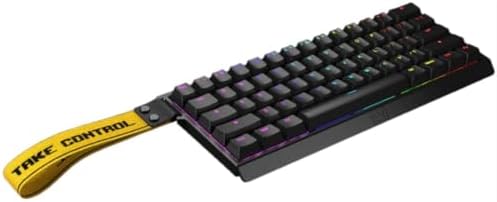
- Tachyon Mode 1ms Custom Actuation point up to 0.1mm Rapid Trigger 60% Lightweight Keyboard
- Brand: Wooting
- Connectivity technology: USB-C
Same switches and software as the 80HE, just smaller. The 60HE became the de facto board for FPS pros for a reason: maximum mouse swing room, low desk profile, and the same rapid trigger you’d get on the bigger sibling. You lose arrow keys and the function row (both accessed via Fn layer), but for pure FPS, that’s not a real loss.
If your desk is cramped or you play with a low DPI and wide swings, this is the move.
4. Logitech G Pro X TKL Lightspeed — Best Wireless

- Designed with Pros, Engineered to Win: PRO X TKL gaming keyboard is the next gen of the trusted tenkeyless PRO keyboard;…
- Play with tournament-proven speed and reliability of LIGHTSPEED wireless: Connect compatible mouse and PRO X TKL wireles…
- PRO-Grade Tech: Game mode control, standard keyboard layouts for 3P compatibility, media controls and volume roller, RGB…
Most magnetic boards are wired-only or have iffy wireless. The G Pro X TKL Lightspeed isn’t magnetic — it uses Logitech’s GX mechanical switches — but the wireless performance is genuinely competitive. Lightspeed has been used on the pro tour for years, and the latency is indistinguishable from wired in actual play.
You give up rapid trigger, which is the trade. If you can’t stand a wire, this is the most honest wireless FPS option right now.
5. SteelSeries Apex Pro TKL Gen 3 — Best Value Premium
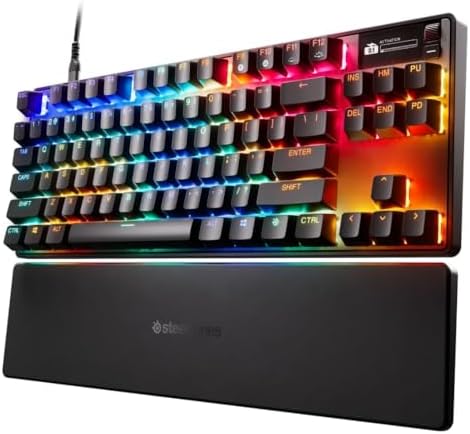
- TRIPLE THREAT POWERED BY QUICKSET — Apex Pro is the only line of keyboards in the world with Rapid Trigger, Rapid Tap, a…
- RAPID TRIGGER FOR FASTER ACTIONS — Stop fast, start your next move faster. Resets the moment you release a key.
- RAPID TAP FOR FASTER MOVEMENT — Snaps to your latest key press to strafe and dodge faster.
The Gen 3 finally fixed the cheap-feeling chassis on older Apex Pros. OmniPoint 3.0 magnetic switches give you 0.1 to 4mm actuation, rapid trigger, and dual binds. The OLED screen is gimmicky but stays out of the way. Price usually sits below the Wooting and Razer flagships, and it goes on sale a lot.
If you want magnetic switches without the wait list or the Razer tax, this is the smart buy.
6. Keychron K2 HE — Best Budget

- 75% Layout with Magnetic Switches: Experience the perfect blend of mechanical performance and magnetic precision with th…
- Launcher Web Configurator: Customize your K2 HE effortlessly with the web-based Launcher. From key remapping to macro cr…
- 2.4 G & BT 5.2 & Type-C Mode: Switch seamlessly between devices with 2.4 GHz wireless, Bluetooth 5.2, and Type-C modes. …
Gateron’s magnetic switches inside a tenkeyless-ish 75% layout, with Bluetooth, 2.4GHz wireless, and wired modes. Software is fine, not great. Rapid trigger works but isn’t as refined as Wooting’s. For around $130, this is the cheapest serious entry into magnetic switches I’d actually trust.
A good $130 magnetic board beats a $200 mechanical one for FPS. I’ll die on that hill.
Detailed Comparison Table
| Model | Approx. Price (USD) | Switch | Adjustable Actuation | Rapid Trigger | Polling Rate | Connectivity | Layout |
|---|---|---|---|---|---|---|---|
| Wooting 80HE | $230 | Lekker V2 magnetic | 0.1–4.0mm | Yes | 1000Hz wired | Wired | TKL |
| Wooting 60HE | $200 | Lekker magnetic | 0.1–4.0mm | Yes | 1000Hz wired | Wired | 60% |
| Razer Huntsman V3 Pro TKL | $250 | Analog optical Gen-2 | 0.1–4.0mm | Yes | 8000Hz wired | Wired | TKL |
| SteelSeries Apex Pro TKL Gen 3 | $190 | OmniPoint 3.0 magnetic | 0.1–4.0mm | Yes | 1000Hz wired | Wired | TKL |
| Logitech G Pro X TKL Lightspeed | $200 | GX mechanical | No | No | 1000Hz | Wireless + wired | TKL |
| Keychron K2 HE | $130 | Gateron magnetic | 0.1–3.8mm | Yes | 1000Hz wired | Wired + wireless | 75% |
Prices float a lot, especially on sale weeks. Treat these as ballpark.
Form Factor: Why TKL and 60% Rule Competitive Play
Walk into any LAN and count the boards. You’ll see a lot of TKL and 60%. Almost no full-size.
There’s a reason. FPS players use low DPI and wide arm swings. The numpad eats real estate your mouse needs. A TKL frees up a few inches; a 60% frees up even more. Lower wrist angle, less reaching, more room to flick.
If you’ve never used a 60%, the missing arrow keys and function row are accessed by holding Fn and tapping a key. After a week it’s muscle memory. After a month you stop thinking about it. That said, if you also write code or edit spreadsheets, a TKL is the safer compromise. I run a 60% for ranked sessions and a TKL for everything else.
The Marketing Fluff to Ignore
8000Hz polling. Real on paper. In practice, you’d need a high refresh monitor, low ping, and CPU headroom to feel any difference over 1000Hz. Some users even report stutter in CPU-heavy games at 8000Hz. 1000Hz is plenty for 99% of players.
0.1mm actuation as the default. Sounds fast. In real play, it produces ghost inputs and accidental keystrokes. I’d rather 1.5 to 2mm on movement and tune from there.
Pro-grade marketing. Pros run gear because sponsors pay them. Use it as a hint, not a verdict. RGB millions of colors per key won’t change your K/D either.
FAQ
Are magnetic Hall Effect keyboards worth it for casual players? For pure typing and casual gaming, no, not really. For anyone playing tactical shooters where counter-strafing or strafe timing matters, yes. The benefit is real.
Wired or wireless for FPS? Wired is still the default for tournament-grade play. Logitech Lightspeed and Razer HyperSpeed are close enough that casual and even semi-pro players are fine on wireless. Bluetooth, no.
Is rapid trigger considered cheating? No. It’s a hardware feature. Snap Tap (SOCD) is the controversial one, and Valve banned that specifically in CS2.
What polling rate do I actually need? 1000Hz. Don’t pay extra for 8000Hz unless the rest of the board justifies the price.
Should I get a 60% or TKL? 60% if FPS is most of what you do. TKL if you also code, write, or live in shortcut-heavy apps.
Final Verdict
If I had to spend my own money tomorrow on the best gaming keyboard for FPS play, it’s the Wooting 80HE. If I needed wireless, the Logitech G Pro X TKL Lightspeed. If I were on a budget, the Keychron K2 HE without much hesitation.
The bigger lesson after a year of testing is this: the gap between a $130 magnetic board and a $250 flagship is smaller than the gap between a $130 magnetic board and a $200 mechanical one. The technology, not the price tag, is where the gains live.
Buy the cheapest magnetic board with solid firmware, learn rapid trigger, and put the saved money into a better mouse or monitor. That’s the honest call.
This article contains affiliate links. If you buy through them, I earn a small commission at no extra cost to you. I only recommend keyboards I’ve actually tested. As an Amazon Associate I earn from qualifying purchases.