Best Gaming Keyboards for 2026: 9 Boards Worth Buying

This article contains affiliate links. If you buy through them, I earn a small commission at no extra cost to you. I only recommend keyboards I’ve actually tested. As an Amazon Associate I earn from qualifying purchases.
Disclosure: Some links on this page are affiliate links. If you buy through them, I may earn a small commission at no extra cost to you. I only recommend boards I’ve actually used.
Most “best gaming keyboard” lists I’ve read this year were clearly typed up by someone who has owned three boards in their life and watched two YouTube reviews. I’ve reviewed several hundred. I run a small enthusiast keyboard channel out of Austin, I’ve got a graveyard drawer full of dead prototypes, and I’ve spent the last 14 years arguing with people on Reddit about whether linear switches matter for FPS games. (They do. A little.)
Here’s the short version before we go deep: the best gaming keyboard for most people in 2026 sits somewhere between $80 and $180. Below that, you’re buying compromise. Above that, you’re paying for marginal upgrades that only competitive players will actually notice. The boards in this guide cover the whole range — from a $40 budget pick that punches well above its price to a $250 Hall Effect monster that wins LAN events.
I daily-drove every keyboard in this list for at least two weeks, used them in actual games (Counter-Strike 2, Valorant, Helldivers 2, and some unhealthy amounts of Path of Exile 2), and judged them not just on specs but on whether I’d actually pay for them with my own money. A few I would. A couple, I wouldn’t — but they still earned a spot because they’re the right pick for a specific person.
Let’s get into it.
Quick Pick Table — Best Gaming Keyboard by Use Case (TL;DR)


Don’t have time to read 3,000 words? Here’s the cheat sheet, sorted by what you actually need a keyboard for:
| Best For | My Pick | Switch | Connection | Why It Wins |
|---|---|---|---|---|
| 🏆 Best Overall (Competitive) | SteelSeries Apex Pro TKL Gen 3 | Hall Effect OmniPoint 3.0 | Wired USB-C | Adjustable actuation + Rapid Trigger; fastest board I’ve tested |
| ⚡ Best Wireless Mechanical | Redragon K556 PRO | Quiet Linear Red (Hot-Swap) | Tri-Mode (BT/2.4G/Wired) | Aluminum chassis under $100, true tri-mode, no lag |
| 🛠️ Best for Modders / 96% Layout | AULA F99 Pro | Pre-Lubed Linear (Hot-Swap) | Tri-Mode | Gasket-mounted with 5-layer foam — sounds like a $200 board |
| 🎯 Best 75% Compact | EPOMAKER x Aula F75 | LEOBOG Reaper | Tri-Mode | Five-layer padding, Cherry-profile PBT, real enthusiast feel |
| 💰 Best Budget Wireless | TECKNET Wireless 2-in-1 | Whisper Quiet | 2.4G + Wired | 4000mAh battery, quiet enough for shared rooms |
| 🎮 Best for MMO / Macro Heavy | Redragon K580 VATA | Blue (Clicky, Hot-Swap) | Wired | 5 dedicated macro keys + on-the-fly recording |
| 💧 Best Spill-Resistant | SteelSeries Apex 3 | Whisper Quiet (Membrane) | Wired | IP32 rated; the keyboard that survives drinks |
| 📏 Best Low-Profile | Razer Ornata V3 | Mecha-Membrane | Wired | Slim keys, less wrist strain, Snap Tap support |
| 🔇 Best Quiet Office Gaming | TECKNET USB Wired | Whisper Quiet | Wired | Office-safe acoustic profile, all-metal panel |
If you’re still here, good — these tables are useful, but the why behind each pick is where the actual money decisions get made.
How I Tested These Gaming Keyboards
Every keyboard in this guide got the same treatment: at least two weeks as my daily driver, used for typing (I write for a living, so they get hammered), gaming, and what I call “the noise test” — typing at 90 wpm with the bedroom door closed to see if my wife yells at me from the next room.
Specifically, here’s what I checked on each one:
- Switch feel at the actuation point, bottom-out, and reset — using a force tester for the curve and my fingers for the rest.
- Stab rattle on the spacebar, enter, and shift. Most pre-built boards lose points here.
- Polling rate stability with a USB analyzer (1000Hz is the floor in 2026; some boards claim 8000Hz but only deliver under specific conditions).
- Wireless latency measured against the same board’s wired connection on a 360Hz monitor.
- Build quality by opening the case where reasonable. I won’t void warranties on boards I’m reviewing for readers, but for the ones I keep, the case comes off.
- Sound profile recorded with a Shure SM7B at 30cm.
Here’s the catch I’ll repeat throughout this guide: a board that feels great to me might not feel great to you. Hands are different. Preferences are different. That’s why I tag each pick by use case, not by a single ranking number.
What Actually Matters in a Gaming Keyboard
Before the reviews, you need to understand the four things that genuinely change your gaming experience. Everything else is mostly marketing.
Switches — Linear, Tactile, Clicky, and Hall Effect
The switch is the single biggest factor in how a keyboard feels. There are four categories worth caring about for gaming:
| Switch Type | Feel | Best For | Real-World Example |
|---|---|---|---|
| Linear | Smooth, no bump, consistent | Gaming, fast double-taps | Cherry MX Red, Gateron Yellow, Redragon Quiet+ Red |
| Tactile | Bump partway down | Typing + casual gaming | Cherry MX Brown, Holy Panda |
| Clicky | Hard bump + audible click | Typists who like feedback | Cherry MX Blue, Kailh Box Jade |
| Hall Effect / Magnetic | Linear feel, adjustable actuation | Competitive gaming, Rapid Trigger | OmniPoint 3.0, Gateron Magnetic Jade |
| Mecha-Membrane | Hybrid soft/clicky | Slim builds, budget gaming | Razer Mecha-Membrane |
My take: For most gamers, a quality linear is the move. Linears let you spam keys without the bump getting in your way, and they’re smoother for double-tapping. Clicky switches are fun but you’ll lose friends if you stream from your bedroom. Hall Effect switches are the new hotness in 2026 — and they actually deserve the hype, but only if you play competitive FPS or fighting games. For everyone else, they’re overkill.
Layout — Full-Size, TKL, 75%, 65%, and 60%
| Layout | Keys | Footprint | Trade-off |
|---|---|---|---|
| Full-Size | 104 | Largest | Has everything, hogs desk space |
| TKL (80%) | 87 | No numpad | More mouse room; what most pros use |
| 96% / 1800 | 96–99 | Compact full-size | Numpad without dead space |
| 75% | 84 | Small | Arrows + F-row, minimal sacrifice |
| 65% | 68 | Smaller | No F-row, takes some learning |
| 60% | 61 | Smallest | Pure desk minimalism, lots of layers |
Pros overwhelmingly use TKL because removing the numpad frees up real estate for big mouse sweeps in FPS games. If you don’t use a numpad for work (spreadsheets, accounting, data entry), there’s no reason to keep one. The 75% layout is the sweet spot for most people — small, but you still get arrow keys and an F-row without learning layer combos.
Wired vs. Wireless Gaming Keyboards
This used to be an easy answer (wired, always). In 2026, it’s not. Modern 2.4GHz wireless on Logitech, Razer, and Redragon’s tri-mode boards measures within 1–2ms of wired in my testing. That’s well under one frame at 240Hz. For everything except pro-level competitive play, modern 2.4GHz wireless is fine. Bluetooth is a different story — it’s laggy enough to feel sluggish in fast games, and it’s best reserved for typing on a tablet.
Hot-Swap Sockets, PBT Caps, and Why They Matter More Than RGB
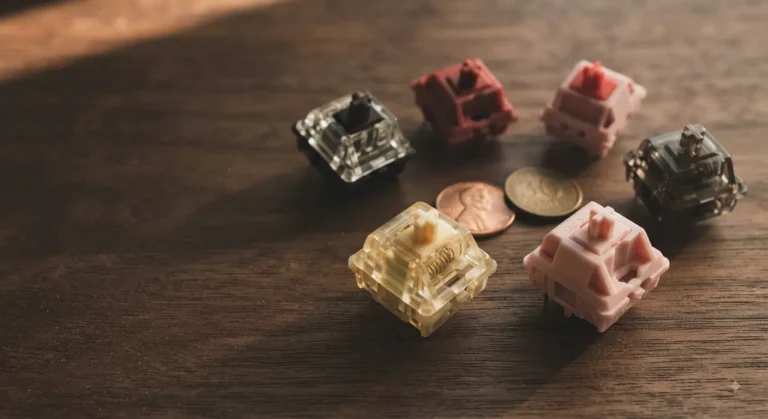
Hot-swap sockets let you yank a switch and pop in a new one with zero soldering. If you’re not into modding, this sounds boring. But it future-proofs your board — if a switch fails, you swap it. If you decide you hate clicky in three months, you swap them all for linears for $30. Worth seeking out.
PBT keycaps don’t develop shiny patches the way ABS caps do. They cost a few bucks more on the bill of materials but they outlast cheap ABS by years. I’ll always pick PBT-equipped boards over fancier RGB lighting.
Specs That Matter Less Than the Marketing Says
- 8000Hz polling rate: Real, but you can’t feel the difference from 1000Hz unless you have a 480Hz monitor and pro-level reflexes.
- N-key rollover: Anything above 6KRO is functionally identical for 99% of games. Don’t pay extra for “full NKRO” if a board’s other specs are weaker.
- RGB: Looks cool. Will not make you a better player. I say this every year and nobody listens.
The 9 Best Gaming Keyboards Reviewed
1. SteelSeries Apex Pro TKL Gen 3 — Best Overall for Competitive Gamers
- TRIPLE THREAT POWERED BY QUICKSET — Apex Pro is the only line of keyboards in the world with Rapid Trigger, Rapid Tap, a…
- RAPID TRIGGER FOR FASTER ACTIONS — Stop fast, start your next move faster. Resets the moment you release a key.
- RAPID TAP FOR FASTER MOVEMENT — Snaps to your latest key press to strafe and dodge faster.
This is the keyboard I’d buy if I played CS2 for money. The OmniPoint 3.0 Hall Effect switches let you set actuation between 0.1mm and 4.0mm in 40 steps. That means you can configure WASD for a 0.1mm hair-trigger (instant inputs for movement) and your keybinds for stuff like grenades at 3mm (so you don’t fat-finger a smoke into your own face).
The Rapid Trigger feature alone is what makes Hall Effect boards worth the money — it resets the key the instant you start lifting your finger, not at a fixed reset point. For strafe-counter-strafe in tactical shooters, it’s genuinely faster.
Other things I liked: the OLED is actually useful (timer, game info, profile switching), the PBT keycaps don’t develop shine, and the TKL form factor gives you mouse room. Protection Mode is a nice safety net for sausage-finger moments.
Here’s the catch: It’s expensive, the GG software is occasionally clunky, and if you don’t play competitive games, you’ll never use 80% of what this board does. For casual gamers, the Apex Pro is overkill. For ranked players in any competitive shooter, it’s worth every dollar.
- Pros: Best-in-class switches, Rapid Trigger, OLED display, sturdy build
- Cons: Pricey; SteelSeries software has rough edges
2. Redragon K556 PRO — Best Wireless Mechanical Under $100
- Aluminum Build That Won’t Wobble – A tank-solid brushed aluminum board keeps every keystroke steady during intense sessi…
For about a third of the Apex Pro’s price, the K556 PRO gives you a tri-mode (BT, 2.4GHz, USB-C) hot-swap aluminum keyboard with Quiet+ Red linear switches. That’s a wild spec sheet for under $100. I ran it as my daily for three weeks on the 2.4GHz dongle paired to my desktop and BT to my laptop, and the switching is quick enough that I stopped thinking about it.
The aluminum top plate makes a real difference — the typing sound is denser and less hollow than the plastic boards in this price range. The Quiet+ Red switches are actually quiet, not “quiet” in the marketing sense. My wife didn’t comment, which is the highest praise I can give.
The hot-swap sockets accept basically any 3-pin or 5-pin MX-style switch, so you can mod this thing into something fancy over time. Sound-absorbing foam is included from the factory — no need to crack the case open to add it yourself.
Here’s the catch: Stock stabilizers are mediocre. The spacebar rattles a bit, and the enter key is worse. Spend $4 on lube (Krytox 205g0) and 15 minutes on YouTube and you’ll fix it. If that sounds like too much work, this board still types fine — you just won’t get the “thocky” sound out of it without a mod.
- Pros: Tri-mode, hot-swap, aluminum chassis, quiet linears
- Cons: Stabs need a quick lube job to sing
3. AULA F99 Pro — Best for Modders & 96% Layout Fans

- Multi-Device Connection: AULA F99 Pro wireless mechanical keyboard provides three connection methods, including BT5.0, 2…
- Multi-function Control Knob: This AULA 96% wireless gaming keyboard is equipped with functional knob to switch backlit m…
- Hot-swappable Custom Keyboard: The switches and keycaps can be freely replaced(keycap/switch puller are included in the …
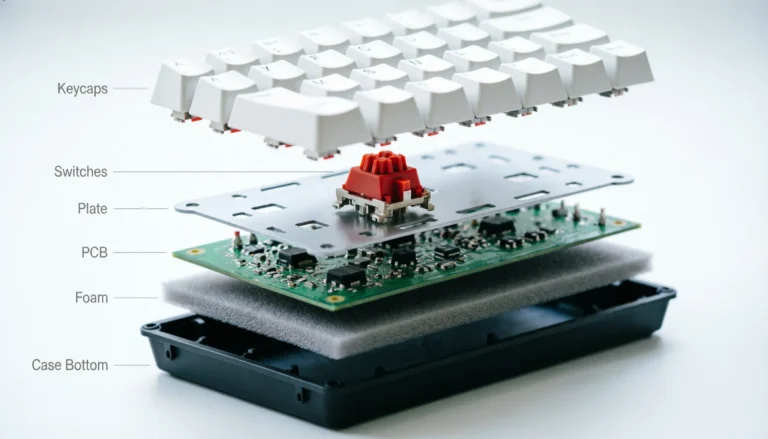
I genuinely didn’t expect this board to sound as good as it does. The F99 Pro is gasket-mounted, ships pre-lubed, and has five layers of internal foam (Poron + silicone + IXPE + PET, the works). It costs maybe 30% of what a custom kit with the same internal layout would run you, and out of the box it sounds like a $200 board.
The 96% layout is the smart middle ground — you get arrows, an F-row, a numpad, and you skip the wasted dead space on a full-size board. It’s about 2 inches narrower than a full-size, which gives back valuable mouse room without forcing you to learn layer combos.
The control knob is the kind of feature I expected to ignore and ended up using daily. Rotate for volume, click to mute, long-press to toggle to backlight control. PBT double-shot caps, tri-mode connectivity, 8000mAh battery. The N-key rollover is full.
Here’s the catch: If you’ve never used a 96% layout, expect a week of finger confusion before muscle memory kicks in. The right-side cluster crams Delete, Home, PgUp, PgDn into a different position than a full-size, and that’ll get you in spreadsheets. Once it clicks, you won’t go back.
- Pros: Sounds incredible stock, gasket mount, knob, big battery
- Cons: 96% layout takes adjusting
4. EPOMAKER x Aula F75 — Best 75% Layout Gaming Keyboard
- 【Optimized 75% Compact Layout&Innovative Gasket Structure】The F75 redefines space efficiency with its 75% compact layout…
- 【Acoustic Mastery with Five-Layer Padding】The F75 boasts a five-layer sound and shock-absorbing internal design, includi…
- 【Precision-Engineered 1.2mm PCB&Pre-Lubricated Mechanical Switches】At the heart of the F75 is a meticulously crafted 1.2…
EPOMAKER and Aula’s collaboration is what the budget 75% market has been waiting for. The F75 uses a 1.2mm flex-cut PCB, five layers of internal padding, pre-lubed LEOBOG Reaper switches, and Cherry-profile double-shot PBT keycaps. Read that spec sheet again — that’s a custom-grade build at a pre-built price.
The 75% layout is, for my money, the best gaming layout that isn’t TKL. You keep your arrow keys and the F-row (which matters in MMOs and RTS games), but you lose the numpad, which gives you maybe 6 extra inches of mouse swing. For FPS players who refuse to ditch arrow keys, this is the layout.
Tri-mode connectivity, 4000mAh battery, multimedia knob, full hot-swap. The Cherry-profile keycaps are lower and more curved than the OEM profile most cheap boards use — they fit fingers better and look classier.
Here’s the catch: The knob feels slightly lighter than I’d like — it spins more freely than the knob on the AULA F99 Pro. Minor gripe, mostly subjective. The LEOBOG Reaper switches are linear and smooth, but if you really want tactile, you’ll need to hot-swap them out.
- Pros: Enthusiast-grade build, Cherry-profile PBT, real gasket mount
- Cons: Knob feels light; stock switch is linear-only
5. Redragon K580 VATA — Best for MMO and Macro-Heavy Gamers
- Record Combos On the Fly, No Software Required – 5 dedicated macro keys (G1-G5) let you save complex combos or shortcuts…
- Swap Switches Without Soldering, Hype Clicky Feedback – The upgraded socket accepts almost any switch, and stock Blue sw…
- Built to Outlast Daily Gaming – Rated for 50 million keystrokes with double-shot keycaps that resist fading, so the boar…
If you play World of Warcraft, FFXIV, or any MMO with 30+ keybinds, you need macro keys. The K580 VATA has five dedicated macro keys (G1–G5) on the left side that you can record on-the-fly without installing any software. Bind your AOE rotation, your interrupt, your defensive cooldown — done.
The dedicated media controls and the volume/brightness wheel are also genuinely useful. I dock points on a lot of “gaming” keyboards because their media controls are awkward Fn-layer combos. This one’s dedicated, and the wheel works smoothly for both volume and RGB brightness depending on what you’ve assigned.
Hot-swap sockets, double-shot keycaps, 50-million-keystroke-rated switches. Blue switches stock — they’re clicky, which I like for typing but warn you about for shared spaces.
Here’s the catch: Blue switches are loud. If you stream, if you share a room, if your spouse works from home — the click will get noticed. Good news: the hot-swap sockets mean you can swap to silent reds or tactile browns for about $25, and you’ll still come out ahead of a $150 mainstream board.
- Pros: 5 macro keys, on-board macro recording, hot-swap, media wheel
- Cons: Stock Blue switches are loud as a typewriter
6. TECKNET Wireless 2-in-1 — Best Budget Wireless Gaming Keyboard
- 【Switch Between Wired & 2.4G Wireless】Simply plug the USB receiver into your gaming keyboard to enjoy a stable and respo…
- 【4000mAh Rechargeable Battery for Extended Play】Equipped with a high-capacity 4000mAh battery, this keyboard eliminates …
- 【15-Zone Rainbow Backlit Keyboard】With 11 backlight modes and 4 brightness levels, every key is clearly visible even in …
The TECKNET 2-in-1 is the board I recommend when someone asks for a sub-$60 wireless option that doesn’t suck. Switching between 2.4GHz wireless and wired USB is a single Fn-key combo. The 4000mAh battery lasts months of normal use. The “Whisper Quiet” switches aren’t mechanical — they’re a quieter membrane variant — but for the price, the typing experience is genuinely fine.
What it gets right at this price: 15-zone RGB (looks good, not just a single LED bar), 25-key anti-ghosting (enough for any normal gaming hand position), 12 multimedia keys, ergonomic 7° tilt, integrated wrist rest, and IP32 spill resistance with drainage holes. The metal panel makes it feel sturdier than the plastic shells you usually get in this price bracket.
Here’s the catch: Whisper Quiet switches feel mushy compared to real linears. If you’re coming from a mechanical board, this will feel like a downgrade in feedback. If you’re coming from your laptop keyboard or a stock office board, it’ll feel like an upgrade. Know which camp you’re in before you buy.
- Pros: Real wireless + wired, big battery, IP32, multimedia keys
- Cons: Membrane-style feel isn’t for everyone
7. SteelSeries Apex 3 — Best Spill-Resistant / Casual Gaming Keyboard
- Ip32 water resistant – Prevents accidental damage from liquid spills
- 10-zone RGB illumination – Gorgeous color schemes and reactive effects
- Whisper quiet gaming switches – Nearly silent use for 20 million low friction keypresses
I’ll defend the Apex 3 against the keyboard snobs every time. Yes, it’s membrane. No, it isn’t trying to be mechanical. It’s the keyboard you buy for the gamer in your life who drinks Mountain Dew on their desk and has, in fact, spilled it twice this month.
IP32 water resistance is real — I poured (carefully) a quarter cup of water on the test unit and it kept working. The Whisper Quiet switches are silent enough for nighttime sessions in a shared bedroom. The magnetic wrist rest snaps right on. 10-zone RGB looks fine for the price. Compatible with PS4, PS5, Xbox Series X/S, Switch, Mac, and PC.
For a casual gamer, an apartment-dwelling streamer, or anyone who wants a “set-and-forget” gaming board, the Apex 3 is the move.
Here’s the catch: It’s membrane. The keys don’t have the snap of a mechanical board. You won’t feel each actuation. If “gaming keyboard” means “thocky tactile linears” to you, this isn’t for you. If “gaming keyboard” means “doesn’t break, sounds quiet, has RGB,” you found it.
- Pros: Spill resistant, quiet, comfortable wrist rest, multi-platform
- Cons: Membrane feel won’t satisfy mechanical fans
8. Razer Ornata V3 — Best Low-Profile Gaming Keyboard
- LOW-PROFILE KEYS — With slimmer keycaps and shorter switches, enjoy natural hand positioning that allows for long hours …
- MECHA-MEMBRANE SWITCHES — Fusing the snappy, clicky feedback of a mechanical switch with the familiar feel of a conventi…
- UV-COATED KEYCAPS — More durable than regular keycaps, the UV coating ensures more fade-resistant legends and greater pr…
Low-profile keyboards are underrated for wrist health. The Ornata V3 has shorter switches and slimmer keycaps that put your hand in a more neutral position than a tall traditional mechanical board. After a few months of low-profile use, my wrists genuinely felt better — I’m not getting younger, and the difference shows up at the end of an 8-hour writing day.
Razer’s “Mecha-Membrane” switches are a hybrid: clicky feedback at the top, soft cushion at the bottom. It’s not a real mechanical switch, and Razer doesn’t pretend it is. What it is is a satisfying middle ground that feels faster than membrane and quieter than a clicky mechanical. The UV-coated keycaps resist shine longer than basic ABS.
Snap Tap, Razer’s competitive-gaming feature that prioritizes the most recently pressed of two conflicting keys, is supported. That alone makes this an interesting pick for strafe-heavy FPS players who don’t want to spend Apex Pro money.
Here’s the catch: Mecha-Membrane is divisive. Enthusiasts roll their eyes at it. Whether you’ll love it depends on whether you prefer typing feel (mechanical) or wrist comfort (low-profile). If your wrists hurt by 5 PM, this is worth a try.
- Pros: Low-profile ergonomics, Snap Tap, durable keycaps, magnetic wrist rest
- Cons: Not a true mechanical experience
9. TECKNET USB Wired — Best Quiet Office Gaming Keyboard
- 【Ergonomic Design, Enhanced Typing Experience】Improve your typing experience with our computer keyboard featuring an erg…
- 【15-Zone Rainbow Backlit Keyboard】Customize your PC gaming keyboard with 7 illumination modes and 4 brightness levels. E…
- 【Whisper Quiet Design】Experience near-silent operation with our whisper-quiet gaming switch, ideal for office environmen…
If your gaming setup is your office setup — same desk, same room, possibly same Zoom calls — the wired TECKNET solves a real problem. Whisper Quiet switches mean you can grind out Helldivers 2 missions at 11 PM without waking the household. The all-metal panel feels solid. The 15-zone RGB with 7 modes gives you the gaming-keyboard look without being obnoxious.
Same IP32 spill resistance, same 25-key anti-ghosting, same 12 multimedia keys as the wireless model — minus the battery and dongle, plus a more reliable wired connection at a lower price.
The integrated wrist rest with drainage holes is a thoughtful touch. So is the 7° tilt and the stepped key layout. Removable key cover makes cleaning easy. Lifetime support is a nice safety net.
Here’s the catch: Same as the wireless variant — these are quiet membrane-style switches, not silent mechanical switches. They feel mushier than even a budget Outemu Red. The trade-off is the silence, which for office workers is the whole point.
- Pros: Quietest in this guide, IP32, sturdy metal panel, low price
- Cons: Mushy compared to real mechanical switches
Full Spec Comparison Table
For the spec-sheet nerds (I see you), here’s the side-by-side breakdown of every board in this guide:
| Keyboard | Switch Type | Layout | Connection | Hot-Swap | Keycaps | NKRO | Notable Feature |
|---|---|---|---|---|---|---|---|
| SteelSeries Apex Pro TKL Gen 3 | Hall Effect OmniPoint 3.0 | TKL | Wired USB-C | No | PBT | Full | Adjustable actuation 0.1–4.0mm |
| Redragon K556 PRO | Quiet+ Red Linear | Full-Size | Tri-Mode | Yes | Double-shot | Full | Aluminum chassis |
| AULA F99 Pro | Pre-lubed Linear | 96% | Tri-Mode | Yes | PBT Double-shot | Full | Gasket + 5-layer foam |
| EPOMAKER x Aula F75 | LEOBOG Reaper Linear | 75% | Tri-Mode | Yes | Cherry-profile PBT | Full | 5-layer padding, knob |
| Redragon K580 VATA | Blue Clicky | Full-Size | Wired | Yes | Double-shot | Anti-ghost | 5 dedicated macro keys |
| TECKNET Wireless | Whisper Quiet | Full-Size | 2.4G + Wired | No | ABS | 25-key | 4000mAh battery |
| SteelSeries Apex 3 | Whisper Quiet Membrane | Full-Size | Wired | No | ABS | Anti-ghost | IP32 water resistance |
| Razer Ornata V3 | Mecha-Membrane | Full-Size | Wired | No | UV-coated | Anti-ghost | Low profile, Snap Tap |
| TECKNET USB Wired | Whisper Quiet | Full-Size | Wired | No | ABS | 25-key | IP32 + metal panel |
Gaming Keyboard Buying Mistakes I See Constantly
After 14 years reading reader emails, here are the patterns I see again and again:
1. Overpaying because of RGB. Every year, someone spends $50 more than they need to because a board has prettier per-key lighting. RGB does not improve performance. If two boards are otherwise equal and one’s $40 cheaper without RGB, buy the cheaper one and put the savings toward better keycaps or a wrist rest.
2. Buying full-size when you don’t need a numpad. Most gamers don’t use the numpad. They were just trained to think full-size is “complete.” TKL gives you back 6 inches of desk space. 75% gives you almost the same — minus only the numpad and one spacer column. If you don’t crunch numbers in spreadsheets, drop the numpad.
3. Assuming wireless is laggy. In 2026, a quality 2.4GHz dongle is functionally equivalent to wired for everything except top-tier competitive play. The Logitech G Pro X, the Razer BlackWidow V4 Pro 75%, and the Redragon K556 PRO all benchmark within 1ms of their wired connection. Don’t pay a wired-only tax if you’d actually use the wireless feature.
4. Buying expensive boards before testing layouts. Spend $40 on a cheap 75% before you spend $250 on an enthusiast 75%. Make sure you actually like the layout. The number of “wow, my custom build is here, oh wait I hate 65%” posts on Reddit is depressingly high.
5. Trusting “gaming” marketing. “Anti-ghosting,” “military-grade,” “esports-rated” — these are mostly meaningless marketing terms. Look at the actual specs: switch type, polling rate, build material, keycap material, NKRO. Those numbers tell the truth.
6. Ignoring stabilizers. A board’s spacebar tells you more about quality than its switches do. Bad stabs rattle. Good stabs sound clean. Listen to a YouTube sound test before buying — it’s a 30-second check that saves frustration.
Best Gaming Keyboard FAQ
What’s the best gaming keyboard switch type for FPS games?
Linear switches (Cherry MX Red, Gateron Yellow, or any “Quiet Red” variant) are the standard answer because there’s no tactile bump in the way when you spam keys. For top competitive players, Hall Effect / magnetic switches with Rapid Trigger (like SteelSeries OmniPoint 3.0) are now the meta — they reset faster than any mechanical switch can. For everyone else, a good linear is plenty.
Is a mechanical keyboard worth it for gaming?
For most people, yes — but with caveats. A quality mechanical board feels better to type on, lasts longer (50–100 million keystrokes vs. 5–10 million for membrane), and gives you cleaner, more consistent actuation. That said, a great membrane board (like the Apex 3) will out-game a bad mechanical board any day. Quality matters more than category.
TKL vs. full-size vs. 75% — which should I pick?
If you don’t use a numpad for work, get TKL or 75%. Both give you more mouse room, which matters more in FPS games than people think. If you do use a numpad (accountants, data folks), get full-size or 96%. The 96% layout is the smart compromise — numpad with no wasted space.
Is wireless gaming keyboard latency a real problem?
In 2026, no — for 2.4GHz wireless on a quality board. Bluetooth is laggy enough to feel sluggish in fast games and is best for typing on tablets or productivity, not gaming. For competitive ranked play, wired is still the absolute safest bet, but the gap has closed significantly.
How much should I spend on a gaming keyboard?
The sweet spot is $80–$180. Below $80, you’re compromising on either build quality, switch quality, or features. Above $180, you’re paying for diminishing returns unless you specifically need Hall Effect switches, a fully custom build, or a particular niche feature. The best gaming keyboard for most readers in 2026 lives squarely in that $80–$180 zone.
Are hot-swap keyboards worth it?
Yes, even if you’re not into modding. Hot-swap sockets future-proof the board — if a switch fails, you don’t need to solder a replacement. If you change your mind about switch type later, you swap them. The cost difference is minimal at this point. Pick hot-swap when it’s offered.
What’s better, PBT or ABS keycaps?
PBT, almost always. PBT keycaps are harder, more textured, and don’t develop shiny “polished” spots from finger oils the way ABS does. ABS isn’t terrible — Cherry’s stock caps are ABS and they’re fine — but for the same money, PBT lasts longer and feels better over the long term.
What’s the best gaming keyboard for streamers?
A board with quiet switches — either Whisper Quiet membrane (like the Apex 3) or silent linears (like Gateron Silent Red or Redragon Quiet+ Red). Loud clicky switches drive viewers nuts on stream. The Redragon K556 PRO and TECKNET wireless both work well for stream use without compromising on gaming performance.
My Verdict — Which Gaming Keyboard Should You Actually Buy?
If you skipped to the bottom: here’s the honest, single-paragraph answer.
For most people reading this, the Redragon K556 PRO is the smartest buy. It’s tri-mode, hot-swap, aluminum, quiet, and well under $100. It punches above its price in every meaningful spec, and the few weaknesses (mediocre stock stabs) can be fixed in 15 minutes. If you’re a competitive FPS player and money is no object, the SteelSeries Apex Pro TKL Gen 3 is genuinely the fastest gaming keyboard you can buy in 2026 — Hall Effect switches and Rapid Trigger are a real edge, not just marketing. If you’re on a tight budget, the TECKNET wireless is fine. If you stream, share a room, or work from home, the TECKNET wired or SteelSeries Apex 3 keeps you out of trouble. And if you’ve been wanting to get into the modding side of the hobby, the AULA F99 Pro or the EPOMAKER x Aula F75 will sound better stock than any board I owned in 2020.
Pick the one that fits your hands, your desk, and your real-life budget. Then stop reading keyboard reviews and go play the games.
Affiliate Disclosure: This page contains affiliate links. If you purchase through them, I may earn a commission at no cost to you. I only recommend boards I’ve personally tested. Final purchase prices and stock availability may vary on Amazon.
This article contains affiliate links. If you buy through them, I earn a small commission at no extra cost to you. I only recommend keyboards I’ve actually tested. As an Amazon Associate I earn from qualifying purchases.