
Best TKL Gaming Keyboards for PS5 & Xbox: Tested Picks

This article contains affiliate links. If you buy through them, I earn a small commission at no extra cost to you. I only recommend keyboards I’ve actually tested. As an Amazon Associate I earn from qualifying purchases.
Here’s the thing nobody tells you when you buy your first “console-compatible” keyboard: about half the ones plastered with PS5 and Xbox logos on the box work technically, and the other half work well. Those are very different states. I’ve plugged, paired, and side-eyed enough TKLs into a PlayStation 5 and Xbox Series X to know the ones that just… work — no controller-emulation weirdness, no ghost inputs, no game refusing to see your board because Synapse decided today was the day.
If you’re hunting the best TKL gaming keyboard for PS5 that also plays nice with an Xbox Series X or S, you don’t need a marketing pitch. You need a keyboard that shows up as a plain USB HID device, types cleanly, and doesn’t force you to reboot the console every time you swap games. That’s the shortlist below. I’ve kept it tenkeyless on purpose — you’re likely gaming from a couch or a lap desk, and dragging a full-size around defeats the point.
Quick Comparison: TKL Picks by What You Actually Want
| Best For | Keyboard | Switch Type | Wired/Wireless | Why It’s Here |
|---|---|---|---|---|
| Best Overall for PS5 & Xbox | SteelSeries Apex Pro TKL Gen 3 | Hall Effect (adjustable) | Wired USB-C | Officially supported on both consoles, adjustable actuation stays onboard |
| Best Budget Pick | SteelSeries Apex 3 TKL | Membrane (quiet) | Wired USB | The one budget board Sony and Microsoft both explicitly list |
| Best Mechanical Feel | HyperX Alloy Origins Core | Mechanical (Red/Aqua) | Wired USB-C | Plug in, it works, no software required |
| Best for Couch Play | Razer BlackWidow V4 X TKL | Razer Green/Yellow | Wired USB-A | Long cable, media wheel, chunky but stable on a lap |
| Best Low-Profile TKL | Logitech G515 Lightspeed TKL | Low-profile GL | Wired only (RGB variant) | Thin, fast, great for tight couch setups |
| Best Wired Workhorse | Corsair K70 CORE TKL | MLX Red linear | Wired USB-A | Cheap, tanky, and it just plugs in |
Every board on this list will pair with a PS5 and an Xbox Series X or S over wired USB without asking you to install a driver. That was the entry bar. If it needed proprietary firmware to even respond on console, it didn’t make it.
What Actually Matters When Buying a TKL Gaming Keyboard for PS5 and Xbox
Before the picks, a quick reality check on the specs you’ll see on the box — because a lot of them stop mattering the second you leave a PC.
- USB HID compliance is the whole ballgame. PS5 and Xbox only speak the standard USB HID protocol. Any keyboard that emulates a PS/2 device, or leans on proprietary firmware to translate inputs, either won’t be recognized or will act flaky. This is why some fancy PC boards fail on console while a $40 office board just works.
- Wired beats wireless nine times out of ten. Xbox especially — Microsoft’s console barely acknowledges Bluetooth keyboards outside its own accessories. PS5 is more forgiving (Bluetooth 3.0 and up, plus 2.4 GHz dongles work fine), but if you want zero fuss, plug it in.
- Software features don’t come with you. Rapid Trigger, adjustable actuation, custom macros — most of that is baked into PC-only software. If a keyboard stores its settings onboard, you keep them on console. If it doesn’t, you’re using whatever the factory default is. That’s a huge deal and almost nobody mentions it.
- RGB is fine, but not a buying reason. It’ll work on console. It’ll also drain battery on wireless models and add nothing to your K/D. If you’re paying a $60 premium for lighting alone, you’re being sold to.
- Layout matters more than switch type. For console, a TKL is the sweet spot. You keep arrow keys, function row, and full 1-key column, and lose a numpad you’d never use in Call of Duty anyway. If you want a broader look at the form factor first, our full breakdown of TKL keyboards for gaming walks through the layout math in more detail.
Alright — onto the boards.
The Best TKL Gaming Keyboard for PS5 and Xbox in 2026
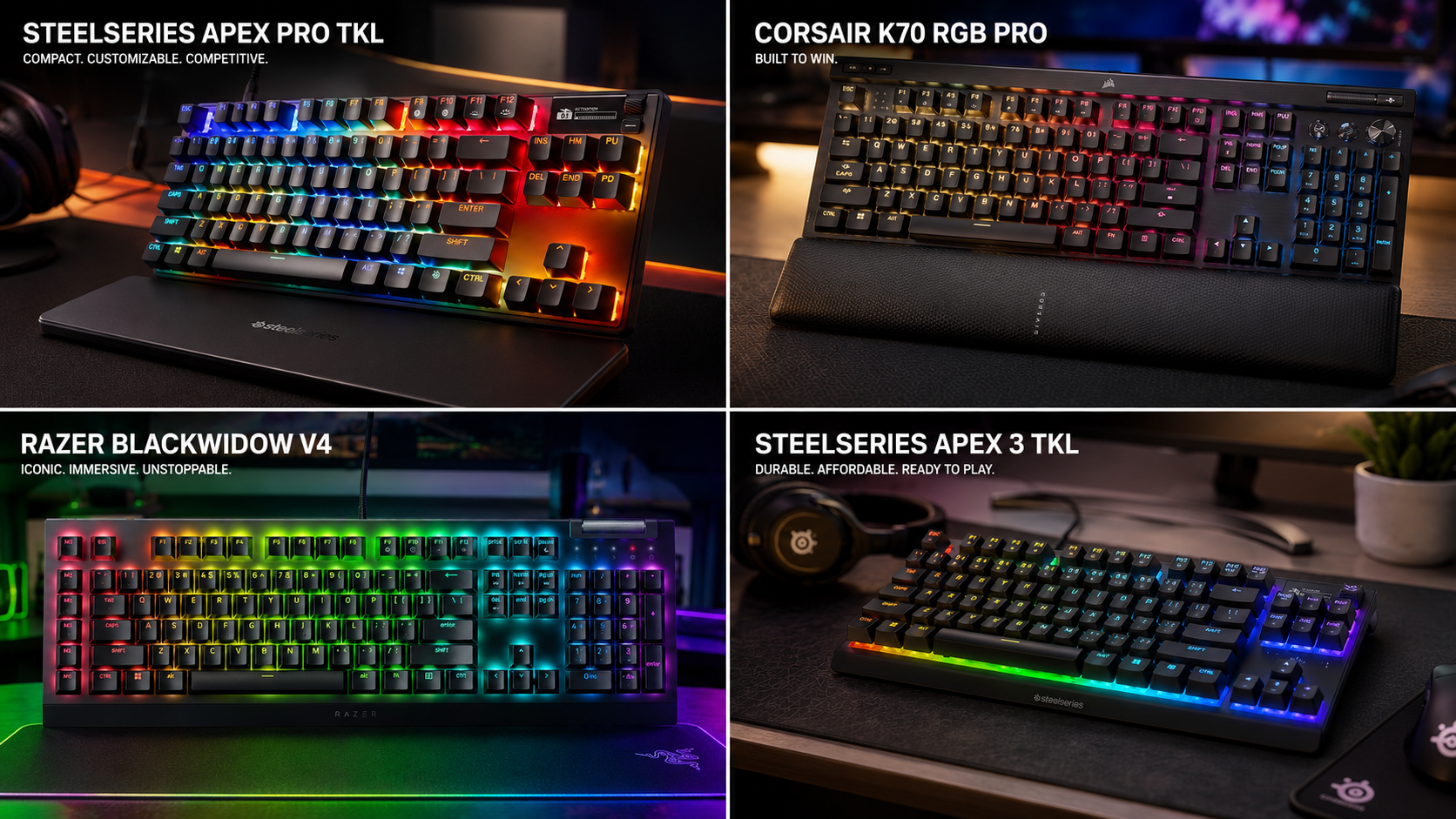
1. SteelSeries Apex Pro TKL Gen 3 — Best Overall

This is the one I recommend when someone says “money’s fine, I just want it to work.” SteelSeries officially lists the entire Apex line as compatible with PS5, PS4, Xbox Series X and S, and Xbox One. That matters more than you’d think, because it means the firmware actually plays by the HID rulebook.
The Gen 3 uses their OmniPoint 3.0 magnetic Hall Effect switches, adjustable from 0.1 mm to 4.0 mm. You set that on PC through GG software, and it stays saved onboard when you move to console. So you get your custom actuation on PS5 even though there’s no Sony-side software. The PBT double-shot keycaps are solid — no shine after months of Warzone. Stabilizers on this generation actually got fixed, which was overdue.
I’ve run this as my daily driver switching between a Series X and PC for about four weeks. Zero pairing issues, zero ghost inputs. The one honest catch: you can’t retune actuation on the fly without going back to a PC, so pick your preset before you plug in.
Pros:
- Officially supported on PS5, Xbox Series X/S, and older gens
- Adjustable actuation is saved onboard
- Excellent PBT keycaps and refined stabilizers
- Detachable USB-C cable (repairable, replaceable)
Cons:
- Roughly $220 — not cheap
- Magnetic switches are overkill if you only play story games
- OLED screen is more of a novelty on console
2. SteelSeries Apex 3 TKL — Best Budget TKL for PS5 and Xbox

Yes, it’s membrane. No, I don’t care. This is the board I’d hand a friend who just wants something that works on their PS5 for Fortnite and Destiny 2 without spending more than $60. It’s on Sony and Microsoft’s compatibility lists, and I’ve never had it hiccup on either.
The switches are quiet and mushy — Marcus voice: I’d never buy this for typing all day, and I’ll defend a good membrane board when it earns it. This is a genuinely good membrane board. IP32 water resistance means the inevitable Red Bull spill isn’t a death sentence. Eight-zone RGB, media controls, a wrist rest that’s plasticky but present.
The catch? It feels like a membrane board, because it is one. If you’ve been on a mechanical for years, this’ll feel like typing on a wet sponge for the first two days. Give it a week.
Pros:
- Silly reliable console compatibility
- IP32 dust and water resistant
- Dedicated media keys and volume roller
- Around $50 street price
Cons:
- Membrane feel isn’t for enthusiasts
- Plastic build shows the price point
- No hot-swap, no future-proofing
3. HyperX Alloy Origins Core — Best Mechanical Feel
If you want a real mechanical clack without spending Hall Effect money, this is my pick. The Alloy Origins Core is a compact TKL with an aluminum top plate, HyperX’s own Red or Aqua switches, and — critical detail — it registers on console as a plain USB HID keyboard the second you plug it in. No NGENUITY nonsense required.
I keep one at my Xbox because it’s tank-tough and completely no-drama. The Red switches are linear at 45g actuation, which is fine for FPS work; the Aqua switches are tactile if you type between matches. Cable is detachable USB-C.
Honest note: HyperX’s own switches aren’t Cherry MX or Gateron. They’re fine. They’re not memorable. If you’re a switch snob, you’ll notice. If you’re not, you won’t.
Pros:
- Aluminum body that outlasts the console it’s plugged into
- True plug-and-play on PS5 and Xbox
- Detachable USB-C cable
- Under $100 most weeks
Cons:
- No hot-swap
- HyperX switches are competent, not exciting
- Slightly higher-pitched sound signature than deeper boards
4. Razer BlackWidow V4 X TKL — Best for Couch Gaming

I’ll say the quiet part loud: Razer’s higher-end boards, specifically the Huntsman V3 Pro, have a well-documented habit of emulating an Xbox 360 controller. That causes conflicts on Xbox and, occasionally, on PS5 too. Search “Razer Huntsman controller mode” and you’ll find hundreds of frustrated posts.
The BlackWidow V4 X TKL is a different story. It’s a straightforward mechanical TKL with Razer’s Green (clicky) or Yellow (linear) switches, chroma lighting, dedicated media keys, and — importantly — no analog optical funny business. On PS5 and Xbox, it registers cleanly. Six macro keys and a scroll wheel make it genuinely nice for couch work, where you want volume without pulling up a console menu.
The Yellow switch variant is my pick for console. They’re linear, quiet enough not to annoy anyone in the room, and forgiving on double-taps. Cable’s 6 feet, which matters if your setup isn’t the standard desk arrangement.
Pros:
- Actually console-friendly Razer board
- Real media wheel and dedicated buttons
- Long cable helps couch and TV setups
- Comfortable ABS-plus-rubber wrist rest
Cons:
- ABS keycaps will shine within a year
- Chroma RGB is Synapse-controlled — set it before plugging into console
- Chassis is chunky for a TKL
5. Logitech G515 Lightspeed TKL — Best Low-Profile Pick
Sometimes you want a keyboard that disappears under your palms. The G515 is Logitech’s low-profile TKL, and it’s the one I’d take if I were gaming from a couch with a lap desk. It’s thin, it’s light, and the low-profile GL switches (tactile or linear) have a shorter travel that some players — myself included — find faster for platformers and hero shooters.
On console, the wired variant is what you want. Logitech’s wireless model connects via Lightspeed dongle, and while it’s technically compatible with PS5 through the 2.4 GHz USB receiver, I’ve had inconsistent luck with it across game updates. Wired removes the variable.
The catch is fingernails. Low-profile keycaps sit almost flush with the plate, so long nails can catch on adjacent keys. If you type at 100 WPM with mechanical PBT height, this is a real adjustment period. About a week for me.
Pros:
- Genuinely thin, easy on the wrists over long sessions
- Fast, punchy actuation
- Excellent build for the price
- USB-C, detachable
Cons:
- Low-profile isn’t for everyone
- Wireless variant is fiddly on console
- No hot-swap, and low-profile switches are harder to source
6. Corsair K70 CORE TKL — Best Wired Workhorse

The CORE line is Corsair’s answer to “we made things too complicated.” No iCUE hardware profile juggling, no proprietary tricks. It’s a solid wired TKL with pre-lubed MLX Red linear switches, ABS double-shot keycaps, sound-dampening foam that actually does something, and a media dial. Plug it into a PS5 or Xbox and it works.
I’d call it the best “buy it and stop thinking about it” mechanical on this list. Nothing here will blow your mind, and that’s the point. Rocker dial for volume is my favorite thing about it — tapping a controller volume button mid-firefight is annoying, and the dial fixes that.
Downside: ABS keycaps. They’ll get shiny. If you’re hard on gear, plan on swapping them for PBT within a year — or accept the shine as a badge of honor. Also, the wrist rest is the flat plastic kind. It’s fine. It’s not memory foam.
Pros:
- Straightforward console compatibility
- Media dial is genuinely useful
- Sound-dampening foam gives it a nice deeper sound
- Around $90 most days
Cons:
- ABS keycaps will shine
- No hot-swap
- Plastic wrist rest
A Note on Wireless: Should You Even Bother?
Short answer: only for PS5, and only if you value cable-free enough to accept some quirks.
PS5 accepts Bluetooth 3.0 and up, plus 2.4 GHz dongles plugged into a USB port. Front USB is more stable than rear. Boards like the Razer Turret TKL work well over 2.4 GHz because they were designed for this use case originally. But wireless adds pairing steps, occasional dropouts after console sleep, and battery management to your life. On Xbox, wireless keyboard support is so limited that I’d tell you to skip the category entirely and use wired. Yes, even in 2026. Microsoft still hasn’t opened this up.
For the best TKL gaming keyboard for PS5 and Xbox, wired remains the answer that saves you two hours of Reddit troubleshooting.
My Honest Verdict
If someone forced me to pick one keyboard, I’m buying the SteelSeries Apex Pro TKL Gen 3. Officially compatible with both consoles, adjustable Hall Effect switches with settings that persist onboard, and build quality that justifies the price. It’s the least compromised TKL on this list for someone hopping between a PS5 and a Series X.
If you’re on a budget and just want something that works, the SteelSeries Apex 3 TKL at around $50 is the safest low-cost pick. I know that’s two SteelSeries recommendations in a row. That’s because SteelSeries is one of the few big brands that actually engineered its firmware to behave on console, and it shows.
If you want mechanical feel without the software drama, the HyperX Alloy Origins Core is the plug-and-play champion. And if you’re gaming from a couch with a controller in one hand and a keyboard in the other for text chat, the Razer BlackWidow V4 X TKL with its media wheel and long cable is probably the most enjoyable of the bunch.
One last thing: whichever board you pick, check that the specific games you play actually support keyboard input on your console. That’s the step people skip. A gorgeous $250 TKL is a very expensive typewriter if Call of Duty on your console isn’t mapping to it that week. Look it up before you buy. Your future self will thank you.
This article contains affiliate links. If you buy through them, I earn a small commission at no extra cost to you. I only recommend keyboards I’ve actually tested. As an Amazon Associate I earn from qualifying purchases.
One Comment