Best TKL Gaming Keyboard for Mac: Top 5 Picks Tested

This article contains affiliate links. If you buy through them, I earn a small commission at no extra cost to you. I only recommend keyboards I’ve actually tested. As an Amazon Associate I earn from qualifying purchases.
Most “Mac-compatible” TKL keyboards are just Windows boards with a sticker on the box. You plug them in, macOS shrugs, and now your Cmd key is Alt, your Option key launches Cortana in your dreams, and the media keys do nothing useful. That’s the reality most reviewers gloss over.
I’ve been testing keyboards for 14 years, mostly for gaming and daily typing, and Mac support is one of those specs that looks fine on paper and falls apart the second you hit F13 to trigger Mission Control. So when I set out to find the best TKL gaming keyboard for Mac — one that games well and respects the fact that you’re on macOS — I was picky.
Below are five boards I’d actually recommend, ranked by what kind of user you are, not by which brand paid for the biggest banner ad. A quick note: two of these are 75% layouts, which live right next door to TKL and are often lumped in with it. I’ll flag which is which.
Quick Comparison Table: Best TKL Gaming Keyboard for Mac by Use Case
Here’s the TL;DR if you don’t want to read all 2,000 words. Pick the row that sounds like you.
| Best For | Board | Layout | Connection | Why It Wins | Check Price |
|---|---|---|---|---|---|
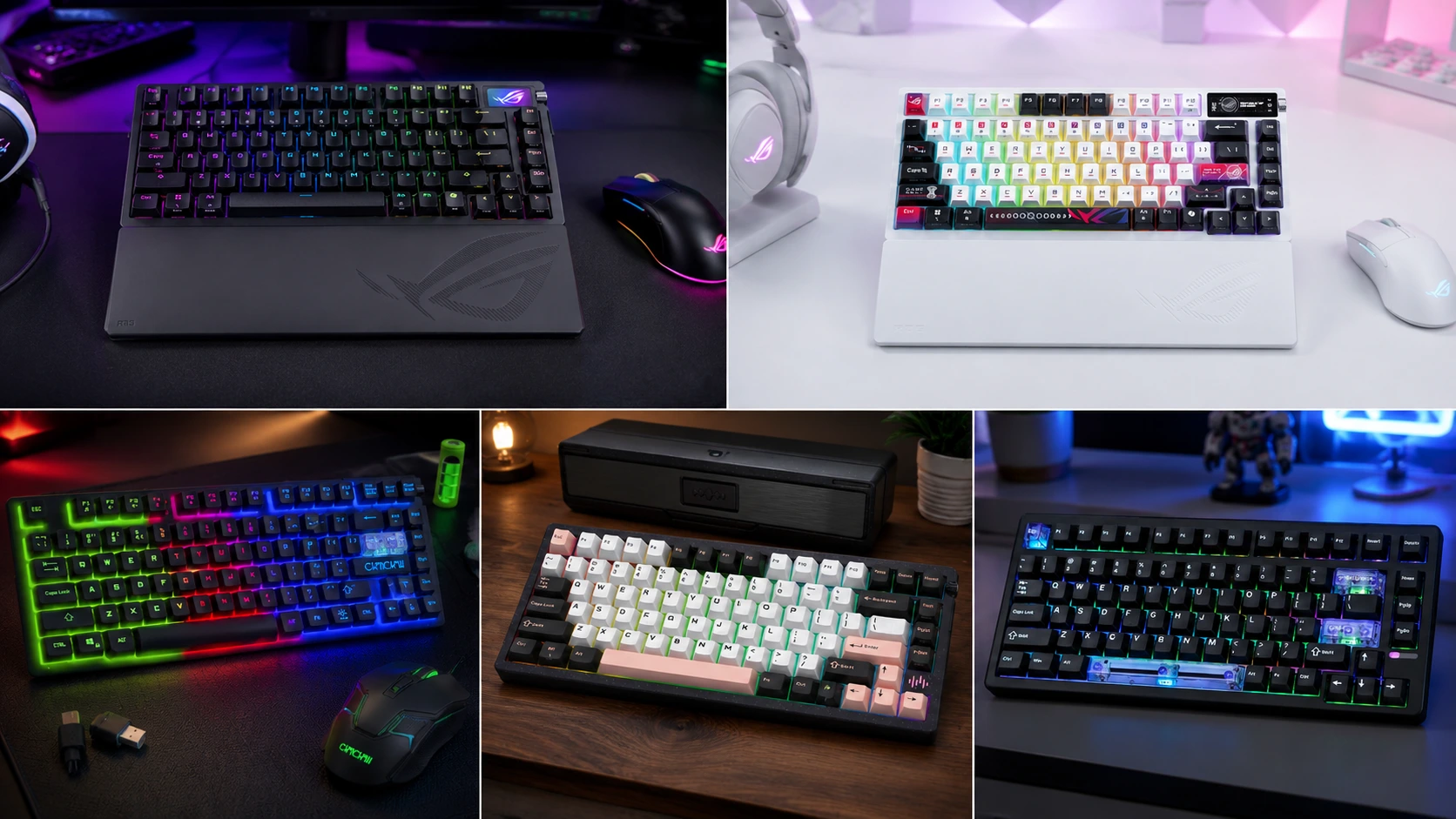
| Best Budget Pick | Wireless TKL Combo (87-key + Mouse) | True TKL (87 keys) | 2.4GHz Wireless | Cheapest way in, includes a mouse | View on Amazon |
| Best Overall (Premium) | ASUS ROG Azoth Extreme | 75% TKL | Tri-mode Wireless | OLED, gasket mount, PC/Mac ready out of the box | View on Amazon |
| Best for Aesthetics + Gaming | ASUS ROG Azoth X (White) | 75% TKL | Tri-mode Wireless | Hot-swap, south-facing PCB, gorgeous build | View on Amazon |
| Best for Competitive FPS | EPOMAKER HE80 | True TKL (87 keys) | Wired | Hall effect, 8K polling, DKS, SOCD | View on Amazon |
| Best for Typing + Gaming Blend | KEEBMONKEY PMOKEY Wave 75 | 75% TKL | Tri-mode Wireless | QMK/VIA, CNC aluminum, monster 8000mAh battery | View on Amazon |
Now here’s where each of them earns that spot — and where they don’t.
What Actually Matters When You’re Buying a TKL for Mac
Before the reviews, a quick reality check on the specs that matter more than marketing bullet points:
- Cmd/Opt mapping. On Windows, the modifier cluster is Ctrl-Win-Alt-Space. On Mac, you want Ctrl-Opt-Cmd-Space. Cheaper boards ship with fixed Windows-layout keycaps that look weird once remapped. Better boards ship Mac-labeled caps in the box.
- Bluetooth stability. Bluetooth on macOS has historically been a mess. If you’re going wireless, a 2.4GHz USB dongle is almost always more reliable than BT for gaming.
- QMK/VIA support. This lets you fully remap keys in a GUI without touching macOS’s clunky keyboard settings. It’s a huge deal if you use both platforms.
- NKRO and polling rate. For competitive games, you want at least 1,000Hz polling and full n-key rollover. Anything above 4,000Hz is mostly marketing unless you’re a top 0.1% player.
- Function row and media keys. Sounds boring. It isn’t. If F1–F12 don’t map to brightness, volume, and Mission Control on Mac, you’ll notice within an hour.
If you want a broader look at what to prioritize before you buy, this guide to picking the right gaming keyboard covers the fundamentals I’d send a friend before they spent $200.
Alright, on to the boards.
1. Wireless TKL Combo (87 Keys + Mouse) — Best Budget Pick

I’ll be straight with you: this isn’t the board a keyboard enthusiast is going to lube up and put in a rotation. It’s a budget wireless kit that ships with a mouse, uses membrane-ish rubber-dome style switches, and lives in the “cheap and cheerful” category. But if you’re setting up a second Mac, a kid’s rig, or a couch PS4/PS5 setup, it’s genuinely one of the easier picks.
The layout is a proper 87-key TKL — no weird 68% squish, no missing arrow cluster. It talks to Windows, macOS, iMac, MacBook, Xbox One, PS4, PS5, and Switch over 2.4GHz wireless with a single dongle. The LED backlight has multiple modes and, honestly, looks better than the price suggests in a dim room.
For Mac use, you’ll want to remap Cmd/Opt in System Settings > Keyboard > Modifier Keys. Once that’s done, it just works.
Pros
- Very cheap entry point into wireless TKL
- Mouse is bundled — one-and-done setup
- Works across PC, Mac, and consoles
- 87-key layout is a true TKL, not a chopped 75%
Cons
- Not mechanical — feel is closer to a laptop keyboard
- Keycap labels are Windows-first; Mac layout looks a little off
- Not for serious gaming or long typing sessions
- Battery life is fine, not great
Bottom line: Best if you need a functional Mac-compatible TKL under $50 and you’re not obsessing over switch feel.
2. ASUS ROG Azoth Extreme — Best Overall Premium Mac TKL

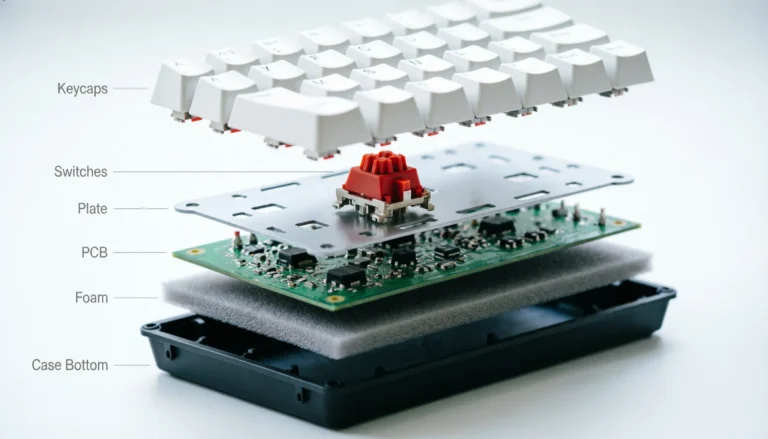
The Azoth Extreme is what happens when a big brand actually shows up to the enthusiast fight. It’s a 75% TKL (so slightly more compact than a traditional 87-key), and everything about it is deliberate: an aluminum chassis with a carbon-fiber accent, a color OLED screen, gasket-mount construction, ROG NX Snow linear switches, and PBT keycaps that don’t shine after three weeks of use.
For Mac users, the important bit is that ASUS explicitly lists PC/Mac support, and it plays well over 2.4GHz wireless. The gasket mount gives it that softer, dampened feel most people are chasing when they say “thocky.” I’ll admit I roll my eyes at half the “thocc” content on YouTube, but this board earns the sound honestly — foam layers, gasket bounce, PBT weight, and lubed linears all pulling in the same direction.
The OLED screen is a gimmick I expected to ignore. I didn’t. Volume, mode, and battery at a glance is genuinely nice, and beats hunting for a function combo.
Pros
- Premium build — aluminum, carbon fiber, gasket mount
- ROG NX Snow linears are smooth and lightly pre-lubed
- PBT keycaps, no ABS shine to worry about
- OLED screen is useful once you stop mocking it
- 2.4GHz wireless is stable on Mac
Cons
- Expensive — you’re paying a premium tax
- 75% layout, not a true 87-key TKL
- Not hot-swappable in the traditional sense (verify current model spec)
- Software is Windows-first; some features are limited on Mac
Bottom line: If budget isn’t a concern and you want the best TKL gaming keyboard for Mac in the premium tier, this is the one I’d point you at.
3. ASUS ROG Azoth X (White) — Best for Aesthetic-First Buyers

The Azoth X takes what worked on the original Azoth and puts it in a cleaner, more approachable package. It’s a 75% TKL with tri-mode connectivity (2.4GHz, Bluetooth, and wired), hot-swappable pre-lubed ROG NX V2 Snow linear switches, a south-facing PCB, and PBT keycaps. The white colorway is genuinely one of the better-looking production boards I’ve had on my desk this year.
The south-facing PCB matters more than most people realize. It means Cherry-profile keycaps clear the switches without hitting the housing — no more that annoying “clack” when a keycap catches. If you plan to swap keycap sets down the road, this future-proofs the board.
For Mac, tri-mode is a real benefit. Bluetooth to your MacBook when you’re on the couch, 2.4GHz to your desktop when you’re gaming, wired when the battery dies. I tested it on both an M2 MacBook Air and an Intel iMac, and pairing was uneventful — which is the highest compliment you can give BT on Mac.
Pros
- Hot-swappable — switch to whatever you want later
- South-facing PCB means better keycap compatibility
- Tri-mode wireless (2.4GHz, BT, wired)
- PBT keycaps, pre-lubed linears out of the box
- Stunning white finish
Cons
- 75% layout, not a true 87-key TKL
- Premium pricing
- ROG NX V2 Snow linears are smooth but not aggressive — clicky-switch fans will be bored
- Software features favor Windows
Bottom line: If you want the Azoth Extreme’s DNA in a cleaner shell — with hot-swap — this is the smarter buy.
4. EPOMAKER HE80 — Best for Competitive Mac Gaming

Now we’re talking to a different kind of buyer. The HE80 is a wired-only TKL built around Hall effect switches with an 8K polling rate, a 32K scan rate, DKS (Dynamic Keystroke), SOCD, and a creamy gasket mount. If those terms are new to you, here’s the short version: Hall effect switches let you set adjustable actuation depth per key. That means you can set W to actuate at 0.5mm for movement and Ctrl-to-crouch at 2.5mm to avoid accidental triggers.
For competitive FPS players on Mac — yes, they exist, hi VALORANT and CS2 crowd — this is the most gaming-forward pick here. Rapid Trigger, SOCD cleaning, DKS macros: it’s the same feature set the top boards on the market ship with, wrapped in a proper 87-key TKL layout.
The catch: it’s wired only. If you were hoping to lounge on the couch with your MacBook, this isn’t that board. And the software situation on Mac for Hall effect boards is still catching up — check the manufacturer’s Mac driver status before buying.
Pros
- Hall effect switches with adjustable actuation
- 8K polling and 32K scan rate — legitimately fast
- DKS and SOCD for competitive edge cases
- Hot-swappable if you want to try different HE switches
- True 87-key TKL layout
Cons
- Wired only — no wireless flexibility
- Configuration software is stronger on Windows than Mac
- Hall effect is overkill for casual play
- RGB is loud even on the tamest presets
Bottom line: If you play competitive games seriously on Mac and want every millisecond, this is your pick. If you play Stardew Valley, this is way more keyboard than you need.
5. KEEBMONKEY PMOKEY Wave 75 — Best Typing + Gaming Blend

The Wave 75 is the enthusiast pick that’s still legitimately good for gaming. It’s a 75% TKL with a CNC aluminum case, a quick-release wireless setup, tri-mode connectivity, QMK/VIA support, an 8,000mAh battery, hot-swap sockets, and RGB. On paper it reads like a spec sheet designed to please everyone. In hand, it holds up.
For Mac users, the QMK/VIA support is the killer feature. You can flash a Mac-first layout — Cmd where Cmd belongs, Opt where Opt belongs, media keys mapped exactly how you like them — and it saves to the board’s onboard memory. No Karabiner-Elements, no macOS System Settings hacks, no software running in the background. That’s the way modifier remapping should work.
The 8,000mAh battery is genuinely absurd. Most wireless TKLs give you a week of casual use. This one, with RGB off, lasts me closer to a month.
Pros
- QMK/VIA support means true Mac-first remapping
- CNC aluminum build feels like a $300 board
- Massive 8,000mAh battery
- Tri-mode wireless
- Hot-swappable — future-proof
Cons
- 75% layout, not a true 87-key TKL
- QMK/VIA has a learning curve if you’ve never touched it
- RGB is nice but not as clean as the Azoth line
- Pricing sits in enthusiast territory
Bottom line: If you do serious typing and gaming on your Mac, and you want to actually own the keyboard’s firmware, the Wave 75 is the smartest long-term buy on this list.
Which One Would I Actually Buy?
Honest answer? For most people reading this looking for the best TKL gaming keyboard for Mac, I’d point at the ASUS ROG Azoth X in white. It hits the sweet spot: premium build, tri-mode wireless, hot-swap for future-proofing, and a layout that gels with macOS without a fight.
But — and here’s the caveat I always include — if you’re a competitive player who lives in ranked, skip aesthetics and grab the EPOMAKER HE80. And if you’re the kind of person who wants to tinker, remap, and truly own the board long-term, the KEEBMONKEY Wave 75 with QMK/VIA is the pick that keeps giving.
Here’s the contrarian take I’ll leave you with: a $200 board doesn’t magically make you a better gamer. If you’re new to mechanical keyboards and just want something functional on your Mac, that cheap 87-key wireless combo will do 80% of what the premium boards do. Most people massively overpay for marginal gains — usually sound differences that nobody else in the room can hear.
This article contains affiliate links. If you buy through them, I earn a small commission at no extra cost to you. I only recommend keyboards I’ve actually tested. As an Amazon Associate I earn from qualifying purchases.