Logitech G915 vs Corsair K100 Air: Wireless Showdown

This article contains affiliate links. If you buy through them, I earn a small commission at no extra cost to you. I only recommend keyboards I’ve actually tested. As an Amazon Associate I earn from qualifying purchases.
Low-profile wireless boards used to be the compromise option. You bought one because you wanted “a real keyboard” without the desk footprint of a full-height mechanical, and for years that meant settling for something that felt like a slightly upgraded laptop chiclet. Then Logitech pushed the G915 hard, Corsair came back swinging with the K100 Air, and the top of this category finally got interesting.
I’ve spent the last month switching between these two as my daily drivers. Work email, code, Discord, way too much Helldivers 2, and a few late-night writing sessions. The Logitech G915 vs Corsair K100 Air comparison gets thrown around online by people who clearly only handled one of them in a Best Buy for ten minutes, and it shows in the writeups. So here’s what actually happens when you live with both — what you’ll feel, what you’ll regret, and the one I’d buy with my own money.
The Quick Verdict (Pick By What You Actually Need)
| What you need | Best pick | Why |
|---|---|---|
| Best overall value | Logitech G915 | Cheaper, more switch options, refined over years |
| Longest battery life | Corsair K100 Air | 200+ hours with RGB off, no contest |
| Best for typing all day | Corsair K100 Air | Cherry ULP tactiles feel more deliberate |
| Best for competitive gaming | Logitech G915 (Linear GL) | Lighter actuation, dedicated G-keys for macros |
| Thinnest profile | Corsair K100 Air | 17mm front edge — actually backpack-friendly |
| Best media controls | Logitech G915 | The volume roller is still unbeaten on any keyboard |
| Best multi-device workflow | Corsair K100 Air | Three Bluetooth pairings, hot-swap between them |
That’s the TL;DR. If you want to know why each of those calls breaks the way it does, keep reading.
Build and Feel — Logitech G915 vs Corsair K100 Air on Your Desk


Both boards have aluminum top plates. Both feel premium when you pick them up. But they’re not the same kind of premium.
The G915 is a chunk of metal. Solid, weighty, very Logitech-industrial. Mine’s the full-size with GL Tactile switches, and after years of revisions Logitech finally got the chassis flex out of it. You can pick it up by one corner and it doesn’t creak. It sits on your desk and stays there.
The K100 Air is thinner. Noticeably thinner. 17mm at the front edge. Corsair calls it the world’s thinnest gaming keyboard and it earns that tagline. It feels less like a desktop fixture and more like something you’d bring to a coffee shop without people side-eyeing you.
Here’s the catch: the K100 Air’s thinness means the keycaps are also thin. They’re ABS. After about three weeks of heavy typing, my WASD and spacebar started showing the faintest shine. The G915 has had the exact same problem since launch — both boards use ABS to keep the profile low, and you’re going to see that polish creep in eventually. If shiny keycaps offend you, neither of these is your forever board.
Switches: The Biggest Real Difference
This is where the two boards split hard, and honestly it’s the most important section in this whole writeup.
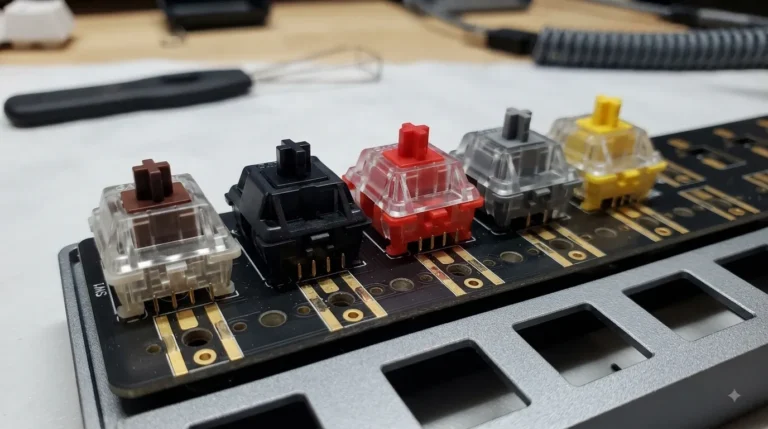
Logitech G915 — GL Low-Profile Switches:
- GL Linear (red) — light, fast, my pick for FPS games
- GL Tactile (brown) — small bump, decent typing, the safe middle choice
- GL Clicky (blue) — loud, springy, your coworkers will hate it
Corsair K100 Air — Cherry MX Ultra Low Profile Tactile:
- One option. Tactile only. That’s the whole menu.
Here’s where I’ll be honest with you. The Cherry ULP Tactiles in the K100 Air are better tactile switches than Logitech’s GL Tactiles. The bump is more defined. The travel feels more intentional. Typing a long email on the K100 Air is genuinely more satisfying than the same email on a G915 with browns.
But Logitech lets you pick. If you mostly game and want a linear, the GL Linear is excellent — lighter than a Cherry MX Red ULP, very predictable, quick to reset. If Corsair offered the K100 Air in a linear variant, this comparison would tilt harder toward Corsair. They don’t. That’s a real strike against it for the gaming-first crowd.
If you want to go deeper into how these compare to Kailh Choc and other low-profile options, I broke down the whole low-profile switch landscape here. Worth a read before you drop $250+.
Wireless and Battery — Where the K100 Air Wins Outright
OK, this is the section where Corsair pulls ahead, and it’s not close.
| Spec | Logitech G915 | Corsair K100 Air |
|---|---|---|
| Wireless protocols | Lightspeed (2.4GHz) + Bluetooth | Slipstream (2.4GHz) + Bluetooth + USB-C wired |
| Polling rate (wireless) | 1ms (1000Hz) | 1ms (1000Hz) |
| Battery life, RGB on (50%) | ~30 hours | ~50 hours |
| Battery life, RGB off | ~135 hours | ~200 hours |
| Bluetooth multi-device | 1 device | 3 devices |
| Charging port | USB-C | USB-C |
In my testing, I plugged the G915 in maybe twice a week. I plugged the K100 Air in once during the entire month, and that was only because I’d left the lights on full brightness for two weeks straight. Corsair’s wireless engineering on this one is genuinely class-leading.
Both have rock-solid 1ms wireless via their respective USB dongles. I couldn’t feel any latency on either in competitive games. Anyone telling you they can feel the difference between a 1ms wireless connection and a wired one is either lying or has a $4,000 monitor whose response time the rest of us can’t afford.
Layout, Macros, and That Volume Roller
The G915 gives you stuff the K100 Air just doesn’t:
- Five dedicated G-keys on the left side (programmable macros)
- A genuine media row (play/pause, skip, mute)
- That volume roller
The volume roller. After a month back on the K100 Air, I missed that roller every single day. It’s the best media control on any keyboard, full stop. Smooth, weighted, instant. Corsair gives you a small wheel that does volume and a few other things via software, and it’s fine. Fine is not the volume roller.
The K100 Air drops the G-keys entirely. The wired K100 keeps them — Corsair cut them on the Air version to hit that thin profile. If macros matter to your workflow (streaming, video editing, gaming with complex inputs), that’s a real loss.
On the other hand: the K100 Air’s three-device Bluetooth pairing is genuinely useful. I had it bouncing between my work laptop, personal desktop, and an iPad without unplugging anything. The G915 only remembers one Bluetooth device at a time, which is honestly hard to defend on a flagship at this price.
Software: G HUB vs iCUE
Both of these are fine and both of these are annoying.
G HUB occasionally forgets your keyboard exists and you have to unplug and replug the dongle. iCUE is a heavier install that wants to manage your fans, your mouse, your case lighting, and probably your taxes if you let it. Neither is going to make or break the keyboard for you.
You’re going to set up your lighting and macros once, then mostly close the app. Don’t make this your deciding factor. If you want a deeper take on getting iCUE to behave without it eating your CPU, I’ve got a setup guide here.
Sound — The “Thocc” Question
Neither of these is going to satisfy the custom keyboard crowd chasing deep marbley thock. Low-profile switches have short travel, thin plastic, and no foam to mute anything. They sound like low-profile keyboards. That’s the deal you signed up for.
That said, the K100 Air is the quieter of the two. The Cherry ULP Tactiles have a softer bottom-out, and the chassis has a tiny bit of damping the G915 lacks. The G915 — especially with Clicky switches — is bright and clacky. Not in a satisfying way. In an “is your roommate going to yell at you” way.
If sound matters to you a lot, you should probably look beyond low-profile entirely. I went into that tradeoff in my piece on quieter wireless options — worth reading if “low-profile” isn’t actually a hard requirement for you.
Logitech G915 vs Corsair K100 Air: Pricing Reality
Street pricing matters more than MSRP, especially on the G915, which has been out long enough to get hammered on sales:
- Logitech G915 (full-size): $200–230 most days, drops to ~$170 on big sales (Prime Day, Black Friday)
- Logitech G915 TKL: $180–200
- Corsair K100 Air: $249–279, rarely below $230
That’s a real gap. Logitech discounts the G915 hard because it’s an older flagship now. Corsair holds the K100 Air’s price tighter because it’s the newer, thinner board.
For the difference, you could grab a solid budget board for travel and still come out ahead financially.
What Neither Board Is Good At
A quick reality check before you pull the trigger on either one:
- Hot-swap sockets. Neither has them. If a switch dies, you’re sending the board in or living with it.
- Repairability. Both are glued and screwed in a way that makes opening them up a small adventure.
- Keycap aftermarket. Low-profile keycap support is still thin. You’re stuck with what comes in the box.
- Per-game polling above 1000Hz. The Corsair K100 (wired version) does 8000Hz. The K100 Air and G915 wireless are both capped at 1000Hz.
If any of those are deal-breakers, you’re looking at the wrong category, not the wrong board.
So Which One Would I Actually Buy?
Here’s the contrarian take: I’d buy the G915 with my own money.
The K100 Air is the more refined product in specific ways. Battery life is genuinely incredible. The Cherry ULP Tactiles are better switches than the GL Tactiles. The thinness is useful if you actually travel with your keyboard. But you’re paying a $50–80 premium for those gains, you’re giving up the volume roller, you’re giving up dedicated G-keys, and you’re locked into one switch type with no linear option.
The G915 isn’t perfect — the ABS keycaps shine, the single-device Bluetooth is weak, the battery isn’t as good — but Logitech has had years to iron out the worst bugs, and most of them are gone. The switch options matter. The volume roller matters. And at $200, the math just works out better for most people.
Get the Corsair K100 Air if: you want the thinnest possible wireless board, you travel constantly, you want the best low-profile tactile switches money can buy right now, and battery life is your number one priority.
Get the Logitech G915 if: you want a flagship wireless that’s been refined over multiple revisions, you actually want a choice between linear, tactile, and clicky, you’ll use the macro keys, and you don’t want to spend full flagship money to get most of the flagship experience.
Either way, you’re getting a serious low-profile wireless keyboard. There aren’t many bad choices left in this category — just expensive ones and slightly-less-expensive ones. The Logitech G915 vs Corsair K100 Air fight comes down to whether the K100 Air’s battery and switch quality are worth giving up the G915’s roller, macro keys, and lower price. For me, they aren’t. Your math might work out different.
This article contains affiliate links. If you buy through them, I earn a small commission at no extra cost to you. I only recommend keyboards I’ve actually tested. As an Amazon Associate I earn from qualifying purchases.