
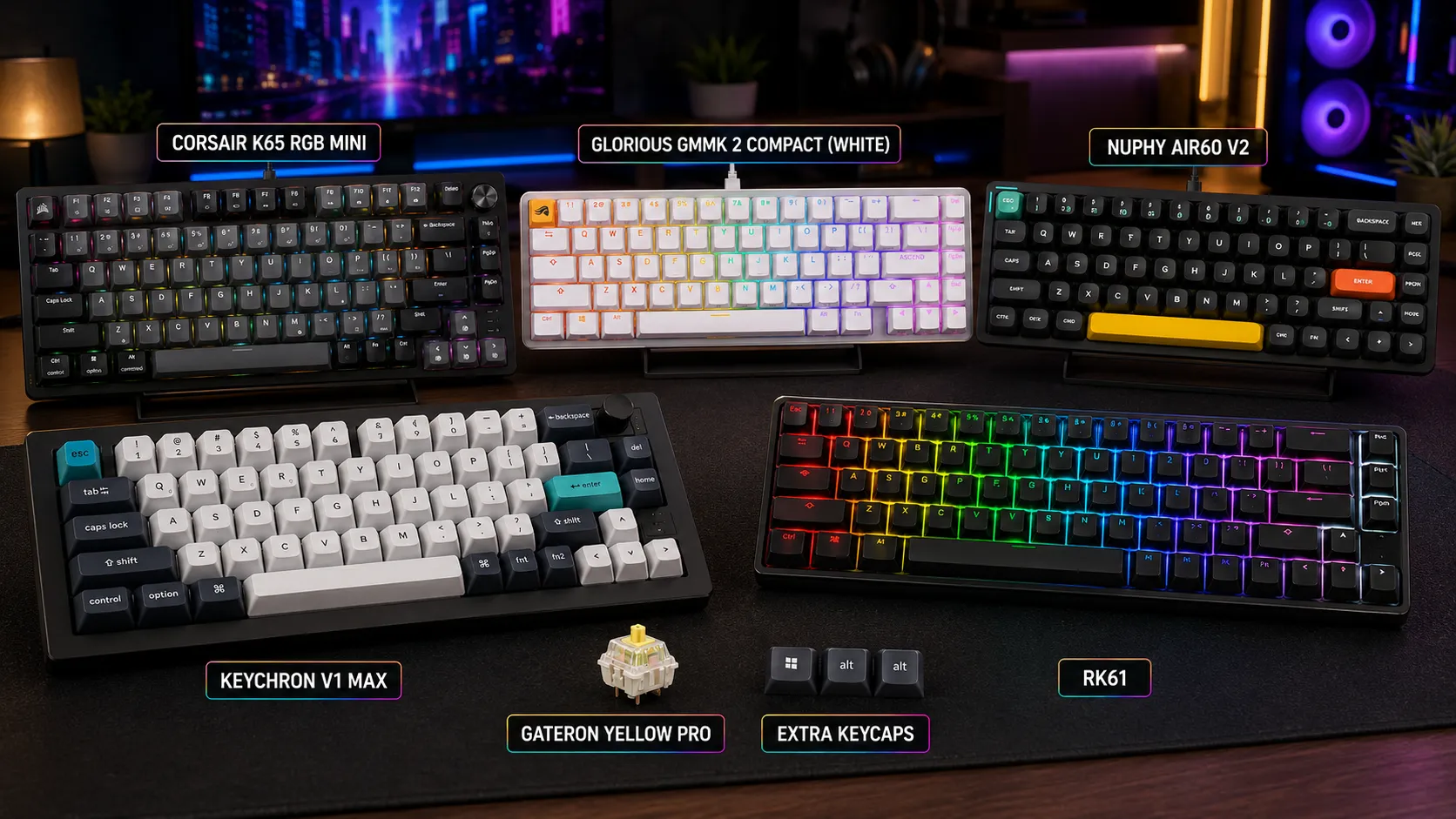
Best 65% Keyboards for FPS: 6 Ranked Picks (Tested)

This article contains affiliate links. If you buy through them, I earn a small commission at no extra cost to you. I only recommend keyboards I’ve actually tested. As an Amazon Associate I earn from qualifying purchases.
There’s a reason 65% boards have basically eaten the enthusiast gaming market over the last three years. You get arrow keys, you get a few dedicated function keys, and you get a mouse pad that isn’t wrestling your keyboard for real estate — all without going full 60% and remapping half your muscle memory to a Fn layer. For competitive FPS specifically, that extra desk space is genuinely useful. Low sens players know exactly what I’m talking about.
I’ve been running various 65% layouts as my daily FPS driver for years, cycling through at least a dozen boards for this roundup alone. What follows are my ranked picks for the best 65% keyboards for FPS — plus one that’s on the list with a big asterisk because the stabilizers rattle enough to bother me, and I won’t pretend they don’t.
Quick Comparison: Best 65% Gaming Keyboards for FPS
Here’s the TL;DR if you don’t want to read the whole thing. Pick the row that matches how you actually play:
| Best For | Keyboard | Switch Style | Connectivity | Approx. Price | Bottom Line |
|---|---|---|---|---|---|
| Best FPS performance overall | Wooting 60HE+ | Hall Effect + Rapid Trigger | Wired | $$$ | The competitive-FPS answer, if you’ll accept 60% |
| Best true 65% pick | Keychron Q2 Max | Mechanical (hot-swap) | Wired + 2.4GHz + BT | $229 | Aluminum tank, gasket mount, no compromises |
| Best traditional build | Ducky One 3 SF | Mechanical | Wired | $89 | Boring in the best way — it just works |
| Best wireless 65% | NuPhy Halo65 V2 | Mechanical (hot-swap) | Wired + 2.4GHz + BT | $119 | Sound and battery life punch above its price |
| Best software wireless | Corsair K65 Plus Wireless | Mechanical (hot-swap) | Wired + 2.4GHz + BT | $119 | iCUE ecosystem, solid 65% at a fair price |
| Best budget pick (with a caveat) | GMMK 2 65% | Mechanical (hot-swap) | Wired | $79 | Good bones, but you’ll want to fix the stabs |
Now here’s why each one landed where it did — and where I’d tell you to spend versus save.
Why 65% Layouts Work So Well for FPS
Before the reviews, the honest case for the layout. A 65% board keeps the alphas, modifiers, arrow keys, and a small function column (usually Delete, PgUp, PgDn, Home, End) — no F-row, no numpad, no dedicated media cluster. You give up almost nothing you actually use during a match.
The FPS-specific wins:
- More mouse room at low sens. If you play Valorant or CS2 at anything under 30 cm/360, this matters. I clawed back around 4 inches of horizontal swing area when I moved from TKL to 65%.
- Neutral wrist angle. Your left hand ends up closer to your mouse hand’s centerline, which is easier on the shoulders in long sessions.
- Arrow keys stay physical. You’d be surprised how much this matters if you also play RTS games or edit clips.
The tradeoff: no F-row. If your push-to-talk, ping, or scoreboard binds live on F-keys, plan on remapping them. Not a dealbreaker. My gaming keyboard layout guide covers this in more depth.
How I Picked These 65% Gaming Keyboards
I daily-drove each of these for at least two weeks, split between FPS sessions (mostly Valorant, CS2, and Apex) and general typing. I looked at:
- Actuation and feel under fast, repeated presses
- Stabilizer quality — shift/space rattle test out of the box, unmodded
- Latency — wired versus wireless response
- Software — QMK/VIA or first-party that isn’t a nightmare
- Build — plate flex, gasket vs. tray, case resonance
- Long-session ergonomics — because your wrists have to last
Prices are current at time of writing at major US retailers. They move around — verify before you buy.
1. Wooting 60HE+ — Best FPS Performance (With a Layout Caveat)
Elephant out of the way first: the Wooting 60HE+ is a 60% board, not a 65%. No physical arrow keys. I still put it at number one because if you’re buying specifically for competitive FPS, this is the honest answer. The 60HE+ uses Lekker V2 Hall Effect switches with per-key analog input and Rapid Trigger, and the difference in counterstrafing and directional cancellation is something you actually feel — in a way no traditional mechanical board delivers.
I’ve been running mine as my Valorant board for months. Rapid Trigger resets the input the instant you start releasing the key rather than waiting to cross a fixed point, which makes A-D strafes and micro-adjustments cleaner. It’s the only gaming keyboard feature in the last five years I’d call a real competitive advantage rather than marketing.
Pros
- Rapid Trigger and adjustable per-key actuation from ~0.1mm to 4.0mm
- Wootility software is the best in the category — clean, powerful, no bloat
- Analog input works in supported games (racing, flight sims)
- Doubleshot PBT keycaps by default, no ABS shine to worry about
Cons
- 60% layout — no dedicated arrow keys, no function row
- Wired only
- Premium price, and you’ll want the $10 arrow-key keycap set
Verdict: If you’re primarily buying for competitive FPS and you can live without physical arrows, this is the pick. If you can’t, keep reading.
2. Keychron Q2 Max — Best True 65% Overall

- The Q2 Max is a full metal QMK/VIA wireless customized mechanical keyboard. Combines advanced 2.4 GHz wireless, Bluetoot…
- Wireless and Wired – The 2.4 GHz wireless and wired connection boasts a rapid 1000 Hz polling rate. You can also connect…
- The entire metal body is crafted with 6063 aluminum that is CNC machined, polished, sandblasted, and undergoes 24 more m…
If you want a real 65% and you want the best example of one, the Q2 Max is what I keep telling people to buy. Full aluminum case, gasket mount, hot-swap PCB, and it supports wired, 2.4GHz wireless, and Bluetooth — the trifecta that used to require picking two out of three.
I tested it with stock Gateron Jupiter Reds. Out-of-box sound is genuinely good — not custom-build good, but better than most $200 boards. The gasket mount cushions typing so it doesn’t feel harsh, and the pre-lubed stabilizers don’t need surgery. QMK/VIA support means you remap without wrestling with proprietary software.
For FPS, the 1000Hz polling on the 2.4GHz dongle is fine for competitive play. I couldn’t feel a latency difference against wired in blind testing, and I tried.
Pros
- Full aluminum case with genuine gasket mount
- QMK/VIA support with hot-swap PCB
- Wired, 2.4GHz, and Bluetooth — pick your poison
- Doubleshot PBT keycaps out of the box
Cons
- Heavy — this is not a board you’re throwing in a laptop bag
- 1000Hz polling on 2.4GHz is capped versus some competitors’ 4K/8K claims (which mostly don’t matter, but if you care about the number, know it)
- Battery life is fine, not class-leading
Verdict: The best “buy it once” 65% for most people. If FPS is one of several things you do with your PC, this is the one I’d point you at.
3. Ducky One 3 SF — Best Traditional Build Quality
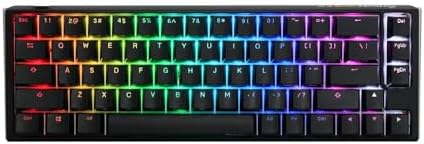
- Featuring Ducky’s QUACK Mechanics design philosophy
- Dual layer PCB w/ exclusive Kailh yellow hotswap sockets
- Low profile One 3 case design in a wide array of exclusive color options
The Ducky One 3 SF is the boring answer, and I mean that as a compliment. No wireless, no Rapid Trigger, no smart features. What you get is one of the best-built plastic 65% cases on the market, Cherry MX switches (Reds are my pick for FPS), and doubleshot PBT keycaps that’ll still look new in five years.
Sound-wise, the added foam and dampening give it a rounder, mellower tone than older Duckys. Not “thocky” custom-build sound, but clean. The stabilizers are the best I’ve heard on a factory Ducky — genuinely rattle-free out of the box, which after years of shift-key surgery on their older boards, I appreciate.
The downside: no hot-swap on the standard SF. If you want to try different switches, you’re soldering or hunting the hot-swap variant (which exists but stock is spotty in the US). And there’s no software — you configure via keyboard shortcuts, which some people love and some people hate.
Pros
- Genuinely excellent build for a plastic case
- Best factory stabilizers Ducky has ever shipped
- Doubleshot PBT keycaps in beautiful colorways
- Rock-solid QC — I’ve never had a dead Ducky
Cons
- No wireless
- Standard version isn’t hot-swap
- No software (this is a con or a pro depending on you)
Verdict: If you want a set-it-and-forget-it 65% that’ll outlive your GPU, this is it. Not the flashiest, but the one I’d bet money on lasting.
4. NuPhy Halo65 V2 — Best Wireless 65% Value
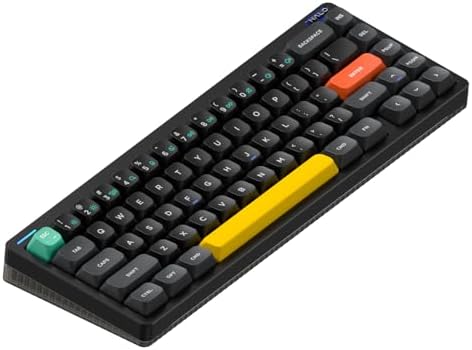
- Compatible With QMK/VIA:Experience boundless creativity with open-source QMK/VIA support, enabling advanced key remappin…
- PBT keycaps:Halo65 V2 mechanical keyboard features PBT keycaps, offering enhanced durability and wear resistance. The ke…
- Three Connection Modes: Halo65 V2 wireless keyboard supports Bluetooth, 2.4GHz, and USB-C connectivity modes. It can con…
NuPhy has quietly become the brand I recommend most for people who want the enthusiast experience without paying enthusiast prices. The Halo65 V2 fixed the small complaints about the original — better stabilizers, better sound dampening, better battery — while keeping the price where it doesn’t sting.
For FPS, the 2.4GHz mode is solid. NuPhy quotes 1000Hz polling wireless, and I didn’t feel a difference against my Q2 Max. Battery life beats most peers — roughly two weeks of daily FPS sessions with RGB dialed way down, which is where I keep it.
Where it edges the Corsair below is sound. The Halo65 V2 has real dampening under the plate and doesn’t sound plasticky. It won’t fool anyone into thinking it’s a $400 custom, but it holds its own against boards costing $50 more.
Pros
- Excellent sound and typing feel for the price
- Wireless (2.4GHz + BT), wired, and hot-swap
- Great battery life
- Nice stock switches (Cowberry linears are my pick)
Cons
- QMK support is via NuPhy’s fork, not full mainline — most people won’t care
- Legend printing on some colorways is a little soft
- Case flex is more than the aluminum picks (obviously — it’s plastic)
Verdict: If wireless matters and $150–$180 is your target, this is where I’d send you. Also see my wireless gaming keyboards breakdown for direct comparisons.
5. Corsair K65 Plus Wireless — Best Compact Wireless With Software

- CORSAIR MLX Red Switches: Pre-lubricated CORSAIR MLX Red linear mechanical switches offer a silky smooth, responsive key…
- Fast and Secure Wireless Connections: Easily connect via low-latency 2.4GHz wireless, Bluetooth, or USB wired, with secu…
- Enduring 266hr Wireless Battery: Power your gaming for up to 266 hours on a single charge with RGB off.
The K65 Plus Wireless is Corsair’s most enthusiast-adjacent board in years. Hot-swap. MX-style stabilizers instead of the plate-mounted ones Corsair used to insist on. Doubleshot PBT keycaps stock. Someone at Corsair was clearly paying attention to the custom scene, and I won’t complain about that.
Where it wins is the software. iCUE is a lot to install if you don’t already run Corsair gear, but if you do, having everything in one place is genuinely convenient. Per-key RGB, macros, remapping — it all works. Wired, 2.4GHz slipstream, and Bluetooth in a sub-$150 hot-swap board is real value.
For FPS, the K65 Plus is fine. Not the fastest actuation, not the crispest sound, but a solid B+ with better software than most peers. If you want wireless 65% without touching VIA, this is the friendly answer.
Pros
- Genuine hot-swap with PCB-mounted MX-style stabs
- Good doubleshot PBT keycaps stock
- All three connectivity modes
- iCUE is polished if you’re in the ecosystem
Cons
- iCUE is heavy if you’re not
- Sound is fine, not memorable
- Battery life is average, not great
Verdict: The right pick if you already own Corsair gear and want the ecosystem, or if you want a wireless 65% that “just works” without VIA. If you’re switch-curious, see my rundown on the best mechanical switches for gaming before you pick your first swap.
6. Glorious GMMK 2 65% — Best Budget 65% (Here’s the Catch)

- Unleash Your Potential: Elevate your PC gaming set-up experience with our top-notch mechanical keyboard, a quintessentia…
- Superior Craftsmanship: More than just a gaming keyboard, this low profile mechanical keyboard is a symbol of quality an…
- Advanced Compatibility: This wired gaming keyboard is designed to adapt to your needs. Compatible with Windows, Mac IOS,…
The GMMK 2 65% is the board on this list I have the most complicated feelings about. On paper, easy budget rec: hot-swap, aluminum top plate, decent stock keycaps, sub-$100 on sale. The switches (Glorious Fox linears if you spec them) are perfectly fine for FPS.
Here’s the catch I flagged in the intro: the stabilizers rattle. Not “you can hear it if you listen carefully” rattle — audible, distracting, get-under-your-skin rattle, especially on the spacebar. Out of every GMMK 2 65% I’ve handled, I have not had a single one I didn’t feel the need to open up, holee-mod, and lube. If you’re comfortable modding, this is fine, even fun. If not, budget the extra hour or skip.
I’m still including it because once you’ve fixed the stabs, this is a legitimately good $90–$100 board that punches above its weight for FPS. Going in without knowing about the rattle would be a bad experience, and I won’t write a review that pretends it isn’t there.
Pros
- Hot-swap for around $100
- Solid aluminum top plate, good rigidity
- Reasonable stock keycaps
- Fully compatible with the enthusiast mod scene
Cons
- Stabilizer rattle out of the box is a real problem
- No wireless
- Software isn’t as polished as competitors
- Case dampening is minimal — you’ll hear the plate
Verdict: Buy it if you’re willing to mod, or you already own lube and a bag of stab wire. Skip it if you want plug-and-play. My best budget mechanical keyboards guide has some alternatives that don’t need surgery.
Which of These Best 65% Keyboards for FPS Should You Actually Buy?
Here’s how I’d sort it if you asked me at a bar.
If your only goal is winning gunfights and you can accept 60%, buy the Wooting 60HE+. It’s not close for pure FPS. Rapid Trigger is a legitimate edge, and the software is the best in the industry.
If you want a real 65% and you play a mix of games, buy the Keychron Q2 Max. It’s the board I’d hand to anyone who says “just tell me what to buy and I’ll listen.” Aluminum, gasket, hot-swap, wireless — the whole package.
If wireless matters more than aluminum, buy the NuPhy Halo65 V2. Best value in the wireless 65% category, and the sound holds up.
If you already own Corsair peripherals, the K65 Plus Wireless slots into your setup with less friction than switching ecosystems.
If you want something bulletproof and don’t care about wireless, the Ducky One 3 SF will still be working when the rest have been replaced.
And if you’re on a tight budget and you’re willing to fix the stabilizers yourself, the GMMK 2 65% is a fine starting point. Just know what you’re signing up for. If you’re brand new to modding and want a broader roadmap, my keyboard modding starter guide is a good next stop.
The best 65% keyboards for FPS aren’t the ones with the flashiest specs or the most RGB zones. They’re the ones that stay out of your way and let you play — and after cycling through this stack, those six are the ones I’d keep on the desk.
This article contains affiliate links. If you buy through them, I earn a small commission at no extra cost to you. I only recommend keyboards I’ve actually tested. As an Amazon Associate I earn from qualifying purchases.
One Comment