Best Compact Gaming Keyboards Under $50: Tested Picks

This article contains affiliate links. If you buy through them, I earn a small commission at no extra cost to you. I only recommend keyboards I’ve actually tested. As an Amazon Associate I earn from qualifying purchases.
I’ve been reviewing keyboards for about fourteen years, and I’ll say it straight: the sub-$50 compact category has changed more in the last three years than in the whole decade before. You can now buy a 60% wireless mechanical board with hot-swap sockets, tri-mode connectivity, and decent keycaps for the price of two takeout dinners. That would’ve been fantasy money in 2018.
But most of what shows up when you search best compact gaming keyboard under $50 on Amazon is disposable garbage. Mystery-brand switches, stabilizers that rattle louder than the keys, and a lifespan measured in months. My job here is to tell you which sub-$50 compact boards actually hold up as daily drivers — and which ones to skip no matter how many propped-up five-star reviews they’ve got.
I’ve typed on, opened, or torn down every board on this list. Nobody paid for placement.
The Quick Comparison Table (TL;DR by What You Actually Need)
Not every reader wants the same thing. Some of you want wireless. Some want the loudest possible thock for $40. Some just want a working TKL that won’t die in six months. Pick your row:
| Your Situation | Best Pick | Layout | Switch Type | Approx. Price | Where to Grab It |
|---|---|---|---|---|---|
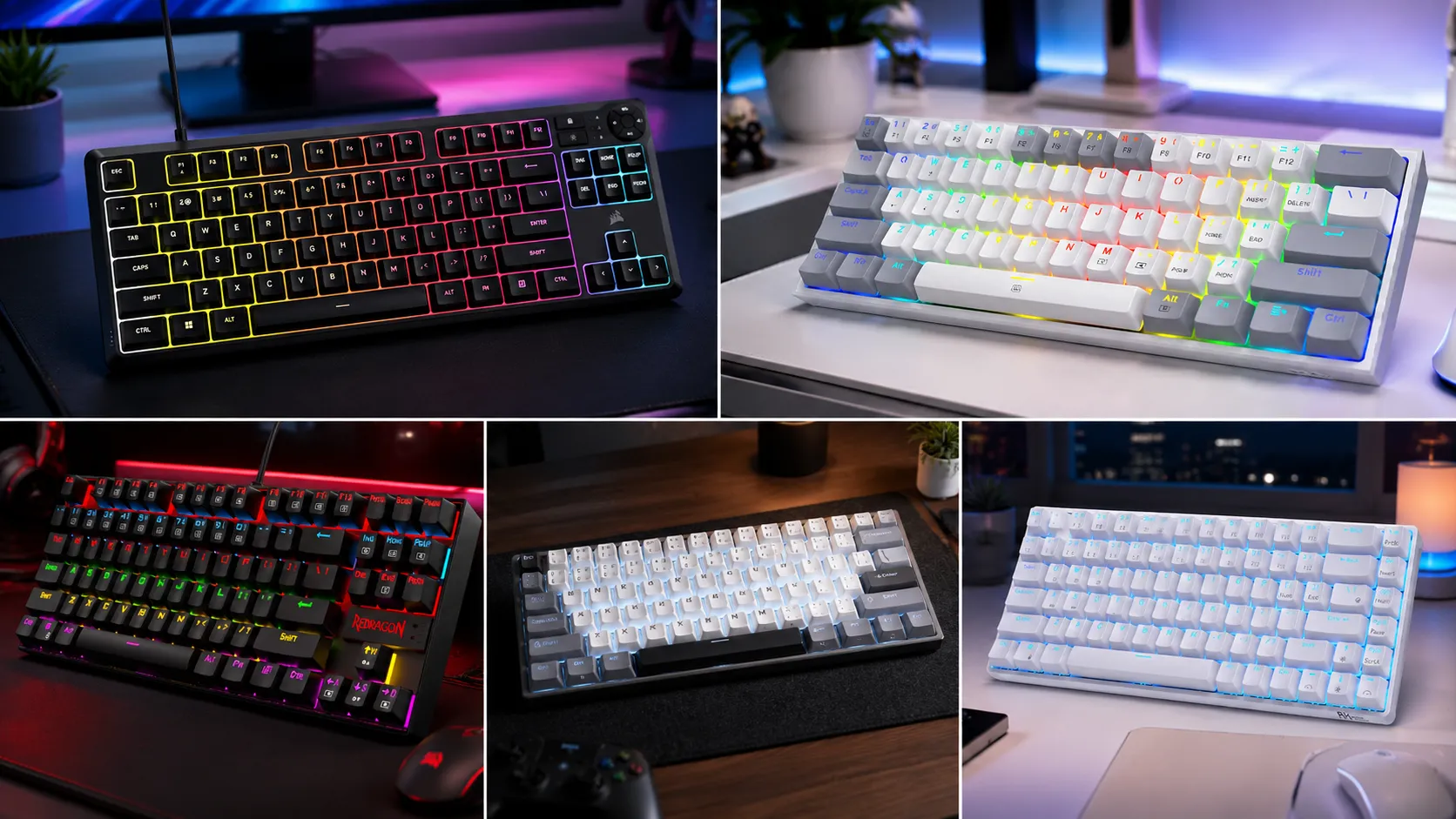
| I want the overall best value under $50 | Royal Kludge RK61 | 60% | Hot-swap mechanical (Red / Brown / Blue) | ~$40–$50 | Check Price → |
| I want a TKL with real build quality | Redragon K552 Kumara | TKL (87 keys) | Outemu mechanical (Red / Blue / Brown) | ~$35–$45 | Check Price → |
| I want the cheapest hot-swap 60% | Redragon K617 Fizz | 60% | Outemu hot-swap | ~$30–$40 | Check Price → |
| I need arrow keys but hate full-size | Royal Kludge RK68 | 65% | Hot-swap mechanical | ~$45–$50 | Check Price → |
| I want quiet and spill-proof (office, dorm, night gaming) | Corsair K55 CORE TKL | TKL | Quiet membrane | ~$40–$50 | Check Price → |
Everything below is why each of these ended up on that table, and where each one falls short. Because at this price nothing is perfect. If it looks perfect on a spec sheet, something got cut somewhere — and it’s usually the stabilizers.
What Actually Matters in a Compact Gaming Keyboard Under $50
Before the picks, one uncomfortable truth: at this price you’re not choosing a “great” keyboard. You’re choosing the best set of compromises. Here’s what I actually weigh, in order:
- Switch quality over switch marketing. Outemu, Kailh, Gateron KS-series, and Royal Kludge’s in-house switches all work fine. “Custom mechanical switch” with no brand name is bin-tier. Skip.
- Build rigidity. Pick the board up and flex it. If the case creaks under your thumbs, the plate will sing every time you press a key. A metal top plate at $40 means someone actually engineered it.
- Stabilizers. This is where budget boards die. Rattly, dry stabs on Spacebar and Shift are the sound of a rushed factory. Not fixable without lube and time.
- Keycap material. ABS is fine for a year, then it shines up. PBT holds up. Under $50, most stock keycaps are ABS — accept it or plan a $15 keycap swap later.
- Software or QMK/VIA. For gaming you want to remap keys and set macros. Proprietary software is fine if it exists. Web-forgot-about-it software means the brand won’t be around in two years.
RGB, “8000 Hz polling,” “mechanical-feel membrane,” and gamer branding are noise. Don’t buy on those. If you want a deeper primer on switches specifically, I broke down the differences in more detail here.
Now the picks.
1. Royal Kludge RK61 — Best Compact Gaming Keyboard Under $50 Overall
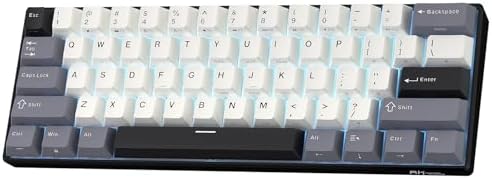
- 60% Compact, Portable Size — The ultra-minimalist 61-key layout reclaims precious desk space, providing more space for l…
- Versatile 3-Mode Connectivity — Seamlessly toggle between Bluetooth 5.0, 2.4GHz wireless, and USB-C wired modes. This co…
- Thocky Typing Experience — Engineered with dual-layer thick silencing foam and spacebar sound-absorbing foam, the RK61 s…
If someone with a $50 bill asked me what to buy tomorrow, no other questions, it’s the RK61. Nothing else in this price range gives you tri-mode connectivity (2.4 GHz dongle, Bluetooth 5.1, USB-C wired), hot-swap sockets, and per-key RGB in a 60% layout that fits in a small backpack pocket.
I ran the RK61 as my daily driver for about three weeks — mostly Valorant and a lot of writing — and honestly, the biggest surprise was the wireless latency. Over the 2.4 GHz dongle, I couldn’t feel a difference versus wired in shooters. Over Bluetooth, you can, so use the dongle for gaming and save Bluetooth for the iPad. Battery hit about 12–14 hours on my unit with the backlight low, in line with what Royal Kludge claims.
The switches vary by model. The stock Red and Brown variants are smooth enough to daily-drive out of the box. If you get one you don’t love, hot-swap it — that’s the whole point. The catch: stabilizers are dry and a little rattly. Ten minutes with a $6 tube of Krytox 205g0 fixes it, and if you don’t want to bother, it’s still totally usable.
Pros
- Tri-mode wireless is genuinely rare at this price
- Hot-swap PCB means you can upgrade switches later
- Compact enough for a laptop bag, sturdy enough to daily-drive
- Runs on Windows, macOS, iOS, and Android without drama
Cons
- ABS keycaps that will shine within a year of hard use
- Stabilizers ship dry and slightly rattly
- No dedicated arrow keys (it’s a true 60%)
- Function-layer keys take a few days to memorize
Verdict: Best all-around compact gaming keyboard under $50 if you can live without arrow keys. Nothing else in the price range gives you this feature set.
2. Redragon K552 Kumara — Best TKL Build Quality Under $50

- 🔥𝗧𝗿𝘂𝗲 𝗠𝗲𝗰𝗵𝗮𝗻𝗶𝗰𝗮𝗹 𝗙𝗲𝗲𝗹 𝘄𝗶𝘁𝗵 𝗟𝗶𝗻𝗲𝗮𝗿 𝗥𝗲𝗱 𝗦𝘄𝗶𝘁𝗰𝗵𝗲𝘀 – Experience smooth, consistent keystrokes with linear red mechanical swi…
- 🔥𝗩𝗶𝗯𝗿𝗮𝗻𝘁 𝗥𝗮𝗶𝗻𝗯𝗼𝘄 𝗟𝗘𝗗 𝗕𝗮𝗰𝗸𝗹𝗶𝗴𝗵𝘁𝗶𝗻𝗴 𝘄𝗶𝘁𝗵 𝟲 𝗗𝘆𝗻𝗮𝗺𝗶𝗰 𝗠𝗼𝗱𝗲𝘀 – Enjoy eye-catching rainbow backlighting with 6 preset lighting …
- 🔥𝗦𝗼𝗳𝘁𝘄𝗮𝗿𝗲 𝗗𝗿𝗶𝘃𝗲𝗿 𝗦𝘂𝗽𝗽𝗼𝗿𝘁 𝗳𝗼𝗿 𝗙𝘂𝗹𝗹 𝗖𝘂𝘀𝘁𝗼𝗺𝗶𝘇𝗮𝘁𝗶𝗼𝗻 𝗖𝗼𝗻𝘁𝗿𝗼𝗹 – Take control of your K552-KR with dedicated software drivers, …
The K552 has been on shelves for close to a decade now, which in this category is basically forever. There’s a reason: it’s an 87-key TKL with a metal top plate at a $35–$45 price. That single design choice — actual metal — is what makes the K552 feel two tiers more expensive than it is.
I keep a K552 in my drawer as a “loaner” board. Every friend who’s tried it for a weekend has come back asking where to buy one. The Outemu Blue variant is loud enough to get you divorced — go Red for gaming, Brown for a middle ground. Anti-ghosting on the main game cluster is solid; for 99% of what you’re doing in-game, it’s more than enough.
The catch is that this board hasn’t fundamentally changed in years. No wireless, keycaps are basic ABS with pad-printed legends that will wear, and the “RGB” is per-zone on the original, not per-key. Newer variants (K552 RGB, K552 Pro) add better lighting; the base K552-N drops lighting entirely for an even lower price.
If you want more context on how TKL layouts stack up against full-size and 65% boards, I’ve got a whole guide on layout tradeoffs here.
Pros
- Metal top plate is unusual at this price and it shows
- Proven track record — thousands of units, years of feedback
- Multiple switch options (Outemu Red, Blue, Brown)
- Splash-resistant enough to survive a coffee incident
Cons
- No wireless, no hot-swap on the base model
- Keycaps are basic ABS with printing that fades
- Software is functional but plain
- Cable is fixed on some variants — bring your desk closer
Verdict: Best compact gaming keyboard under $50 if TKL is your layout and you value build over features. This is the “boring, reliable” pick, and I mean that as a compliment.
3. Redragon K617 Fizz — Cheapest Hot-Swap 60% That’s Actually Good

- 60% Compact, More Room to Aim – Ditching the numpad and nav cluster frees up desk space for wide mouse swipes, so your s…
- Swap Switches Without Soldering, Smooth and Quiet – The upgraded socket accepts almost any 3-pin or 5-pin switch, and st…
- Vibrant RGB for a True eSports Vibe – Up to 20 preset lighting modes with adjustable brightness and flow speed give your…
The K617 Fizz is the board I recommend when someone has $35 and wants to see if they even like 60%. It’s a 61-key compact with hot-swap sockets, per-key RGB, a detachable USB-C cable, and switches that are… fine. Nothing more, nothing less.
What Redragon did right here is treat the K617 like a starter platform. Don’t like the stock Outemu Reds? Pull them and drop in Gateron Yellows for $20 later. That upgrade path at this entry price is unusual. For pure gaming feel on a budget, it’s genuinely hard to beat.
Where the K617 shows its price: the case is all plastic and flexes under pressure, the sound is hollow (a piece of packing foam under the plate helps), and the RGB has a slightly cheap look next to the RK61. At ~$35, complaining about that is like complaining a Corolla doesn’t corner like a BMW.
For a deeper look at the 60% form factor and whether it’s actually right for you, I wrote about the 60% tradeoffs in more detail here.
Pros
- One of the cheapest genuinely-hot-swap 60% boards available
- Detachable USB-C cable (not universal at this price)
- Vibrant per-key RGB
- Perfect starter platform for entry into the hobby
Cons
- Hollow plastic case, some flex under pressure
- Stock keycaps are thin ABS
- Software is barebones
- No wireless
Verdict: The best “toe in the water” compact gaming keyboard under $50 for anyone who might want to mod later. Get it, use it, upgrade parts of it over time.
4. Royal Kludge RK68 — Best 65% With Arrow Keys

- Dual Modes, Reliable Free: Equipped with an upgraded chip, every keystroke is instantly registered and stable wireless c…
- 65% Layout, Compact Practical: What makes the 68 keys different from the 61/71 keys, it’s RK68 boasts both practical and…
- Hot-swappable Quiet Red: Hot-swap PCB allows you to replace 3 pins/5 pins switches freely without soldering issue. Enjoy…
Here’s the thing nobody warned me about when I switched to 60%: I missed the arrow keys immediately. If you’re the same, the RK68 (also sold as RK837) is the fix. It’s a 65% board — 68 keys — that keeps dedicated arrows and a small nav cluster while still fitting in about the same footprint as a 60%.
The RK68 uses the same tri-mode wireless setup as the RK61, has hot-swap sockets, and is basically the “grown-up” RK61 for people who need to spreadsheet as well as game. In my testing it hit right at the $50 line on sale and drifted a hair above at full price. Watch for holiday sales.
Stabs are still a weak spot — Royal Kludge ships dry, slightly loose stabilizers across most of their lineup — but the extra column of keys makes this one worth it for anyone editing documents, moving around code, or playing games that use arrows for menus.
If you want to see how 65% stacks up against 75%, I compared the two layouts here in more depth.
Pros
- Real arrow keys + small nav cluster in a compact footprint
- Same tri-mode wireless as the RK61
- Hot-swap PCB with plenty of switch options
- Better daily-driver ergonomics than a true 60%
Cons
- Hovers right at the $50 ceiling, sometimes just above
- Same rattly stabs as the RK61
- ABS keycaps
- Not as widely stocked as the RK61 — availability varies
Verdict: If you like the RK61 idea but can’t stand losing arrow keys, this is the compact gaming keyboard under $50 to grab. Watch the price closely.
5. Corsair K55 CORE TKL — Best Membrane Pick (Yes, Really)
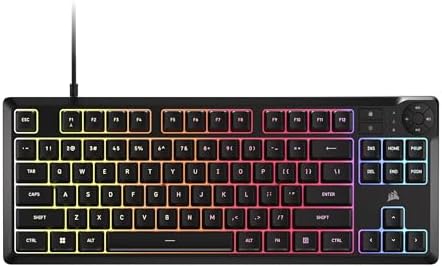
- More Room to Make Big Plays: A compact, space-saving layout designed to give players more room for sweeping mouse moveme…
- Eight Zone RGB Backlighting: Create personalized lighting as dazzling as your clutch plays with 8 zones of brilliant RGB…
- 300ml Spill Resistance: K55 CORE TKL is built for gaming and built to stand up to the perils of daily life. Don’t let a …
I’ll take heat for this one, and I don’t care. If you’re gaming late at night in a shared apartment, or you sit in a quiet office, or you just don’t want to hear a clicky-clack every time you Alt-Tab — a good membrane board is a better answer than a bad mechanical one.
The K55 CORE TKL is Corsair’s budget entry, and it’s the one membrane board I’ve used in the last few years that doesn’t feel like a corporate cubicle relic. It’s got 12-key rollover in the game cluster (which is what matters for shooters), IP32 spill resistance, 1,000 Hz polling, and per-zone RGB. Keys are quiet, actuation is short, and it doesn’t fight you the way old membranes did.
Is the typing feel as satisfying as a good mechanical? No, and nobody’s pretending it is. But at $40–$50 with Corsair’s iCUE software and warranty behind it, it’s the safest sub-$50 buy for people who don’t want the whole mechanical rabbit hole. It’s also what I’d pick for a kid’s first gaming setup — durable, quiet, and it doesn’t sound like a machine gun through the wall.
If you’re weighing membrane vs mechanical seriously, I broke down the honest differences here.
Pros
- Genuinely quiet — roommates and coworkers will thank you
- IP32 spill resistance (rare at this price)
- Corsair iCUE software is deep and reliable
- 1,000 Hz polling means it responds like a gaming board should
Cons
- It’s still a membrane — no thock, no crispness
- No hot-swap, no upgrade path
- Keycaps are basic
- You will outgrow it in a year if you catch the keyboard bug
Verdict: The best compact gaming keyboard under $50 for anyone who values quiet, spill-resistance, and zero-fuss reliability over enthusiast feel.
The Sub-$50 Boards Built to Die Fast (Skip These)
I said in the intro I’d tell you what to avoid, so here’s the honest section. Under $50, these categories of boards look tempting and shouldn’t be:
- The $25 “RGB Gaming Mechanical Keyboard” from a brand you can’t pronounce. Mystery switches, wet-noodle case, stabs that sound like Tic Tacs. Two months in, keys start double-registering.
- Any board that says “mechanical-feel” or “semi-mechanical.” That’s marketing for membrane with a click sticker on top. You want mechanical, buy mechanical.
- Ultra-cheap wireless-only boards under $30. The wireless chipset is where the cost got cut. Latency will be noticeable in any competitive game.
- “60% keyboard bundles” with a mouse and mousepad thrown in for $35. Something in that bundle is trash. Usually the keyboard.
The rule I live by: if you can’t find at least fifty legitimate written reviews of a specific model — not the brand, the specific model — from real sites, it’s a gamble. And at this price, it’s a small enough gamble that plenty of people take it. Just know what you’re signing up for.
Final Verdict: Which Compact Gaming Keyboard Under $50 Should You Actually Buy?
If I had to hand out five recommendations and be done with it:
- You want the best all-around under-$50 pick: Royal Kludge RK61.
- You want a bulletproof TKL that just works: Redragon K552 Kumara.
- You want a mod-friendly starter for $35: Redragon K617 Fizz.
- You need arrow keys but hate full-size: Royal Kludge RK68.
- You want quiet, spill-proof, and no drama: Corsair K55 CORE TKL.
Here’s the honest bottom line. The sub-$50 tier is better than it’s ever been, but it’s still a compromise tier — you’re trading long-term polish for right-now performance. Buy one of these five, throw twenty bucks at lube and better keycaps later, and you’ll have a board that punches into the $100 range for feel. That’s the play.
The best compact gaming keyboard under $50 isn’t the flashiest one on Amazon’s front page. It’s the one that shows up, works, and doesn’t embarrass itself when you take it apart. All five of these do that. Skip everything else in this bracket unless you’ve got money to burn on the lesson.
This article contains affiliate links. If you buy through them, I earn a small commission at no extra cost to you. I only recommend keyboards I’ve actually tested. As an Amazon Associate I earn from qualifying purchases.