ANSI vs ISO TKL Keyboard: Which Layout Should You Buy?

This article contains affiliate links. If you buy through them, I earn a small commission at no extra cost to you. I only recommend keyboards I’ve actually tested. As an Amazon Associate I earn from qualifying purchases.
Most people picking out a tenkeyless keyboard obsess over switches, keycaps, and case material — then completely forget to check which physical layout they’re buying. That’s a mistake. The choice between ANSI, ISO, and Winkeyless will follow you around for the entire life of that board. It affects your muscle memory, your keycap options, and even what you’ll be able to resell it for later.
I’ve been reviewing boards for over a decade at this point, and the layout question lands in my inbox almost weekly. So let’s settle it in one place.
The short version: if you’re in the US and you type mostly in English, ANSI is almost always the right call on a TKL keyboard. ISO makes sense if you write daily in a language that uses accented characters. Winkeyless is an aesthetic and enthusiast pick — cool, but with real tradeoffs. And no, there’s no “premium” layout here. Anyone telling you otherwise is selling you something.
Here’s the honest breakdown.
Quick Comparison: ANSI vs ISO vs Winkeyless TKL
| You Are… | Best Layout | Why It Fits | Good Boards to Start With |
|---|---|---|---|
| A US typist or gamer | ANSI | Big horizontal Enter, wide left Shift, huge keycap support | Keychron Q3, Ducky One 3 TKL, Leopold FC750R |
| A European or multi-language typist | ISO | Tall Enter, extra key for accented characters, matches your OS | Varmilo VA88M ISO, Filco Majestouch 2 ISO, Keychron Q3 ISO |
| An enthusiast chasing symmetry | Winkeyless (WKL) | Clean look, no Windows keys, symmetrical bottom row | Custom builds from IC/GB scene, secondhand TGR/Duck boards |
| New to mechanical keyboards | ANSI | Widest ecosystem, cheapest keycap sets, easiest to replace | Any solid ANSI prebuilt under $150 |
| A programmer or shortcut-heavy user | ANSI + QMK/VIA | Straightforward key positions, remap anything you don’t like | GMMK Pro-adjacent boards or any QMK-ready TKL |
That table’s the whole article for most of you. The rest is why.
What “TKL” Actually Means, Fast
A tenkeyless is a full-size keyboard with the number pad chopped off — you keep your function row, arrow cluster, and nav keys (Home, End, Insert, Delete, Page Up/Down). Around 87 keys on ANSI, 88 on ISO. It’s the sweet spot for a huge chunk of buyers: more mouse room without giving up any of the utility keys you actually reach for.
If you want the deeper dive on tenkeyless as a form factor and how it stacks up against 60% and 75%, I already covered that here: why the TKL is still the safest form factor for most buyers.
Now, the layout part.
The ANSI Layout — The Default for a Reason
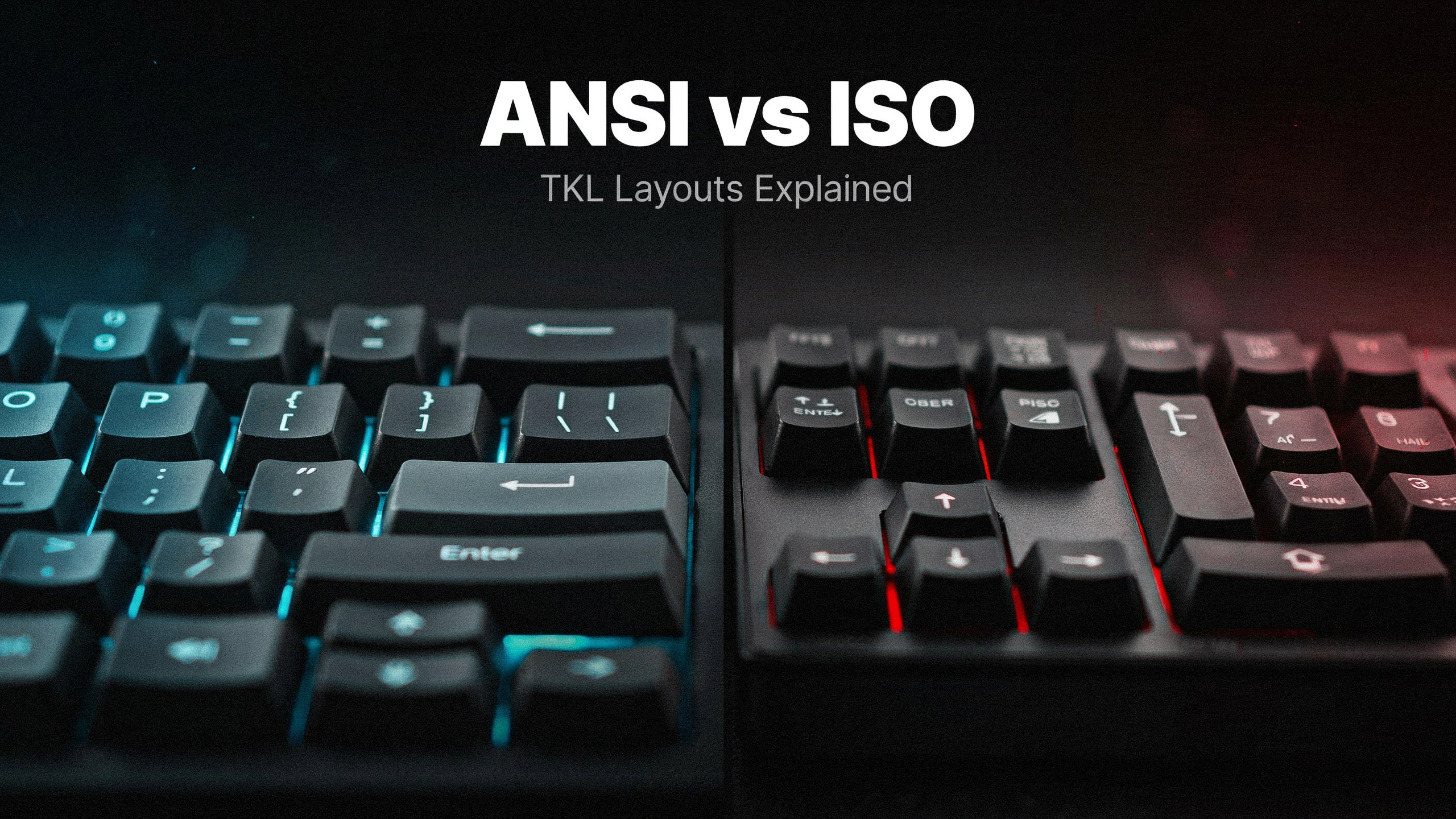
ANSI is the layout you grew up on if you’re American. Big horizontal Enter key, 2.25u left Shift, a single-row backslash sitting above Enter. Bottom row goes Ctrl, Win, Alt, spacebar, Alt, Win/Fn, Menu, Ctrl. Simple. Familiar. Nothing exotic.
It dominates for practical reasons:
- Keycap support is unmatched. Almost every GMK set, ePBT set, and PBT budget kit ships in ANSI first. ISO variants usually cost more or don’t get made at all. Winkeyless kits are usually buried in an “extras” section.
- Resale value stays higher. ANSI boards move faster on r/mechmarket. Simple as that.
- Muscle memory is universal in the US. Every prebuilt on Amazon, every office board, every gaming keyboard sold in America uses this layout.
- Gaming feels right. That 2.25u left Shift is exactly where your pinky expects it during a WASD grip. I’ve genuinely never met a US gamer who preferred ISO for shooters. If you want the fuller picture on what actually matters in a gaming keyboard, most of it holds true regardless of layout.
The catch: if you write frequently in Spanish, French, German, or Polish, ANSI forces you into dead-key workarounds or software layers. Doable, but annoying if you’re doing it fifty times a day.
For most US buyers reading this, I’d honestly stop here. ANSI wins. Go pick your switches.
The ISO Layout — Not Just “The European One”
ISO gets misunderstood in the States. People see the tall vertical Enter key and assume it’s some quirky Old World choice. It isn’t. It’s the correct answer if your daily typing includes characters ANSI doesn’t have a native home for.
Here’s what’s actually different from ANSI:
- Enter is vertical, spanning two rows. Bigger visual target. But you lose that comfy horizontal Enter feel.
- Left Shift is only 1.25u instead of 2.25u. In its place, there’s an extra key — usually backslash or a language-specific character.
- Right Alt becomes AltGr, which unlocks accented characters directly at the OS level.
- Backslash moves next to Enter as a vertical key, freeing up space in the top row.
That extra key next to Left Shift is the whole point. If your language needs it, ISO is genuinely faster and more comfortable. If it doesn’t, that key is just a landmine your pinky keeps stepping on.
I’ve used ISO boards for week-long stretches when reviewing European-market versions. As an American English typist, I never adapted fully to that skinny left Shift. My gaming accuracy tanked. If you didn’t grow up with it, ISO will fight you.
Real caveat worth calling out: ISO keycap sets almost always cost more, ship later, and offer fewer design options. Enthusiast group buys often skip ISO Enter and ISO Shift entirely unless the numbers hit a threshold. That alone kills ISO for a lot of custom-keyboard people.
Winkeyless — The Layout That’s Quietly Dying
Winkeyless (WKL) is exactly what it sounds like: no Windows keys. The bottom row is symmetrical — Ctrl, Alt, spacebar, Alt, Ctrl. That’s it. Clean.
It came out of the Korean custom keyboard scene in the mid-2000s and became a badge of enthusiast taste for years. TGR, Duck, and a handful of other high-end makers ran WKL variants that sold for absurd money on the aftermarket. If you wanted to signal you were deep in the hobby, a WKL board on your desk did the job.
But here’s the reality in 2026: WKL is fading, and here’s why.
- Windows shortcuts got more useful. Win+V for clipboard history, Win+Shift+S for screenshots, Win+arrow for snapping windows. Losing the Win key means losing daily productivity shortcuts.
- QMK and VIA solved the problem another way. You don’t need to physically remove the Win key to avoid pressing it mid-game. You just remap it or disable it in software. Takes about ten seconds on any modern board.
- The keycap ecosystem shifted. Newer group buys prioritize ANSI and ISO. WKL kits are afterthoughts if they exist at all.
- Bottom-row aesthetics stopped mattering as much. The current enthusiast obsession is with sound, weight, and gasket feel — not the shape of your spacebar row.
You still see WKL on some custom TKLs and 65% builds, and there’s a devoted crowd that loves the look. But new group buys with WKL support have gotten rarer year over year. It’s not dead. It’s past its peak. If you already know you want WKL, you already know why. If you’re asking whether you should get it, you probably shouldn’t.
ANSI vs ISO TKL Keyboard: Where the Differences Actually Show Up
Enough theory. Here’s where the layout choice affects your actual day.
Typing Speed and Accuracy
On the boards I’ve timed across ANSI and ISO in monkeytype sessions:
- Native ANSI typists lose 5–15 WPM switching to ISO cold. Usually recovers within a week if they push through.
- Native ISO typists switching to ANSI report better speed but complain about mis-hits on Enter for the first few days.
- Neither layout is objectively “faster” for the same typist. What matters is which one you learned first.
Gaming
ANSI wins for most FPS and MOBA setups. The 2.25u left Shift gives your pinky a bigger target when you’re mashing sprint or crouch under pressure. ISO’s narrow Shift plus that extra 1u key becomes a real annoyance mid-fight. It’s not a huge gap, but it’s real, and every US-based competitive player I know types on ANSI.
Keycap Availability
This is where ANSI’s advantage gets brutal. If you’re new to the keycap materials and profiles conversation, the short version is that layout affects your options as much as material does. Rough rule of thumb from years of watching group buys:
- Every enthusiast set supports ANSI.
- Around 60–70% support ISO, usually as a paid add-on.
- Around 40–50% include WKL kits, often at extra cost too.
Budget PBT sets from Akko, EPOMAKER, and Drop follow the same pattern. If you like changing your keycaps often, this alone should tilt you toward ANSI.
Programmability and Layers
If your board supports QMK or VIA — and most decent TKLs from Keychron, GMMK, Drop, and the custom keyboard scene now do — the layout matters less than it used to. You can remap almost anything, add a caps-lock layer, or turn AltGr into whatever key you want. That mitigates a lot of “wrong layout” pain, but it doesn’t change the physical key sizes on your keycaps.
The Contrarian Take Nobody Wants to Hear
Most people way overthink this decision. If you’re a US buyer stressing over ANSI vs ISO because you saw some European reviewer swear ISO is superior — stop. You will hate ISO. You’ve spent decades on ANSI. Muscle memory is a real, physical thing, and rebuilding it for zero practical gain is a waste of a few good months of typing.
The only US buyer who should seriously consider ISO is someone who writes in a second language every single day. Not “occasionally emails clients in Spanish.” Every day.
And the only person who should chase Winkeyless is someone already deep enough in the hobby that they’re browsing interest-check threads on geekhack, and the aesthetic honestly matters to them more than shortcut convenience.
Which TKL Layout Should You Actually Buy?
Straight recommendation, US buyer edition:
- Default answer: ANSI. For 90% of American readers, this isn’t a real decision. A prebuilt like the Keychron Q3 (hot-swap, QMK, gasket mount, around $180) covers almost every base. A Ducky One 3 TKL is another safe pick if you want plate-mount and don’t mind soldered switches. A Leopold FC750R is still the boring-but-brilliant choice for pure typing.
- Get ISO if: you type daily in a language that needs AltGr characters, and you already use ISO at work. Otherwise skip it.
- Get WKL if: you’re deep in the hobby, the aesthetic genuinely matters to you, and you’ve made peace with paying more for keycaps forever.
There’s no premium layout in this fight. ANSI isn’t the budget pick and ISO isn’t classier. They’re regional standards designed for the people who use them. Pick the one that matches how you actually type, not the one you saw on someone else’s desk shot.
Get that right, and every other TKL decision — switches, keycaps, plate material, mount style — is downstream. And honestly, a lot more fun to fiddle with.
This article contains affiliate links. If you buy through them, I earn a small commission at no extra cost to you. I only recommend keyboards I’ve actually tested. As an Amazon Associate I earn from qualifying purchases.