Best 60% Wireless Gaming Keyboard My 5 Honest Pick

This article contains affiliate links. If you buy through them, I earn a small commission at no extra cost to you. I only recommend keyboards I’ve actually tested. As an Amazon Associate I earn from qualifying purchases.
Most “best 60% wireless gaming keyboard” lists are recycled spec sheets stitched together with affiliate links and zero actual typing time. I’ve spent the last few months bouncing between five of these boards on my desk — same mouse, same mousepad, same Valorant ranked grind — and I’ve got opinions. Some I’d buy with my own money. One I’d skip even if it showed up free. And yes, there’s a popular favorite that almost every roundup slots in by default. I left it off on purpose. I’ll explain why in a minute.
If you’re new to the format: a 60% board ditches the function row, arrows, and nav cluster. You get more mousepad real estate (low-DPI FPS players feel this immediately), a lighter bag, and a cleaner desk. The tradeoff is layers — you’ll hold Fn to hit F5 or the arrow keys for a week or two before it becomes muscle memory. After that, you won’t miss what’s gone.
Quick Comparison Table — Pick by What You Actually Need
Skip the reading and grab the one that fits your situation. This is how I’d categorize them after weeks of side-by-side testing.
| What You Need | Pick | Connectivity | Switch | Why It Wins |
|---|---|---|---|---|
| Best Enthusiast 60% Wireless Gaming Keyboard | Womier Q61 V2 | 2.4G + BT + Wired | POM Linear | QMK/VIA, gasket mount, hot-swap — closest thing to a custom build |
| Best Value | RK Royal Kludge RK61 | BT 5.0 + 2.4G + USB-C | Hot-swap | PBT keycaps + hot-swap at a budget price |
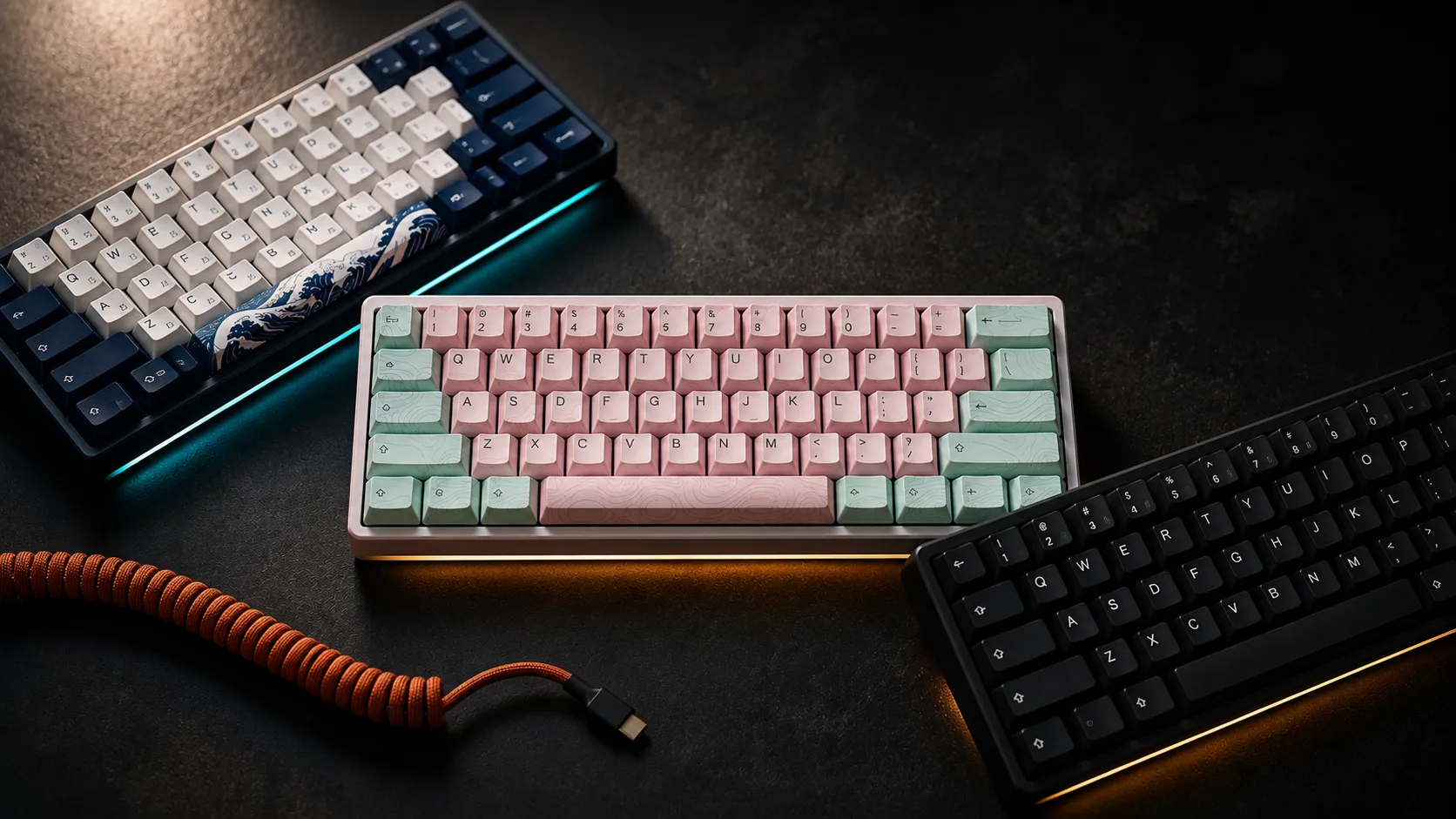
| Best Aesthetic | XVX M61 Pro | 2.4G + BT + Wired | Pre-lubed Linear | Great Wave keycaps that don’t feel like a gimmick |
| Best Budget Combo | Snpurdiri 2.4G Wireless Combo | 2.4G only | “Mechanical feel” | Keyboard + vertical mouse bundle for less than most boards alone |
| Best Clicky Pick | 60% Triple Mode Blue Switch | BT + 2.4G + USB-C | Clicky Blue | Real tactile click on three connection modes |
The Popular Favorite I Left Off the List
The Anne Pro 2. It still shows up in every “best 60% wireless gaming keyboard” article I read, and it earned that reputation — back in 2018. Here in 2026, you can get a hot-swap board with gasket mount, real PBT keycaps, and a 2.4 GHz dongle for the same money or less. The Anne Pro 2’s Bluetooth-only wireless adds noticeable latency for competitive FPS, and a soldered-switch board is tough to justify now that hot-swap is the baseline. If you own one and love it, keep typing. For anyone shopping fresh in 2026, the value isn’t there anymore.
That’s my contrarian take. Take it or leave it.
Womier Q61 V2 — Best Enthusiast 60% Wireless Gaming Keyboard

- 60% Wireless Gaming Keyboard with with Dedicated Knob: Q61 V2 wireless mechanical keyboard uses a fun design balanced in…
- QMK/VIA Keyboard Programmable: QMK/VIA is open-source software for keyboards that allows anyone to program and remap eac…
- Hot-swap Creamy Keyboard & Full POM Linear Switches: Wireless mechanical keyboard Hot swappable keyboard features a gask…
I ran the Q61 V2 as my daily driver for about three weeks. That included roughly 20 hours of competitive Valorant, a long writing stretch, and a lot of Discord. With POM linears, gasket mount, and full QMK/VIA support, it’s the closest thing to a custom-build experience you’ll find out of the box at this price.
What I liked:
- The gasket mount actually does something here. The flex is subtle but it’s there, and the typing feel softens a bit on bottom-out.
- QMK/VIA means real remapping. Not janky driver software — proper firmware-level customization.
- Hot-swap sockets, so you’re not stuck with the stock switches forever.
- The 2.4 GHz dongle latency is competitive, not just “good for wireless.”
Here’s the catch: The topographic keycap set is divisive. I happen to like it, but the texture is more aggressive than smooth PBT — your fingertips will let you know after a long session. The POM linears are smoother than most pre-lubed stock switches, but they’re still stock. If you’re picky about sound and feel, plan on swapping them eventually.
Verdict: This is the one I’d buy with my own money. If you want a 60% wireless gaming keyboard that’s actually built like a custom board, the Q61 V2 is it.
RK Royal Kludge RK61 — Best Value Pick
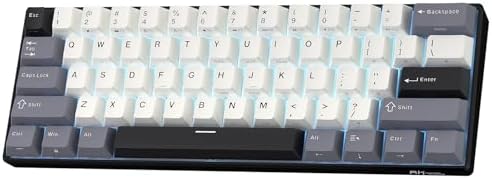
- 60% Compact, Portable Size — The ultra-minimalist 61-key layout reclaims precious desk space, providing more space for l…
- Versatile 3-Mode Connectivity — Seamlessly toggle between Bluetooth 5.0, 2.4GHz wireless, and USB-C wired modes. This co…
- Thocky Typing Experience — Engineered with dual-layer thick silencing foam and spacebar sound-absorbing foam, the RK61 s…
This is the board I recommend to most people who message me asking where to start. PBT keycaps, hot-swap sockets, triple-mode connectivity (Bluetooth 5.0, 2.4 GHz, USB-C), and it’s usually well under $80. Royal Kludge’s software has gotten better over the years. Not great. But better.
The good:
- PBT keycaps at this price is rare, and they hold up against shine.
- Hot-swap means you can upgrade switches later without buying a new board.
- 2.4 GHz mode is solid for FPS. I tested it head-to-head against the Q61 V2 and didn’t feel a meaningful difference in latency.
- Battery life landed around 50 hours with RGB off in my testing — your mileage will vary.
Here’s the catch: Stock switches are nothing special. Whether you pick RK Yellow, Brown, or Blue, they all feel a bit scratchy out of the box. If you care about sound, plan on a lubing session or just swap them out down the road.
Verdict: If you want a 60% wireless gaming keyboard that’s a real platform — one you can grow with instead of replace in six months — the RK61 is the smart-money buy.
XVX M61 Pro — Best Looking Without Sacrificing Feel

- 【Upgrades & Highlights】The custom keyboard supports hot-swap, providing more possibilities for customization. Comes with…
- 【Great Wave Off Kanagawa Ergonomic Keyboard】This 60 percent keyboard is with unique Xvx Profile PBT keycap and themed sh…
- 【Triple Mode Connection Mini Keyboard】M61 PRO wireless keyboard supports bluetooth, 2.4 GHz and usb-c wired connection, …
The Great Wave Off Kanagawa keycaps catch the eye first, but the M61 Pro earned its spot on actual typing feel. Pre-lubed linear switches out of the box. Three-mode wireless. RGB if you want it (I usually leave it off).
The good:
- Pre-lubed switches feel noticeably better than the dry, scratchy stock switches most budget boards ship with.
- The Hokusai keycap design is genuinely well executed. I expected a muddy print job and got something that holds up to close inspection.
- Wireless stability was rock solid over a six-week test. No dropouts, no weird reconnect lag.
Here’s the catch: It’s heavier than the others on this list. If portability is your number-one priority — throwing it in a backpack daily — that matters. The legends are also printed on the side of the keycaps, which looks gorgeous but slows you down if you’re not a confident touch typist.
Verdict: If you want a board that looks like desk art and types like a budget custom, the M61 Pro delivers on both. Just don’t expect it to feel weightless.
Snpurdiri 2.4G Wireless Combo — Best Budget Bundle (Eyes Open)

- Small Gaming keyboard and Mouse Combo — The scientific choice is a wireless compact 60% keyboard and a cute pocket-sized…
- 2.4G wireless keyboard and mouse — Snpurdiri 2 in 1 keyboard and mouse set shares Only ONE USB tiny receiver placed unde…
- Rechargeable & Long Battery Life — This rechargeable 60 percent keyboard is equipped with 2000 mAh battery. It only take…
Let me be straight with you. This is a budget combo, and it shows. “Mechanical feel” almost always means membrane with extra travel, and that’s roughly what you’re getting here. The interesting part is the vertical mouse — it actually helps with wrist angle if you’re dealing with pain.
The good:
- You get a keyboard AND a mouse for less than most cheap mechanicals cost alone.
- The vertical mouse is legitimately ergonomic. I don’t say that lightly.
- 2.4 GHz works fine for casual gaming and everyday use.
Here’s the catch: This isn’t a real mechanical keyboard, and the listing is generous with the term. If you’re coming from Cherry switches and you want that feel, this will disappoint you. There’s also no Bluetooth, so you can’t pair it across multiple devices.
Verdict: Get the Snpurdiri combo if you’re on a tight budget, you want a wireless keyboard and mouse together, and you understand it’s a starter setup. Not an enthusiast tool.
60% Triple Mode Wireless with Clicky Blue Switches — Best for Click Lovers

- More Connection Options: Supporting both wired and wireless connections, this wireless gaming keyboard can be connected …
- 60% Compact, 100% Portable: By eliminating the numeric keypad, function key row, and navigation cluster, this 60 percent…
- Immersive RGB Brilliance: Equipped with 16 RGB backlight modes, 8 color choices, 6 brightness levels, and per-key custom…
For everyone who loves the sound of clicky switches and doesn’t share an office, this is the budget-friendly clicky entry. Triple-mode (BT, 2.4 GHz, USB-C), 61 keys, RGB, rechargeable battery, and the click is the real deal — not a muted approximation.
The good:
- Genuine clicky blues with a real tactile bump. None of that mushy “tactile-but-not-really” stuff.
- Three connectivity modes at this price is uncommon.
- Compatible with iPad, Mac, PC, and Xbox out of the box.
Here’s the catch: Clicky switches annoy roommates, coworkers, partners, and pets. If you record video or take calls at your desk, the mic will pick up every keystroke no matter what you do. Build quality is also plastic-fantastic — not bad, just not premium.
Verdict: If you’re a clicky loyalist on a budget shopping for a 60% wireless gaming keyboard, the triple-mode clicky is a solid pick. If you’ve never typed on blues before, borrow one before you commit. They’re not for everyone.
What Actually Matters in a 60% Wireless Gaming Keyboard
Here’s the cheat sheet I wish I had when I started reviewing wireless boards. These are the specs worth caring about — and the ones that are marketing fluff.
- 2.4 GHz, not Bluetooth-only. For competitive FPS, you want sub-5ms latency. Bluetooth’s fine for typing and casual play. It’s not fine for ranked.
- Hot-swap sockets. Future-proofs the board. You can change switches without a soldering iron and learn what you actually like.
- PBT keycaps over ABS. PBT doesn’t shine, holds legends longer, and has a fuller sound. The price difference is small now. There’s no real reason to choose ABS in 2026.
- Battery life claims. Manufacturers lie. Expect 60–70% of the advertised number once you turn RGB on. Always.
- Polling rate. 1000 Hz is the standard. Anyone advertising 8000 Hz wireless polling is mostly selling you a number — current wireless protocols can’t reliably deliver it across all conditions yet.
- Layer support. A 60% board lives and dies by how easily you can reach the keys it doesn’t have. QMK/VIA boards win here. Driver-only boards lose.
So Which One Do I Use?
The Womier Q61 V2 lives on my desk right now. It’s the most enthusiast-feeling board on the list, and it’s the one I reach for when I’m doing my own ranked sessions. The RK61 is what I tell most people to buy first — it’s the smart money. The XVX M61 Pro is where I’d point you if you want something that looks unmistakably yours without going down the full custom rabbit hole.
That’s five 60% wireless gaming keyboards I’d actually stand behind, one popular favorite respectfully left out, and a few honest tradeoffs along the way. Pick the one that matches your hands, your ears, and your wallet — and don’t overpay for marginal sound differences. A good $90 board still beats a bad $200 one. Every time.
This article contains affiliate links. If you buy through them, I earn a small commission at no extra cost to you. I only recommend keyboards I’ve actually tested. As an Amazon Associate I earn from qualifying purchases.