Budget Gaming Keyboards 23 Best Picks Under $50

This article contains affiliate links. If you buy through them, I earn a small commission at no extra cost to you. I only recommend keyboards I’ve actually tested. As an Amazon Associate I earn from qualifying purchases.
Most people shopping for a budget gaming keyboard assume the RGB and the “gaming” label are what they’re paying for. They’re not. What you’re really paying for is the switch, the keycaps, and whether the board still works the same way in a year. Everything else is paint.
I’ve spent a lot of years around keyboards, from the original Cherry MX boards to boards that cost more than my first car payment. And here’s the thing I keep telling people: a good $50 board beats a bad $150 one every time. The gap between “decent” and “great” is smaller than the internet wants you to believe. The gap between “decent” and “garbage” is where most budget shoppers get burned.
So this guide is built around that gap. I’ve sorted 23 boards into three tiers, roughly $30 and under, around $50, and a “stretch” tier where a few extra dollars buy features you’ll actually feel. Each one gets pros, cons, and a straight verdict.
A few ground rules before we start.
First, I’m judging these on what’s on the spec sheet and what I know about the hardware, switch types, layouts, and the way boards in this class generally behave. I haven’t put every one of these through weeks of daily use, and I’m not going to pretend I have. Where I’m going on specs rather than hands-on time, I’ll say so.
Second, prices on Amazon move around constantly. The tiers below reflect where these boards typically land, but check the listing before you buy.
Third, this page contains affiliate links. If you buy through them, I may earn a small commission at no extra cost to you. It doesn’t change the verdicts. I’ll happily tell you to skip a board I’m linking to.
Quick Comparison: The Best Budget Gaming Keyboard for Your Situation
If you just want an answer, start here. This table is organized by need, not by price, because “best” depends on what you’re doing with the thing.
| If you want… | Best pick | Type | Why it wins | Link |
|---|---|---|---|---|
| The safest all-round buy | Redragon K552 | Mechanical, TKL, Red | Proven design, metal-plate feel, easy to live with | Check price |
| A compact board you can mod | Redragon K617 | 60% hot-swap, RGB | Swap switches later without soldering | Check price |
| Hot-swap plus PBT keycaps | Redragon hot-swap Red (PBT) | Full-ish layout, hot-swap | Double-shot PBT at this price is rare | Check price |
| Wireless without paying much | Redragon K521KS | Tri-mode, 4000mAh | Bluetooth, 2.4GHz, and wired in one board | Check price |
| A wireless board with a number pad | Redragon K517 Pro | Tri-mode, 94 keys | Macro keys and numpad, wireless | Check price |
| Quiet membrane for shared spaces | Corsair K55 CORE TKL | Membrane, TKL | Quiet keys, spill resistance, known brand | Check price |
| Fast response for shooters | DAREU EK60 HE | 60% Hall effect | Magnetic switches, adjustable actuation | Check price |
| A keyboard and mouse in one box | AULA combo | Wired, 104-key combo | Metal panel, mouse included | Check price |
| The cheapest way into a 60% layout | TMKB 60% Red Linear | 60%, wired | Low entry cost, linear switch | Check price |
| A creamy, typing-friendly sound | Kisnt KN85 | 75%, hot-swap linear | Retro look, wireless, smooth switches | Check price |
Now the long version. Let’s start with the cheapest tier.
Tier 1: Budget Gaming Keyboards at Around $40 and Under
At this price you’re making trade-offs, and the trick is picking the right ones. Don’t expect premium keycaps or a flawless stabilizer. Do expect a keyboard that registers every press, which is the only thing a gaming board truly has to do.
A warning about this tier: a lot of boards here are near-identical generic hardware sold under different names. The “60% Mechanical Keyboard with Blue Switches” listings, for example, are very much interchangeable. I’ll flag those as I go.
1. Redragon K552 Mechanical Keyboard (Red Switches)

- 🔥𝗧𝗿𝘂𝗲 𝗠𝗲𝗰𝗵𝗮𝗻𝗶𝗰𝗮𝗹 𝗙𝗲𝗲𝗹 𝘄𝗶𝘁𝗵 𝗟𝗶𝗻𝗲𝗮𝗿 𝗥𝗲𝗱 𝗦𝘄𝗶𝘁𝗰𝗵𝗲𝘀 – Experience smooth, consistent keystrokes with linear red mechanical swi…
- 🔥𝗩𝗶𝗯𝗿𝗮𝗻𝘁 𝗥𝗮𝗶𝗻𝗯𝗼𝘄 𝗟𝗘𝗗 𝗕𝗮𝗰𝗸𝗹𝗶𝗴𝗵𝘁𝗶𝗻𝗴 𝘄𝗶𝘁𝗵 𝟲 𝗗𝘆𝗻𝗮𝗺𝗶𝗰 𝗠𝗼𝗱𝗲𝘀 – Enjoy eye-catching rainbow backlighting with 6 preset lighting …
- 🔥𝗦𝗼𝗳𝘁𝘄𝗮𝗿𝗲 𝗗𝗿𝗶𝘃𝗲𝗿 𝗦𝘂𝗽𝗽𝗼𝗿𝘁 𝗳𝗼𝗿 𝗙𝘂𝗹𝗹 𝗖𝘂𝘀𝘁𝗼𝗺𝗶𝘇𝗮𝘁𝗶𝗼𝗻 𝗖𝗼𝗻𝘁𝗿𝗼𝗹 – Take control of your K552-KR with dedicated software drivers, …
This is the board I point people to when they say “just tell me what to buy.” It’s a tenkeyless layout, so you lose the number pad and gain desk space for mouse swings. The red switches are linear, meaning smooth with no bump, which is what most gamers prefer.
The K552 has been around for years, and that longevity counts for something. Budget boards come and go. This one stuck around because it holds up.
Pros
- Tenkeyless layout frees up mouse room
- Linear red switches suit gaming
- Long track record in this price class
- Sturdy build for the money
Cons
- Not hot-swappable, so the switches are what you get
- ABS keycaps will shine over time
- Software is basic
Verdict: The default pick. If nothing else on this list speaks to you, buy this and stop shopping.
2. TMKB 60% Mechanical Gaming Keyboard, Red Linear, White
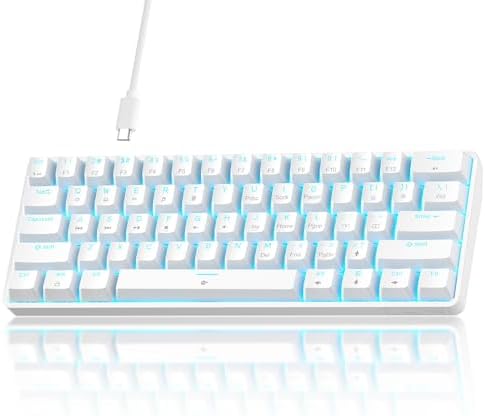
- Compact 60% Gaming Layout & Portability: Maximize desk space with a streamlined ANSI design; Ideal for gaming setups and…
- Ultra-Responsive Linear Red Switches: Smooth, low-resistance switches with 45g actuation; Optimized for rapid keystrokes…
- Customizable LED Backlighting & Durability: 15 dynamic lighting modes with adjustable brightness/speed; Double-shot keyc…
A white 60% board with linear reds. It’s compact, which is great for small desks and low-sensitivity mouse players who need swing room. It’s also a cheap way to find out whether you like a 60% layout at all.
Here’s the catch with any 60%: no arrow keys, no function row, no navigation cluster. Everything lives behind an Fn layer. Some people adapt in a day. Others hate it forever.
Pros
- Small footprint
- Linear reds are quiet-ish and smooth
- Clean white look
- Low risk way to try 60%
Cons
- Fn layer takes real adjustment
- Brand support is thin
- Little information on long-term durability
Verdict: Fine if you’re curious about 60% and don’t want to spend much. Not the pick if you work in spreadsheets all day.
3. Snpurdiri 60% Wired Mechanical Keyboard (Black-Red, Red Switches)

- 60% small mechanical keyboard — This 60 percent mechanical keyboard is ultra-compact. Its small size helps you save spac…
- Mechanical Red Switches — The red switch is popular with gamers and typer because these switches respond faster and they…
- Luminous LED backlit — Rainbow LED backlight gives this small gaming keyboard a vibrant and splendid visual effect. Add …
Similar idea to the TMKB, in a black and red colorway with red linear switches. At this level, the main thing separating one generic 60% from another is the color scheme and whatever lighting modes the firmware offers.
I’ll be straight: I’d treat this and the TMKB as close cousins. Pick whichever you like the look of, or whichever is cheaper on the day.
Pros
- Compact and wired, so no latency worries
- Red switches are a good gaming default
- Aggressive colorway if that’s your thing
Cons
- Same Fn-layer learning curve
- Generic hardware, limited long-term data
- Probably no hot-swap
Verdict: A perfectly reasonable cheap 60%. Not special, not bad.
4. 60% Mechanical Keyboard, Blue Switch, LED Backlit (Generic)
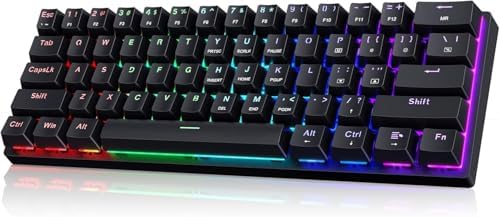
- 🌟【60% Keyboard: 61 Keys Compact Design】Ultra-compact layout with 61 keys that free up your desktop, leaving more space f…
- 🌟【Mechanical keyboard: Responsive Blue Switches】CACKBIRD gaming keyboard features blue mechanical keys that give a satis…
- 🌟【Rainbow LED Backlit Accompanies Your Night】18 LED Rainbow Backlight Effects,5 brightness levels & speeds,1 customizati…
This one comes with blue switches, which are clicky. Loud, tactile, and satisfying for about a week. Then your roommate, partner, or officemate starts glaring at you.
I’m mildly protective of clicky switches. They’re genuinely fun to type on. But for gaming they’re a questionable choice. The tactile bump isn’t a problem, but the extra noise can be, especially if you’re on voice chat.
Pros
- Very satisfying click for typing
- Compact layout
- Backlit
Cons
- Loud enough to leak into your mic
- Not ideal for rapid repeated presses
- Generic brand
Verdict: Buy it if you type a lot and live alone. Otherwise grab a red-switch version.
5. 60% Mechanical Keyboard, RGB, Blue Switch (Generic)

- 💎 Compact and Portable: Experience the ultimate gaming and typing with our 61-Key Mechanical Keyboard, designed for bo…
- 💎 Gamer's Delight: Elevate your gameplay with our Mechanical Gaming Keyboard, featuring tactile Mechanical Blue Switch…
- 💎 Versatile Connectivity: Utilize the detachable USB-C interface for easy portability and ultra-high-speed data transm…
Almost the same pitch as the one above, with RGB lighting as the headline. Same blue switches, same noise warning.
If you’ve got to choose between these two listings, I’d go with whichever has the better recent reviews and the easier return policy. With generic boards, the return policy is the real spec.
Pros
- RGB lighting
- Compact
- Clicky feedback
Cons
- Loud
- Unknown long-term quality
- Fn-layer dependence
Verdict: Interchangeable with the previous pick. Don’t overthink it.
6. TECKNET Wired Gaming Keyboard, RGB Backlit, Metal Panel Design

- 【Ergonomic Design, Enhanced Typing Experience】Improve your typing experience with our computer keyboard featuring an erg…
- 【15-Zone Rainbow Backlit Keyboard】Customize your PC gaming keyboard with 7 illumination modes and 4 brightness levels. E…
- 【Whisper Quiet Design】Experience near-silent operation with our whisper-quiet gaming switch, ideal for office environmen…
Now we’re in membrane territory. Don’t write that off. A good membrane board is quiet, usually cheaper, and perfectly fine for casual gaming.
The metal panel is mostly a rigidity and looks upgrade. It makes the board feel less like a toy. You won’t feel switch-level magic here, but you’ll get something solid for everyday use.
Pros
- Metal panel adds rigidity
- RGB backlight
- Quiet compared to mechanical
- Wallet-friendly
Cons
- Membrane feel is mushy compared to mechanical
- Not hot-swappable (membrane, so not relevant)
- Not ideal for competitive play
Verdict: A solid choice if you play casually and want something quiet.
7. TECKNET Wired RGB Gaming Keyboard, 108 Membrane Keys, Wrist Rest, Phone Holder
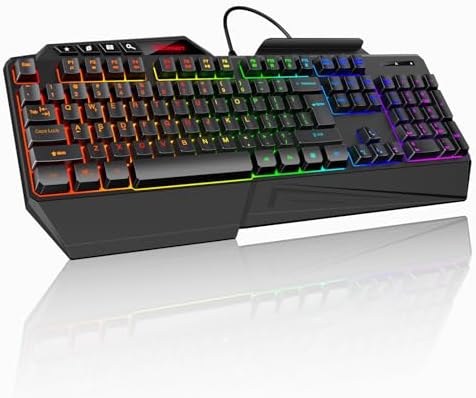
- 【Professional Performance with Membrane Technology】Featuring a durable membrane switch mechanism and 26-key anti-conflic…
- 【Ergonomic Design for Ultimate Comfort】Designed with your comfort in mind, this wired ergonomic keyboard gaming features…
- 【Customizable RGB Lighting for an Immersive Gaming Experience】 Enhance your gaming setup with 13 vibrant color options a…
This is a full-size membrane board with a wrist rest and a phone holder. It’s a practical, comfortable, office-meets-gaming kind of keyboard. The 26-key anti-ghosting claim means you can press many keys at once without dropped inputs, which matters for gaming, though most people never hit that limit.
I care about wrist comfort more than most keyboard reviewers do. A wrist rest won’t fix bad posture, but it does reduce the edge pressure. If you type or game for hours, that’s worth something.
Pros
- Includes a wrist rest
- Phone holder is genuinely handy
- Spill-resistant design
- Full-size with number pad
Cons
- Full-size layout eats desk space
- Membrane feel
- The phone holder won’t matter to everyone
Verdict: Best in this tier for comfort and everyday use. Not the one for competitive shooters.
8. BlueFinger RGB 87 Keys Gaming Keyboard and Backlit Mouse Combo
A combo deal: an 87-key tenkeyless board and a backlit mouse in one box. If you’re building a first setup and want to spend as little as possible, this is the logic.
The caveat is that bundled mice at this price are usually the weakest link. Treat the mouse as a spare and plan to upgrade it when you can.
Pros
- Keyboard and mouse together
- TKL layout is space-friendly
- Rainbow lighting for the lighting fans
Cons
- Bundled mouse is rarely great
- Lighting-forward design over substance
- Quality can be inconsistent
Verdict: Good for a first setup or a kid’s PC. Not for anyone chasing performance.
9. AULA Gaming Keyboard and Mouse, Wired 104-Key Combo, Metal

- RGB Rainbow Backlit Keyboard: The aula keyboard and mouse is through rainbow backlit keyboard and RGB breathable backlit…
- Metal Panel Keyboard & Ergonomic Design: This wired computer keyboard and mouse combo boasts an aluminum alloy brushed p…
- Phone Holder & Floating Keycaps: This mouse and keyboard combo featuring a practical phone and pen bracket, this membran…
Another combo, this time full-size with a metal panel. AULA has a reputation for punching above its price, and the metal panel helps it feel less flimsy than most combos.
Full-size keeps the number pad, so it’s handy if you switch between gaming and spreadsheets.
Pros
- Full-size with number pad
- Metal panel feels sturdier
- Mouse included
Cons
- Takes up desk space
- Bundled mouse is basic
- Membrane-style feel in this class
Verdict: One of the better combos if you want one purchase and done.
10. RedThunder K10 Wired Keyboard, Mouse, and Wrist Rest Combo
A three-in-one: keyboard, 7200 DPI mouse, and a leather wrist rest. The pitch is “complete setup in a box.”

- 【Professional Gaming Keyboard】The 104-key full-size keyboard has a standard layout with F-keys (function keys) and a num…
- 【Professional gaming mouse】The mouse uses high-precision optical sensor, sensitivity is 7200DPI, 12000fps scan rate, 100…
- 【Upgraded RGB Lighting Gaming Combo】All the keys of the keyboard, the light bar on the bottom side of the keyboard, and …
Be skeptical of any DPI number on a budget mouse. 7200 DPI sounds impressive, but nobody games at that setting. It’s a marketing figure. What matters is sensor quality, and that’s hard to judge from a spec sheet.
Pros
- Everything in one box
- Wrist rest included
- “Mechanical feel” keys for a more tactile response
Cons
- “Mechanical feel” is not mechanical
- Big DPI numbers are mostly noise
- Quality varies across the bundle
Verdict: Okay for a first-time setup. Don’t expect to keep every piece for years.
11. Snpurdiri 60% Wireless Gaming Keyboard and Mouse Combo, Black
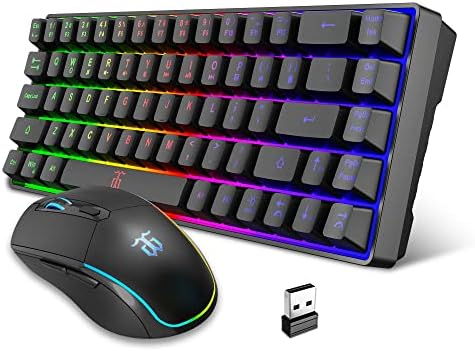
- Suitable Gaming Keyboard Mouse Combo: Snpurdiri team has developed a compact size gaming combo that can balance work and…
- 2.4G Wireless Keyboard and Mouse: Snpurdiri 2 in 1 keyboard and mouse set shares only a USB tiny receiver placed in the …
- Rechargeable and Long Battery Life: This rechargeable 60% keyboard is equipped with 2000 mAh battery, and the mouse is e…
A wireless 60% keyboard plus a mouse. Wireless at this price is a gamble on latency and battery life. For casual use it’s fine. For fast-paced shooters, I’d stay wired.
Pros
- Cable-free desk
- Compact layout
- Mouse included
Cons
- Wireless latency is a question mark at this price
- Battery life can disappoint
- Generic hardware
Verdict: Good for casual play and clean desks. Competitive players should look elsewhere.
12. 60% Wireless Gaming Keyboard and Mouse Combo, RGB Backlit, Rechargeable
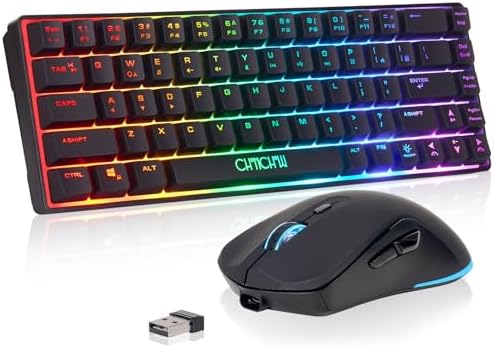
- 【Small Gaming keyboard and Mouse Combo】This 68-key light up wireless keyboard and mouse combo features a 60% compact lay…
- 【2.4G Wireless Keyboard and Mouse 】The gaming mouse and keyboard both use a 2.4G wireless connection and share a USB ada…
- 【Rechargeable & Long Battery Life】This rechargeable 60 percent keyboard is equipped with 2000 mAh battery,and the mouse …
Very similar to the previous one, with rechargeable batteries and RGB lighting. The rechargeable part is a small win: you’re not buying AAAs forever.
Pros
- Rechargeable
- RGB lighting
- Compact and cable-free
Cons
- Same latency question as other budget wireless
- Generic brand
- Compact layout won’t suit everyone
Verdict: Fine for light use. I’d choose based on reviews and return policy.
Tier 2: The Best Budget Gaming Keyboard Around $50
This is the sweet spot. A little more money gets you noticeably better switches, better keycaps, and in several cases hot-swap sockets, which means you can change the switches later without soldering. If you only read one tier, read this one.
13. Redragon K617 60% Hot-Swap RGB Mechanical Keyboard
This is the board I’d pick for anyone who thinks they might get into the hobby. Hot-swap sockets let you pull a switch out and push a different one in. No soldering, no commitment.

- 60% Compact, More Room to Aim – Ditching the numpad and nav cluster frees up desk space for wide mouse swipes, so your s…
- Swap Switches Without Soldering, Smooth and Quiet – The upgraded socket accepts almost any 3-pin or 5-pin switch, and st…
- Vibrant RGB for a True eSports Vibe – Up to 20 preset lighting modes with adjustable brightness and flow speed give your…
Think about what that means. If you buy this with red switches and later realize you want something tactile, you buy a pack of switches and swap them. The board grows with you. That’s rare at this price.
Pros
- Hot-swap sockets for easy switch changes
- Compact 60% layout
- RGB lighting
- Great learning platform for modding
Cons
- 60% layout, so Fn-layer adaptation required
- Stock keycaps are standard ABS
- Stabilizers may rattle until tuned
Verdict: My top pick for the budget-meets-future-proof crowd.
14. Redragon Mechanical Gaming Keyboard, Hot-Swappable Red Switch, Double-Shot PBT Keycaps
I’m a PBT loyalist. PBT plastic resists the greasy shine that ABS gets after a few months of use, and it tends to feel a bit more textured. Double-shot means the legends are molded through, so they won’t wear off.

- Brilliant Color Illumination- With 11 unique backlights, choose the perfect ambiance for any mood. Adjust light speed an…
- Support Macro Editing: The K671 Mechanical Gaming Keyboard can be macro editing, you can remap the keys function, set sh…
- Hot-swappable Linear Red Switch- Our K671 gaming keyboard features red switch, which requires less force to press down a…
Getting hot-swap and double-shot PBT at this price is the kind of combo that makes people overpay elsewhere for no reason. On paper, this is one of the strongest value propositions on the list.
Pros
- Double-shot PBT keycaps
- Hot-swappable switches
- Programmable backlight modes
- Anti-ghosting
Cons
- Layout is larger than a 60%
- Brand-name budget board, so quality control can vary
- Still not a premium feel
Verdict: If PBT and hot-swap matter to you, this is a smart buy.
15. Redragon K521-E Gaming Keyboard with Knob, RGB 104 Keys
A full-size board with a volume knob. The knob is the sleeper feature. Once you’ve adjusted volume with a physical dial, going back to Fn combos feels clumsy.
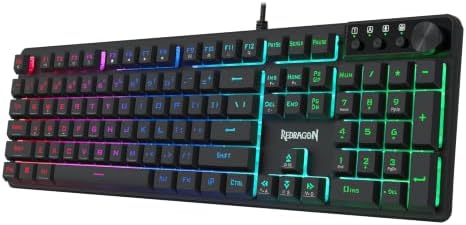
- 【Dreamy RGB Gaming Keyboard】K521-E Redragon keyboard now upgrades to a vivid RGB backlight design, going far beyond trad…
- 【Multifunction Volume Knob】The Redragon K521-E keyboard features a dedicated volume knob that allows you to freely adjus…
- 【Customizable Software Driver】 The K521-E supports flexible customization of key mapping, macro editing, RGB lighting ef…
Full-size means you keep the number pad. Gamers who care about mouse room might find it too wide, but it’s great for people who split time between work and play.
Pros
- Physical volume knob
- Full number pad
- RGB lighting
- Comfortable for productivity
Cons
- Takes up desk space
- Not a TKL for tight setups
- Switch feel depends on the version you get
Verdict: A practical all-rounder for desks that can handle the width.
16. MageGee Portable 60% Mechanical Gaming Keyboard, MK-Box, 68 Keys, Red Switch
This one’s a 68-key layout, which is 60% plus dedicated arrow keys. That’s a better compromise than a straight 60%. Arrow keys matter more than people realize, especially for anyone who edits documents or navigates menus.

- Mini portable 60% compact layout: MK-BOX is a 68 keys mechanical keyboard have cute small size, but with separate arrow …
- Mechanical red switch: characterized for being linear and smoother, slight key sound has no paragraph sense with minimal…
- Classic charming blue LED backlit: Customize multiple illuminated LED light effects, supports about 16 backlight modes, …
I’d rank the 68-key layout above standard 60% for general use. You get the compact footprint without giving up the arrows.
Pros
- Dedicated arrow keys
- Compact and portable
- Red linear switches
- Clean, minimal design
Cons
- Smaller brand
- Not hot-swappable, as far as I can tell from the listing
- Fewer keys means more Fn use for other functions
Verdict: A smart compact pick for people who dislike giving up arrows.
17. RedThunder K84 Wireless Keyboard and Mouse Combo, 75% Layout
A 75% layout is the middle ground: compact, but with arrows and a function row squeezed in. Add a lightweight honeycomb optical mouse and a rechargeable battery and you’ve got a tidy wireless combo.

- 【High-performance 2.4G Wireless Keyboard and Mouse】Are you looking for a small wireless keyboard and mouse combo that ca…
- 【Rechargeable Wireless Keyboard and Mouse】The keyboard is equipped with a 1850 mAh battery, and the mouse is equipped wi…
- 【75% Compact Mini Keyboard and Ultra-light Honeycomb Shell Mouse】Removed the 10-key numeric pad. The ultimate tenkeyless…
Remember what I said about wireless at this price. It’s great for convenience and casual play. I’d still use a wired board for ranked shooters.
Pros
- 75% layout keeps arrows and function keys
- Rechargeable
- Mouse included
- Rainbow backlight
Cons
- Wireless latency isn’t ideal for competitive play
- Honeycomb mice are light, which some people dislike
- Quality varies
Verdict: A tidy wireless setup for casual gamers and everyday work.
18. Corsair K55 CORE TKL RGB Gaming Keyboard
Here’s the quiet membrane pick. Corsair is a name you can trust to answer a warranty email, which counts for something in this class. The K55 CORE TKL has 8-zone RGB, media keys, spill resistance, and 1000Hz polling.
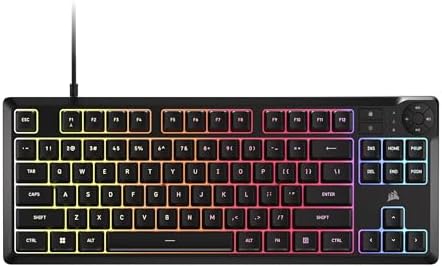
- More Room to Make Big Plays: A compact, space-saving layout designed to give players more room for sweeping mouse moveme…
- Eight Zone RGB Backlighting: Create personalized lighting as dazzling as your clutch plays with 8 zones of brilliant RGB…
- 300ml Spill Resistance: K55 CORE TKL is built for gaming and built to stand up to the perils of daily life. Don’t let a …
The contrarian take: for a lot of people, a quiet membrane board from a reputable brand beats a cheap mechanical from a no-name one. Mechanical is better in theory. A bad mechanical isn’t better than a good membrane in practice.
Pros
- Reputable brand and support
- Quiet keys, good for shared rooms
- Spill resistant
- Dedicated media keys
- 1000Hz polling
Cons
- Membrane feel is softer and mushier
- Zone lighting rather than per-key RGB
- Not for enthusiasts
Verdict: The right pick for shared spaces, late-night sessions, and anyone who values brand support.
19. SteelSeries Apex 3 TKL Gaming Keyboard, White
SteelSeries is a respected name in esports gear. The Apex 3 TKL uses a quiet membrane-style design, in a white finish that looks clean on a desk.

- GAMING-GRADE PERFORMANCE – Flawless performance in TKL form factor, with anti-ghosting keys
- WATER AND DUST RESISTANT — Extra durable to protect against splashes, dust, and more
- TKL FORM FACTOR — The compact Esports-proven TKL design maximizes space and enhances performance
I’ll be careful here. I’m going off the brand’s reputation and the spec class rather than long-term use of this exact model. SteelSeries generally delivers solid build and reliable software, and that’s why I’m comfortable listing it.
Pros
- Trusted esports brand
- TKL layout saves desk space
- White colorway stands out
- Good software support
Cons
- Membrane feel
- Costs more than generic competitors for similar feel
- Not hot-swappable
Verdict: Pay a little extra for the brand if you want reliability and clean looks.
Tier 3: Up to $100, Where a Few Extra Dollars Buy Features You’ll Feel
This tier is for people willing to stretch. I’m not sure every board here actually costs near $100, and some might sit lower. They’re grouped here because they offer something the cheaper tiers don’t: wireless freedom, magnetic switches, or a better typing sound.
20. Redragon K521KS Wireless Gaming Keyboard, Tri-Mode
Tri-mode means Bluetooth, 2.4GHz wireless, and wired USB-C, all in one board. The 4000mAh battery is a big one. That’s a lot of runtime.
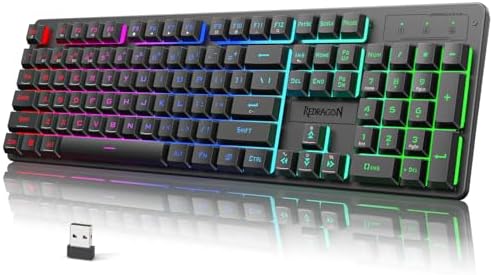
- 【Tri-Mode Connection & 4000 mAh Battery】The K521KS red dragon keyboard supports Bluetooth, 2.4GHz wireless, and USB wire…
- 【Fully Programmable Software】The programmable software can edit the RGB light, key function, and Macro. So you can DIY y…
- 【RGB Backlit Gaming Keyboard】The K521KS PC Gaming Keyboard comes with 8 different RGB backlighting modes, 7 monochrome b…
The smart way to use it: wired when you’re playing competitively, wireless the rest of the time. You get the best of both. Note that it’s “mechanical feeling” rather than true mechanical, so don’t expect a switch you can pull out.
Pros
- Three connection modes
- Big 4000mAh battery
- Multimedia keys
- Anti-ghosting
Cons
- “Mechanical feeling,” not true mechanical
- Wireless latency is still slightly behind wired
- Bulky for small desks
Verdict: The most flexible board on the list for people who move between devices.
21. Redragon K517 Pro Wireless Gaming Keyboard, Tri-Mode, 94 Keys with Macro Keys
This is a more compact cousin of the K521KS, with four dedicated macro keys and a number pad. If you play MMOs or use lots of shortcuts, macro keys are legitimately useful.

- 【3-Mode Connection】Geared with Redragon innovative tri-mode connection technology, USB-C wired, BT 3.0/5.0 & 2.4Ghz wire…
- 【Four Dedicated Macro Keys】Activate functions or shortcuts in one stroke with four macro keys, and easily edit and execu…
- 【RGB Illumination】 Light up your desktop through 8 preset RGB modes, 7 solid colors, and 5 brightness levels with adjust…
Again, “mechanical feel,” so it’s not the same as a true mechanical board. But for macros and wireless freedom, it’s an interesting package.
Pros
- Tri-mode connectivity
- Four macro keys
- Number pad
- 4000mAh battery
Cons
- Mechanical feel, not true mechanical
- Macro keys are overkill for FPS players
- Layout is unusual
Verdict: A good pick for MMO players and heavy shortcut users.
22. Kisnt KN85 Wireless Mechanical Keyboard, 75%, Hot-Swappable Linear, Retro Beige
I’ll admit it: I’m a little tired of the “thocc” hype. But I won’t pretend I don’t enjoy a creamy linear board. The KN85 is aimed squarely at that crowd, with hot-swappable linear switches, three connection modes, and a retro beige look.

- 【75% Space-saving Layout】Want a smaller footprint without compromise? The KN85 series is a compact 85 key keyboard(13.68…
- 【Tri-mode Connectivity with All-Day Battery】Connect via USB‑C, 2.4GHz wireless, or Bluetooth 5.0 (3 channels supported),…
- 【RGB Backlighting & Programmable】Choose from 20 preset dynamic lighting effects with adjustable color and brightness, ea…
Hot-swap plus wireless plus a 75% layout is a very good set of features. The caveat is that I haven’t tested this particular board, and sound claims like “creamy” depend heavily on the typing surface and keycaps.
Pros
- Hot-swappable linear switches
- Bluetooth, 2.4GHz, and wired
- 75% layout keeps arrows and function keys
- Attractive retro design
Cons
- “Creamy sound” varies with setup
- Less proven than the Redragon boards
- Wireless adds a latency question
Verdict: The pick for typists who also game, and who care about the sound.
23. DAREU EK60 HE Hall Effect Magnetic Switch 60% Mechanical Gaming Keyboard
This is the most interesting board on the list. Hall effect switches use magnets rather than physical contacts. In practice, that usually means adjustable actuation points, so you can set how far a key must travel before it registers.
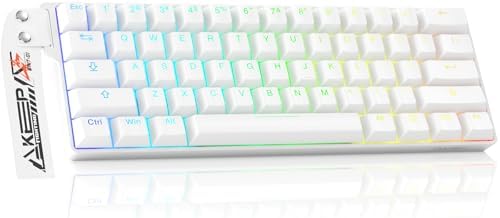
- 8000Hz Polling Hall Effect Keyboard: Dominate in FPS games with the DAREU EK60 HE gaming keyboard. Its breakthrough 8000…
- 0.01mm Rapid Trigger Gaming Keyboard: Equipped with tournament-grade magnetic switches with industry-leading 0.01mm RT s…
- Dual Web/Software Driver System: Supports a powerful yet user-friendly driver accessible through both web browsers and d…
For competitive shooters, that adjustability is the real draw. Shorter actuation can mean slightly faster inputs. I’d also be honest that most players won’t feel a dramatic difference, and the benefit depends heavily on the game and your skill level.
It’s still a big deal that this tech has trickled down to budget prices.
Pros
- Hall effect magnetic switches
- Adjustable actuation, depending on software
- Compact 60% layout
- Great fit for competitive play
Cons
- 60% layout, Fn-layer required
- Software quality is a question mark
- Benefit is smaller than marketing suggests
Verdict: The most forward-looking buy here. Worth it for tinkerers and competitive players.
How to Pick a Budget Gaming Keyboard Without Wasting Money
Here’s how I’d narrow it down.
Decide on the layout first
Layout matters more than anything else on the spec sheet. Here’s what each one means in real use:
- Full-size (104/108 keys): Number pad included. Best if you also work on this machine.
- Tenkeyless (87 keys): No number pad. More mouse room, which helps in shooters.
- 75% and 68-key: Compact, but arrows and some function keys survive.
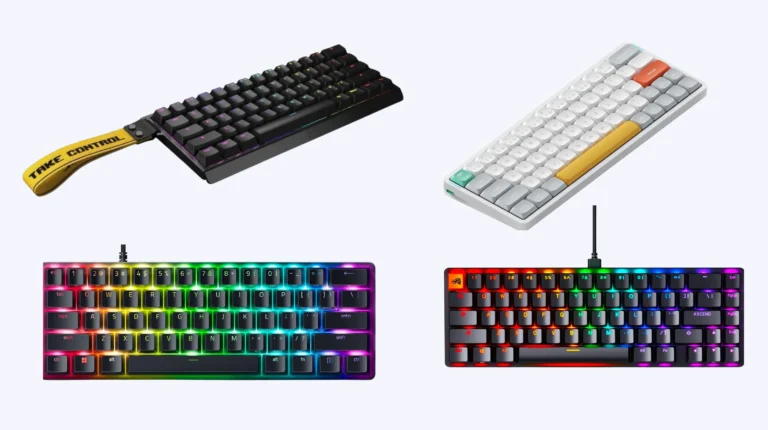
- 60%: Smallest. No arrows, no function row. Everything lives behind Fn.
If you’ve never used a 60%, don’t start with a cheap one as your only keyboard. Try it before you commit.
Pick your switch type honestly
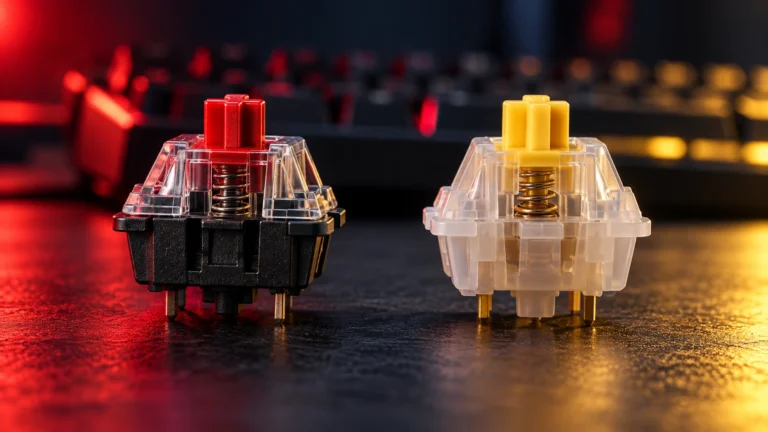
- Linear (reds): Smooth, no bump. The usual gaming pick.
- Tactile: A subtle bump. Great for typing and fine for gaming.
- Clicky (blues): Loud. Fun to type on, rough for voice chat.
- Membrane or “mechanical feel”: Softer, quieter, cheaper.
Most people overthink this. If you’re unsure, go linear.
Look for features that actually matter
- Hot-swap sockets: Let you change switches without soldering. The biggest long-term value feature.
- PBT keycaps: They last longer than ABS and resist shine.
- Wired or tri-mode: If you play competitively, you want wired as an option.
- Anti-ghosting: Standard on most boards now. Not a differentiator.
Ignore these
- RGB modes: Thirteen lighting modes versus eleven changes nothing.
- Huge DPI numbers on bundled mice: Marketing, not performance.
- “Gaming” in the product name: It’s a label, not a spec.
The Honest Catch with Any Budget Gaming Keyboard
Here’s the catch. At this price, quality control is inconsistent. Two units of the same board can feel different. A stabilizer might rattle on one and not another. A switch might feel scratchy.
That’s why the return policy matters as much as the spec sheet. Buy from a seller with easy returns, test the board in the first week, and send it back if something’s off. Also, unfamiliar generic brands tend to come with very little support if something fails after the return window, so lean toward the brands with a track record when the price difference is small.
And a mild contrarian take: if you’re picking between a cheap mechanical board from an unknown brand and a quiet membrane board from Corsair or SteelSeries, the membrane board is often the smarter buy. Mechanical isn’t automatically better. A well-made membrane keyboard beats a poorly-made mechanical one in everyday use.
My Picks for the Best Budget Gaming Keyboard
If I had to boil all 23 down to a handful:
- Best overall: Redragon K552. Proven, solid, and easy to recommend.
- Best for growing into the hobby: Redragon K617. Hot-swap sockets make it a platform, not just a keyboard.
- Best value on paper: The Redragon hot-swap board with double-shot PBT keycaps.
- Best wireless flexibility: Redragon K521KS. Three modes and a big battery.
- Best for shared spaces: Corsair K55 CORE TKL. Quiet, reputable, spill resistant.
- Best for competitive tinkerers: DAREU EK60 HE. Magnetic switches at a budget price.
- Best for typists who game: Kisnt KN85. Hot-swap, wireless, and a pleasant sound profile.
- Best cheapest complete setup: The AULA combo. One box, metal panel, done.
Here’s my blunt advice. Don’t overspend chasing marginal sound or fancy lighting. Pick the layout you’ll actually use, pick a switch you won’t hate after a week, and buy from a seller with easy returns. A well-chosen budget gaming keyboard will serve you better than a mismatched expensive one, and you can always upgrade the keycaps or switches later if you catch the bug.
Affiliate disclosure: Links in this article are affiliate links. I may earn a commission on qualifying purchases at no additional cost to you. <!– INTERNAL LINK PLACEHOLDERS (add your own URLs): – “hot-swap sockets” -> your hot-swap explainer – “linear” / “tactile” -> your switch guide – “stabilizers” -> your stabilizer tuning guide – “60% layout” -> your keyboard layouts guide –>
This article contains affiliate links. If you buy through them, I earn a small commission at no extra cost to you. I only recommend keyboards I’ve actually tested. As an Amazon Associate I earn from qualifying purchases.
2 Comments