Best Switches for Gaming 5 Tested Picks (& 5 to Skip)

This article contains affiliate links. If you buy through them, I earn a small commission at no extra cost to you. I only recommend keyboards I’ve actually tested. As an Amazon Associate I earn from qualifying purchases.
Most “best switches for gaming” lists you’ll find in 2026 are lying to you in the same tired way. They rank a linear, a tactile, and a clicky like it’s a democracy, then pretend Cherry MX Reds are still the smart pick because they were the smart pick in 2015. Reds are fine. They’re not the answer anymore.
I’ve spent the last twelve months lubing, tuning, and daily-driving switches to see what holds up when you’re clutch-timing a peek in Valorant or trying to survive a boss run in Elden Ring. Some of my picks will surprise you. A few of the popular ones I ran for three weeks and quietly put back in the graveyard drawer.
Here’s what I’d actually buy — and what I’d skip — for gaming in 2026.
TL;DR: Quick Comparison Table for the Best Switches for Gaming
Pick your priority on the left. The switch on the right is the one I’d hand you if you walked into my apartment holding an empty hot-swap board.
| Your Priority | My Pick | Switch Type | Best For | Where to Get It |
|---|---|---|---|---|
| Best Overall Gaming Switch | Gateron Magnetic Jade | Hall Effect linear | Competitive FPS + everyday typing | Check Price → |
| Best Premium MX Linear | Gateron Oil King | MX-style linear | Enthusiasts who game daily | Check Price → |
| Best Budget Pick (Under $30) | Gateron Milky Yellow Pro 3.0 | MX-style linear | First real mechanical build | Check Price → |
| Best Speed / Short-Travel | Kailh Speed Silver | MX-style linear | Twitch shooters, rhythm games | Check Price → |
| Best Clicky (If You Insist) | Kailh Box White | Click-bar clicky | Solo gamers who love feedback | Check Price → |
Now let’s get into why.
What Actually Matters in a Gaming Switch
Every “gaming switch” marketing page talks about actuation force in centinewtons and pre-travel distance in tenths of a millimeter like you’re supposed to feel every 0.1mm difference. You won’t. Not on most switches. Not most of the time.
What genuinely matters:
- Smoothness under stress. A linear that scratches under a fast double-tap is worse than a slightly heavier one that stays clean at speed.
- Consistent bottom-out. If your fingers can’t trust where the floor is, muscle memory gets sloppy.
- Rapid trigger or per-key actuation adjustment. This is the real 2026 upgrade. Hall Effect switches let you set actuation as short as 0.1mm and reset the moment you lift a finger. On a traditional MX switch, you literally can’t do that.
- Stem wobble. Especially top-housing wobble. Wobbly stems throw off diagonal-input consistency, and you’ll feel it in movement-heavy games long before you can name what’s wrong.
- Sound, but only after everything else. A thocky switch that gets you killed is not a gaming switch. It’s a jewelry piece.
Here’s the catch: unless you’re grinding rank at a genuinely competitive level, the gap between a great $0.40 linear and a “premium” $1 linear is smaller than the gap between a well-modded budget board and a stock $250 board. Spend accordingly.
Linear vs. Tactile vs. Clicky for Gaming
Short version: linears win for most gamers. But not for the reasons you’ve probably been told.
Linears feel the same from top to bottom — no bump, no click. Your finger only has to learn one thing: where the floor is. In fast games where you’re mashing WASD or double-tapping to strafe, that predictability is genuinely useful. It’s why I run linears on my main FPS board and have for years.
Tactiles have a bump partway through the travel. Some competitive players hate it because the bump can register as “the key pressed” a hair before it actually actuates, which throws off timing in shooters. Others — mostly MMO, MOBA, and turn-based players who also type all day — swear by them for the accuracy boost on rotation-heavy inputs.
Clickies are loud. That’s their whole point. For gaming they’re rarely optimal, but if you play solo, don’t use a mic, and you love the feedback, a good Kailh Box clicky is more accurate than the Cherry MX Blue reputation would suggest. Just don’t blame me when your Discord chat mutes you.
Now the picks.
The Best Switches for Gaming in 2026 — Ranked
1. Gateron Magnetic Jade — Best Overall Hall Effect Switch
If you’re building or buying a keyboard in 2026 and you’re not at least considering a Hall Effect board, you’re leaving performance on the table. Full stop. Gateron’s Magnetic Jades are, hands down, the ones I’d point someone toward first.

- Tip: The magnetic switch is designed for magnetic keyboards(Hall effect keyboards), not for mechanical keyboards.
- Magnetic Keyboard Compatibility: This magnetic switch N-pole faces down to the PCB board, any keyboard model featuring d…
- Dual-drive Modular Structure: A Revolutionary Dual-Drive Architecture–Pioneering the Split-Structure Magnetic Switch. T…
They’re smooth out of the box — noticeably smoother than most factory-lubed MX linears I’ve tested this year. Sound is a soft, muted poc rather than the harsh clack a lot of cheaper Hall Effect switches give you. And because they’re magnetic, actuation is fully adjustable from around 0.1mm to 3.4mm on any board that supports the standard, per-key.
- Actuation force: ~50gf
- Total travel: ~3.5mm
- Type: Hall Effect linear
- Great in: Keychron Q1 HE, Meletrix Boog75, Wuque Studio Ikki68 Aurora HE
Compared to Gateron’s own Magnetic Whites, the Jades feel more refined and a touch heavier at the bottom — which helps reduce accidental double-inputs when you have rapid trigger dialed aggressively short. That’s a real problem on lighter magnetic switches that most reviewers won’t mention.
Caveat: you need a Hall Effect-compatible board. These don’t work in a regular MX hot-swap PCB. If you’re picking a whole setup, my breakdown of the best Hall Effect gaming keyboards covers boards that pair well with these without wasting money.
2. Gateron Oil King — Best Premium MX Linear

- Newest Gateron Oil King V2 switch prelubed switches-New upgraded Enhanced pins version.
- Oil King Switches:5-pin Linear Switch,Actuation Force:55gf±5gf,Bottom Force:65±10gf,Total travel:4mm Max,Life:60000000 c…
- Gold touching Point, supports 2-pin or 4-pin LED lights, and non-protruding SMD lights.
For a regular MX hot-swap board, the Gateron Oil King is my go-to recommendation, and it has been for a while now. Factory lube is genuinely good — I’ve opened a batch and there’s real product in there, not a token dab. Sound is deep and low-pitched without being obnoxious. The stem is stable enough that diagonal WASD inputs stay consistent even at high speed.
I ran a set in a Keychron V3 for about three weeks as my daily driver — writing during the day, playing Helldivers 2 at night — and I never once wished for something else in the drawer.
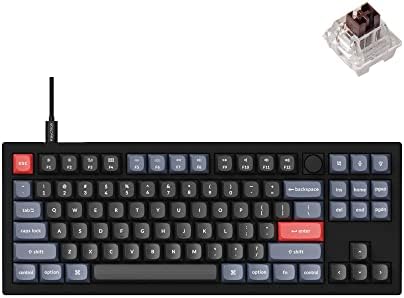
- 87 Keys Mechanical Keyboard: The V3 has a classic TKL (80%) layout with QMK/VIA support, which can offer you endless pos…
- Fully Customizable From the Inside Out: To build a fully customizable keyboard, we designed every component easily assem…
- Hot-swappable Support: With the pre-lubed mechanical tactile brown switch provides unrivaled tactile responsiveness with…
- Actuation force: 55gf
- Total travel: 3.5mm
- Type: MX-style linear
- Sound profile: Deep, muted, thocky without shouting
If you want the best-feeling linear that works in any modern hot-swap board without needing a Hall Effect PCB, this is it.
Caveat: at roughly $0.70 to $1 per switch depending on where you buy, an 87-key set adds up fast. If you’re on a strict budget, you’ll get 85% of the experience for a third of the price. Which brings us to the next pick.
3. Gateron Milky Yellow Pro 3.0 — Best Budget Switch
I refuse to gatekeep. If someone messages me with a $70 total budget for a keyboard, I’m not sending them to a Wooting. I’m sending them here.

- Gateron G Ks-3 milky yellow Pro V2 switch is Pre-lubed will feel better than regular milky yellow.
- Alloy contacts process upgrade, The improve the resistance to oxidation and vulcanization, Thus improving the service li…
- Yellow: Linear – 50g Actuation Force, Lifetime: 80 million cycles.
The Milky Yellow Pro 3.0 is the switch I’d put in a first serious build. Smooth enough out of the box that most people don’t feel the need to lube them. Bottom-out is firm but not fatiguing over long sessions. Sound is a clean clack that works fine in a foam-modded case.
- Actuation force: 50gf
- Total travel: 4.0mm
- Type: MX-style linear
- Best paired with: any decent hot-swap board under $100, including entry-level Royal Kludge, Redragon, or Keychron C-series models


If you’re new to mechanical keyboards, this is where I’d start. Then upgrade the board around them, not the switches. My budget mechanical keyboard buying guide covers what to pair these with without wasting money on marketing.
Caveat: these are boring in the best way. Enthusiasts will call them “beginner” switches. Fine. They still perform better than half the “premium” switches from five years ago and cost a fifth as much.
4. Kailh Speed Silver — Best Short-Travel Switch

- Ultra-Fast Actuation: Kailh Speed Silver switches feature an extremely low actuation point, perfect for competitive gami…
- Gaming-Optimized: Designed specifically for gamers, these switches enable ultra-fast key presses for competitive gamepla…
- 120-Pack: Ideal for DIY enthusiasts, or for a comprehensive keyboard repair or upgrade.
Kailh Speed Silvers actuate at around 1.1mm instead of the usual 2.0mm. On paper that sounds like a small difference. In practice — in a rhythm game like osu! or a fast shooter where you’re spamming reload and weapon swaps — it’s noticeable, and consistently so.
- Actuation force: ~40gf
- Actuation distance: 1.1mm
- Total travel: 3.5mm
- Type: MX-style linear
For twitch-heavy gameplay, these are still one of the fastest MX-style options you can buy. And unlike Cherry’s own Speed Silvers, the Kailh version feels smoother out of the box in my testing.
Caveat: short pre-travel means more accidental keypresses if you’re a heavy resting-hand typist. If you spend more time in Slack than in a Slayer’s Den, skip these. They shine when your fingers hover.
5. Kailh Box White — Best Clicky (If You Insist)
Cherry MX Blues are the reason clickies got a bad name in gaming. They rattle. They’re inconsistent. They double-tap on rapid presses. Kailh Box Whites fix all three problems with a click-bar mechanism instead of a click-jacket, and the difference is genuinely night and day.
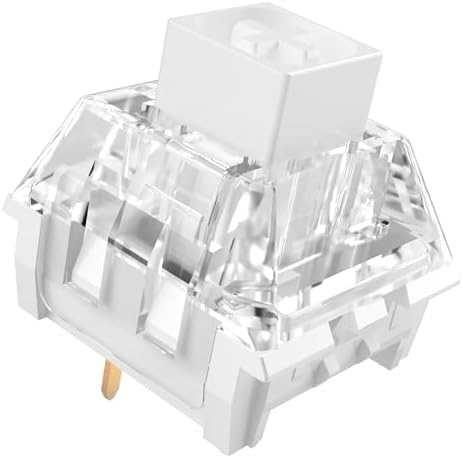
- [Quality] Kailh Box White Classic Mechanical Keyboard Switches, clicky type switches with distinct tactile feedback and …
- [Features] Kailh unique box structure (dustproof and waterproof), the guide bar is made of high quality POM material, PC…
- [Compatibility] 3 Pin switch,Compatible with most hot-swappable mechanical gaming keyboards or custom keyboards.
For gaming they’re still not optimal — the reset feel adds an extra beat of feedback that pure-linear players find distracting. But if you love the sound, play solo, and mostly do slower-paced games, they’re a real option instead of a joke.
- Actuation force: ~45gf
- Total travel: 3.6mm
- Type: MX-style clicky (click-bar)
Caveat: you will annoy anyone in a Discord call with you. This is not a bug.
Popular Gaming Switches I’d Actually Skip in 2026
Some of these will earn me hate mail. That’s fine.
- Cherry MX Red — Still fine, but 2015 called and wants its recommendation back. Any modern Gateron linear beats it for less money.
- Cherry MX Speed Silver — Stock feel is rougher than the Kailh Speed Silver, and the pre-travel savings aren’t worth what you give up in smoothness.
- Razer Green / Razer Orange — OEM’d, wobbly, and locked to Razer boards where you can’t easily swap them out. Skip.
- HyperX Red — Not offensive, just not special. And most boards they ship in aren’t hot-swap, so you’re stuck with them.
- Any “gaming edition” switch sold on RGB or aesthetics first — If the marketing page talks about the LED before the stem material, walk away. That’s a red flag every single time.
How to Choose the Right Gaming Switch for the Way You Actually Play
Skip the spec sheets for a second. Ask yourself these five questions in order, and the answer usually falls out on its own:
- Do you play competitively at a level where rapid trigger would matter? If yes, go Hall Effect. Gateron Magnetic Jade is the pick. Nothing MX-based will match what a good HE switch gives you on rapid double-taps and instant reset.
- Do you also type all day for work? Skew slightly heavier and stick with an MX linear that has some weight behind it. The Gateron Oil King’s 55gf spring handles both fast games and long typing sessions without wrist fatigue.
- Is your total budget under $100 for the board? Get a hot-swap board with Gateron Milky Yellow Pro 3.0. Don’t cheap out on the case — cheap out on switches you can upgrade later.
- Do you game in a shared space? Avoid clickies. Even Kailh Boxes. Your roommate isn’t the one you should be trying to outlast.
- Do you care mostly about sound? Any modern linear will sound good in a well-built case. The case matters more than the switch here. Don’t drop $150 on a switch set to fix a hollow board — mod the board first.
The Verdict on the Best Switches for Gaming in 2026
If you take one thing from this: the gaming switch conversation has genuinely changed. Hall Effect switches — the Gateron Magnetic Jade at the top of the pile — offer a level of input control that MX switches physically cannot match. If you’re buying a new board and gaming is a real part of your life, that’s where I’d start.
If you’re staying with a traditional MX hot-swap board, the Gateron Oil King is the best-feeling linear I’ve put fingers on this year. And if your budget is tight, the Milky Yellow Pro 3.0 will get you 85% of the way there for a third of the price. That’s not a consolation prize. That’s genuinely a smart buy.
Skip the Cherry loyalty. Skip the marketing around “gaming edition” anything. Buy the switch that fits the way you actually play, and put the rest of your budget where you’ll feel it — a solid case, a well-mounted PCB, and a stabilizer job that isn’t rattling under your space bar. That’s the setup that wins games. The switches just make it feel good while you do.
This article contains affiliate links. If you buy through them, I earn a small commission at no extra cost to you. I only recommend keyboards I’ve actually tested. As an Amazon Associate I earn from qualifying purchases.