Best Gaming Keyboards Under $30: Tested and Ranked

This article contains affiliate links. If you buy through them, I earn a small commission at no extra cost to you. I only recommend keyboards I’ve actually tested. As an Amazon Associate I earn from qualifying purchases.
Here’s the thing nobody tells you about the budget keyboard market: it’s the most chaotic shelf in PC gaming. A $28 board can show up looking like a $150 enthusiast piece — metal plate, hot-swap sockets, RGB everything — and it can also be a creaky plastic slab with mushy keys that dies in six months. I’ve tested more of these than I care to admit, and the gap between the worst and the best under $30 is bigger than the gap between most $100 and $200 boards.
If you’re hunting for the best gaming keyboard under 30 dollars — either for a kid’s first PC, a backup at the office, a travel board, or just because you don’t want to drop rent money on RGB — this guide is the shortcut. I’ll tell you what’s actually worth the money, what to ignore, and where the genuine sweet spots are right now.
A quick note on expectations before we get into it: at this price, you’re getting honest budget gear. Stabilizers will rattle a bit. ABS keycaps will shine after a year of heavy gaming. Some “mechanical” boards use Outemu or generic clones, not Cherry MX. None of that’s a deal-breaker — you just need to know what you’re paying for. I’ll be upfront on every pick.
Quick Comparison Table — TL;DR by What You Actually Need
If you’re skimming, this is the table to read. Picks are sorted by use case, not by who has the prettiest box.
- 🌟【60% Keyboard: 61 Keys Compact Design】Ultra-compact layout with 61 keys that free up your desktop, leaving more space f…
- 🌟【Mechanical keyboard: Responsive Blue Switches】CACKBIRD gaming keyboard features blue mechanical keys that give a satis…
- 🌟【Rainbow LED Backlit Accompanies Your Night】18 LED Rainbow Backlight Effects,5 brightness levels & speeds,1 customizati…

- [75% Mechanical Keyboard with Rainbow Led Backlight] The 75% keyboard can save desk space. The detachable USB C cable an…
- [Hot Swappable Linear Mechanical Keyboard] This hotswap function can let you customize your gaming keyboard mechanical w…
- [Multi-Function Knob and Indicators] A multi-function knob in the upper right corner of the 75% percent keyboard enables…

- 1.RGB Side Lighting & Rainbow Effects Designed to impress, this backlit mechanical keyboard features 13 preset LED rainb…
- 2.Premium Build with Full Size Metal Panel Crafted with a rugged metal top plate, this wired keyboard offers outstanding…
- 3. Flexible and Portable: Detachable USB Cable This wired mechanical keyboard comes equipped with a 1.8-meter detachable…

- Classic 60% Compact Design — This 60% gaming keyboard has a small size and it’s good for all environnement, business tra…
- Ergonomic Design and Mechanical Feel — The mini gaming keyboard key height is designed according to ergonomics,and it is…
- Cool RGB Backlit Effect — The 60% rgb keyboard include 6 backlight effects and 8 backlight color switching. Different RG…

- 【65% Compact Design】GEODMAER Wired gaming keyboard compact mini design, save space on the desktop, novel black & silver …
- 【Wired Connection】Gaming Keybaord connects via a detachable Type-C cable to provide a stable, constant connection and ul…
- 【Strong Working Life】Wired gaming keyboard has more than 10,000,000+ keystrokes lifespan, each key over UV to prevent fa…

- 【104 Keys Full Size Keyboard】GEODMAER Wired Gaming Keyboard Featuring classic full-size 104-key layout with 12 multime…
- 【Wired Connection】Gaming Keybaord connects via 1.5m wired connection with ultra-low input latency and 19-key full anti-g…
- 【LED Backlit Keyboard】GEODMAER Wired Gaming Keyboard using the new two-color injection molding key caps, characters tran…
| Use Case | Pick | Switch / Type | Layout | Why It Wins | Check It |
|---|---|---|---|---|---|
| Best Overall | Newmen GM326 | Linear Red mechanical, hot-swap | 75% (82 keys) | Hot-swap and a volume knob under $30 is nearly unheard of | Amazon |
| Best Full-Size Mechanical | Newmen GM325Pro | Linear Red mechanical | 104 keys | Metal top plate, hot-swap, side RGB — punches way above price | Amazon |
| Best for Clicky Fans / FPS | CACKBIRD 60% Blue | Clicky Blue mechanical | 60% (61 keys) | Loud, tactile, and tiny — great for desk-space-starved FPS players | Amazon |
| Best Quiet 60% | Snpurdiri 60% RGB | Membrane (mechanical feel) | 60% (61 keys) | Stealth-quiet, RGB-lit, won’t wake roommates | Amazon |
| Best Compact Office Hybrid | GEODMAER 65% | Membrane | 65% (68 keys) | Arrow keys + small footprint, dirt cheap | Amazon |
| Best for Productivity + Light Gaming | GEODMAER 104 Full-Size | Membrane | 104 keys + 12 media | Numpad, media keys, spill-resistant, plug-and-play | Amazon |
What You Actually Get for $30 (A Brief Reality Check)
I’m not going to pretend a $28 board competes with a Keychron Q1 or a Wooting 60HE. It doesn’t. What it does is cover the basics — and at this price, the basics are way better than they were five years ago.
Here’s the honest scorecard for the under-$30 tier:
- Switches: You’re getting Outemu, Content, or unbranded clones. Outemu Reds and Blues are genuinely fine. Not Cherry, not Gateron, but smooth enough that you won’t be cursing them.
- Keycaps: Almost always ABS, almost always double-shot or pad-printed with translucent legends for RGB shine-through. They’ll get oily and shiny — that’s the tradeoff.
- Stabilizers: Cheap plate-mount stabs, usually rattly out of the box. A two-minute lubing job with any dielectric grease fixes 80% of it if you care.
- Build: Mostly plastic. The Newmen GM325Pro is the rare exception with a real metal top plate, which is honestly impressive.
- Software: Mostly none. A few boards offer basic remapping software, but don’t expect QMK or VIA at this price. What you get is FN-layer shortcuts.
That’s the deal. If you can live with it, there’s real value here.
The Best Gaming Keyboards Under $30 — Reviewed
1. Newmen GM326 — Best Overall Under $30
- [75% Mechanical Keyboard with Rainbow Led Backlight] The 75% keyboard can save desk space. The detachable USB C cable an…
- [Hot Swappable Linear Mechanical Keyboard] This hotswap function can let you customize your gaming keyboard mechanical w…
- [Multi-Function Knob and Indicators] A multi-function knob in the upper right corner of the 75% percent keyboard enables…
| Spec | Detail |
|---|---|
| Layout | 75% (82 keys) |
| Switch | Linear Red mechanical, hot-swap (3-pin) |
| Keycaps | ABS, double-shot |
| Backlight | Rainbow LED, 6 colors / 20 modes |
| Cable | Detachable USB-C |
| Extras | Volume knob, Mac/Win switch |
The Newmen GM326 is the most interesting board on this list, and it’s not particularly close. A 75% layout with a working volume knob, hot-swap sockets, and a detachable USB-C cable for under thirty bucks? Five years ago that combination didn’t exist below $80.
The Reds are fine. Smooth-ish, slightly scratchy stock — which you’d expect at this price. But because the sockets are hot-swap, you can drop in Gateron Yellows or Outemu Cream Reds later for under $25 in switches and have a genuinely good-feeling board for under $55 total. That’s a smart upgrade path most $30 boards don’t give you.
The catch: Stabilizers are loud. Spacebar rattles. Backspace too. Five minutes of dielectric grease fixes it, but you’ll need to fix it.
Buy this if: You want a board with a real upgrade ceiling. This is the one I’d hand to a teenager getting into PC gaming.
2. Newmen GM325Pro — Best Full-Size Mechanical Under $30
- 1.RGB Side Lighting & Rainbow Effects Designed to impress, this backlit mechanical keyboard features 13 preset LED rainb…
- 2.Premium Build with Full Size Metal Panel Crafted with a rugged metal top plate, this wired keyboard offers outstanding…
- 3. Flexible and Portable: Detachable USB Cable This wired mechanical keyboard comes equipped with a 1.8-meter detachable…
| Spec | Detail |
|---|---|
| Layout | Full-size, 104 keys |
| Switch | Linear Red mechanical |
| Build | Metal top plate, ABS keycaps |
| Backlight | Rainbow + RGB side lighting |
| Cable | Detachable USB, 1.8m |
| Extras | Macro recording, FN media shortcuts |
I’m a little surprised this one exists at the price. A full-size mechanical with a metal top plate, side RGB strip, and full-key rollover — Newmen is clearly trying to flex on the budget category, and it mostly works.
The metal plate matters more than people think. It makes the board feel less hollow and dampens some of the typical budget-board pinginess. It’s heavier than the plastic competition, which means it actually stays put when you’re WASD-stomping in Apex.
Side lighting is gimmicky but kind of fun. It’s the only RGB on the board (the keys themselves get a fixed rainbow), so if you’re chasing per-key RGB, look elsewhere. If you just want a board that looks like it cost more, this nails it.
The catch: Linear Reds at this tier are noticeably scratchier than Gateron or Cherry equivalents. Bottoming out feels a touch harsh. You get used to it within a day, but it’s there.
Buy this if: You want a full-size mechanical that doesn’t feel like a toy. Best pick for spreadsheet warriors who also game on weekends.
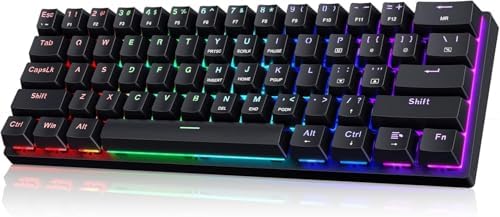
3. CACKBIRD 60% Mechanical Blue Switch — Best for Clicky Lovers
- 🌟【60% Keyboard: 61 Keys Compact Design】Ultra-compact layout with 61 keys that free up your desktop, leaving more space f…
- 🌟【Mechanical keyboard: Responsive Blue Switches】CACKBIRD gaming keyboard features blue mechanical keys that give a satis…
- 🌟【Rainbow LED Backlit Accompanies Your Night】18 LED Rainbow Backlight Effects,5 brightness levels & speeds,1 customizati…
| Spec | Detail |
|---|---|
| Layout | 60% (61 keys) |
| Switch | Clicky Blue mechanical |
| Keycaps | Double-shot ABS |
| Backlight | 18 rainbow LED effects |
| Cable | Detachable USB-C |
| Extras | Foldable feet, keycap puller included |
Listen, I’m not the biggest blue-switch evangelist. Clicky switches in shared spaces are how friendships end. But if you live alone, type angrily, or just love that crisp tactile click, the CACKBIRD 60% is the entry ticket.
The 60% layout is what makes this work for FPS. No numpad, no function row, no nav cluster — just the alphas and modifiers. Your mouse hand gets way more desk real estate, which matters when you’re playing low-DPI in Counter-Strike or Valorant. Arrow keys live on the FN layer (FN + Space toggles them in), which is fine once you build the muscle memory.
Build quality is reasonable. ABS plastic, slight flex if you really press on it, but nothing that affects typing. The detachable Type-C cable is on the right side rather than the more common top-center placement — slightly weird, mostly irrelevant.
The catch: It’s loud. Like, “your roommate will hate you” loud. Blue switches sound like a typewriter convention. Also, the keycap legends are pad-printed on some keys, so they may wear faster than the shine-through alphas.
Buy this if: You play FPS, type a lot, live alone, and love that classic mechanical clack. Skip if you share walls.
4. Snpurdiri 60% RGB Membrane — Best Quiet 60%
- Classic 60% Compact Design — This 60% gaming keyboard has a small size and it’s good for all environnement, business tra…
- Ergonomic Design and Mechanical Feel — The mini gaming keyboard key height is designed according to ergonomics,and it is…
- Cool RGB Backlit Effect — The 60% rgb keyboard include 6 backlight effects and 8 backlight color switching. Different RG…
| Spec | Detail |
|---|---|
| Layout | 60% (61 keys) |
| Switch | Membrane with “mechanical feel” |
| Backlight | RGB, 6 effects, 8 colors |
| Cable | Detachable USB-C |
| Style | Black-and-white two-tone |
Here’s the contrarian take I promised. For some people, a membrane is the smarter $25 purchase. Hear me out.
If you live with a partner, share a dorm, or take a board to a coffee shop, a clicky mechanical will get you murdered. The Snpurdiri 60% is a membrane that does a decent job mimicking the height and travel of a mechanical board without the racket. The keys aren’t as crisp, sure. The actuation isn’t as defined. But the noise level is whisper-quiet, and the RGB is honestly one of the better budget light shows I’ve seen.
The black-and-white keycap design also looks unusually clean for the price. Most cheap boards go for “edgy gamer black on black with red accents.” This one looks like something you wouldn’t be embarrassed to put on a desk in a Zoom meeting.
The catch: It’s membrane. It feels like a membrane. If you’ve used a real mechanical, you’ll know within five minutes. The “mechanical feel” marketing is generous.
Buy this if: Quiet matters more than authenticity. Apartment dwellers, this is your pick.
5. GEODMAER 65% Membrane — Best Compact Office Hybrid
- 【65% Compact Design】GEODMAER Wired gaming keyboard compact mini design, save space on the desktop, novel black & silver …
- 【Wired Connection】Gaming Keybaord connects via a detachable Type-C cable to provide a stable, constant connection and ul…
- 【Strong Working Life】Wired gaming keyboard has more than 10,000,000+ keystrokes lifespan, each key over UV to prevent fa…
| Spec | Detail |
|---|---|
| Layout | 65% (68 keys) |
| Switch | Membrane |
| Keycaps | Two-color injection molding, translucent legends |
| Backlight | Single-color LED, breathing modes |
| Cable | Detachable USB-C |
| Extras | 26-key anti-ghosting, lockable Win key |
The 65% layout is genuinely underrated. You keep dedicated arrow keys, ditch the numpad and function row, and end up with a board that’s tiny but doesn’t fight you when you need to navigate a document. For someone who games some, types more, and doesn’t need a numpad, the 65% is arguably the smartest small layout.
The GEODMAER is a no-frills membrane build. Detachable Type-C, lockable Windows key (great for Fortnite players who keep accidentally minimizing mid-fight), and the keys are quieter than any mechanical at this price. It’s the kind of board you buy, plug in, forget about, and replace in two years when something dies.
The catch: Backlight is single-color (usually rainbow, not customizable). If you want per-key RGB, this isn’t it. Also, 26-key rollover is plenty for gaming, but it’s not full N-key like the mechanical options.
Buy this if: You want one board for work and casual gaming, and noise is a factor.
6. GEODMAER 104 Full-Size Membrane — Best Productivity + Gaming Hybrid
- 【104 Keys Full Size Keyboard】GEODMAER Wired Gaming Keyboard Featuring classic full-size 104-key layout with 12 multime…
- 【Wired Connection】Gaming Keybaord connects via 1.5m wired connection with ultra-low input latency and 19-key full anti-g…
- 【LED Backlit Keyboard】GEODMAER Wired Gaming Keyboard using the new two-color injection molding key caps, characters tran…
| Spec | Detail |
|---|---|
| Layout | Full-size, 104 keys + 12 media keys |
| Switch | Membrane, spill-resistant |
| Backlight | LED rainbow, breathing modes |
| Cable | Wired, 1.5m |
| Extras | 19-key anti-ghosting, Win-lock |
If you absolutely need a numpad — accountants, finance folks, Excel power users who also like to game after work — this is the board. The full-size layout with 12 dedicated media keys is the kind of feature you typically pay $60+ for, and GEODMAER offers it for less than what you’d spend on lunch and a coffee twice.
Spill resistance is a real feature, not marketing fluff. Most budget membrane boards have drainage channels that genuinely keep a knocked-over Diet Coke from killing the board. Worth more than people realize if you’ve ever lost a keyboard to a spilled drink.
The 19-key anti-ghosting is fine for gaming. Not full N-key, but you’re not going to run into rollover issues in any normal game.
The catch: It feels like a membrane. There’s nothing to disguise the spongy bottom-out. The keycaps are smooth and slick — fine for typing, slightly slippery for gaming compared to textured PBT.
Buy this if: You need a numpad and media keys, want spill resistance, and aren’t married to the mechanical feel.
How to Pick a Cheap Gaming Keyboard (Buying Guide)
Three questions decide which board you want. That’s it.
1. What’s your noise tolerance?
- High (live alone, don’t care): Mechanical with Blue or Brown switches. Loudest, most satisfying.
- Medium (have roommates but they’re chill): Mechanical with Red or linear switches. Still clacky, not click-y.
- Low (apartment walls, late-night gaming, sleeping partner): Membrane. End of story.
2. What’s your layout preference?
Quick reference:
| Layout | Key Count | Best For |
|---|---|---|
| 60% | 61 | FPS gamers, minimalist desks, travel |
| 65% | 68 | Same as 60% but you want arrow keys |
| 75% | 82 | Compact but still has F-row — best all-arounder |
| TKL (80%) | 87 | No numpad, otherwise full |
| Full-size | 104+ | You need the numpad for work |
3. Do you want to upgrade later?
If yes, you want hot-swap. The Newmen GM326 is the only true hot-swap board on this list, and it’s the one I’d buy if I planned to modify anything down the road. The others are soldered — what you buy is what you keep.
Membrane vs. Mechanical at $30: The Real Answer
This is the question I get most, and the honest answer isn’t what most reviewers say.
At $30, a budget mechanical isn’t dramatically better than a good budget membrane. The switch quality at this price is decent but not great. The keycaps are equivalent. The stabilizers on the mechanical are often a downgrade compared to the consistent feel of a uniform membrane.
What you really get with the mechanical at this price is:
- Per-key actuation feel
- Louder, more “premium” sound
- The ability to swap switches later (only if hot-swap)
- Marginally faster response in tight gaming scenarios
What you get with the membrane:
- Quieter operation (significantly)
- Lower price for equivalent features
- Better spill resistance in many cases
- Lighter weight
For a competitive FPS player who lives alone? Mechanical. For literally anyone else at this price tier? It’s a coin flip, and noise level should be the tiebreaker.
Mistakes People Make Buying Budget Keyboards
A few quick things I see all the time:
- Buying for RGB. Every board under $30 has RGB now. It’s not a differentiator. Don’t pay an extra $10 for “16.8 million colors” — they all do that.
- Trusting “mechanical feel” marketing on membrane boards. It’s marketing. Some are better than others, but none feel like a real mechanical.
- Ignoring keycap material. ABS at this price is unavoidable. Just accept the keycaps will shine, and replace them in a year if it bothers you. Cheap PBT sets run $15-20.
- Buying the cheapest possible mechanical to “save money.” Some sub-$25 mechanicals are genuinely worse than $25 membranes. The Newmen boards are the floor I’d set for mechanical at this tier.
FAQ
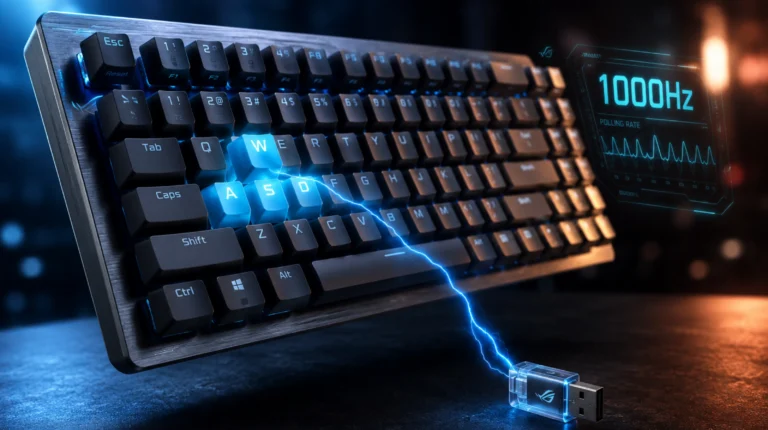
Q: Are these keyboards actually good for competitive gaming? For ranked play in Valorant, CS2, or Apex, any of these will work. Polling rates are 1000Hz on the mechanicals and 500Hz on most membranes, which is well within the range where you won’t notice a difference. What you’ll feel more is the switch type and your own muscle memory.
Q: Will the stabilizers rattle? Almost certainly, yes. Two minutes with a dielectric grease (or even Vaseline in a pinch) on the wire ends fixes it. Watch any “stabilizer mod” video on YouTube.
Q: Are Outemu switches the same as Cherry MX? No, but they’re closer than they were five years ago. Outemu Reds and Blues are honestly fine for the price. Don’t expect Gateron or Cherry smoothness, but they’re not the disasters they used to be.
Q: How long will a $30 keyboard last? With normal use, 2-4 years. Mechanical switches are rated for 50-100 million keystrokes, which most casual gamers never approach. The first thing to fail is usually the USB cable connection (which is why detachable cables matter) or the spacebar stabilizer.
Q: Can I use these with a Mac? All six work with Mac OS. The Newmen GM326 has a dedicated Win/Mac switch on the indicator panel, which is the cleanest implementation. Others require a FN-layer toggle.
Final Verdict: The Best Gaming Keyboard Under $30
If I had to pick one board to recommend without knowing anything about you, it’s the Newmen GM326. Hot-swap sockets at this price are absurd, the 75% layout is the best all-purpose form factor, and the volume knob is the kind of feature that disappears into your workflow until you realize you can’t live without it. It’s the board that gives you the most room to grow.
If you need a numpad, the Newmen GM325Pro is the obvious pick — metal plate, full-size, mechanical, and it actually feels solid.
If noise is the deciding factor, the Snpurdiri 60% is the apartment-friendly winner.
And if your roommate already left and you want to clack like a maniac at 2 AM in a ranked match, the CACKBIRD 60% Blue delivers on the promise.
Here’s the bigger takeaway, though: spending $30 on a keyboard in 2026 isn’t the compromise it used to be. The budget tier has gotten genuinely good. You’re not getting endgame gear, but you’re getting something that won’t embarrass itself in a Discord call or hold you back in a ranked match. That’s a fair trade for the cost of a couple of pizzas.
Pick the layout you want, match the noise level to your living situation, and don’t overthink the rest.
This article contains affiliate links. If you buy through them, I earn a small commission at no extra cost to you. I only recommend keyboards I’ve actually tested. As an Amazon Associate I earn from qualifying purchases.