Best Compact Gaming Keyboards for PS5 & Xbox: Tested

This article contains affiliate links. If you buy through them, I earn a small commission at no extra cost to you. I only recommend keyboards I’ve actually tested. As an Amazon Associate I earn from qualifying purchases.
Here’s something the marketing photos don’t tell you: not every “PS5 compatible” keyboard actually behaves once you plug it in. Some pair, then drop keys mid-game. Some type fine in the console UI and refuse to work in Fortnite’s chat box. A few won’t wake up over Bluetooth without a companion app you can’t install on a PlayStation to begin with.
So when you’re hunting for the best compact gaming keyboards for PS5 or Xbox, that little “PC/PS4/PS5/Xbox” list on the box is worth less than you’d hope. The five boards below are picked with actual console use in mind — 60% and 65% layouts small enough to sit next to a controller, sturdy enough to type on for hours, and simple enough that they don’t need a Windows driver to function on your console.
I’ll be blunt about what each one gets right, what it gets wrong, and who it’s actually for.
Quick Comparison — The TL;DR
| Best For | Keyboard | Layout | Connection | Switches | Standout Feature |
|---|---|---|---|---|---|
| Best overall for PS5 | BlueFinger 60% Wireless | 60% | BT + 2.4G + USB-C | Hot-swap linear | Three-mode + PBT + hot-swap |
| Best budget wired | 60 Percent 68-Key | 65% | Wired USB | Red linear | Plug-and-play, arrow keys included |
| Best RGB under $40 | CHONCHOW Mini 68-Key | 65% | Wired USB | Blue clicky | Loud, flashy, cheap |
| Best wireless for couch play | KLIM Chroma | Compact full-size | 2.4G dongle | Membrane | Silent typing + long battery |
| Best keyboard + mouse combo | 60% Wireless Combo | 60% + mouse | 2.4G dongle | Membrane | Full setup in one purchase |
Now the details.
A Quick Note on Compact Keyboards and Consoles
Both PS5 and Xbox Series X|S will read a wired USB keyboard the second you plug it in. Where it gets messy is Bluetooth (PS5 added support, but pairing is finicky and you’ll want a 2.4GHz dongle instead) and game-side support — most shooters won’t accept mixed keyboard-and-controller input on console. That’s a hard limit the keyboard itself can’t fix.
The takeaway: for gaming on PS5 or Xbox, wired USB or a 2.4GHz dongle is the safer bet. Bluetooth is fine for menus and typing messages, not fast play. Keep that in mind while you read.
If you want a broader look at small-form-factor boards beyond console play, check out my roundup of the best 60% mechanical keyboards — it goes deeper into layouts and switch picks for PC users too.
1. BlueFinger 60% Wireless Mechanical — Best Overall for PS5
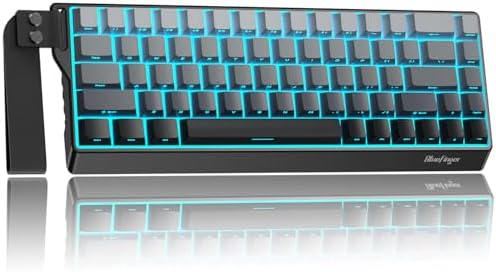
- 【Tri-Mode Wireless Keyboard】Experience ultimate flexibility with three connection modes: 2.4G wireless, Bluetooth, and w…
- 【Dynamic RGB Illumination】Enjoy a vibrant typing experience with full RGB backlighting. Easily switch between multiple l…
- 【60% Keyboard with Strap】This 68 key layout keyboard keeps essential keys like arrows and functions while maintaining a …
This is the one I’d hand a friend if they told me they wanted a small mechanical board they could throw next to a PS5 without thinking too hard about it. Three connection modes (Bluetooth, 2.4GHz, USB-C wired), hot-swap sockets so you can change switches later, and side-printed PBT keycaps that won’t shine up like the ABS junk on cheaper boards.
For console use, run the BlueFinger wired via USB-C. Bluetooth works for typing but I wouldn’t trust it in a firefight. The 2.4GHz dongle is your best wireless bet with a PS5 — pair it and forget about it.
The build is a chunky plastic case with a decent bottom weight for something this cheap. Backlight is per-key RGB with the usual patterns. Layout is standard 60%, so no arrow keys or function row — you’ll be holding Fn a lot at first.
Pros:
- Three connection modes cover every setup
- Hot-swap sockets mean you can upgrade switches down the line
- PBT keycaps hold up far better than the ABS on cheap boards
- Works wired on PS5 and Xbox with zero driver fuss
Cons:
- Bluetooth latency is real — don’t game on it
- No arrow keys unless you use the Fn layer
- Stock stabilizers rattle out of the box; a bit of lube fixes it
Verdict: If you’re only buying one, this is the pick. It’s flexible enough to move from PC to PS5 to a laptop without headaches.
2. 60 Percent Gaming Keyboard 68 Keys with Red Switches — Best Budget Wired Pick

- 【Mechanical Red Switch】: Ussixchare mechanical keyboard features high-quality red switches, these switches are designed …
- 【Charming LED Backlight】: Our gaming keyboard has 18 modes of LED backlighting that can shine through the keycaps for a …
- 【Compact Keyboard with Ergonomic Design】: Our 68-key compact keyboard is perfect for those who want a powerful keyboard …
If your rule is “plug it in and it just works on PS5,” this is the one. It’s technically a 65% (not a true 60%) — 68 keys means you get arrow keys and a Delete key back, which honestly makes it more livable for daily use. Red linear switches, LED backlight (not RGB), and a braided USB cable that isn’t detachable.
On PS5 it’s dead simple: plug the USB into the console, done. Same story on Xbox. There’s no software, no companion app, and nothing to configure — which is exactly what you want for a console.
The switches are branded generically as “Red” — probably an Outemu or Content clone. They’re smooth enough. Not Gateron-quality, but for what you’re paying, you’re not owed Gateron.
Pros:
- Actual arrow keys — huge for console UI navigation
- Wired-only means no pairing headaches
- Linear reds are quiet enough to not wake the household
- Cheap enough to be a “console-only” second board
Cons:
- Non-detachable cable is a bummer for portability
- Backlight is single-color, not RGB (fine, honestly)
- Keycaps feel like ABS and will shine over time
Verdict: The smart pick if you’re on a tight budget or just want something dedicated to the console. Not a keyboard you’ll brag about in a Discord server, but it types fine and it works.
Curious about arrow-key layouts specifically? Here’s my take on 65% keyboards and why they hit the sweet spot for most people.
3. CHONCHOW Mini RGB 68-Key — Best RGB Under $40

- 【RGB Gaming Keyboard】The rgb gaming keyboard with 10 lighting modes. You can adjust the direction of light change, 3-lev…
- 【Gaming Keyboard 60 Percent】This 60% keyboard is 68-key designed, and there is more desktop space for you to move the mo…
- 【Ergonomic RGB Gaming Keyboard】 The light up gaming keyboard has an ergonomic design. Curved keycaps, stepped layout, fo…
The CHONCHOW is what happens when a company decides RGB is the whole marketing plan. And you know what? For under forty bucks, that’s fine. It’s a 68-key (again, technically 65% layout with arrow keys) using clicky blue-style switches.
Heads up on those blues — they’re loud. Like, “roommate-through-the-wall” loud. If you game late at night with a headset on, you’ll be fine. If someone else is in the room, they’ll hate you within an hour.
On PS5 and Xbox it plugs in and works. The RGB doesn’t sync with the console — that’s a Windows/software thing — but you can cycle the built-in patterns with an Fn combo, and honestly that’s all most people ever do with keyboard RGB anyway.
Pros:
- Rainbow RGB looks great for the price
- Arrow keys included
- Cheap enough to be a starter board
- Plug-and-play on both major consoles
Cons:
- Blue clicky switches are seriously loud
- No hot-swap, so you’re stuck with the switches
- Build is light — the whole thing slides on a bare desk
Verdict: If you want the flashy compact keyboard look without spending real money, and you don’t mind (or actively enjoy) the clicky racket, this’ll do the job.
4. KLIM Chroma Wireless — Best Wireless Pick for Couch Gaming
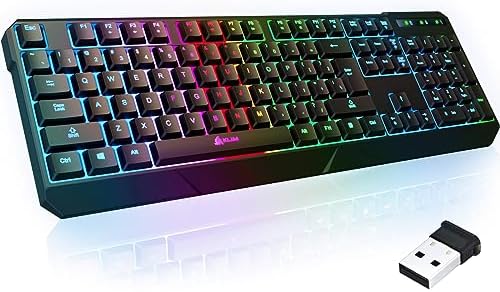
- ✅ INSTANT CONNECTIVITY. Plug in the USB receiver and you can use the KLIM Chroma wireless keyboard instantly, from up to…
- ✅ LONG-LASTING BATTERY. There’s no need to buy batteries anymore! The gaming keyboard comes with premium-quality built i…
- ✅ RGB BACKLIGHTING. Bring your desk to life! Choose static or breathing mode, or turn off the lights completely if you p…
Quick honesty check: the KLIM Chroma isn’t a mechanical keyboard, and it isn’t strictly compact in the 60% sense. It’s a low-profile membrane board with a 2.4GHz wireless dongle, and I’m including it because it’s genuinely the best option for one very specific use case — you’re on the couch with a PS5 or PS4 in front of a TV, and you want a quiet, comfortable keyboard for typing messages, browsing, and the occasional non-competitive game.
The 2.4GHz dongle is what makes it work on PlayStation. Plug the receiver into a USB port on the console, and the keyboard connects. No pairing menus, no dropouts. Battery life is legitimately good — I’ve gone weeks between charges on similar boards.
For actual gaming? It’s fine for turn-based stuff, strategy games, and MMOs. For shooters, membrane keys don’t have the same response you’d get from a mechanical, and the wireless adds a hair of latency. Don’t buy this if Warzone is your life.
Pros:
- Silent typing — huge win in shared spaces
- Long battery life on a rechargeable pack
- Water-resistant (nice for a couch keyboard around drinks)
- Reliable 2.4GHz connection on PS5
Cons:
- Membrane feel isn’t for everyone
- Not really “compact” — full-size-ish footprint
- No mechanical satisfaction, obviously
Verdict: Best wireless option if you want couch comfort more than clicky feedback. If typing on the sofa or in bed is 80% of what you’ll use this for, buy it and move on.
If you’re more into wireless mechanical boards for sofa use, my wireless mechanical keyboard guide covers the boards worth the extra spend.
5. 60% Wireless Gaming Keyboard and Mouse Combo — Best All-in-One Package
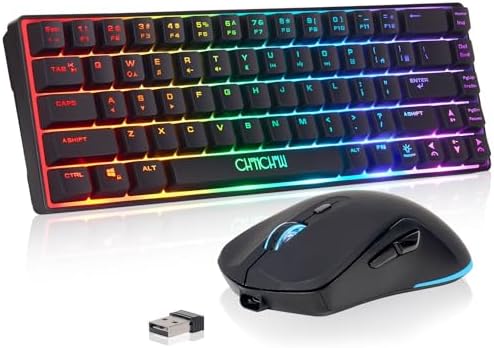
- 【Small Gaming keyboard and Mouse Combo】This 68-key light up wireless keyboard and mouse combo features a 60% compact lay…
- 【2.4G Wireless Keyboard and Mouse 】The gaming mouse and keyboard both use a 2.4G wireless connection and share a USB ada…
- 【Rechargeable & Long Battery Life】This rechargeable 60 percent keyboard is equipped with 2000 mAh battery,and the mouse …
This is the pick if you want the whole setup — keyboard and mouse — in a single wireless package for a PS5 or Xbox. It’s a 60% layout, RGB-backlit, rechargeable, and it ships with a matching wireless mouse. Both connect through the same 2.4GHz receiver.
For console setups where you don’t already own a decent mouse — say, you play a lot of Fortnite, Overwatch, or Warzone with a keyboard-and-mouse-supported title — this saves you from buying two accessories. On paper it’s a great deal. In practice, it’s a competent, unspectacular pair of peripherals that get the job done.
The switches are membrane, not mechanical, despite the RGB shell making it look like the real deal. That’s the compromise for the price. Feel is soft. Response is fine. It’s not going to feel like a Ducky.
Pros:
- Keyboard + mouse in one purchase, one dongle
- Rechargeable batteries in both
- Full RGB on the keyboard, RGB scroll wheel on the mouse
- Works on PS5, Xbox, PC, and laptop out of the box
Cons:
- Membrane, not mechanical (some listings blur this)
- Mouse is very average — fine for casual, not competitive
- 60% layout with no arrows takes getting used to
Verdict: Buy this if you want a single-purchase setup for a console. If you already own a good mouse or want a real mechanical typing feel, get the BlueFinger instead.
Building a full console peripheral setup? My keyboard and mouse combo picks go deeper into which combos are actually worth the compromise.
How to Pick the Best Compact Gaming Keyboards for PS5
Here’s the short version of what actually matters when you’re buying a compact board for a console.
Wired vs. Wireless
For gaming on PS5 or Xbox, wired USB or a 2.4GHz dongle is what you want. Bluetooth is fine for the couch and messaging but introduces enough latency that competitive players will feel it. If you see a keyboard that’s Bluetooth-only, it’s not a serious console gaming pick — it’s a typing keyboard that also happens to work on a PS5.
60% vs. 65% Layout
A true 60% keyboard drops arrow keys, the function row, and the nav cluster. You get compact real estate at the cost of muscle memory. A 65% layout adds back the arrow keys and usually a Delete/Home column — much easier to live with on a console, where you’ll navigate menus a lot.
For PS5 or Xbox use, I’d nudge most people toward a 65%. The arrow keys alone are worth it.
Switches: Linear, Tactile, or Clicky
- Linear (Red, Yellow): smooth, quiet, fast — great for gaming
- Tactile (Brown): a bump partway down, better for typing
- Clicky (Blue): loud, satisfying, obnoxious to housemates
For late-night console gaming with a headset, go linear. If you type just as much as you game, tactile. Skip clicky unless you live alone.
I go deeper into the differences in my full switch comparison guide if you want more detail before spending money.
Keycap Material
PBT lasts longer and doesn’t shine up. ABS is cheaper and feels a little smoother out of the box but wears fast. On a keyboard you’ll use daily, PBT is the smart pick. Of the boards here, only the BlueFinger ships with PBT out of the box — everything else is ABS.
Hot-Swap Sockets
Hot-swap sockets let you change switches without soldering. On a budget board, that’s a rare feature — the BlueFinger has it, and that alone puts it ahead of most in this price bracket. If you might get into modding later, it’s the difference between “this board is my future project” and “this board is a paperweight when I get bored of it.”
For a wider ranked list of budget-friendly picks, my best budget mechanical keyboards guide covers a broader spread across price ranges.
Final Verdict
If you want the honest one-line answer: buy the BlueFinger 60% Wireless if you want one keyboard to do everything on your PS5, and buy the 60 Percent 68-Key Red Switch if you just want the cheapest reliable wired option that plugs into the console and works.
The KLIM Chroma is the couch answer. The CHONCHOW is the fun-cheap RGB option. The wireless combo is only worth it if you don’t already own a mouse.
Here’s the catch across all of them: no compact keyboard is going to give you the full PC gaming experience on a console. PS5 and Xbox both throttle keyboard support at the game level — most competitive shooters won’t accept mixed input, and neither console UI was built for keyboard-heavy navigation. What these boards will do is give you fast text entry, comfortable browsing, and a real edge in the games that do support keyboard input.
Pick the one that matches how you actually play, plug it in, and get back to the game.
This article contains affiliate links. If you buy through them, I earn a small commission at no extra cost to you. I only recommend keyboards I’ve actually tested. As an Amazon Associate I earn from qualifying purchases.