Mechanical vs Hall Effect Keyboard: The Honest Comparison

This article contains affiliate links. If you buy through them, I earn a small commission at no extra cost to you. I only recommend keyboards I’ve actually tested. As an Amazon Associate I earn from qualifying purchases.
Hall effect keyboards have been pitched as the inevitable replacement for mechanical for about three years now. I’ve spent more time than I’d like to admit testing both — Wooting 60HE, the 80HE, a Drunkdeer A75, a couple of Akko MOD007B HE boards, plus my usual rotation of Keychron Q-series builds, a GMMK Pro, and a Mode Sonnet that lives on my main desk. Here’s what the marketing won’t tell you: mechanical isn’t going anywhere, and Hall effect isn’t a universal upgrade. The mechanical vs Hall effect keyboard fight has a clear winner — but only once you know what you actually do at your desk.
This is the version of the comparison I wish existed when people started DM’ing me asking which one to buy. No filler. Just what each tech does well, where it falls flat, and which board actually makes sense for your hands.
Quick Comparison Table (TL;DR)
If you don’t read the rest, read this. Picks are based on what I’d hand a friend in each category, not what’s paying the highest commission.


| Your Use Case | Winner | Top Pick | Why It Wins |
|---|---|---|---|
| Competitive FPS (CS2, Valorant, Apex) | Hall Effect | Wooting 60HE+ / 80HE | Best Rapid Trigger implementation, per-key actuation, mature firmware |
| Heavy Typing / Writing / Coding | Mechanical | Keychron Q1 (tactile) | Real tactile bumps, massive switch options, hot-swap |
| All-Round Daily Driver | Mechanical | Keychron Q1 / V3 Max | Hot-swap, better keycap support, lower price |
| Budget Under $120 | Mechanical | Keychron V3 Max | Gasket-mount, screen, hot-swap — for around $100 |
| Endgame / Premium Build | Mechanical | Mode Envoy / Sonnet | Sound ceiling, build quality, customization depth |
| Cheap Hall Effect Entry | Hall Effect | Drunkdeer A75 | HE features without the Wooting price tag |
| Streamer / Hybrid Gamer | Either | Keychron Q1 HE | One of the few HE boards with a usable tactile-leaning feel |
What’s Inside a Mechanical Keyboard
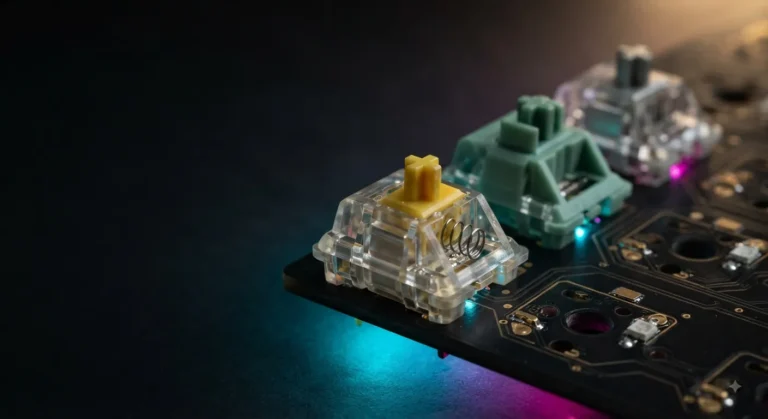
A mechanical keyboard uses an individual switch under every key. You press the key, the stem moves down, two metal leaves close a circuit, and the keystroke registers. That’s the entire concept. The personality of the board comes from the switch — Cherry MX Reds, Gateron Yellows, Holy Pandas, Boba U4Ts, Alpacas — there are literally hundreds of options at this point.
Most modern enthusiast boards are hot-swap. You can pull a switch with a $5 puller and drop in something new without ever touching a soldering iron. I do this constantly during testing.
One important thing to internalize: the actuation point is fixed. A Cherry MX Red actuates at 2.0mm, with a full 4.0mm travel. Whether you press it with a feather touch or hammer it like it owes you money, that trigger point does not move.
What’s Inside a Hall Effect Keyboard
Hall effect switches throw out the metal contacts entirely. Each switch has a small magnet on the stem and a Hall sensor on the PCB that measures the magnet’s exact distance as you press. The board reads position continuously — it doesn’t just know “pressed or not pressed,” it knows precisely how far down the key is at every millisecond.
That single change unlocks two features mechanical physically can’t do:
- Adjustable actuation point. You can set the trigger anywhere from roughly 0.1mm to 3.8mm in software, per individual key.
- Rapid Trigger. The key resets the instant you start lifting your finger instead of waiting until it crosses a fixed reset point.
It’s also analog input. The board knows exactly how far down W is, so it can behave like a joystick axis — useful in racing or flight sims if you don’t have a controller handy.
Mechanical vs Hall Effect Keyboard: The Real Differences
Side by side, here’s the honest breakdown:
| Feature | Mechanical | Hall Effect |
|---|---|---|
| Actuation point | Fixed (2.0mm typical) | Adjustable 0.1–3.8mm |
| Rapid Trigger | No | Yes |
| Analog input | No | Yes |
| Switch variety | Massive — linear, tactile, clicky, silent | Mostly linear, a few tactile options |
| Hot-swap | Standard on enthusiast boards | Limited to HE-specific switches |
| Keycap compatibility | Universal MX stem | Mostly MX, occasional proprietary stems |
| Sound modding ceiling | Very high | Decent but capped |
| Rated lifespan | 50–100M actuations | 100M+ (no contact wear) |
| Real entry price | ~$50 for something solid | ~$130 for something solid |
| Software dependency | Optional (QMK/VIA, mostly enthusiast) | Heavy — most key features need software |
When Hall Effect Keyboards Actually Win
Three scenarios. They’re real, and I’ll defend them.
1. Competitive FPS Where Reaction Time Genuinely Matters
If you play Counter-Strike 2, Valorant, Apex, or Rainbow Six at a level where you actually care about peeker’s advantage and clean counter-strafing, Hall effect is a measurable upgrade. Rapid Trigger means the moment you let off A to counter-strafe, the key registers as released — not 1.5mm of travel later. On a mechanical board, the key has to physically rise past the reset point before it lets go. We’re talking milliseconds, but in a duel that’s enough. The Wooting 60HE became the de facto board at the top of the CS ladder for exactly this reason.
2. Snap Tap and SOCD Workflows (Read the Caveat)
Snap Tap let you bind A and D so pressing one instantly cancels the other. Brilliant feature. Then Valve pushed an update flagging null-binding behavior and effectively banned it in CS2, and Valorant followed shortly after. So: if you stream on Twitch playing games that haven’t restricted Snap Tap, or you use it in single-player or training contexts, it’s still a real advantage. But don’t buy a Hall effect keyboard expecting to use Snap Tap in ranked Counter-Strike. Those days are over.
3. Sim Racing and Flight Sims Without a Controller
Analog input means W can be “go forward at 23% throttle.” You can feather the throttle and steering with the keyboard. Niche use case, but for the right user it’s actually useful.
When Mechanical Keyboards Still Win
Most people who think they want Hall effect actually want a good mechanical keyboard. I say this having tested a lot of both.
- Tactile and clicky switches. The HE market is still around 90% linear. If you type all day and want that tactile bump on every keystroke — Holy Pandas, Boba U4Ts, Glorious Pandas, Zealios V2 — there’s basically no Hall effect equivalent that feels the same. A few tactile HE switches exist (some Geon and Akko options), but the ecosystem is years behind.
- Modding and customization. This isn’t close. PBT keycap sets in every profile you can name, lubing kits, PE and EVA foam, gasket mounts, plate swaps, custom-coiled cables — the whole hobby is built on the mechanical platform. HE boards are mostly closed ecosystems with three switch options if you’re lucky.
- Sound. Yes, the “thocc” discourse got annoying. But a well-built mechanical with lubed linears, PE foam, and PBT caps on a gasket-mounted board sounds genuinely different from anything I’ve heard out of an HE board. Most HE boards have a thinner, slightly hollow sound that I find less satisfying over long sessions. Your ears might disagree.
- Price. A Keychron V3 Max gives you a hot-swap, gasket-mounted, knob-and-screen board for around $100. The cheapest HE board worth owning is closer to $130, and the good ones start around $170.
- Switch swap freedom. On a hot-swap mechanical, I can change the entire feel of the keyboard in 20 minutes with a switch puller and a fresh set of tactiles. On HE, you’re locked into whatever proprietary HE switches the manufacturer supports.
Tradeoffs Nobody Mentions
Here’s the catch with Hall effect — actually, a few catches:
- Most HE boards need their software running in the background to access Rapid Trigger and per-key actuation tuning. If you hate background apps, this is annoying.
- Firmware quality varies wildly. Wooting’s Wootility is genuinely excellent. A lot of other HE boards ship with buggy or feature-limited software that gets an update every six months at best.
- “100 million actuation lifespan” sounds great in marketing copy, but most enthusiasts swap keyboards or switches long before they ever approach 30 million on a single key.
- Some HE boards can have very mild magnetic interference quirks near steel plates or other magnets. Rare, but it’s been reported in the forums.
And mechanical has tradeoffs too — I’m not pretending it doesn’t:
- Stabilizer rattle out of the box on most boards under $150. Fixable with a Holee mod or a quick lube, but you’re modding.
- ABS keycaps shine over time on the home row. PBT solves this, and most enthusiast boards ship PBT now anyway.
- Fixed actuation. No Rapid Trigger, full stop. If that’s the feature you want, mechanical can’t give it to you.
Mechanical vs Hall Effect Keyboard: Which One Wins?
Quick gut-check by who you actually are:
- You play CS2 or Valorant ranked, seriously, and care about your numbers. Wooting 60HE+ or 80HE. Stop overthinking it.
- You write, code, or do customer support 6+ hours a day. Mechanical with a tactile switch. Keychron Q1 with Boba U4Ts is the easy pick. A Mode Sonnet if you’ve got the budget and want to feel something.
- You game casually and type the rest of the time. Mechanical, hot-swap. Keychron Q1 or GMMK 3. Tune to taste later.
- You want HE features without spending Wooting money. Drunkdeer A75. Not as refined, but it nails the basics.
- You’re building toward an endgame setup. Mechanical. The HE ecosystem just isn’t there yet for true enthusiast builds with custom cases, plates, and sound mods.
- You’re a streamer playing a mix of genres. Either tech works. HE gives you the FPS edge; mechanical sounds better on a desk mic and gives your viewers something to comment on.
Final Verdict: Mechanical vs Hall Effect Keyboard
Hall effect is the right answer for one specific person — the competitive FPS player who counter-strafes for a living and grinds ranked seriously. For that user, Rapid Trigger is a real, measurable upgrade, and a Wooting is worth every dollar.
For everyone else — typists, programmers, casual gamers, enthusiasts, anyone who wants the best-feeling keyboard for the money — mechanical still wins, and honestly it’s not particularly close. Better switch variety, better modding ceiling, better keycap support, lower entry price, and a sound profile that’s just more satisfying after eight hours at the desk.
Here’s my mildly contrarian take to wrap this up: a lot of people buying Hall effect right now are paying a premium for a feature they’ll never actually use the way pros do, and giving up the things they really care about — tactile feel, switch flexibility, modding potential — to get it. If you can’t tell me, specifically, that you want Rapid Trigger for a game you play daily, buy mechanical. You’ll be happier, you’ll spend less, and you’ll have more fun with the board over time.
Skip the hype cycle. Buy the keyboard that fits the hands you actually have, doing the work you actually do.
This article contains affiliate links. If you buy through them, I earn a small commission at no extra cost to you. I only recommend keyboards I’ve actually tested. As an Amazon Associate I earn from qualifying purchases.