5 Best Budget Gaming Keyboards With PBT Keycaps

This article contains affiliate links. If you buy through them, I earn a small commission at no extra cost to you. I only recommend keyboards I’ve actually tested. As an Amazon Associate I earn from qualifying purchases.
Ten years ago, if you wanted PBT keycaps, you paid for a premium board or bought a $60 aftermarket set and swapped them yourself. That’s over. The best budget gaming keyboards with PBT keycaps now ship for under $90, and a couple of them come in under $40. I’ve had all five boards below on my desk, and the real story isn’t that cheap PBT exists. It’s that some of it is genuinely good and some of it is just a spec-sheet checkbox.
Here’s my bias up front: a good $90 board beats a bad $200 one every time. Nothing in this roundup changes my mind on that.
If you’re new to the materials debate, our PBT vs. ABS keycaps explainer covers the basics. Short version below.
For a closely related buying path, see our cheap gaming keyboards that look expensive guide.



Quick Comparison: Best Budget Gaming Keyboards With PBT Keycaps
In a hurry? Find your situation in the left column and you’ve got your board.
| Best for | Keyboard | Price | Size | Connection | Keycaps | Hot-swap | Deal |
|---|---|---|---|---|---|---|---|
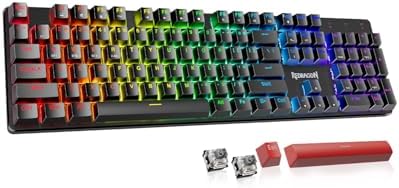
| Tightest budget, wired | Redragon Wired Gaming Keyboard (Red switch) | $29.99 | See listing | USB wired | Double-shot PBT | Yes | Check price on Amazon |
| Best wireless under $40 | Redragon K671KS | $39.78 | See listing | Bluetooth / 2.4GHz / USB-C | PBT | Yes | Check price on Amazon |
| Tinkerers and remappers | RK Royal Kludge R65 | $59.99 | 65% (66 keys) | USB wired | Side-printed PBT | Yes | Check price on Amazon |
| Best overall value | AULA F75 Pro | $64.99 | 75% with knob | Bluetooth 5.0 / 2.4GHz / USB-C | Side-printed PBT | Yes | Check price on Amazon |
| Full-size + numpad | AULA F108 Pro | $89.99 | Full-size with screen and knob | Bluetooth / 2.4GHz / USB-C | Side-printed PBT | Yes | Check price on Amazon |
Prices are what I saw at the time of writing. Budget boards bounce around a lot on Amazon, so check the current number before you decide.
Why PBT Keycaps Matter on a Budget Gaming Keyboard
ABS plastic is fine on day one. By month six, the keys you hit most (WASD, space, Shift) start to shine. That greasy gloss is the plastic wearing smooth, and it never comes back. PBT is a harder, denser plastic that resists that wear for years. It also tends to sound a little lower and feel slightly textured under your fingers.
That’s the whole case. It’s not about status. It’s about a board still feeling decent in year two.
Real PBT vs. “PBT-like”
Here’s the catch with cheap boards. You’ll see listings that say “PBT-feel,” “PBT-like,” or “premium keycaps” with no material named at all. Those are almost always ABS with a coating, and the coating wears off. Every board in this guide lists PBT outright, which is the first filter I’d use.
A few quick ways to sanity-check a set once it arrives:
- Texture. PBT has a faint grainy, matte feel. Smooth and slick usually means ABS.
- Thickness. Pull a cap and look at the wall. Thin, flimsy walls are a bad sign regardless of material.
- Legend type. Double-shot legends are molded in and can’t wear off. Side-printed legends sit on the front face of the cap, so they stay out of your fingers’ path entirely.
A quick word on side-printed legends
Three of these five boards use side-printed caps, so it’s worth knowing what you’re signing up for. The tops are blank, and the letters sit on the front edge. It looks clean and the legends basically can’t wear off.
The tradeoff: if you still glance down to find keys, you’ll hate it for a week. Most people adapt. Some don’t, and that’s fine. If you hunt and peck, lean toward the double-shot Redragon.
The 5 Best Budget Gaming Keyboards With PBT Keycaps, Reviewed
I’ve ordered these by price, cheapest first. Don’t read that as a ranking. The best pick depends on whether you need wireless, a numpad, or just the cheapest board that won’t embarrass you.
1. Redragon Wired Gaming Keyboard (Red Switch, Double-Shot PBT): Best Under $30
Thirty bucks. Double-shot PBT. Hot-swap sockets. Five years ago that sentence would’ve been a typo.
This is the board I’d hand a teenager building a first gaming PC. The red switches are linear, light, and fast, which is what most people want for games anyway. The double-shot PBT caps are the standout. The legends are molded into the plastic, so they’ll outlive the board, and you can actually see them, unlike side-printed sets.
The lighting is basic: 11 backlight modes, nothing you’ll write home about. Honestly, I don’t care. RGB has never been a good reason to buy a keyboard.
Out of the box, expect some stabilizer rattle on the spacebar. That’s standard at this price. A dab of dielectric grease on the stab wires fixes most of it in ten minutes, and our stabilizer tuning guide walks you through it.
Pros
- Double-shot PBT at $29.99 is a genuinely rare combo
- Hot-swappable, so you can try other switches later
- Legends are on top and fully readable
- Anti-ghosting for gaming
Cons
- Wired only
- Basic lighting, no fancy software experience
- Expect some stock rattle and a hollow-ish sound
Who should skip it: anyone who wants wireless or a quieter, more dampened sound.
2. Redragon K671KS: Best Wireless Board Under $40
- 【𝟑-𝐌𝐨𝐝𝐞 𝐂𝐨𝐧𝐧𝐞𝐜𝐭𝐢𝐨𝐧】Geared with Redragon innovative tri-mode connection technology, USB-C wired, BT 3.0/5.0 & 2.4Ghz wire…
- 【𝐁𝐫𝐢𝐥𝐥𝐢𝐚𝐧𝐭 𝐑𝐆𝐁 𝐈𝐥𝐥𝐮𝐦𝐢𝐧𝐚𝐭𝐢𝐨𝐧】16 preset backlights set the perfect mood. Adjust speed and brightness (5 levels) for a comf…
- 【𝐇𝐨𝐭-𝐒𝐰𝐚𝐩𝐩𝐚𝐛𝐥𝐞 𝐂𝐮𝐬𝐭𝐨𝐦 𝐒𝐰𝐢𝐭𝐜𝐡𝐞𝐬】Upgrade the K671's red switches to custom switches for a more comfortable feel that preve…
The K671KS adds the one thing the $30 Redragon lacks: wireless. You get tri-mode connectivity, which means Bluetooth for a tablet or Mac, a 2.4GHz dongle for gaming, and USB-C when you want to plug in. It’s hot-swappable and ships with PBT caps.
For gaming, use the 2.4GHz dongle, not Bluetooth. Bluetooth adds latency you can feel in fast shooters. The dongle is fine for anything short of competitive play, and a cable is always there if you’re paranoid.
This is the board for the person who games on a PC and also wants to type on an iPad on the couch. It’s not trying to be an enthusiast board. It’s trying to be a useful one, and at $39.78 it mostly pulls that off.
Pros
- Tri-mode wireless at a price most brands charge for wired
- PBT keycaps and hot-swap sockets
- Works across PC, Mac, and tablets
- Programmable keys
Cons
- Bluetooth is too laggy for serious gaming, so use the dongle
- Sound and feel are budget-tier, not premium
- Battery life varies with how much RGB you run
Who should skip it: competitive FPS players who’ll never use wireless anyway. Save the $10 and buy the wired Redragon.
3. RK Royal Kludge R65: Best for Tinkerers and Remappers
- 【Upgrade to Side-Prined PBT Keycaps】:Upgraded version of the R65 gaming keyboard. This keyboard features a minimalist de…
- 【60% Percent Gasket Mount Mechanical Keyboard】: Compact gaming keyboard adopts a gasket structure with five layers of so…
- 【Metal Volume Knob & Indicator Lights】: The PC gaming keyboard is equipped with a high quality aluminum CNC metal knob. …
The Amazon listing calls it a 60%. It’s not. With 66 keys and dedicated arrows, the R65 is a 65% board, which is honestly the better layout for most people. You keep the arrow keys, lose the numpad and F-row, and free up a lot of desk space for your mouse.
The real reason to buy the R65 is QMK/VIA support. That’s rare under $60. It means you can remap any key, build layers, and set up macros through a browser, with no bloated vendor software. If you’ve ever wanted Caps Lock to be a second Ctrl, this is how you do it cleanly.
It also has a volume knob, which I use far more than I expected. It ships with RK’s beige switches and side-printed PBT caps.
Pros
- QMK/VIA remapping, which is a big deal at this price
- 65% layout keeps the arrow keys
- Volume knob is genuinely handy
- Hot-swappable with side-printed PBT
Cons
- Wired only
- No F-row means function layers for F-keys, which some games need
- Side-printed legends take a week to get used to
Who should skip it: anyone who leans on F-keys for game binds or wants wireless.
4. AULA F75 Pro: Best Overall Budget Pick
If you only read one review here, make it this one. The F75 Pro is the board that made me stop telling people to spend $150 on their first “real” keyboard.
It’s a 75% layout, so you keep the F-row and arrows without the numpad sprawl. It’s tri-mode wireless with a knob. The switches come pre-lubed from the factory, and the Reaper switches are smooth for the money. AULA also uses a gasket-style mount with internal foam, and you can hear it. The F75 Pro sounds noticeably deeper and less hollow than the Redragons.
Yes, that’s the “thocc” everyone talks about. I’m mildly tired of the word. I still enjoy the sound.
Here’s my one gripe. The side-printed PBT caps look sharp, but if your room is dark and the RGB is off, finding the right key takes muscle memory.
Pros
- Best sound and feel in this roundup by a clear margin
- 75% layout with F-row and arrows
- Tri-mode wireless with a knob
- Pre-lubed switches and hot-swap sockets
Cons
- Side-printed legends are hard to read in low light
- At $64.99, it’s twice the price of the cheapest pick
- Software is functional, not polished
Who should skip it: people who need a numpad. Go to the F108 Pro instead.
5. AULA F108 Pro: Best Full-Size Board With a Numpad
The F108 Pro is the F75 Pro’s big brother. You get a full-size layout with a numpad, a small screen, a knob, and an 8,000mAh battery. That battery is huge for a keyboard. Unless you crank the RGB all day, you’ll be charging it rarely.
It keeps the same recipe that makes the F75 Pro good: pre-lubed switches, hot-swap, tri-mode wireless, and side-printed PBT.
Now, the contrarian part. I think the screen is the least useful feature on this board. It shows battery, time, and connection mode, which is nice, but it’s not why you should buy it. Buy it for the numpad and the battery. If you don’t need a numpad, the F75 Pro gives you the same experience for $25 less and a lot less desk space.
Pros
- Full-size with numpad, great for spreadsheets and MMO binds
- Massive 8,000mAh battery
- Same sound-focused build approach as the F75 Pro
- Tri-mode wireless with knob
Cons
- Takes up a lot of desk, which crowds your mouse in low-sens games
- The screen is more gimmick than tool
- Heaviest, priciest board here at $89.99
Who should skip it: low-sensitivity FPS players. You need that mouse room.
How to Choose a Budget Gaming Keyboard With PBT Keycaps
Skip the marketing bullets and answer these four questions in order:
- Wired or wireless? If the board never leaves your desk and you play competitive shooters, wired saves money. If you want one board for your PC and your tablet, get tri-mode.
- How much layout do you need? Full-size if you use the numpad daily. 75% if you want F-keys and arrows. 65% if desk space and mouse room matter most.
- Can you live with side-printed legends? Touch typists won’t care. Hunt-and-peck typists should pick double-shot.
- Do you care about sound? If yes, spend the extra on the AULA boards. The foam and mounting make a difference you’ll actually hear.
One thing I wouldn’t worry about: polling rate claims and “gaming-grade” switch marketing at this price. For most players, a clean 1,000Hz wired or 2.4GHz connection is plenty. Switch feel matters more than spec-sheet numbers. If you want to go deeper, our linear vs. tactile vs. clicky switch guide breaks it down.
And since every board here is hot-swappable, your first switch choice isn’t permanent. That’s the best thing about this price tier in 2026.
The Verdict
For most people, the AULA F75 Pro is the one to buy. It’s the best-sounding, best-feeling board here, it’s wireless, and the 75% layout fits nearly everyone. At $64.99, it’s the clearest proof that you don’t need to spend $150 to get a keyboard you’ll enjoy.
If $65 is too much, the $29.99 Redragon is the smart buy. Double-shot PBT at that price is a steal, and you can upgrade the switches later. Need wireless on a tight budget? Grab the K671KS. Want to remap everything? The RK R65. Need a numpad and huge battery life? The F108 Pro.
Whatever you pick, don’t overpay for RGB or a tiny screen. Pay for PBT, hot-swap, and a layout that fits how you actually play. That’s what you’ll still appreciate a year from now.
This article contains affiliate links. If you buy through them, I earn a small commission at no extra cost to you. I only recommend keyboards I’ve actually tested. As an Amazon Associate I earn from qualifying purchases.