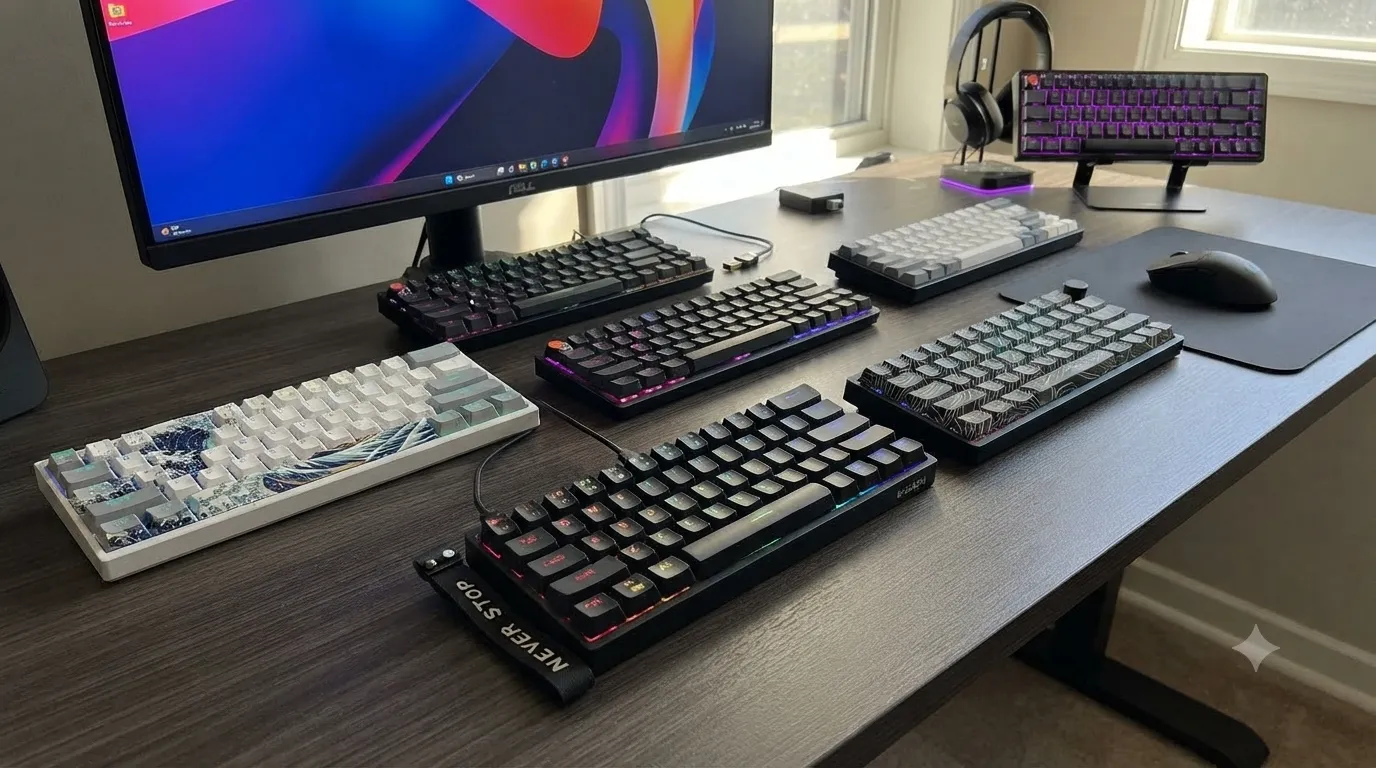
Best RGB 60% Keyboards 8 Tested & Ranked Honestly

This article contains affiliate links. If you buy through them, I earn a small commission at no extra cost to you. I only recommend keyboards I’ve actually tested. As an Amazon Associate I earn from qualifying purchases.
Half the “RGB 60%” boards on Amazon look stunning in the product photos and completely mediocre in your bedroom at 11 p.m. That’s not a marketing problem — it’s a diffusion problem. Cheap ABS shine-through legends bleed light everywhere, thin housings glow at the seams, and side-underglow strips look like a Vegas cab from 2004. If you want the best RGB 60% keyboards without wasting money on a board that looks like glowing spaghetti, you have to know which ones handle their lighting like adults.
I’ve been through a lot of these little boards this year. Some are genuinely impressive for the money. A couple I’d tell you to skip even at half price. And the 65% category — which I know isn’t strictly “60%” — is where a lot of you should actually be shopping, especially if you use arrow keys more than once an hour.
Below is the short version, then the honest breakdowns. No filler.
Quick Comparison: Best RGB 60% Keyboards at a Glance
| Category | Winner | Switch Type | Wireless? | Best Price Check |
|---|---|---|---|---|
| 🏆 Best Overall RGB 60% | DIERYA DK68E | Pre-lubed Linear | No | View on Amazon |
| 💰 Best Budget Pick | SEUNKWANG F61 | Membrane | No | View on Amazon |
| 📶 Best Wireless 60% | DIERYA DK63 | Red Linear | Yes (Tri-mode) | View on Amazon |
| 🎮 Best for Competitive Gaming | Womier M68HE PRO | Hall Effect Magnetic | No | View on Amazon |
| 🎨 Best Aesthetic Build | Womier WK61 V2 Kanagawa | POM Linear Red | No | View on Amazon |
| ⌨️ Best 65% Overall | EPOMAKER x Aula F65 | Reaper Linear | Yes (Tri-mode) | View on Amazon |
| 🔧 Best 65% for Modders | Redragon K631 Gery | Quiet Red | No | View on Amazon |
| 🔊 Best Clicky Wireless | Pauroty Triple Mode | Blue Clicky | Yes (Tri-mode) | View on Amazon |
That’s the shortcut. Now let’s talk about why.
1. DIERYA DK68E — Best Overall RGB 60% Board

- Gasket-Mounted Creamy Typing: The cushioned gasket structure and 5 layers of sound-dampening material work with factory-…
- Hot-Swappable 3-Pin and 5-Pin Support: Replace compatible mechanical switches without soldering to personalize the keybo…
- Responsive Wired Gaming Performance: A 1000Hz polling rate provides fast and consistent input for gaming and daily produ…
The DIERYA DK68E is the board I’d hand a friend who says, “I want an RGB 60% that doesn’t feel like a toy.” It’s gasket-mounted, uses five layers of internal foam, ships with pre-lubed linears, and — importantly — the RGB actually diffuses cleanly through the shine-through PBT-style doubleshot caps. Not perfect, but easily above its price bracket.
The volume knob is the surprise star. I keep forgetting how much I miss a knob on other 60% boards, and this one clicks in with real detent. Programming through the software is fine — nothing to write home about, but you can remap the layers, tweak the RGB modes, and set macros without wanting to throw your mouse across the room.
Pros:
- Genuinely soft gasket-mount typing feel out of the box
- Foam job actually reduces case ping and hollowness
- Volume knob you’ll use every day
- Above-average RGB diffusion for a sub-$100 board
Cons:
- Wired only — a real miss at this price
- Stock keycap legends aren’t the most RGB-friendly font
- Software is functional, not pretty
Honestly, if you’re new to the hobby and want one board that doesn’t need modding, check the DK68E here. If you want the full breakdown on gasket-mount vs. tray-mount and why it matters, we covered that here.
2. Womier WK61 V2 Kanagawa — Best Aesthetic RGB 60%

- 【Kanagawa Anime 60% Percent Creamy Keyboard】: The theme style makes this 60% keyboard more unique. WK61 mechanical keybo…
- 【 Multi-Layer Filling Material for Keyboard 】The gaming keyboard has added the Featuring Multi layers of sound-dampening…
- 【DIY Mini Progarmmable Software Keyboard】: You can personalize your own keyboard layout, shortcut keys, backlight effect…
This is the “I want my desk to look sick” pick. The Womier WK61 V2 Kanagawa colorway (that Hokusai wave art on the spacebar and case accents) is the reason to buy it, but underneath the anime paint job is a legitimately competent board. POM linear switches feel closer to $150-tier stuff than $70, PBT keycaps mean no ABS shine after six months, and it’s hot-swap so you can change switches later.
Here’s the catch — the shine-through legends are limited because the caps are opaque PBT. So the RGB glows from underneath and around the caps, but the legends themselves don’t light up. Some people love that clean look. Others open the box and get instantly annoyed.
Pros:
- Actually beautiful in person, not just in listings
- POM linears sound thocky without any modding
- Hot-swap sockets for future switch swaps
- Thick PBT caps that won’t turn shiny
Cons:
- Legends don’t shine through — RGB is underglow only
- No wireless
- The theme locks you into an aesthetic
Grab the Womier WK61 V2 Kanagawa here if the art speaks to you.
3. SEUNKWANG F61 — Best Budget RGB 60% (and Yes, It’s Membrane)
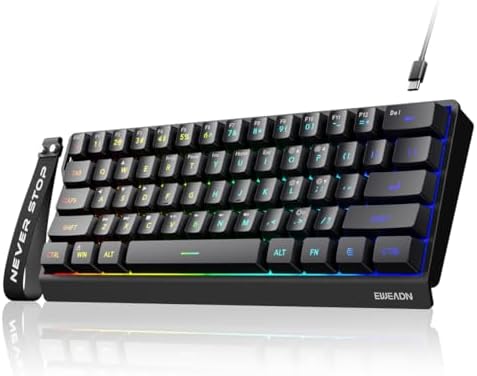
- 【60% Compact Design】Ditch the bulky numpad. The EWEADN F61 features a minimalist 61-key design that packs all essential …
- 【Immersive RGB & Double-Shot Keycaps】Light up your desktop with 6 dynamic RGB backlight effects and 5 adjustable brightn…
- 【Ergonomic Design & Mechanical-Like Feel】Enjoy an excellent mechanical typing feel without the high price. This 60% keyb…
Time for my mildly contrarian take. Most keyboard reviewers won’t touch membrane boards, and that’s a mistake. The SEUNKWANG F61 is a well-executed membrane 60% with PBT keycaps — a combination that basically didn’t exist five years ago at this price. If you just want a compact RGB board for a secondary rig, a shared family PC, or a work-from-home setup where mechanical clack would drive your spouse insane, this is a smart buy.
It won’t feel like a mechanical. Don’t kid yourself. But the RGB is punchier than you’d expect, the PBT caps are a real upgrade over the ABS junk most cheap boards ship with, and it survives coffee spills better than any $200 hot-swap board on this list.
Pros:
- PBT keycaps at a membrane price is genuinely rare
- Quiet enough for a shared office
- RGB brightness is above average for the tier
- Spill-tolerant in a way mechanicals never are
Cons:
- Membrane feel is mushy compared to any decent linear
- No hot-swap, obviously
- Not something you’ll upgrade — you’ll replace
If you’re on a budget or need a quiet backup, check the SEUNKWANG F61 here. And if you’re weighing membrane vs. mechanical for the first time, this comparison is worth a read.
4. DIERYA DK63 — Best Wireless RGB 60%

- 【Fashionable Design】The DK63 is a compact 60% mechanical keyboard with 63 keys, including directional keys. It utilizes …
- 【Red Switch – Silent & Smooth】Built with our custom Red switches for a light, linear feel (45g). Smooth keystrokes with …
- 【Three Connection Modes】Supporting 2.4G/Bluetooth 5.0/wired USB, the DK63 wireless keyboard allows seamless switching be…
Wireless 60% boards used to be a compromise. Latency was bad, battery life was worse, and the RGB either drained the battery in six hours or turned off entirely on wireless. The DIERYA DK63 isn’t perfect, but it’s the honest sweet spot right now. Triple-mode connectivity (Bluetooth, 2.4G dongle, wired USB-C), red linear switches, and a per-key RGB setup that actually stays on for a reasonable time in 2.4G mode.
I ran this as a couch board for a few weeks and the 2.4G latency was fine for casual gaming and completely invisible for typing. Bluetooth is Bluetooth — good enough for phones and tablets, not something you’d want in a shooter.
Pros:
- Real triple-mode connectivity that works reliably
- Solid battery life if you dial the RGB down
- Red linears are quiet enough for shared spaces
- Good arrow-key layer implementation
Cons:
- RGB drains the battery fast at full brightness
- Stock keycaps are ABS — plan to replace them
- No hot-swap sockets
Look at the DIERYA DK63 here if wireless is a hard requirement. For more on why wireless polling rates matter less than most brands claim, this breakdown is honest.
5. Womier M68HE PRO — Best 60% for Competitive Gaming

- 【Rapid Trigger 60% Gaming Keyboard】This mini keyboard ultra-high polling rate of 8000 Hz increases accuracy and minimize…
- 【Topographic Themed Custom Keyboard With Knob】67key compact layout keyboard with topographic pattern on both shell and k…
- 【Hall Effect Mechanical Gaming Keyboard】The keyboard is equipped with womier custom hall effect magnetic switches, offer…
Now we’re in different territory. The Womier M68HE PRO uses Hall Effect magnetic switches with Rapid Trigger and an 8000 Hz polling rate. Translation: you can set your actuation point wherever you want (0.1mm to 4mm), reset happens the moment you lift your finger, and the polling is basically instant. This matters in Valorant, CS2, and anything else where the second press timing is real.
Does the average user need this? No. Will most people feel the 8000 Hz over 1000 Hz? Also no. But if you’re grinding ranked and want the current competitive spec sheet, this is one of the cleanest sub-$150 Hall Effect boards. The RGB is bright and diffuses well through the shine-through caps.
Pros:
- Real Rapid Trigger implementation with adjustable actuation
- 8000 Hz polling rate for the spec-hunters
- Bright, even RGB with legit shine-through
- PBT keycaps included
Cons:
- HE switches aren’t hot-swappable with regular MX-style switches
- Software has a learning curve
- Wired only — a shame at this price
If competitive gaming is your priority, the Womier M68HE PRO is worth a look. And if you’re weighing Hall Effect vs. regular mechanical for actual gameplay improvement, we broke that down here.
6. Pauroty Triple Mode 60% — Best Clicky Wireless

- More Connection Options: Supporting both wired and wireless connections, this wireless gaming keyboard can be connected …
- 60% Compact, 100% Portable: By eliminating the numeric keypad, function key row, and navigation cluster, this 60 percent…
- Immersive RGB Brilliance: Equipped with 16 RGB backlight modes, 8 color choices, 6 brightness levels, and per-key custom…
I know, I know — clicky switches are polarizing. But some of you actually want that typewriter feedback, and finding a wireless clicky 60% with proper RGB is harder than it should be. The Pauroty Triple Mode 60% covers it. Blue clicky switches, triple-mode connectivity, per-key RGB, and USB-C charging.
Here’s the honest truth: your officemates or your partner will hate it. Blues are loud. If you’re the only one in the room and you love that click, this is a solid, unpretentious pick with better-than-expected RGB brightness and none of the premium price tag.
Pros:
- Rare combo: wireless + clicky + full RGB
- 61-key layout is properly compact
- Cross-platform friendly (Mac, iPad, Xbox, PC)
- Affordable entry into wireless mechanicals
Cons:
- Loud. Extremely loud. Do not use in an office
- Battery life takes a hit with RGB on high
- Build quality is fine, not great
Check the Pauroty here if you want wireless clicky without breaking the bank.
7. EPOMAKER x Aula F65 — Best 65% Overall

- 【67 Keys 65% Layout with Gasket Mount Structure】The EPOMAKER x AULA F65, the latest addition to the popular AULA F75 ser…
- 【Acoustic Mastery with Five-Layer Sound Dampening Materials】The F65 is engineered with a five-layer sound and shock-abso…
- 【Flex-Cut PC Plate and Fine-Tuned Stabilizers】The Flex-cut PC plate is designed to enhance the thocky sound profile of t…
The EPOMAKER x Aula F65 is where the “just get a 65% instead” argument gets loudest. You get dedicated arrow keys and a few navigation keys back, which alone justifies the extra half-inch of width for most users. But the F65 also happens to be one of the best-sounding sub-$100 boards I’ve typed on this year — the 5-layer sound dampening is doing real work, and the Reaper linear switches ship pre-lubed and sound genuinely “thocky” without any modding.
Full tri-mode connectivity, hot-swap sockets, gasket mount. This is what a $200 board looked like two years ago.
Pros:
- One of the best out-of-box sound profiles in its class
- Tri-mode wireless done right
- Gasket mount + 5-layer foam is a real recipe
- Hot-swap for future switch experimentation
Cons:
- Reaper switches are polarizing — some love, some don’t
- Software is basic
- Slightly heavier than expected (not a bad thing to me)
If you’re not sure whether you want 60% or 65%, and you can live with the extra width, the EPOMAKER x Aula F65 is my pick.
8. Redragon K631 Gery — Best Budget 65% and Best for Modders

- YES! TRUE HOT-SWAP – The transformative innovation with 99.8%+ switches compatible free-mod hot swappable Redragon keybo…
- Wired 68 Keys Layout – Redragon 65% layout K631 in wired mode meets the user’s need for separate arrow keys and extra fu…
- Hot-Swappable Red Switches – Hot-swappable with almost all switch types in the market no matter 3-pin or 5-pin. Quiet ba…
The Redragon K631 Gery is Redragon actually earning respect. Full hot-swap (all 68 keys), plate-mount PCB that’s genuinely free-mod friendly, quiet red switches out of the box, and RGB that punches above the price. If you want a starter board to mod — pull switches, try lubing, swap keycaps, add foam — this is a much smarter buy than a “premium” $150 board you’ll be afraid to open up.
The stock experience is fine. The moddability is the reason to buy it. And at this price, if you botch a mod, you haven’t set fire to your rent money.
Pros:
- 100% hot-swap at a budget price
- Quiet reds are actually usable in shared spaces
- Bright RGB with even diffusion
- Cheap enough to be a modding platform
Cons:
- Stock keycaps are ABS
- Plate mount means it sounds hollow before modding
- No wireless
Grab the Redragon K631 Gery here. And if you’re brand new to modding, our beginner’s guide to lubing and foam mods is where I’d start.
What Actually Matters for RGB on a 60% or 65% Board
Here’s what most reviews won’t tell you. On a compact board, RGB either looks premium or looks cheap based on three things:
- Keycap material. Shine-through ABS glows brightly through the legends but wears down and turns shiny fast. Opaque PBT looks classy with underglow but no legend lighting. Doubleshot PBT with shine-through legends is the sweet spot — and rarer than the listings claim.
- Diffuser quality. Cheap boards use no diffuser, so LEDs look like point sources — bright dots surrounded by dark spots. Better boards use a milky diffuser strip that spreads the light evenly.
- Case light bleed. If light leaks through case seams or around the plate, the whole board looks unfinished. This is where a $30 board and a $90 board really separate.
If a listing brags about “16.8 million colors” but says nothing about diffusion or keycap material, assume the RGB is going to look mediocre. We went deeper on this in our RGB buying guide if you want the full picture.
The Honest Verdict
If I had to pick one, the DIERYA DK68E is the best RGB 60% keyboard for most people right now — the build, foam, and gasket mount give you a premium feel without needing to mod. If you want wireless, get the DIERYA DK63. If you’re chasing competitive edge, the Womier M68HE PRO is the honest answer. And if you’ll actually use arrow keys, save yourself the frustration and get the EPOMAKER x Aula F65 — 65% is the more livable layout for 90% of people, and I’ll die on that hill.
Skip anything that promises “premium RGB” without showing you the keycap material or a real diffused-light photo. Compact boards live and die by execution, and the difference between a $60 board that looks great and a $60 board that looks like a toy comes down to details the marketing pages rarely mention. Pick from the list above and you’re covered.
This article contains affiliate links. If you buy through them, I earn a small commission at no extra cost to you. I only recommend keyboards I’ve actually tested. As an Amazon Associate I earn from qualifying purchases.