How Hall Effect Switches Actually Work (With Diagrams)

This article contains affiliate links. If you buy through them, I earn a small commission at no extra cost to you. I only recommend keyboards I’ve actually tested. As an Amazon Associate I earn from qualifying purchases.
I keep hearing the same line at meetups: “Hall effect switches are basically magnets, right?” Close. That’s also like calling a car engine “basically explosions.” Technically not wrong. Misses everything that matters.
If you’ve been trying to figure out how Hall effect switches work — really work, not just the marketing-deck version — this is the writeup I wish I’d had when I bought my first Wooting 60HE back in 2023. I’ll walk through the physics, the mechanical layout inside the switch, the analog-to-digital sampling that turns a magnetic field into a keystroke your computer can read, and why this whole stack lets HE boards do things a regular mechanical switch flat-out cannot.
No fluff. Just the actual mechanism.
Quick Comparison: Best Hall Effect Keyboards by Use Case
If you’re skimming for a buying call, here it is. Everything below is the explainer.


| Best For | Keyboard | Switch | Why It Wins |
|---|---|---|---|
| Competitive FPS | Wooting 60HE | Lekker L60 | The benchmark. 8 kHz polling, rapid trigger, true analog input. |
| TKL Gaming | Wooting 80HE | Lekker V2 | Same firmware brain as the 60HE, bigger layout, hot-swap HE sockets. |
| Premium Typing Feel | Keychron Q1 HE | Gateron Magnetic Jade | Aluminum case, gasket mount, HE that doesn’t feel like a gaming-only board. |
| Mainstream / Easy Buy | SteelSeries Apex Pro TKL Gen 3 | OmniPoint 3.0 | Polished software, available at Best Buy, no enthusiast hunt required. |
| Wireless HE | NuPhy Field75 HE | Gateron Jade Pro | The first wireless HE board I’d actually recommend. |
| Budget Entry | Akko MOD 007B HE | Akko Magnetic | Around $130, surprisingly competent for the price. |
Right. Onto the part you came for.
The Hall Effect — A Quick Physics Refresher
A guy named Edwin Hall figured this out in 1879. Run a current through a thin conductor. Apply a magnetic field perpendicular to that current. A voltage shows up across the conductor — perpendicular to both. That voltage is called the Hall voltage, and the useful part is that it scales linearly with the strength of the magnetic field.
Magnetic field B (down through the page) ↓ ↓ ↓ ↓ ┌───────────────────┐ I → │ conductor strip │ → I └──┬─────────────┬──┘ │ │ V_Hall (voltage difference shows up here)That’s it. That’s the whole effect. A Hall sensor is just a tiny silicon chip — a couple of millimeters wide — that exploits this. Bring a magnet close, output voltage rises. Move it away, voltage drops. The sensor doesn’t touch anything. It doesn’t wear out. It just reads field strength.
That last part is doing a lot of the work in answering how Hall effect switches work in a keyboard. There’s no physical contact making or breaking. The switch is sensing, not connecting.
How Hall Effect Switches Work Mechanically: Inside the Switch
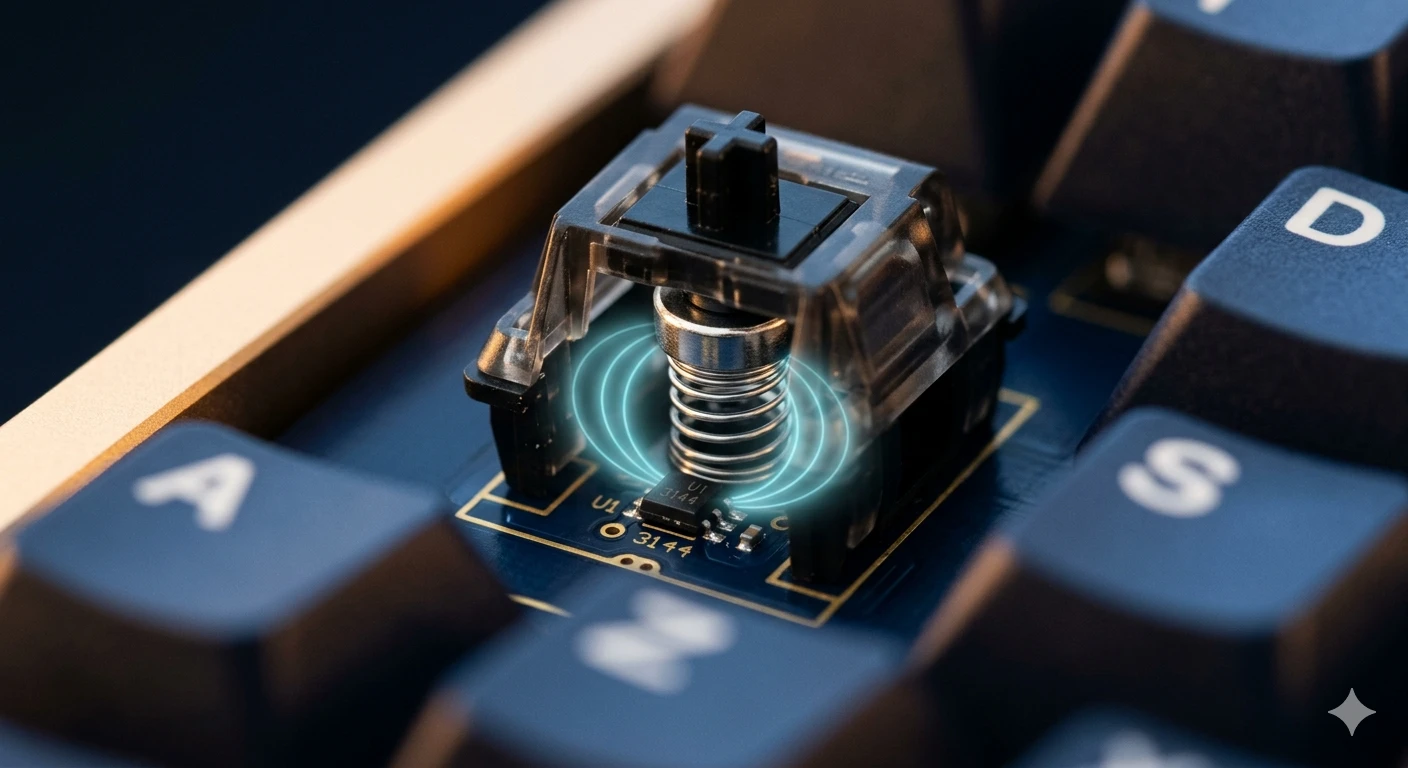
Crack open a Gateron Magnetic Jade or a Lekker L60 and you’ll find a layout that looks almost identical to a regular MX switch — except for one detail.
┌──────────┐ │ Keycap │ └────┬─────┘ │ ┌─────┴─────┐ │ STEM │ │ │ ← MX-compatible up top │ ┌─────┐ │ so normal keycaps fit │ │MAGNET│ │ │ └─────┘ │ ← small neodymium magnet └─────┬─────┘ bonded to bottom of stem │ spring │ ═══════════════════════ ← PCB ● ← Hall sensor (directly below) reads field strengthThe pieces:
- A plastic stem that looks like an MX stem, usually Cherry-compatible on top so your existing keycaps fit
- A small neodymium magnet bonded to the bottom of the stem
- A spring — linear feel on basically every HE switch shipping right now
- A Hall sensor soldered to the PCB directly below each switch
When you press the key, the stem travels down. The magnet rides with it. The Hall sensor, which never moves, sees the field get stronger as the magnet approaches.
No metal contacts touching. Nothing arcing. Nothing physically completing a circuit. The switch never “clicks closed” in the way an MX Red does. It just modulates a magnetic field that a chip on the PCB is constantly reading.
The Magnet’s Position vs. the Sensor’s Reading
Here’s the curve that makes everything else possible:
field strength ↑ │ ● │ ● │ ● │ ● │ ● │ ● │ ● │ ● └─────────────────────────────────→ stem position pressed resting (~4 mm down) (0 mm)It’s smooth. It’s continuous. Every fraction of a millimeter of travel produces a different voltage out of the sensor. That’s the entire insight.
With a normal mechanical switch, the firmware sees one of two states: contact closed or contact open. Binary. A Hall effect switch hands the firmware a number on a scale — somewhere between “fully up” and “bottomed out.” That number gets refreshed thousands of times a second.
Hold that idea. It’s where the magic happens.
The ADC: How a Magnetic Field Becomes a Keystroke
This is the part most explainers skip, and it’s actually where the real cleverness lives.
The Hall sensor outputs an analog voltage. Your PC speaks digital. Something has to bridge that gap. On a Hall effect board, the microcontroller has an ADC — analog-to-digital converter — that reads each sensor’s voltage and converts it to a number, repeatedly, very fast.
Modern HE boards typically sample at:
- 8 kHz per key on Wooting 60HE and 80HE — 8,000 readings per second, on every key
- 8 kHz on the Razer Huntsman V3 Pro
- Up to 32 kHz on some newer boards (largely marketing — your monitor, OS scheduler, and game tick rate can’t keep up anyway)
Each sample produces a 10-bit or 12-bit number — so 1,024 or 4,096 possible values along the travel distance. The firmware then asks, for every key on every cycle: “Is the current value past the actuation threshold the user set?”
If yes → send keystroke. If no → don’t.
And because the threshold is just a number in firmware, you can change it per key, on the fly. That’s the whole superpower in one sentence.
[sensor reads field] → [ADC converts to number] → [firmware compares to threshold] → [USB report] analog digital logic keystrokeWhat Hall Effect Switches Let You Do That Mechanical Can’t
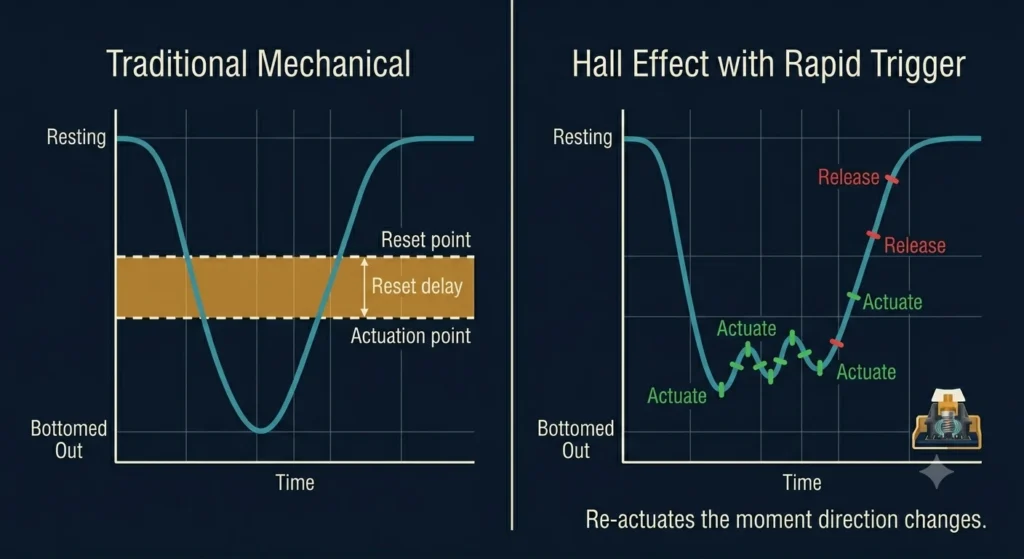
Once you understand how Hall effect switches work, the feature list stops sounding like sci-fi and starts making obvious sense.
- Adjustable actuation per key. Want your WASD to trigger at 0.3 mm and your F-row at 2.0 mm? Done. It’s just a different number in firmware.
- Rapid trigger / dynamic reset. The switch doesn’t have a fixed reset point. The moment you start moving the stem back up — by as little as 0.1 mm — it can register a release. Then a re-press the instant it moves back down. This is the feature competitive Counter-Strike and Valorant players actually care about.
- Analog input. Because the firmware knows exactly how far down the key is, it can send that as a controller-style axis. In a driving game, “W” can be a variable throttle. Wooting was first to ship this well.
- Snap Tap and SOCD modes. Pressing A while D is held can auto-release D. Controversial for esports, but mechanically only possible because the firmware sees both keys’ positions continuously.
- Zero debounce delay. Mechanical switches need a debounce window (typically around 5 ms) because their metal contacts physically bounce when they close. HE has no contacts. There’s nothing to bounce. The firmware doesn’t have to wait.
- Effectively unlimited lifespan. No contact wear, no oxidation. The magnet doesn’t degrade in any meaningful way. Manufacturers claim 100 million presses, which is honestly conservative.
How They Actually Feel — My Daily-Driver Notes
I ran a Wooting 60HE as my main board for about four months in 2024. Then a Keychron Q1 HE with Gateron Magnetic Jades for another two. Some honest impressions, since spec sheets only tell you so much.
The Lekker switches in the Wooting feel like a slightly mushier Gateron Yellow. Fine. Not exciting. Smooth bottom-out, decent ping suppression after Wooting’s foam revisions. They sound okay. Not “thocc.” Not bad. Just average.
The Gateron Magnetic Jades in the Keychron Q1 HE are a step up — heavier, smoother, with a more dignified bottom-out. The aluminum case helps a lot.
Where Hall effect actually shines, though, isn’t the feel. It’s the responsiveness. After a couple weeks with rapid trigger turned on, going back to a regular MX board feels like there’s a slight, sticky delay on every release. There isn’t, really — you’d just gotten used to no debounce and instant re-actuation. It’s the input equivalent of going from a 60 Hz to a 144 Hz monitor. You don’t notice it until you switch back.
Where Hall Effect Switches Fall Short
Time for the honest caveats. This is the part where I’ll lose the gamer subreddits.
- Switch variety is anemic. Compared to the hundreds of MX-style switches on the market, HE options are a small handful. Mostly linear. If you want a tactile HE switch with a real bump, your options are essentially Geon Raw HE and a couple of Gateron experiments. The MX ecosystem is decades ahead.
- They’re not cheap. A decent HE board starts around $130 and quickly climbs past $200. You’re paying for sensors under every key plus the MCU horsepower to sample them.
- Hot-swap is rare and weird. Most HE boards solder the sensors directly to the PCB. The Wooting 80HE has hot-swap HE sockets, but you’re still stuck choosing between a small pool of HE-compatible switches — you can’t drop in your favorite Holy Pandas.
- Sound is usually worse than a tuned mechanical. The magnet adds mass to the stem, which changes the acoustic profile, usually for the worse. A well-modded $150 mech still out-thocks most stock HE boards I’ve owned.
- Software lock-in. Each brand has its own configuration software. Wootility is genuinely excellent. Some others… aren’t. QMK and VIA aren’t real options in the HE world yet.
If you mainly type, write, and code — most of these tradeoffs aren’t worth it. A nicely built mechanical with PBT keycaps will serve you better and cost less.
The Verdict
Here’s where I land after a couple of years on these things.
Hall effect is real, the technology works exactly the way the marketing claims, and the responsiveness gains for competitive games are genuine — not placebo. The Wooting 60HE earned its reputation honestly. If you’re playing Counter-Strike 2, Valorant, or Apex at any serious level, rapid trigger alone is worth the cost of entry.
But if you bought a $90 board last year and you like it, and you’re not playing twitch shooters, please don’t sell it for a $230 HE board because some YouTuber told you it’s the future. It’s not your future. It’s a specific tool for a specific kind of player.
Now you actually know how Hall effect switches work — the physics, the sensor, the ADC, the firmware loop, the whole chain. Next time someone tells you they’re “basically magnets,” you can let them know — politely — that the magnet is the boring part. The interesting part is what the chip underneath does with it.
This article contains affiliate links. If you buy through them, I earn a small commission at no extra cost to you. I only recommend keyboards I’ve actually tested. As an Amazon Associate I earn from qualifying purchases.