Best Corsair Keyboards Ranked: K100, K70 & K65 Tested

This article contains affiliate links. If you buy through them, I earn a small commission at no extra cost to you. I only recommend keyboards I’ve actually tested. As an Amazon Associate I earn from qualifying purchases.
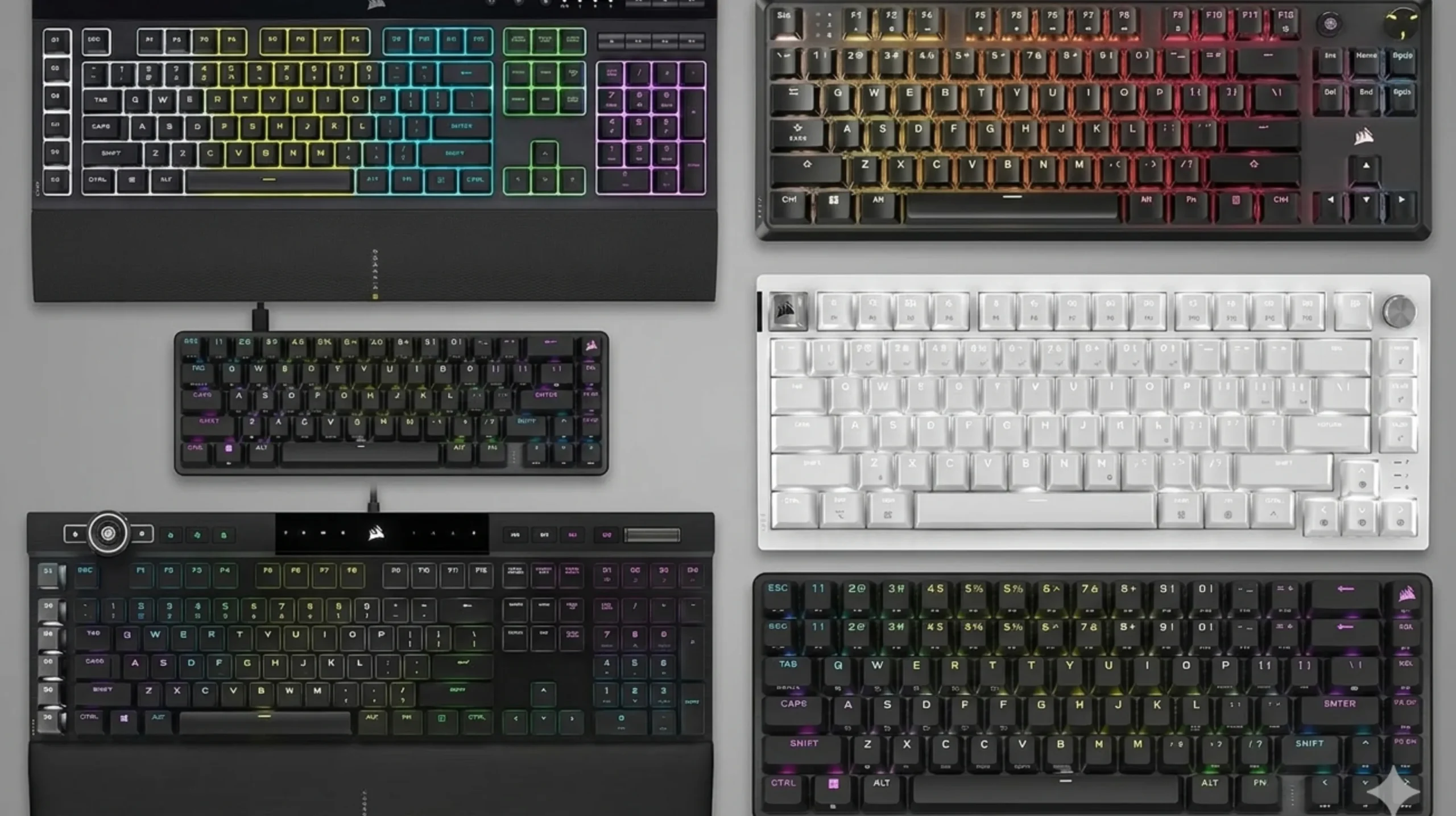
If you’ve been shopping for the best Corsair keyboard lately and feel like the lineup is a tangled mess of Pros, Maxes, Cores, Mids, Airs and Plus Wirelesses, you’re not imagining it. Corsair has more keyboard SKUs than most people have keyboards, and the gap between the cheapest one and the most expensive one is roughly the cost of a used GPU.
I’ve had most of these boards on my desk at one point or another over the last couple of years. I’ve torn down the stabilizers on a K70, swapped switches on the K65 Plus, lived with the K100 Air for a month as a travel board, and used the K70 Max as my daily driver long enough to form actual opinions about Hall-effect switches. This guide is the version of that experience I wish someone had handed me before I dropped 230 dollars on a magnetic-switch keyboard.
Here’s how the current Corsair lineup actually shakes out. What’s worth the money, what’s overpriced for what it is, and which model is genuinely the best Corsair keyboard for your specific use case.
TL;DR: Best Corsair Keyboard by Use Case (Quick Comparison)
Skip the deep dive if you just want a verdict. Here’s the short version.
| Use Case | Pick | Why | Approx. Price |
|---|---|---|---|
| Best Overall | Corsair K70 RGB Pro | Real Cherry MX, full-size, PBT keycaps, 8,000 Hz polling. Boring, but right. | ~$170 |
| Best for Competitive FPS | Corsair K70 Max | Adjustable Hall-effect magnetic switches, rapid trigger, dual actuation. | ~$200 to $229 |
| Best Premium Pick | Corsair K100 RGB | Optical-mechanical OPX switches, iCUE wheel, 4,000 Hz, full bling. | ~$230 |
| Best Value Mechanical | Corsair K70 Core / Core TKL | Pre-lubed switches, foam, decent sound, around $100. The smart buy. | ~$90 to $110 |
| Best Wireless (Enthusiast Feel) | Corsair K65 Plus Wireless | 75% hot-swap, PBT, MLX Reds, dual-layer foam, ~265 hr battery. | ~$160 |
| Best Low-Profile / Travel | Corsair K100 Air Wireless | 11 mm thin, Cherry ULP tactile, 8,000 Hz wired, 50 to 200 hr battery. | ~$200 to $280 |
| Best Compact (60%) | Corsair K65 RGB Mini | Tiny footprint, PBT doubleshots, 8,000 Hz, OPX or MX Red. | ~$110 |
| Best Hot-Swappable | Corsair K65 Plus Wireless | Genuinely socketed, swaps in seconds, decent stock sound. | ~$160 |
| Best Budget (Membrane) | Corsair K55 RGB Pro | Quiet, 6 macros, IP42 spill-resistant. Not mechanical, and that’s fine. | ~$50 to $60 |
Marcus’s honest take: Most people overpay. If you’re buying a Corsair keyboard primarily to type and play games, the K70 RGB Pro or the K70 Core is the smarter buy 80% of the time. The K100 lineup is legitimately nice, but the price-to-feel ratio gets steep fast.
Who Should Actually Buy a Corsair Keyboard?
Let me get one thing out of the way. The custom keyboard world has exploded in the last few years. You can get a gasket-mounted board from GMMK, Keychron, Akko, or Mode that beats a $200 Corsair on sound, feel, and modability for less money.
So why buy a Corsair at all?
A few real reasons:
- You already own Corsair gear and want one app (iCUE) lighting up your mouse, keyboard, RAM, fans, and PSU cables in sync.
- You want strong RGB and onboard memory. Corsair’s per-key lighting and 8 MB onboard profile storage are genuinely class-leading.
- You want a brand-name warranty and retail availability, not a small-batch group buy with a 6-month wait.
- You want analog or Hall-effect switches on a familiar full-size layout without dealing with Wooting’s niche-vibe support.
If none of those describe you, look at Keychron and Wooting first. If at least one does, Corsair has a board for you. Here’s how to figure out which one.
The Current Corsair Keyboard Lineup at a Glance
| Model | Form Factor | Switch Type | Wireless? | Hot-Swap? | Polling | PBT Caps? | Approx. Price |
|---|---|---|---|---|---|---|---|
| K100 RGB | Full-size | OPX optical | No | No | 4,000 Hz | Yes | $230 |
| K100 Air Wireless | Full-size, low-profile | Cherry MX ULP Tactile | Yes | No | 8,000 Hz (wired) | No (ABS) | $200 to $280 |
| K70 Max | Full-size | Corsair MGX magnetic (analog) | No | No | 8,000 Hz | Yes | $200 to $229 |
| K70 RGB Pro | Full-size | Cherry MX Red/Brown/Speed/Silent | No | No | 8,000 Hz | Yes | $170 |
| K70 Core | Full-size | Corsair MLX Red (linear) | No | No | 1,000 Hz | No (ABS) | $90 to $100 |
| K70 Core TKL | TKL | Corsair MLX Red | Yes (wireless variant) | No | 1,000 Hz | No (ABS) | $100 to $130 |
| K65 Plus Wireless | 75% | MLX Red / MLX Fusion tactile | Yes | Yes | 1,000 Hz | Yes | $160 |
| K65 RGB Mini | 60% | Cherry MX / OPX | No | No | 8,000 Hz | Yes | $110 |
| K55 RGB Pro | Full-size | Rubber dome (membrane) | No | No | 1,000 Hz | No (ABS) | $50 to $60 |
Now let’s go through them one at a time.
Corsair K100 RGB: The Flagship
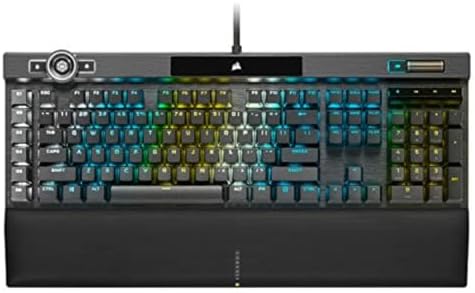
- You’ve Reached the Top: The CORSAIR K100 RGB is the pinnacle of CORSAIR keyboards, offering the cutting-edge performance…
- The Centerpiece of Your Setup: The CORSAIR K100 RGB boasts a refined design bolstered by a durable aluminum frame, dynam…
- Powered by CORSAIR AXON Hyper-Processing Technology: CORSAIR’s most advanced gaming keyboard experience delivers up to 4…
The K100 RGB is Corsair’s “throw everything at it” board. Aluminum top plate, 44-zone LightEdge lighting, programmable iCUE control wheel, dedicated macro column, PBT double-shot keycaps, and Corsair’s OPX optical-mechanical switches with a 1.0 mm actuation point.
I ran the K100 as my main board for about three weeks. The verdict is mixed, and mostly positive.
What’s genuinely great:
- Build feels rock-solid. There’s almost no flex anywhere.
- The OPX switches are fast. If you’re coming from a Cherry MX Red, the lighter actuation and shorter travel are immediately noticeable in FPS games.
- The control wheel beats Logitech’s crown for jogging through video timelines.
- 4,000 Hz native polling is real and useful at high frame rates.
What’s annoying:
- The G keys are dedicated macro keys, not flex hardware. If you don’t use macros, that’s wasted real estate.
- 8 MB of onboard memory is generous, but I’ve still had iCUE step on stored profiles after firmware updates.
- The keycaps, while PBT, are textured in a way that some people will love and some will find sandpapery.
- It’s full-size. There’s no TKL or 75% version of the actual K100, only the Air variant.
Pricing reality: At full $230 MSRP, it’s hard to call this a bargain. On sale at $180, it’s a different conversation entirely. Watch deals.
Verdict: Buy if you want Corsair’s most feature-loaded board and you actually care about RGB and macros. Skip if you mostly just want to type and play.
Corsair K100 Air Wireless: The Slim Flagship

- Stunning, Refined, and Ultra-Thin: The K100 AIR is an unbelievably thin wireless gaming keyboard just 11mm at its slimme…
- Fast Wireless and Wired Connection Options: Three ways to connect to up to five different devices – Via sub-1ms SLIPSTRE…
- Masterful Wireless Multi-Tasking: Quickly switch between wireless connections on your PC, Mac, and more at the press of …
Different beast. The K100 Air is 11 mm thin at its slimmest point. It’s the closest thing to a “MacBook keyboard, but mechanical” that exists from a major gaming brand.
It uses Cherry’s MX Ultra Low Profile Tactile switches: short travel, a real bump, and a satisfying click that’s not loud. Wired polling tops out at 8,000 Hz, wireless via Slipstream sits at 2,000 Hz, and Bluetooth handles up to three more devices. Battery life is 50 hours with lighting on, around 200 with it off.
I traveled with this board for two weeks straight. A few honest observations:
- The typing experience is shockingly good for something this thin. Better than any chiclet laptop keyboard I’ve used, including the MacBook Pro.
- ABS keycaps will shine eventually. At $280 retail, that’s a real gripe. PBT should be the standard at this price.
- The aluminum frame is gorgeous, but it does pick up fingerprints fast.
- Battery anxiety is minimal. I went 8 days of mixed use before needing to charge.
The catch? MSRP is $280, which is a lot of keyboard money. The current going rate has dropped significantly since launch. I’ve seen it as low as $130 on clearance. At $130, this is one of the best deals in wireless gaming keyboards. At $280, it’s a hard sell against the Logitech G915 and a $129 Keychron K3 Pro.
Verdict: Best Corsair keyboard for travel and minimalist desks. Wait for it to drop below $180 if you can. At MSRP, hard to recommend over the K70 RGB Pro for most people.
Corsair K70 Max: The Analog Magnetic Option

- Adjustable Magnetic-Mechanical Switches: The entire keyboard is equipped with fully adjustable CORSAIR MGX switches, ena…
- Two Actions for One Keypress: Dual-point actuation lets you assign two discrete actions to one keypress, giving you the …
- CORSAIR AXON Hyper-Processing Technology: AXON enables premier K70 performance, processing and transmitting inputs up to…
This is where Corsair’s lineup got interesting. The K70 Max uses Corsair MGX magnetic switches, Hall-effect sensors that let you set the actuation point anywhere from 0.4 mm to 3.6 mm per key, plus rapid trigger and dual-action support.
If you’ve heard the buzz around Wooting and the SteelSeries Apex Pro, this is Corsair’s answer to that segment.
What analog switches actually get you:
- Rapid trigger. The key resets the moment you start lifting your finger, not after a fixed reset point. For counter-strafing in CS2 and Valorant, this is the real deal.
- Adjustable actuation. Set the spacebar to actuate at 3.4 mm so you don’t bunny-hop accidentally, set WASD to 0.4 mm for instant inputs.
- Dual-action keys. One input on a light press, a different one on a hard press. Walk and sprint on the same key. Niche, but cool.
Where the K70 Max stumbles:
- The stabilizers rattle. Out of the box, the spacebar on my unit pinged enough that I lubed it within the first day. For a $230 board, that’s frustrating.
- The acoustic profile isn’t the K70 Max’s strength. Exposed switches and a high-pitched ping are a known issue at this price.
- iCUE’s interface for tweaking per-key actuation points is genuinely confusing. You’ll spend an evening figuring it out.
If you don’t play competitive FPS at a level where 0.4 mm actuation matters, you don’t need this board. If you do, it’s one of the best Corsair keyboards on the market for that exact job, though Wooting’s options are arguably more polished for pure performance.
Verdict: Buy for competitive FPS. Skip if you primarily type or play single-player games.
Corsair K70 RGB Pro: The Reliable Workhorse

- The Legend Continues: The K70 RGB PRO retains the iconic elements of the award-winning K70 RGB with a durable aluminum f…
- Powered by CORSAIR AXON Hyper-Processing Technology: Enables a new level of K70 performance, processing and transmitting…
- 100% CHERRY MX RGB Red Mechanical Keyswitches: Have a linear travel with a silky smooth keypress that’s ideal for perfor…
If I could only recommend one Corsair keyboard to a general audience, this would be it. The K70 RGB Pro is what Corsair has been doing well for a decade now: genuine Cherry MX switches, brushed aluminum top plate, double-shot PBT keycaps, dedicated media controls with a metal volume wheel, detachable USB-C cable, and Corsair AXON for 8,000 Hz polling.
You pick your switch flavor:
- Cherry MX Red. Light linear, the default gaming choice.
- Cherry MX Brown. Light tactile, decent for typing.
- Cherry MX Speed Silver. Same feel as Red but actuates earlier.
- Cherry MX Silent. For officemates who’d otherwise kill you.
A few honest notes after months on this board:
- The PBT keycaps will outlast the laptop you’re typing on. They don’t shine, they don’t fade.
- The metal volume wheel is the best physical control on any keyboard at this price.
- It’s loud-ish. Even with MX Reds, the chassis adds some pinginess.
- The wrist rest is plastic and forgettable. Get an aftermarket one.
The K70 RGB Pro is the best Corsair keyboard for someone who wants a “this just works” full-size board and isn’t chasing analog switches or wireless. It’s been the spine of the lineup for years for a reason.
Verdict: The most “buy and forget” board in the lineup. Recommended.
Corsair K70 Core and K70 Core TKL: The Budget Sweet Spot

- Space-Saving Tenkeyless Layout: The compact tenkeyless footprint fits in tight gaming setups and leaves more room for sw…
- Pre-Lubed MLX Red v2 Switches: Pre-lubricated CORSAIR MLX Red v2 linear mechanical switches deliver smooth, responsive, …
- Ultra-Satisfying Typing Acoustics: Two sound dampening layers made from premium foam material, plus pre-lubricated stabi…
Here’s the punchline: the K70 Core is around $100 (often $70 on sale) and gives you most of what the more expensive boards offer in terms of typing feel.
You get pre-lubricated Corsair MLX Red linear switches, two layers of EVA sound-dampening foam, an aluminum top plate, a rotary control knob, a magnetic palm rest, and per-key RGB. It’s a full-size board, and there’s a TKL variant (including a wireless TKL Core) that drops the numpad.
Where Corsair cut to hit the price:
- ABS keycaps, not PBT. They will shine over time.
- 1,000 Hz polling instead of 8,000 Hz. You will not feel this in real gameplay. Anyone who tells you otherwise has not done a blind test.
- USB-A cable, not USB-C. Mildly annoying. Doesn’t affect performance.
- Plastic chassis under the aluminum top plate, so the bottom flexes if you press it hard.
The sound profile is genuinely surprising for $100. The pre-lubed switches and foam give it a soft, contained thock that feels punchier than a stock $200 K100 from five years ago. Corsair’s clearly absorbed what enthusiasts have been doing with foam mods.
One honest caveat: Some reviewers have said the Core still sounds a bit hollow and clacky. I agree it’s not in the same league as a gasket-mounted custom board. But against other $100 prebuilts, it’s competitive, and often better than the Razer BlackWidow at the same price.
Verdict: The smartest dollar-for-dollar buy in the Corsair lineup. Don’t overthink it.
Corsair K65 Plus Wireless: The Enthusiast Crossover

- Standout Style and Superstar Performance: The Frost White colorway and single-color default lighting will match your set…
- CORSAIR MLX Red v2 Switches: Pre-lubricated CORSAIR MLX Red v2 linear mechanical switches offer a silky smooth, responsi…
- Hot-Swappable Switches: Enjoy the flexibility to easily swap in your own switches and personalize how your keys sound an…
This is the most interesting board Corsair has launched in years. The K65 Plus Wireless is their first genuine attempt at an enthusiast-style keyboard. 75% layout, fully hot-swappable PCB, pre-lubed MLX Red linear or MLX Fusion tactile switches, dual-layer sound dampening, PBT double-shot keycaps, 2.4 GHz Slipstream wireless plus Bluetooth, and up to 266 hours of battery life on the tactile variant.
Best part: it’s $160. That’s the price of a high-end Keychron, not a flagship Corsair.
What I like:
- The 75% layout is the right one for desk-conscious gamers who still want F-keys and arrows. I’ve owned three 60% boards and ditched all of them for this exact reason.
- Hot-swap actually works. I swapped MLX Reds for some Kailh Box Whites in about 8 minutes total. Note: I’ve seen one or two scattered Best Buy reviews where users reported difficulty getting switches out. Make sure you’re using the included switch puller and pulling straight up. The sockets are real.
- The PBT keycaps and dual-layer foam give it a sound profile that’s miles ahead of the older K70 lineup.
- 266 hours of battery on the tactile model is wild. I’ve gone over two weeks without charging on moderate use.
Real downsides:
- No backlight shines through the PBT caps unless you order the shine-through variant. The keycaps on most colorways are opaque. If you type in the dark, that matters.
- No dedicated media keys. You use Fn combos. For some, a deal-breaker.
- The MLX Fusion tactile bump is decent but not as pronounced as a Holy Panda or even a stock Cherry MX Brown.
This is the best Corsair keyboard for anyone who wants to dip a toe in the enthusiast pool without leaving Corsair’s ecosystem. It’s also the only board in the lineup where the hot-swap is real, which makes it a long-term keeper.
Verdict: My personal recommendation for the keyboard hobbyist who wants Corsair’s stability with enthusiast features.
Corsair K65 RGB Mini: The Compact Option

- 65% Layout Lets You Play with a Purpose: The compact 65% layout is small enough to fit on any desktop, yet includes the …
- Optical Switches for Laser-Like Inputs: CORSAIR OPX optical-mechanical switches offer insanely smooth, linear, ultra-res…
- Play at AXON-Speed: CORSAIR AXON Hyper-Processing Technology gets your actions from the keyboard to the game up to 8x fa…
A proper 60% board with PBT double-shot keycaps, AXON 8,000 Hz polling, and your choice of Cherry MX or Corsair OPX switches. Onboard storage holds up to 50 profiles.
A 60% layout is polarizing. You lose the arrow keys, function row, and numpad. Everything gets pushed onto Fn layers. If you can live with that, you get a tiny board, more mouse swing room, and a clean desk.
For competitive FPS players who run low-sens setups, 60% boards are popular for a reason. The K65 RGB Mini does the job. It’s not the best 60% on the market (that’s probably the Wooting 60HE or a Mode SixtyFive), but it’s a legitimate option if you want a Corsair-ecosystem 60%.
Verdict: Buy only if you’ve used a 60% before and know you like it. If you’re new to compact layouts, the K65 Plus Wireless’s 75% is a much safer pick.
Corsair K55 RGB Pro: The Membrane Budget Pick
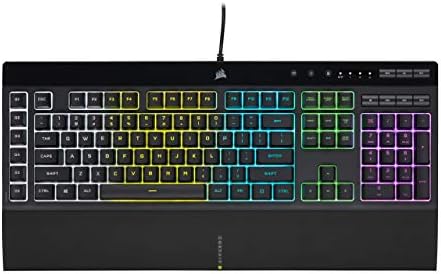
- Dynamic RGB Backlighting: Light up your desktop with six onboard lighting effects, assign a color to each lighting zone,…
- Six Dedicated Macro Keys: Activate functions, shortcuts, or keypresses in just one stroke with six dedicated macro keys,…
- Dust and Spill-Resistant Design: IP42-rated protection guards against accidents so your gameplay never has to stop.
I’m going to defend this board for a second. The K55 RGB Pro is a membrane keyboard, which means rubber dome switches instead of mechanical. Enthusiast crowd hates membrane on principle.
Here’s the thing: it costs $50, it’s IP42 spill-resistant, it has 6 dedicated macro keys, a detachable palm rest, dedicated media controls, and dynamic RGB. For a kid’s first gaming setup, a shared family PC, or an office machine where you don’t want to annoy coworkers, it’s genuinely fine.
It’s not mechanical. The keys are quieter, softer, and less satisfying. The keycaps are ABS and will shine. Anti-ghosting is limited compared to NKRO on the mechanical boards.
But for $50, it gives you Corsair build quality and iCUE compatibility. If your budget is hard-locked at sub-$60, this is the best Corsair keyboard in that range.
Verdict: Honest budget pick. Don’t expect mechanical feel.
Analog (Magnetic) vs. Mechanical: Which Should You Buy?
This is the question I’ve been getting most often in my inbox over the past year. Should you spend the extra $60 to $130 to get a K70 Max over a K70 RGB Pro? Or a Wooting over either?
Here’s the plain answer.
Buy magnetic or analog (K70 Max) if:
- You play competitive FPS where rapid trigger and adjustable actuation give measurable advantage, primarily CS2, Valorant, Apex Legends.
- You’ve already tried mechanical and feel limited by it.
- You want to tinker with per-key actuation profiles for different games.
- You’re willing to spend an evening figuring out iCUE’s actuation UI.
Stick with standard mechanical (K70 RGB Pro, K70 Core, K65 Plus Wireless) if:
- You mostly type, work, or play single-player and casual multiplayer.
- You want a board that just works out of the box without software tweaking.
- You care more about sound and feel than competitive milliseconds.
- Your budget is under $200.
Most people, and I’m including a lot of self-described “competitive” players who’d benefit more from better mouse aim than from rapid trigger, should stick with regular mechanical. Hall-effect is genuinely cool tech. It’s just not the upgrade most buyers think it is.
The State of iCUE Software in 2026 (Honest Take)
I can’t write a guide on the best Corsair keyboard without addressing the elephant: iCUE.
iCUE is Corsair’s all-in-one peripheral software. It controls RGB lighting, key remapping, macros, profile switching, fan curves, AIO pumps, RAM lighting, and pretty much everything else Corsair makes. When it works, it’s powerful. When it doesn’t, it’s notorious.
Here’s where things actually stand:
- It’s gotten more stable than it was in 2022 and 2023, when iCUE 4 was a regular crash machine for many users.
- It’s still resource-heavy. Running iCUE in the background uses real RAM and a small but measurable amount of CPU. If you’re chasing FPS, you can run keyboards in onboard mode without iCUE open most of the time.
- Corsair finally launched a web-based firmware updater in 2024 and 2025, so you can update keyboard firmware in your browser without installing iCUE at all. This is the right move and I hope it expands.
- Forum complaints remain steady. Issues with iCUE Link hubs, device detection, and inconsistent RGB sync are still being reported as of 2025.
Practical advice: Install iCUE to set up your keyboard’s lighting and macros. Save everything to onboard memory. Then close iCUE (or set it to not launch on startup) and let the keyboard run from its own profiles. This is how I run every Corsair board I own. iCUE is a setup tool, not a daily-driver app.
If iCUE is a deal-breaker for you, look at Keychron with VIA or QMK. Completely software-free remapping in a browser, no background process, no bloat. Most Corsair boards do not support VIA or QMK.
Final Verdicts: Which Is the Best Corsair Keyboard for You?
After roughly 10,000 words of disclaimers and feature breakdowns elsewhere on the web, here’s mine in plain English:
- You want the most “Corsair” experience possible: K100 RGB. Full feature set, control wheel, dedicated macros, OPX switches.
- You want a no-drama daily driver that lasts: K70 RGB Pro. Cherry MX, PBT, aluminum, done.
- You don’t want to spend more than $100: K70 Core or K70 Core TKL. Honestly close to the K70 Pro for typing feel.
- You play CS2 or Valorant competitively: K70 Max. Rapid trigger and adjustable actuation are real.
- You want wireless that feels like a custom keyboard: K65 Plus Wireless. The best Corsair keyboard launched in years for value.
- You want a low-profile travel board: K100 Air Wireless, but only on sale below $180.
- You want compact 60%: K65 RGB Mini, but only if you know you like 60%.
- You want cheap and reliable: K55 RGB Pro. Membrane, not mechanical, but solid for the money.
If I had to hand one keyboard to a stranger and walk away confident they’d be happy, it’d be the K70 RGB Pro or, if they value modability and wireless, the K65 Plus Wireless. Those are the two I’d hand my brother.
FAQ
What is the best Corsair keyboard overall?
For most buyers, the Corsair K70 RGB Pro is the best Corsair keyboard overall. It hits the right balance of build quality, Cherry MX reliability, PBT keycaps, full-size layout, and 8,000 Hz polling. The K100 RGB is more feature-loaded but doesn’t feel meaningfully better day-to-day for the extra $60.
Is the Corsair K70 Max worth it over the K70 RGB Pro?
Only if you play competitive FPS games and will actually use rapid trigger and adjustable actuation. The magnetic switches are real tech, but they don’t make typing or casual gaming feel meaningfully better than Cherry MX. For most users, the K70 RGB Pro is the smarter buy.
Is the Corsair K65 Plus Wireless really hot-swappable?
Yes, the PCB is genuinely socketed and supports both 3-pin and 5-pin Cherry MX-style switches. Use the included switch puller and pull straight up. A small number of user reviews report difficulty, almost always due to angle or pulling on the wrong part of the switch.
What’s the difference between the K100 RGB and the K100 Air?
The standard K100 RGB is a full-thickness wired board with OPX optical switches and a dedicated macro column. The K100 Air is an 11 mm thin wireless board with Cherry MX Ultra Low Profile Tactile switches and no macro keys. Different products for different jobs. The Air is for slim and portable setups, the standard K100 is for a stationary battlestation.
Do I have to use iCUE with a Corsair keyboard?
For initial setup of lighting and macros, yes. After that, you can save profiles to onboard memory and run iCUE only when you need to change something. As of 2024 and 2025, Corsair also offers a web-based firmware updater, so you can keep firmware current without installing iCUE permanently.
Are Corsair keyboards good for typing or just gaming?
The Cherry MX-equipped K70 RGB Pro, the K65 Plus Wireless, and the K100 Air are all excellent typing boards. The K70 Max is decent for typing but the linear magnetic switches won’t satisfy people who prefer tactile feedback. The K70 Core punches above its price for typing thanks to pre-lubed switches and foam.
What’s the most durable Corsair keyboard?
Any K70 or K100 with PBT double-shot keycaps and an aluminum top plate. PBT keycaps won’t shine or fade, and the aluminum chassis resists deck flex. The K70 RGB Pro is built like a tank and has been on the market long enough that the long-term reliability data is solid.
Last updated June 2026. Prices and availability change frequently. Always check current retailer pricing before pulling the trigger.
This article contains affiliate links. If you buy through them, I earn a small commission at no extra cost to you. I only recommend keyboards I’ve actually tested. As an Amazon Associate I earn from qualifying purchases.