Best Budget Gaming Keyboards for Beginners

This article contains affiliate links. If you buy through them, I earn a small commission at no extra cost to you. I only recommend keyboards I’ve actually tested. As an Amazon Associate I earn from qualifying purchases.
Here’s something that surprises people: the keyboard I’d hand most first-time buyers costs about $35. Not $150. Not the $200 “esports edition” with the light bar and the aluminum wrist rest you’ll take off in a week.
I’ve spent 14 years typing on, tearing down, and occasionally ruining keyboards. And honestly? The best budget gaming keyboards for beginners in 2026 are better than a lot of the midrange boards I reviewed back in 2018. Hot-swap sockets, gasket mounts, PBT keycaps, even Hall Effect magnetic switches have all slid down into the $35–$70 range.
That’s the good news. The bad news is that the bargain bin is also packed with boards that look identical in product photos and feel completely different on your desk. So I’ll keep this simple: six boards I’d actually put my name behind, who each one is for, and the beginner mistakes that land in my inbox almost every week.
For a closely related buying path, see our Redragon K552 Kumara review guide.
For a closely related buying path, see our whether cheap gaming keyboards are worth it guide.
Prices are what I’ve seen at the time of writing (late October 2026). Budget boards swing $10–$20 with coupons and holiday sales, so check the live listing. Amazon links in this article are affiliate links — if you buy through them, I may earn a small commission at no extra cost to you. It never decides what makes the list.


Quick Comparison: The Best Budget Gaming Keyboards at a Glance
Short on time? Find your situation in the left column. That’s your board.
| If you want… | Get this | Why it wins | Switch type | Size | Approx. price | Buy |
|---|---|---|---|---|---|---|
| The safest first board | Keychron C3 Pro | QMK/VIA remapping and a normal layout for pizza-night money | Mechanical (red or brown) | TKL | $35–$45 | Check price on Amazon |
| The cheapest mechanical worth owning | Redragon K552 Kumara | Steel top plate, built like a cinder block | Mechanical (red or blue) | TKL | $30–$40 | Check price on Amazon |
| That “expensive board” feel on a budget | AULA F75 | Gasket mount, hot-swap, PBT keycaps, wireless | Pre-lubed linear | 75% | $55–$70 | Check price on Amazon |
| An edge in Valorant or CS2 | Epomaker HE68 Lite | Hall Effect with rapid trigger and adjustable actuation | Magnetic (Hall Effect) | 65% | ~$49 | Check price on Amazon |
| Hall Effect for the least money | AULA WIN60 HE | Rapid trigger for less than a new AAA game | Magnetic (Hall Effect) | 60% | $35–$40 | Check price on Amazon |
| Quiet keys for a shared room | SteelSeries Apex 3 | Whisper-quiet, spill-resistant, comes with a wrist rest | Membrane | Full size | $40–$50 | Check price on Amazon |
Still stuck? Buy the Keychron C3 Pro. If you play competitive shooters and basically nothing else, get the Epomaker HE68 Lite instead.
What Actually Matters in a Budget Gaming Keyboard for Beginners
Most spec sheets are written to sell, not to inform. Four things will change how a board feels to you. Everything else is decoration.
1. Switch type: linear, tactile, or clicky
- Linear (reds, yellows): Smooth straight down, no bump. Great for gaming because there’s nothing to fight through. My default pick for beginners.
- Tactile (browns): A small bump tells you the key registered. Nice for typing. Budget browns are often so faint they feel like slightly scratchy reds, though.
- Clicky (blues): Bump plus an audible click. Fun for about a week. Your roommate, your partner, and everyone on your Discord call will hate it for much longer.
If you’re torn, get linear. I break down the feel differences in more detail in my linear vs. tactile vs. clicky switch guide.
2. Size: how much keyboard you actually need
Smaller boards leave more room for big mouse swipes, which matters if you play at low sensitivity. But every size down costs you keys.
| Layout | Roughly | What you lose | Best for |
|---|---|---|---|
| Full size | 104 keys | Nothing; it’s all there | Spreadsheet days, numpad users |
| TKL | 87 keys | Numpad | Most beginners; the safe middle |
| 75% | ~84 keys | Numpad, some spacing | Best balance of compact and usable |
| 65% | ~68 keys | Function row | FPS players with small desks |
| 60% | ~61 keys | Function row and arrow keys | Players comfortable with Fn layers |
3. Hot-swap sockets
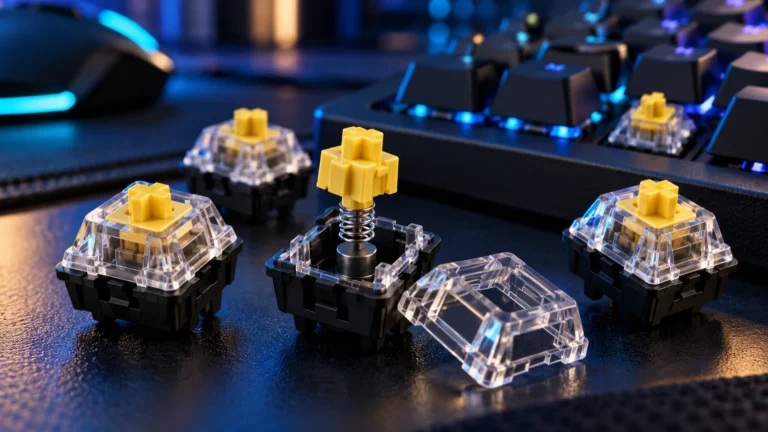
Hot-swap means you can pull a switch out with a tool and push a new one in. No soldering. On a budget board, this is the single best feature you can buy, because it turns a $50 keyboard into a platform instead of a dead end. Don’t like the stock switches in six months? Swap them for $20 instead of buying a new board.
4. Hall Effect: do beginners need it?
Hall Effect (magnetic) switches measure how far a key is pressed instead of waiting for a metal contact. That enables adjustable actuation (set a key to fire at 0.5 mm or 3.5 mm) and rapid trigger (the key resets the instant you start lifting). In tactical shooters, that makes counter-strafing feel noticeably snappier. I covered the tech in my Hall Effect keyboards explained piece.
Here’s my nuanced take: if you mostly play MMOs, RPGs, or strategy games, Hall Effect does almost nothing for you. Buy a good mechanical board and spend the difference on a better mouse.
Specs you can safely ignore
- 8000 Hz polling. In my testing, nobody I’ve handed a 1000 Hz and an 8000 Hz board to could reliably tell them apart blind. It also costs CPU time on weaker systems.
- “100% anti-ghosting” claims. Every board on this list handles more simultaneous keys than your hand can press.
- RGB effects. Pretty. Not a reason to spend an extra $30.
The Best Budget Gaming Keyboards for Beginners: My Picks
1. Keychron C3 Pro — Best Overall for Beginners
- Layout: TKL (87 keys), wired USB-C
- Switches: Keychron red (linear) or brown (tactile)
- Keycaps: Double-shot ABS
- Software: QMK/VIA, runs in your browser
- Price: about $35–$45
The C3 Pro is the board I recommend when someone says “I just want a good mechanical keyboard and I don’t want to think about it.” It’s a plain-looking TKL with a standard layout, which matters more than people realize. Every replacement keycap set on the market will fit it.
The sleeper feature is QMK/VIA support. That’s the same open-source remapping firmware enthusiast boards use. You can turn Caps Lock into a second Ctrl, build macros, or set up a gaming layer, all through a web page. No 400 MB driver suite running in your system tray.
I used one as my work-and-play board for two weeks. The reds are light and smooth enough for gaming. The stabilizers are better than they have any right to be at this price, with only a little spacebar rattle.
Here’s the catch: The ABS keycaps will develop shine on WASD within a few months of heavy use. And depending on the variant, the switches may be soldered rather than hot-swap, so check the listing if swapping matters to you.
Pros
- QMK/VIA remapping, the best software on this list
- Standard TKL layout, so any aftermarket keycap set fits
- Smooth, light reds that work well for gaming
- Better stabilizers than most boards at this price
- Quiet enough for an office or shared room
Cons
- Wired only, with no wireless option
- ABS keycaps shine on WASD within months
- Hot-swap depends on the variant, so check the listing
- Plain, no-frills looks
2. Redragon K552 Kumara — Cheapest Mechanical Worth Owning
- 🔥𝗧𝗿𝘂𝗲 𝗠𝗲𝗰𝗵𝗮𝗻𝗶𝗰𝗮𝗹 𝗙𝗲𝗲𝗹 𝘄𝗶𝘁𝗵 𝗟𝗶𝗻𝗲𝗮𝗿 𝗥𝗲𝗱 𝗦𝘄𝗶𝘁𝗰𝗵𝗲𝘀 – Experience smooth, consistent keystrokes with linear red mechanical swi…
- 🔥𝗩𝗶𝗯𝗿𝗮𝗻𝘁 𝗥𝗮𝗶𝗻𝗯𝗼𝘄 𝗟𝗘𝗗 𝗕𝗮𝗰𝗸𝗹𝗶𝗴𝗵𝘁𝗶𝗻𝗴 𝘄𝗶𝘁𝗵 𝟲 𝗗𝘆𝗻𝗮𝗺𝗶𝗰 𝗠𝗼𝗱𝗲𝘀 – Enjoy eye-catching rainbow backlighting with 6 preset lighting …
- 🔥𝗦𝗼𝗳𝘁𝘄𝗮𝗿𝗲 𝗗𝗿𝗶𝘃𝗲𝗿 𝗦𝘂𝗽𝗽𝗼𝗿𝘁 𝗳𝗼𝗿 𝗙𝘂𝗹𝗹 𝗖𝘂𝘀𝘁𝗼𝗺𝗶𝘇𝗮𝘁𝗶𝗼𝗻 𝗖𝗼𝗻𝘁𝗿𝗼𝗹 – Take control of your K552-KR with dedicated software drivers, …
- Layout: TKL (87 keys), wired
- Switches: Redragon red (linear) or blue (clicky)
- Build: Steel top plate
- Price: about $30–$40
The K552 has been around forever, and there’s a reason it keeps showing up in best-seller lists. It’s heavy, the steel plate gives it zero flex, and it shrugs off the kind of abuse a dorm desk delivers.
It’s not refined. The switches are a little scratchy, the keycaps are thin ABS, and the spacebar rattles out of the box. But you can fix that rattle in ten minutes with a dab of dielectric grease on the stabilizer wire. My stabilizer rattle fix guide walks you through it.
Here’s the catch: Buy the red-switch version. The blue version is genuinely loud, and loud is the number one reason people return this board.
Pros
- One of the cheapest mechanical boards worth buying
- Steel top plate with zero flex
- Heavy and durable enough for a dorm desk
- Compact TKL frees up mouse space
Cons
- Switches feel a little scratchy
- Spacebar rattles out of the box (fixable in 10 minutes)
- Thin ABS keycaps
- Blue-switch version is very loud
- Basic software
3. AULA F75 — Best “Enthusiast Feel” on a Budget
- Layout: 75% with volume knob
- Connection: Wired, 2.4 GHz wireless, Bluetooth
- Switches: Pre-lubed linears, hot-swap sockets
- Keycaps: PBT
- Mount: Gasket
- Price: about $55–$70
I’m a little tired of the “thocc” hype. I’ll still admit the F75 made me grin the first time I typed on it. Gasket mount, internal foam, and factory-lubed switches give it that deep, muted sound people spend $200 chasing. It’s here for under $70.
You also get PBT keycaps that won’t shine, a 75% layout that keeps the function row, and hot-swap sockets so you can experiment later. For a beginner who suspects they’ll catch the keyboard bug, this is the smart buy. Want to understand why PBT matters? See my PBT vs. ABS keycaps breakdown.
Here’s the catch: The companion software is clunky. And for ranked matches, plug in the cable rather than relying on the wireless dongle.
Pros
- Gasket mount and foam give a deep, premium sound
- Factory-lubed switches feel smooth out of the box
- PBT keycaps that won’t shine
- Hot-swap sockets, so you can try new switches later
- Tri-mode: wired, 2.4 GHz, and Bluetooth
- 75% layout keeps the function row
Cons
- Clunky companion software
- Price jumps around a lot between sales
- Use the cable rather than wireless for ranked play
- Costs more than the other entry-level picks
4. Epomaker HE68 Lite — Best for Competitive FPS
- Layout: 65%, wired USB-C only
- Switches: Linear Hall Effect (magnetic), hot-swap with HE switches only
- Features: Adjustable actuation, rapid trigger, 8000 Hz polling
- Price: around $49
A year or two ago, a Hall Effect board this cheap would’ve been a gamble. The HE68 Lite isn’t. Rapid trigger works the way it should, and dialing actuation down on WASD makes counter-strafing in Valorant and CS2 feel tighter. For about $49, that’s a lot of performance.
It makes sense for a specific kind of beginner: someone who knows they’re mostly going to play tactical shooters. If that’s not you, skip it.
Here’s the catch: The magnetic linears feel a bit flat for long typing sessions, and the board sits at a fixed angle with no adjustable feet. If you’ve got wrist trouble, pair it with a wrist rest. Also, the sockets only take Hall Effect switches. Your regular mechanical switches won’t fit.
Pros
- Rapid trigger and adjustable actuation for around $49
- Real advantage for counter-strafing in Valorant and CS2
- 8000 Hz polling
- Compact 65% layout keeps the arrow keys
- Hot-swappable Hall Effect switches
Cons
- Wired only
- Fixed typing angle with no adjustable feet
- Linear magnetic switches feel flat for long typing sessions
- Only accepts Hall Effect switches, not standard mechanical ones
- Little benefit if you don’t play tactical shooters
5. AULA WIN60 HE — Cheapest Way Into Hall Effect

- Layout: 60%, wired
- Switches: Magnetic (Hall Effect)
- Features: Adjustable actuation, rapid trigger
- Price: about $35–$40
This is the cheapest Hall Effect keyboard I’d still recommend. Rapid trigger works, and adjustable actuation is there. That’s the whole pitch, and for under $40 it’s a good one.
Here’s the catch: A 60% layout drops the arrow keys and function row, so you’ll need Fn layers for basic stuff like editing text. Long-term firmware updates and warranty support are also less certain from smaller brands. Treat it as a low-cost way to find out whether rapid trigger actually matters to you.
Pros
- Cheapest Hall Effect board I’d recommend
- Rapid trigger and adjustable actuation
- Tiny 60% footprint leaves lots of mouse room
- Low-risk way to test whether rapid trigger matters to you
Cons
- No arrow keys or function row
- Fn layers take time to learn
- Budget build quality
- Uncertain long-term firmware and warranty support
6. SteelSeries Apex 3 — Best Quiet Pick (Yes, It’s Membrane)
- Layout: Full size (TKL version also available)
- Switches: Whisper-quiet membrane
- Extras: IP32 water and dust resistance, magnetic wrist rest, media controls
- Price: about $40–$50
Here’s my contrarian pick. Not everyone should buy a mechanical keyboard first. If you game late at night with someone sleeping in the next room, or you’ve got a kid who treats your desk like a juice bar, the Apex 3 makes more sense than anything else here.
It’s quiet, it survives spills, and the included wrist rest is genuinely comfortable. I’m not a snob about membrane boards. A good one beats a bad mechanical board every time.
Here’s the catch: It feels softer and mushier than any mechanical switch, and you can’t upgrade it. The full-size version also eats a lot of mouse space.
Pros
- Very quiet, so it suits late-night gaming and shared rooms
- IP32 water and dust resistance survives spills
- Comfortable magnetic wrist rest included
- Dedicated media controls
- TKL version available if you want it smaller
Cons
- Soft, mushy membrane feel
- No switch upgrades, ever
- Full-size version takes up a lot of mouse space
- RGB is zoned, not per-key
7 Beginner Mistakes I See Almost Every Week
- Buying clicky blue switches for a shared space. They sound great in a YouTube video. In a dorm room, or on an open mic in voice chat, they’re a nightmare. Get linear or tactile unless you live alone.
- Paying extra for RGB. Per-key lighting adds $20–$40 to the price and nothing to your aim. Spend that money on PBT keycaps or a hot-swap board.
- Jumping straight to a 60% layout. Losing the arrow keys sounds fine until you’re editing a document. Start with TKL or 75%. You can always go smaller later.
- Chasing polling-rate numbers. 8000 Hz looks great on the box. You almost certainly won’t feel it over 1000 Hz, and it can cost frames on older CPUs.
- Buying switches that won’t fit. Hall Effect boards only accept Hall Effect switches. A standard mechanical board only takes standard switches, and some only take 3-pin, not 5-pin. Check before you order.
- Ignoring keycap compatibility. Some budget boards use odd bottom-row sizes, and south-facing LEDs can make certain Cherry-profile caps hit the switch housing. A standard layout saves you a lot of headaches if you upgrade caps later.
- Flipping the feet up by default. Most people’s wrists are happier with the board flat, or even tilted slightly away. If your wrists ache after a long session, put the feet down and try a wrist rest first. Your mileage will vary with hand size, but this one fix solves more complaints than any switch swap.
My Verdict: Which Budget Gaming Keyboard Should You Buy First?
For most first-time buyers, the answer is the Keychron C3 Pro. It’s cheap, it’s standard, and the remapping software is better than boards costing three times as much. You’ll learn what you like without spending much to find out.
If you already suspect you’ll get hooked, stretch to the AULA F75. A good $60 board you keep for years beats a $35 board you replace in six months. If ranked shooters are your whole life, the Epomaker HE68 Lite is the one I’d buy with my own money.
Whatever you pick, don’t overthink it. The best budget gaming keyboard for beginners is the one that feels good under your hands tonight, not the one with the longest spec sheet. Still deciding how far your money stretches? My best keyboards under $100 roundup covers the next tier up.
This article contains affiliate links. If you buy through them, I earn a small commission at no extra cost to you. I only recommend keyboards I’ve actually tested. As an Amazon Associate I earn from qualifying purchases.