
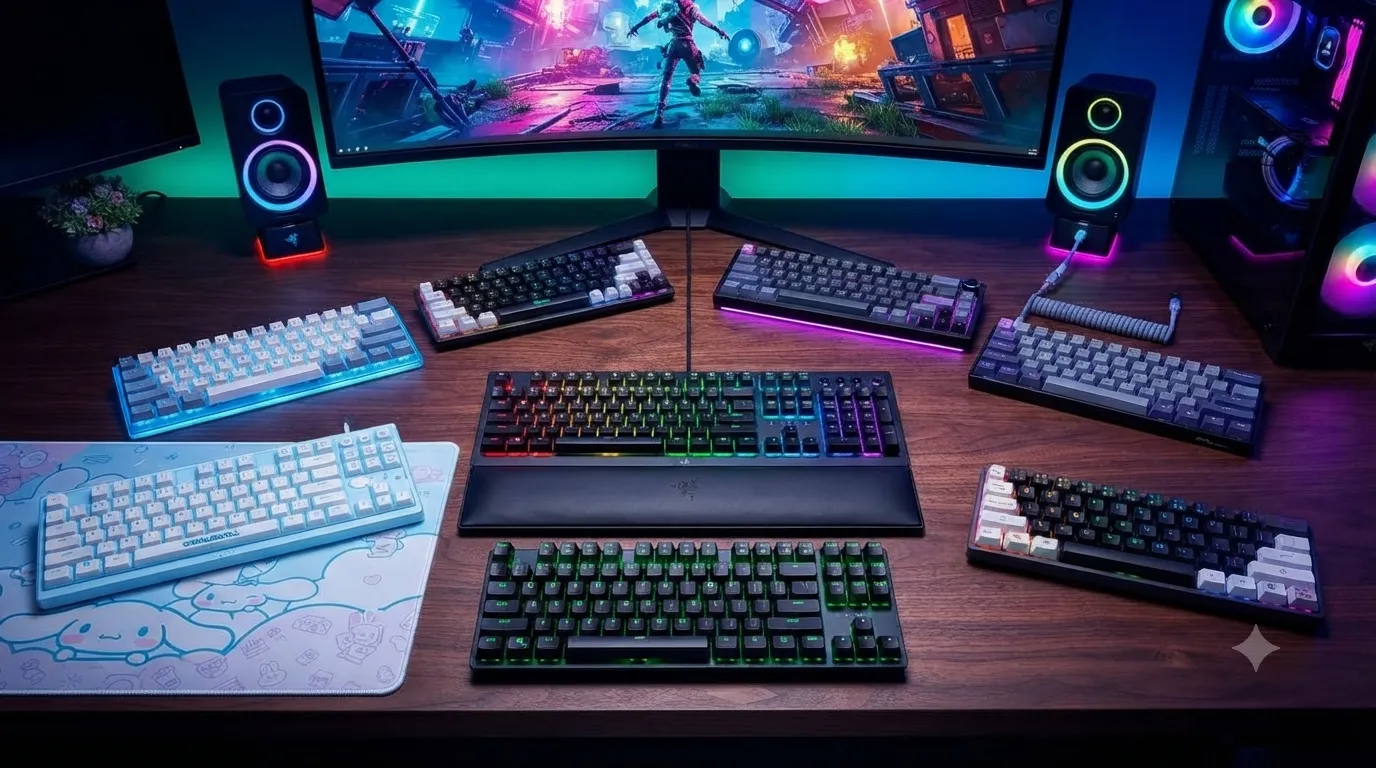
Best Low Profile Compact Gaming Keyboards 8 Tested Picks

This article contains affiliate links. If you buy through them, I earn a small commission at no extra cost to you. I only recommend keyboards I’ve actually tested. As an Amazon Associate I earn from qualifying purchases.
There’s a stubborn idea floating around that low-profile keyboards can’t hang with “real” mechanicals for gaming. I’ve heard it in Discord servers, in comment sections, at meetups. It’s mostly wrong. The best low-profile compact gaming keyboards on the market right now punch harder than most people give them credit for, and I’ve been running 60%, 65%, and TKL boards as my daily gaming setups for a few years, mixed with full-height flagships. The gap in feel and speed has closed a lot faster than the forum crowd will admit.
A good low-profile compact board gets you three things at once: less travel for faster actuation, a smaller footprint so your mouse hand has room to breathe, and a keyboard you can toss in a backpack without wondering if you’re going to hear something crack. That last one matters more than people admit.
I’ve spent the last few months rotating through the eight boards below. Some are true low-profile switches, some are just compact standard-height boards that ride the same “small and portable” wave. I’ll call out which is which. Here’s what I’d actually spend my own money on.
Best Low-Profile Compact Gaming Keyboards at a Glance
| Best For | Board | Layout | Switch Type |
|---|---|---|---|
| Best Overall Low-Profile | Logitech G515 TKL | TKL | Low-profile mechanical (tactile) |
| Best for Competitive FPS | Nuphy Air75 HE | 75% | Hall Effect, adjustable actuation |
| Best Cheap Wireless | RK Royal Kludge RK61 | 60% | Hot-swap mechanical |
| Best Full-Feature Wireless | AULA F75 Pro | 75% | Hot-swap, pre-lubed linears |
| Best Full-Size Low-Profile | Razer Ornata V3 | Full-size | Mecha-membrane |
| Best Themed / Gift Pick | Razer Ornata V3 TKL Cinnamoroll | TKL | Mecha-membrane |
| Best Quiet Office Backup | Razer Ornata V3 X (Renewed) | Full-size | Silent membrane |
| Best Ultra-Budget Compact | GEODMAER 65% | 65% | Standard mechanical |
Now the deep-dive on each one.
What “Low-Profile Compact” Actually Means
Two words doing separate work here, and half the confusion online comes from mashing them together.
Low-profile is about switch height. A standard Cherry MX-style switch sits about 18–19mm tall from the PCB, with roughly 4mm of key travel. A low-profile switch — Kailh Choc, Cherry MX Low Profile, Nuphy’s Jade Pro, Logitech’s own low-profile mechanicals — shaves that down to somewhere around 11–13mm, usually with 2.5–3mm of travel. Less finger movement per press. Lower wrist angle. Feels closer to a chiclet laptop board, but with actual switch character.
Compact is about layout. 60%, 65%, 75%, and TKL boards drop the numpad and sometimes the function row to save desk space. You get more room to swing your mouse in shooters, and you can carry the whole board with one hand.
Put them together and you get a keyboard that’s low, small, and doesn’t try to eat your desk. That doesn’t mean every board wearing the label is worth it — some are lazy shrunken mechanicals with terrible stabilizers. Here’s what actually works.
1. Logitech G515 TKL — My Overall Pick

- Compact Gaming Keyboard: The Logitech G515 TKL wired mechanical gaming keyboard offers a slim profile and tenkeyless des…
- Smooth, Precise Typing Experience: Factory-lubed low-profile GL mechanical switches for a smoother feel, fast actuation,…
- Anti-Oil Design and Premium Feel: Double-shot PBT keycaps offer durability for the most intense moments of play and look…
If I had to pick one from this list and lock the rest in a drawer, this is it. The G515 TKL uses Logitech’s own low-profile tactile switches — their “brown” equivalent — in a proper TKL layout with, and this is the surprise, double-shot PBT keycaps. At this price on a factory board, that’s rare. Most low-profile keyboards ship with painted or coated ABS that shines up inside a month.
I ran the G515 as my daily driver for about three weeks. The tactile bump is subtle but honest — you feel it, you don’t fight it. Actuation is quick without being twitchy. RGB is fully per-key through G Hub, and the wired-only design keeps latency out of the argument. It’s not the flashiest board here. It’s the one I kept reaching for.
Note the listing linked is a Renewed unit, which is how you get it well under new-retail pricing. In my experience Amazon Renewed on Logitech gear has been solid — most units arrive looking basically untouched.
Pros:
- Real low-profile mechanical feel, not membrane pretending
- Double-shot PBT keycaps at this price is a genuine flex
- Snappy tactile switches that work for both gaming and typing
- Clean TKL layout with dedicated arrows
Cons:
- Wired only — no wireless option
- Renewed stock availability comes and goes
- No hot-swap sockets, so what you buy is what you get
2. Nuphy Air75 HE — Best for Competitive FPS

- NuPhyIO Self-developed Driver: NuPhyIO’s new design makes it easier for all users to operate. Customizable adjustments a…
- Quick Keyboard Profile Switching: Depending on different games or office work, we may need to customize key assignments …
- Fast response with low latency: Air75 HE magnetic switch keyboard features both an 8000Hz polling rate and an 8000Hz PCB…
Hall Effect switches used to be a niche thing you’d read about on custom keyboard forums. Now they’re on shelves, and the Air75 HE is the one I’d hand a Valorant or CS2 player without hesitation.
The magic here is adjustable actuation. Every key can be set to trigger anywhere from around 0.1mm to 3.4mm of press depth. Rapid Trigger lets a key reset the instant you start lifting off, which is why HE boards keep showing up on pro setups. I set my WASD to a shallow actuation for movement and a deeper one for utility keys, and the difference in strafe timing versus a normal mechanical was real. Not placebo real. Actually real.
The Air75 is a genuine low-profile chassis — Nuphy’s Air line has been the reference for that since it launched. The Jade Pro magnetic switches feel decent as linears, and the PBT keycaps hold up. If you’re serious about competitive shooters, this is the FPS-focused board worth the price jump.
Pros:
- Adjustable actuation and Rapid Trigger are legitimate FPS upgrades
- True low-profile chassis, actually thin
- Multi-mode wireless (2.4GHz, Bluetooth, wired)
- Feels premium in hand for the price
Cons:
- Steeper learning curve — you’ll want to dial in per-key settings
- Software is decent, not great
- Priciest board on this list
3. RK Royal Kludge RK61 — Best Cheap Wireless 60%
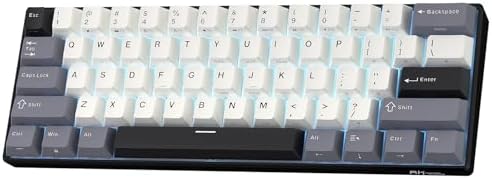
- 60% Compact, Portable Size — The ultra-minimalist 61-key layout reclaims precious desk space, providing more space for l…
- Versatile 3-Mode Connectivity — Seamlessly toggle between Bluetooth 5.0, 2.4GHz wireless, and USB-C wired modes. This co…
- Thocky Typing Experience — Engineered with dual-layer thick silencing foam and spacebar sound-absorbing foam, the RK61 s…
The RK61 is not new, and that’s part of why I keep recommending it. It’s had years to sort itself out, and the current triple-mode revision (Bluetooth 5.0, 2.4GHz dongle, USB-C wired) is the best it’s ever been.
Full disclosure: this is a standard-height mechanical, not low-profile. But the 60% footprint puts it right in the same “small and portable” territory low-profile fans usually care about, and at this price it’s kind of unbeatable. Hot-swap sockets mean you can drop in Gateron Yellows, Akko Cream Blues, whatever suits you — no soldering.
I’ve traveled with the RK61 more than any other board on this list. It survives being crammed in a backpack. Battery life is fine, not spectacular — RGB will drain it if you leave it cranked, but a few days of moderate use with lighting low is realistic. If you’re torn between a true 60% and something with arrows, this breakdown of layout tradeoffs might save you a return trip.
Pros:
- Genuinely portable 60% with three connection modes
- Hot-swap sockets at a budget price is unusual
- PBT keycaps come standard now
- Cheap enough to be a proper travel beater
Cons:
- Not low-profile — standard MX key travel
- Stabilizers are okay, not great — the space bar can rattle
- No dedicated arrow keys (the 60% tradeoff)
4. AULA F75 Pro — Best Full-Feature Wireless

- Tri-mode Connection Keyboard: AULA F75 Pro wireless mechanical keyboards work with Bluetooth 5.0, 2.4GHz wireless and US…
- Hot-swap Custom Keyboard: This custom mechanical keyboard with hot-swappable base supports 3-pin or 5-pin switches repla…
- Advanced Structure and PCB Single Key Slotting: This thocky heavy mechanical keyboard features a advanced structure, ext…
The F75 Pro is the board I keep pulling out when someone asks “what’s the most keyboard I can get for around a hundred bucks?” It’s a 75% layout with a rotary knob, gasket-style mount, hot-swap sockets, pre-lubed switches, side-printed PBT keycaps, and triple-mode wireless. Read that sentence again. That’s a lot.
Another standard-height mechanical, not low-profile — and again, I’m including it because “compact and gaming-ready” is what a lot of you actually mean when you type “low profile” into a search box. The Reaper switches are linear, factory-lubed, and honestly punch above their weight. Smoother than most sub-$100 factory switches I’ve tested this year.
The knob controls volume by default and can be remapped in software. The RGB is bright without being clownish. Only real gripe: the pre-lubed stabilizers still rattle a little on the space bar. Ten minutes with clip-in stab pads fixes it. If that’s new territory for you, here’s the walkthrough I usually point people to.
Pros:
- 75% layout keeps arrows and a function row — great compromise
- Rotary knob is genuinely useful, not gimmicky
- Hot-swap plus factory-lubed switches is a killer combo at this price
- Triple-mode wireless works cleanly
Cons:
- Not truly low-profile; standard MX-height keys
- Space bar stab needs a small mod for perfect sound
- Software is functional but a little rough around the edges
5. Razer Ornata V3 (Full-Size) — Best Full-Size Low-Profile

- LOW-PROFILE KEYS — With slimmer keycaps and shorter switches, enjoy natural hand positioning that allows for long hours …
- MECHA-MEMBRANE SWITCHES — Fusing the snappy, clicky feedback of a mechanical switch with the familiar feel of a conventi…
- UV-COATED KEYCAPS — More durable than regular keycaps, the UV coating ensures more fade-resistant legends and greater pr…
Now to Razer’s Ornata V3 line, which is where a lot of casual gamers actually enter the low-profile world. The Ornata V3 uses Razer’s mecha-membrane switches — a hybrid design that gives you a soft membrane cushion with a light clicky snap on top. It’s not a true mechanical, and Razer doesn’t pretend otherwise.
Honest read: if you’ve never used a real mechanical, you’ll probably enjoy it. If you’ve been on Gateron Yellows or MX Reds for years, you’ll notice the mushiness. The UV-coated keycaps hold up better than raw ABS, though they’ll still shine eventually. 10-zone RGB is fine — not per-key, which some people care about and most don’t.
Snap Tap is Razer’s version of null-binding for movement inputs, and it works. Full-size layout means you keep the numpad. The included magnetic wrist rest is a genuinely nice touch that other brands charge extra for.
Pros:
- Low-profile keys with a clicky-ish feel most people enjoy
- Snap Tap gives you a real FPS movement trick
- Magnetic wrist rest included in the box
- Backlit dedicated media keys
Cons:
- Mecha-membrane won’t satisfy mechanical purists
- Only 10-zone RGB, not per-key
- Full-size layout takes more desk space than the rest of this list
6. Razer Ornata V3 TKL Cinnamoroll — Best Themed Pick

- OFFICIALLY LICENSED — Hit cloud-nine precision and dreamy immersion with an officially licensed gaming keyboard inspired…
- LOW-PROFILE KEYS — With slimmer keycaps and shorter switches, enjoy natural hand positioning that allows for long hours …
- MECHA-MEMBRANE SWITCHES — Fusing the snappy, clicky feedback of a mechanical switch with the familiar feel of a conventi…
This is the Ornata V3 TKL Cinnamoroll edition — the same board in TKL form with the Sanrio paint job. Same mecha-membrane switches, same UV-coated keycaps, same magnetic wrist rest — dropped the numpad, added the aesthetic.
I mention it because the “who’s this for” question has a clear answer: someone who wants a soft, quiet-ish low-profile board that also happens to look great on stream. The TKL layout is a real upgrade over the full-size Ornata for gaming — more mouse space, immediately noticeable. The 8-zone RGB is a step down from the standard V3’s 10-zone, which is a weird spec-sheet move, but visually you won’t notice.
If you don’t care about the theme, honestly get the regular V3 TKL or one of the more mechanical picks above. If you do care, this is well-made merch, not slapped-on stickers.
Pros:
- Cinnamoroll edition looks legitimately good
- TKL layout is a better gaming footprint than full-size
- Same wrist rest and media keys as the standard V3
- Well-executed theming for the fan crowd
Cons:
- Same mecha-membrane feel — not for mechanical purists
- 8-zone RGB, fewer zones than the standard model
- Small premium for the theme
7. Razer Ornata V3 X (Renewed) — Best Cheap Quiet Backup

- Low-Profile Keys: With slimmer keycaps and shorter switches, enjoy natural hand positioning that allows for long hours o…
- Silent Membrane Switches: Perfect for those who prefer a quieter, more comfortable experience when gaming or typing
- Ergonomic Wrist Rest: Aligns to the keyboard and provides the perfect place to rest your wrists for support that’s vital…
Different beast from the other Ornatas. The V3 X uses silent membrane switches — no mecha, no click. It’s the entry point of the line and, on Renewed pricing, it’s cheap.
Here’s the catch: this is a full membrane keyboard. It doesn’t feel like a mechanical, it doesn’t sound like one, and no amount of Chroma RGB fixes that. So why is it on this list? Because readers keep asking me for a quiet, spill-resistant, low-profile board they can leave at the office or hand to a kid — and the V3 X actually fits that brief. It’s a lot better than the $20 keyboard that came with your PC. It’s not trying to be a competitive gaming board.
The wrist rest is included, the RGB is per-key on paper (10-zone in practice), and it survives coffee spills better than any of the mechanicals here. Sometimes that’s what you need.
Pros:
- Genuinely quiet — office-friendly
- Spill-resistant, which none of the mechanicals on this list are
- Included wrist rest
- Cheap on Renewed pricing
Cons:
- Membrane feel, not mechanical
- Not built for competitive gaming
- Renewed listing means some cosmetic wear is possible
8. GEODMAER 65% — Best Ultra-Budget Compact

- 【65% Compact Design】GEODMAER Wired gaming keyboard compact mini design, save space on the desktop, novel black & silver …
- 【Wired Connection】Gaming Keybaord connects via a detachable Type-C cable to provide a stable, constant connection and ul…
- 【Strong Working Life】Wired gaming keyboard has more than 10,000,000+ keystrokes lifespan, each key over UV to prevent fa…
This is the “you have $40 and just want to try a compact board” pick. The GEODMAER 65% is a 68-key wired mechanical with LED backlight, anti-ghosting, and enough decent switches to game on. Standard height, not low-profile.
Straight talk: this is not going to sit next to your Nuphy or Logitech and get compared favorably. Stabilizers are basic, the ABS keycaps will shine, and the switches are generic. But it works. It plugs in, it registers keys reliably, it has arrows, and the 65% layout is a real step up from full-size for gaming.
If someone’s brand new to mechanical keyboards and doesn’t want to commit real money before finding out if they like the format, this is a fine starting point. If you stick with it, budget for a keycap upgrade down the line. When you’re ready to move up, this rundown of what to look for in your second mechanical is worth a scan.
Pros:
- One of the cheapest ways into a 65% layout
- Wired, plug-and-play, no software required
- LED backlight is bright enough to be useful
- Anti-ghosting works for actual gaming inputs
Cons:
- Generic switches, no hot-swap
- ABS keycaps will shine and yellow over time
- No wireless option
How I’d Actually Buy From This List
Shortcut for the skip-to-the-verdict crowd:
- Main game is competitive FPS? The Nuphy Air75 HE. Rapid Trigger is genuinely felt, not marketing.
- Best all-around low-profile mechanical? The Logitech G515 TKL. PBT keycaps at that price are the tell.
- Cheap, portable, and wireless? The RK Royal Kludge RK61. No debate.
- Maximum features per dollar and don’t mind standard-height? The AULA F75 Pro. The knob alone earns its slot.
- Like the mecha-membrane middle ground? Razer’s Ornata V3 or the TKL Cinnamoroll edition, whichever fits your desk and taste.
- Quiet and cheap for an office? The Ornata V3 X Renewed.
- Absolute floor price on a compact? The GEODMAER 65%.
Two things I’ll say that most affiliate roundups won’t. First, a good $90 board beats a bad $200 one every single time. Chase feel and fit, not brand hype. Second, the best low-profile compact gaming keyboards aren’t the ones with the loudest marketing — they’re the ones you keep on your desk two months later.
Test drive if you can. Return if it’s wrong for you. If you end up modding your first set of stabilizers, welcome to the hobby — here’s the guide on lubing your first board I send new folks to. And if you’re already deep in the rabbit hole and thinking about your endgame build, here’s my current take on premium compacts worth the price jump.
This article contains affiliate links. If you buy through them, I earn a small commission at no extra cost to you. I only recommend keyboards I’ve actually tested. As an Amazon Associate I earn from qualifying purchases.
One Comment