2.4GHz vs Bluetooth Gaming Keyboard: Latency, Range, Battery

This article contains affiliate links. If you buy through them, I earn a small commission at no extra cost to you. I only recommend keyboards I’ve actually tested. As an Amazon Associate I earn from qualifying purchases.
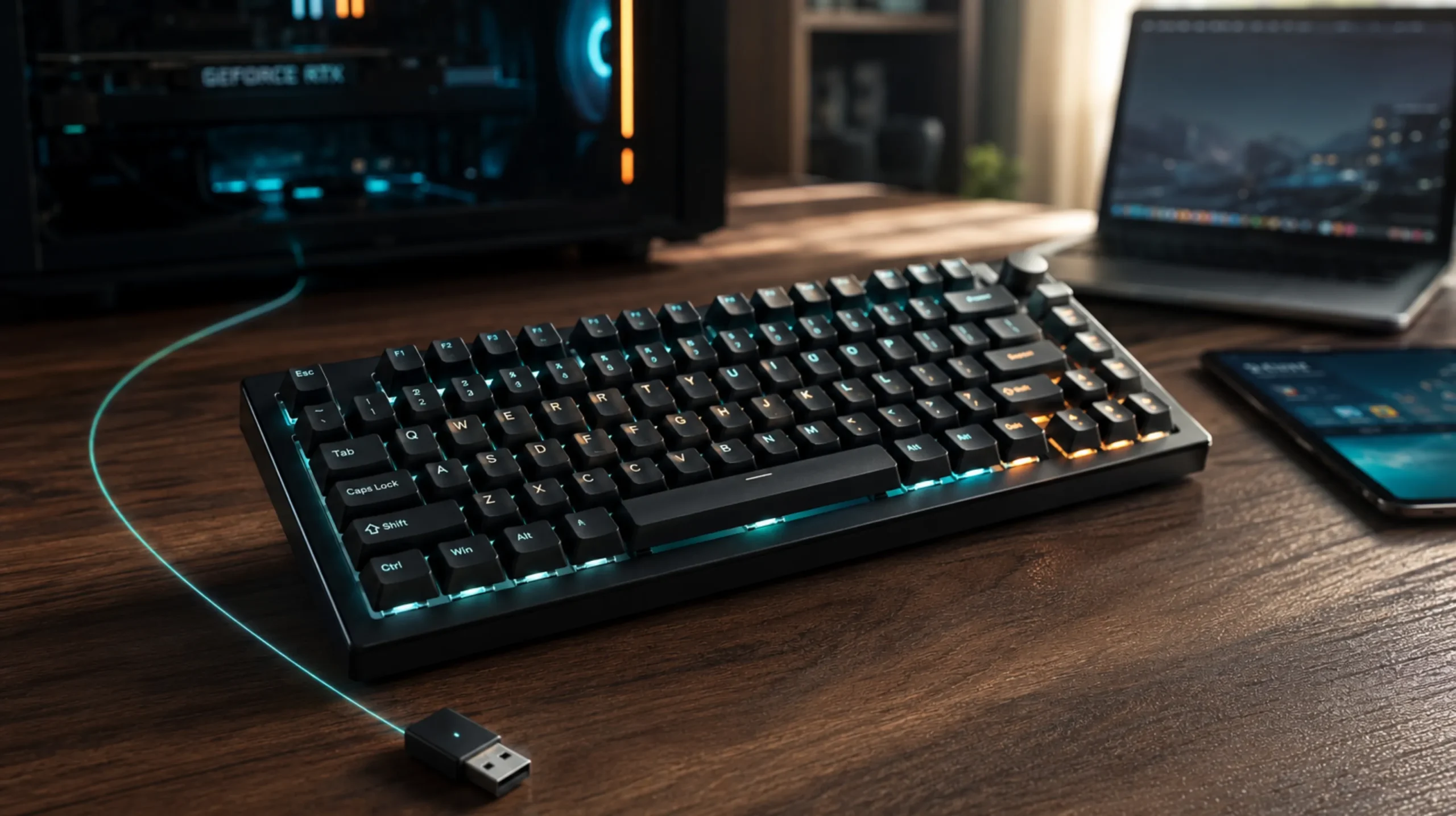
Here’s the thing nobody tells you in the spec sheet: every serious wireless gaming keyboard on the market still ships with a tiny USB dongle in the box. Not because the engineers got lazy or wanted to pad the parts list. Because Bluetooth, for all its convenience, still can’t quite hang with a dedicated 2.4GHz link when frames matter.
That’s the short version of the 2.4GHz vs Bluetooth gaming keyboard debate. The long version is more interesting, and there are absolutely cases where Bluetooth is the smarter choice. I’ve daily-driven wireless boards for years now — Logitech G Pro X TKL, Keychron Q1 Max, Razer BlackWidow V3 Mini, the ASUS ROG Strix Scope II 96. Some weeks I’m on the dongle. Some weeks I’m bouncing across three Bluetooth profiles. Both have a place. Just not the same place.
The TL;DR: Quick Pick by What You Actually Do
| Your setup | Best wireless mode | Why it wins |
|---|---|---|
| Competitive FPS / esports | 2.4GHz dongle | Sub-1ms latency, 1000Hz+ polling, no handshake hiccups |
| Mixed gaming + work laptop + tablet | Board with both modes | Dongle for the game PC, Bluetooth for everything else |
| Couch gaming, 6–10 ft from the screen | 2.4GHz dongle | More consistent at distance under load |
| Travel, café, on a plane | Bluetooth | One less thing to lose, pairs to anything |
| MMO / strategy / slower-paced games | Bluetooth is fine | You’ll never feel the difference |
| Single-key macros, fighting games | 2.4GHz dongle | Input timing matters frame-to-frame |
If you only read one section, read that table. The rest is me showing my work.
How 2.4GHz Actually Works on a Gaming Keyboard
The “dongle” is a proprietary radio. The keyboard talks to it on a dedicated channel using the manufacturer’s own protocol — Logitech calls theirs Lightspeed, Razer calls theirs HyperSpeed, Corsair has Slipstream, ASUS uses SpeedNova. They’re all variations on the same idea: ditch Bluetooth’s handshake overhead and run a lean, predictable link straight from the board to a small USB receiver.
The result is what you’d expect.
- Polling rates of 1000Hz are standard. Newer flagships push 4000Hz or 8000Hz over the dongle. Bluetooth can’t touch that.
- End-to-end latency typically lands between 1ms and 4ms. That’s wired-keyboard territory for most people’s purposes.
- The connection doesn’t have to wake up. No re-pairing, no Bluetooth stack fighting your headphones for bandwidth.
Downside? You’re occupying a USB port. The dongle sticks out about an inch on most setups. Lose it on a trip and you’ll be ordering a replacement from the manufacturer because they’re rarely interchangeable across brands.
How Bluetooth Stacks Up
Bluetooth on modern keyboards is mostly BT 5.0, 5.1, or 5.2. It works. It’s gotten way better than the laggy nonsense Bluetooth keyboards were in 2015. But it carries baggage the dongle doesn’t.
Bluetooth runs on the crowded 2.4GHz ISM band — same band as Wi-Fi, microwaves, baby monitors, your neighbor’s smart bulbs. It has to negotiate channel hopping and share airtime. Add an encryption layer, frequent handshakes, and a polling rate that historically caps around 125Hz on most keyboards, and you’ve got a connection that’s totally fine for typing this article but noticeably looser when you’re trying to hit a flick shot in CS2.
A few honest observations from my own testing:
- Bluetooth typing latency on a good board (say, a Keychron Q-series in BT mode) sits around 15–25ms. You don’t feel that while writing emails.
- Wake-from-sleep is the real annoyance. Most BT boards take 1–3 seconds to reconnect when you press a key after they’ve idled. That’s a chunk of a clutch round.
- BT keyboards usually let you pair to 3 devices at once and toggle with a key combo. That’s the genuine killer feature 2.4GHz can’t match. If you bounce between a desktop, a work laptop, and an iPad, this is gold.
Latency: The Heart of the 2.4GHz vs Bluetooth Gaming Keyboard Debate
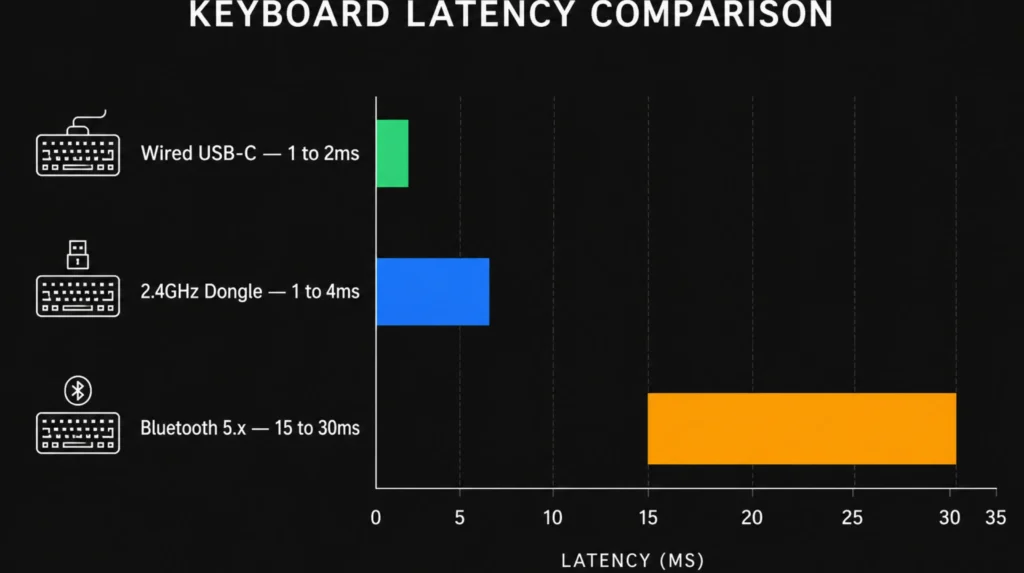
This is where the whole conversation lives, so let’s look at numbers I actually trust.
| Connection | Typical end-to-end latency | Max polling rate | Best for |
|---|---|---|---|
| Wired USB-C | 1–2ms | 1000Hz – 8000Hz | Pure competitive use |
| 2.4GHz dongle | 1–4ms | 1000Hz – 8000Hz | Competitive gaming, wireless |
| Bluetooth 5.x | 15–30ms | ~125Hz (some 250Hz) | Casual gaming, productivity |
Here’s the catch nobody mentions: under USB hub load, with a busy Wi-Fi network around you, 2.4GHz dongles can occasionally hiccup. I had a Razer dongle that hated being plugged into the same powered hub as my webcam. Moved it to a rear motherboard port with a short extension cable and the problem vanished. If you’re chasing every millisecond, plug the dongle into a rear USB port and give it some breathing room. Don’t bury it behind a hub.
For most non-competitive players, the 10–25ms gap between 2.4GHz and Bluetooth sits below your perception threshold during normal play. I won’t pretend you’ll feel it in a turn-based RPG. But in Valorant, Apex, Tarkov, or any rhythm game, you will.
Battery Life: The Quiet Win for Bluetooth
This is where Bluetooth gets some of its dignity back.
A 2.4GHz dongle running at 1000Hz polling burns through battery noticeably faster than the same board on Bluetooth. On my Keychron Q1 Max, I get roughly:
- Bluetooth, RGB off: ~3–4 weeks of normal use
- Bluetooth, RGB on (low): ~10–14 days
- 2.4GHz, RGB off, 1000Hz: ~7–10 days
- 2.4GHz, RGB full, 1000Hz: ~3–5 days
Crank a board to 4000Hz or 8000Hz polling over 2.4GHz and battery life falls off a cliff. Some flagship boards barely last two days at those rates with the lights on.
Most boards let you flip between modes with a switch on the back or a function-layer combo. The smart play is to game on 2.4GHz, then switch to Bluetooth when you’re just answering Slack messages. Your battery thanks you.
If you want a deeper look at how wireless boards handle battery life, sleep settings, and idle drain, there’s more to dig into — those settings can double your runtime if you actually configure them instead of leaving the defaults alone.
Range and Interference: The Real-World Mess
On paper, both 2.4GHz dongles and Bluetooth 5 advertise around 10 meters / 30 feet of range. In practice, it depends entirely on what’s between the board and the receiver.
- 2.4GHz dongles stay more stable at usable gaming distances (2–10 feet). They’re tuned for that link specifically.
- Bluetooth drops out earlier under interference. If your router is screaming on 2.4GHz Wi-Fi in the same room, you’ll feel it.
- Couch gaming — say, 8 feet from a TV with a PC under it — the dongle wins almost every time. Use the USB extension cable that came in the box and put the dongle on top of the desk, not stuffed behind it.
I’ve had Bluetooth boards stutter when my phone was charging on a Qi pad two feet away. Switched to the dongle, the stutter disappeared. Anecdotal, but I’ve seen it enough times to mention it.
When Bluetooth Is Actually the Better Pick
I’m not here to dunk on Bluetooth. It earns its keep in a few real scenarios:
- You own a laptop, a desktop, and a tablet and you want one nice board for all of them. Multi-device pairing is a genuine quality-of-life win.
- You travel and don’t want to remember a dongle. Drop the board in a bag, pair to whatever’s there.
- You play slower-paced games: city builders, CRPGs, MMOs, indie stuff. The latency difference is invisible.
- You hate USB-port clutter. Some compact laptops only have two USB-C ports and you don’t want to burn one on a dongle full-time.
For most people doing a mix of work and casual gaming, a board with both modes is the honest answer. You’re not really choosing — you’re using each one where it shines. If you’re shopping that category, the best wireless mechanical keyboards with dual connectivity cover a wide range of price points and layouts.
A Few Specific Boards Worth Knowing About
I won’t list a dozen because most “best of” lists are noise. Three categories cover almost everyone:
- Pure competitive 2.4GHz: Logitech G Pro X TKL Lightspeed, Razer BlackWidow V4 Pro 75% HyperSpeed, ASUS ROG Azoth. Dongle-first, low-latency, no compromise.
- Dual-mode enthusiast: Keychron Q1 Max, Keychron Q3 Max, NuPhy Air75 V2. Great typing feel, both connection modes, multi-device pairing, hot-swap sockets.
- Compact / travel: Lofree Flow Lite, Keychron K3 Pro, Logitech MX Mechanical Mini. Bluetooth-first, ultra-portable.
If you’re more interested in low-profile wireless options for travel, that’s a different rabbit hole worth exploring — the typing feel is genuinely different from full-height boards and not everyone loves it.
My Honest Verdict
The 2.4GHz vs Bluetooth gaming keyboard question has a straight answer for serious gamers: use the dongle when you’re playing. That’s why every flagship still includes one. Manufacturers aren’t shipping a $4 USB receiver in a $250 board out of nostalgia — they ship it because Bluetooth still loses on latency, polling rate, and connection stability under load.
But “use the dongle when gaming” doesn’t mean “Bluetooth is bad.” Bluetooth is the connection mode you’ll use for 70% of your day if you also work on the keyboard. It’s the reason you can switch from your gaming PC to your work laptop without unplugging anything. It’s the reason your board survives a week of typing on a single charge.
Buy a board with both. Use 2.4GHz for matches. Use Bluetooth for everything else. That’s the answer almost nobody puts plainly, and it’s the one that actually fits how most of us use our setups.
One last caveat: if you’re a casual gamer who mostly plays single-player or co-op games, and you also use the keyboard with multiple devices, you can absolutely live full-time on Bluetooth and never feel held back. Don’t let spec-sheet anxiety push you into an extra dongle you’ll lose in three months. Match the tool to how you actually play.
If you want to keep going down this road, the differences between wireless and wired latency in 2026 testing are worth a closer look — wireless has closed the gap further than most people realize.
This article contains affiliate links. If you buy through them, I earn a small commission at no extra cost to you. I only recommend keyboards I’ve actually tested. As an Amazon Associate I earn from qualifying purchases.