Best Budget Optical Gaming Keyboards 4 Honest Picks

This article contains affiliate links. If you buy through them, I earn a small commission at no extra cost to you. I only recommend keyboards I’ve actually tested. As an Amazon Associate I earn from qualifying purchases.
Here’s a line I hear every week: “Optical switches are just a gimmick so Razer and ASUS can charge more.” It’s half right. The speed claims get oversold. But the best budget optical gaming keyboards fix a real, boring problem — metal switch contacts that wear out and start double-typing — and some of them do it for less than a decent dinner for two.
I’ve narrowed this down to four boards (five listings, since one comes in black and white). One is a $69 60% that punches way above its price. Two cost $179.99, which isn’t budget by any honest definition, so I’ll tell you exactly when they’re worth the stretch and when they’re not.


Quick Comparison: The Best Budget Optical Gaming Keyboards by What You Need
Short on time? Find your row, click, done.
For a closely related buying path, see our best gaming keyboards under $100 guide.
| Best For | Keyboard | Price | Switch | Layout | Why It Wins | Buy |
|---|---|---|---|---|---|---|
| 🏆 Best overall value | Razer Huntsman Mini (Black) | $69.00 | Razer Linear Optical (Gen-2) | 60%, wired | Aluminum top plate and doubleshot PBT at a bargain price | Check Price on Amazon → |
| Best for white setups | Razer Huntsman Mini (White) | $69.00 | Razer Linear Optical (Gen-2) | 60%, wired | Same board, Mercury white finish | Check Price on Amazon → |
| Best full-size under $120 | ASUS ROG Strix Scope II RX | $109.50 | ROG RX Red (pre-lubed) | 100%, wired | IP57 spill resistance, foam, wrist rest, media controls | Check Price on Amazon → |
| Best wireless | ASUS ROG Strix Scope II 96 RX Wireless | $179.99 | ROG RX Red | 96%, tri-mode | Bluetooth, 2.4GHz and wired, numpad in a compact body | Check Price on Amazon → |
| Best for competitive FPS | Razer Huntsman V3 Pro Mini 8KHz | $179.99 | Razer Analog Optical Gen-2 | 60%, wired | 0.1–4.0mm adjustable actuation, Rapid Trigger, 8000Hz | Check Price on Amazon → |
Prices at time of writing. Amazon prices move a lot, especially on the Huntsman Mini.
The 10-second version:
- Tight budget or small desk? Huntsman Mini. Don’t overthink it.
- Want a numpad and a wrist rest? Scope II RX.
- Hate cables? Scope II 96 RX Wireless.
- Grinding ranked in Valorant or CS2? Huntsman V3 Pro Mini 8KHz — and only then.
Are Optical Switches Worth It Under $100?
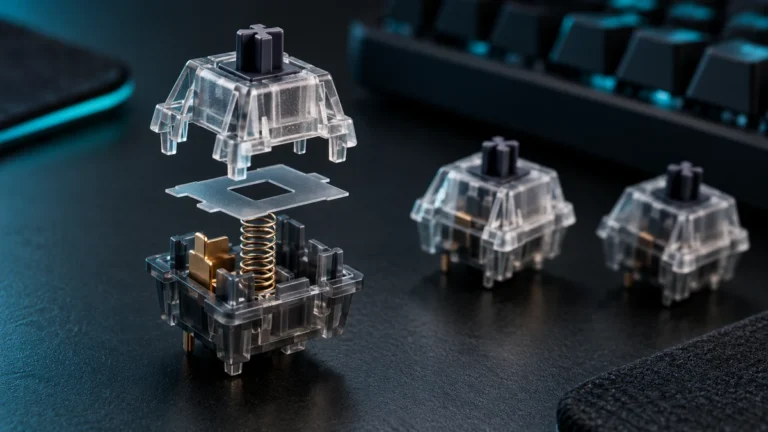
An optical switch registers a press when the stem breaks (or clears) a beam of light. No metal leaf touching another metal leaf. That one design change drives everything good and bad about these boards. If you’re fuzzy on switch types in general, start with my linear vs. tactile vs. clicky switch guide and come back.
Here’s what actually matters, in order:
- Durability is the real win. Mechanical contacts oxidize and wear, and that’s where key chatter (one press, two letters) comes from. Optical switches don’t have those contacts. Both Razer and ASUS rate their optical switches at 100 million keystrokes.
- The “speed of light” pitch is mostly marketing. Yes, optical skips debounce delay. But on a decent mechanical board that delay is a few milliseconds, and most people won’t notice it. What you will feel is the short actuation point — around 1.0–1.2mm on Razer’s linear optical, versus about 2mm on a classic MX Red.
- Analog optical is a different animal. Analog switches read how far the key is pressed, which enables adjustable actuation and Rapid Trigger. In counter-strafe-heavy shooters, that’s a genuine edge, not fluff. It’s also why analog boards cost more.
- Here’s the catch: you’re locked in. You can’t drop Gateron Yellows or lubed Cherry clones into an optical board. Hot-swap here means “swap for the same brand’s optical switch,” if it’s supported at all. And ASUS’s RX switches don’t take standard MX-stem keycaps, so that fancy keycap set you’ve been eyeing may not fit.
My slightly unpopular take: for typing, a good optical board isn’t automatically better than a well-tuned $60 mechanical one. Razer’s light linear optics can feel a little hollow next to a lubed Gateron Yellow. You’re buying optical for longevity and quick actuation — not for a nicer typing feel. If sound and feel are your priority, read my budget hot-swap mechanical keyboard picks instead.
The Best Budget Optical Gaming Keyboards, Reviewed
1. Razer Huntsman Mini (Black or White) — Best Budget Optical Gaming Keyboard Overall

This is the one I’d tell most people to buy, and it’s not close. The Huntsman Mini launched as a premium-priced 60% back in 2020. At $69, it’s a completely different deal.
What you get:
- Razer Linear Optical switches with a short ~1.0–1.2mm actuation and a light press (Razer’s spec sheets list 40–48g, depending on which one you read)
- Doubleshot PBT keycaps with side-printed secondary functions — they won’t shine up in six months like cheap ABS
- Matte aluminum top frame and a detachable USB-C cable
- Onboard profile storage, so your settings travel without Synapse
The PBT caps are the sleeper feature. Most boards at this price ship with thin ABS that goes greasy fast. Razer’s keycaps also use standard stems, so you can swap in an aftermarket set later.
Now the honest part. Those switches are light. If you rest your fingers heavily, you’ll fire off stray keys for the first few days. And 60% means no arrow keys, no F-row and no Delete key without a layer. Some people adapt in a week. Some never do. If you’re unsure, my 60% vs. TKL vs. full-size layout guide will save you a return.
Black or white? Same internals. White PBT resists shine just as well, but it shows dirt sooner. Pick the one that matches your desk.
Pros
- Excellent value at $69
- Doubleshot PBT keycaps and an aluminum top
- Small footprint frees up a lot of mouse room
- Standard keycap compatibility
Cons
- Very light switches can cause typos for heavy typists
- No arrow keys or function row without layers
- Spacebar can sound a bit rattly stock; a dab of dielectric grease on the stabilizer wire helps
2. ASUS ROG Strix Scope II RX — Best Full-Size Budget Optical Keyboard
- ROG RX optical switches: Pre-lubed RX switches feature centralized lighting and provide consistent wobble-free keystroke…
- IP57-rated: Waterproof and dust resistant for long-lasting durability
- Hotkeys: F1–F5 keys are pre-programmed as hotkeys for Xbox Game Bar and recording
Yes, it’s $9.50 over the $100 line. I’m including it anyway, because it’s the most complete package here. You get the numpad, a detachable wrist rest, media controls and real spill protection in one box.
What you get:
- Pre-lubed ROG RX Red linear optical switches rated for 100 million keystrokes
- IP57 water and dust resistance — it’ll shrug off a knocked-over soda
- Sound-dampening foam
- Doubleshot PBT keycaps (ASUS ships UV-coated ABS in some regions, so check the listing)
- F1–F5 preset as Xbox Game Bar and recording hotkeys, plus a multi-function button and wheel
- Detachable wrist rest and three tilt angles
- 1000Hz polling
The wrist rest matters more than people think. I care about wrist health, and a full-size board with no rest pushes your hands into extension for hours. Here, it’s in the box.
Here’s the catch: RX switches use a non-standard stem. Most aftermarket MX keycap sets won’t fit, so if you like to customize, this board will frustrate you. And Armoury Crate is still the clunkiest part of owning ROG gear.
Pros
- Full layout with numpad, media wheel and streaming hotkeys
- IP57 spill and dust resistance
- Wrist rest included
- Pre-lubed switches and foam keep it quieter than most gaming boards
Cons
- RX switches don’t fit standard MX keycaps
- Takes up a lot of desk space
- Armoury Crate software is heavy
3. ASUS ROG Strix Scope II 96 RX Wireless — Best Wireless Optical Pick
- 96% layout: Retains all function and number keys in a more compact and efficient layout that frees up desk space, with a…
- ROG RX optical switches: Light actuated for consistent wobble-free keystrokes with near-zero debounce delay
- ROG-themed keycaps: UV-coated keycaps with special ROG elements for unique look
Let’s be straight: $180 isn’t budget. But if you want wireless optical switches and a numpad, there’s very little else at this price.
What you get:
- Tri-mode connection: Bluetooth (up to three devices), 2.4GHz ROG SpeedNova, or wired USB
- ROG Omni Receiver support (one dongle for compatible ROG mice and keyboards) and Polling Rate Booster
- Silicone dampening foam and ROG stabilizers
- Doubleshot PBT keycaps, plus a set of extra ROG-themed ABS caps
- Wrist rest and three tilt angles
The 96% layout is the smart part. You keep the numpad and arrows, but the whole thing is barely wider than a tenkeyless. Your mouse hand will thank you.
Here’s the catch, and it’s a big one. ASUS rates this board at up to 378 hours of battery on 2.4GHz. The mechanical NX version of the same keyboard is rated at up to 1,500 hours. Optical switches need power for every key’s light sensor, and that shows. Run RGB and you’ll be charging far more often than that best-case number suggests.
Pros
- Tri-mode wireless with multi-device Bluetooth
- Compact 96% layout keeps the numpad
- Omni Receiver cuts down on dongles
- PBT caps plus bonus keycaps
Cons
- Battery life is a fraction of the mechanical version’s
- Same RX keycap compatibility problem
- Costs about $70 more than the wired Scope II RX
4. Razer Huntsman V3 Pro Mini 8KHz — Best for Competitive FPS (Not Budget, Read Why)
This is the one board here built to win rounds, not save money. It’s on this list because a lot of people searching for budget optical boards really want Rapid Trigger, and this is the most sensible way into Razer’s analog lineup in a small footprint.
What you get:
- Razer Analog Optical Switches Gen-2 with 0.1–4.0mm adjustable actuation
- Rapid Trigger, plus Snap Tap, Snap Flex, Dynamic Keystroke and Dual-Keypress Priority
- 8000Hz HyperPolling
- Individually lubed switches over a sound-dampening foam layer
- Actuation and Rapid Trigger tuning right from the number row, with six onboard profiles
- Synapse Web for browser-based setup
- 5052 aluminum alloy top case
Rapid Trigger is the one “gaming spec” I’ll defend without hedging. A key resets the instant it starts rising, so counter-strafing gets tighter. You feel that.
8000Hz is a different story. Most players can’t tell it from 1000Hz, and high polling rates put extra load on your CPU. Treat it as a bonus, not a reason to buy.
One more caveat: Snap Tap-style features have been restricted in some games, including CS2 on Valve’s official servers. Check your game’s rules before you lean on it.
Pros
- Adjustable actuation and Rapid Trigger are real competitive advantages
- Tuning on the board itself, no software required
- Premium aluminum build in a tournament-friendly size
- Six onboard profiles
Cons
- $179.99 is more than double the regular Huntsman Mini
- 8000Hz is mostly a spec-sheet win
- Snap Tap isn’t allowed everywhere
- 60% layout limits it for work use
Specs Side by Side
| Spec | Huntsman Mini | Scope II RX | Scope II 96 RX Wireless | Huntsman V3 Pro Mini 8KHz |
|---|---|---|---|---|
| Price | $69.00 | $109.50 | $179.99 | $179.99 |
| Switch type | Linear optical | Linear optical (pre-lubed) | Linear optical | Analog optical |
| Actuation | ~1.0–1.2mm, fixed | Fixed | Fixed | 0.1–4.0mm, adjustable |
| Rapid Trigger | No | No | No | Yes |
| Polling rate | 1000Hz | 1000Hz | Polling Rate Booster supported | 8000Hz |
| Connection | Wired USB-C | Wired | Bluetooth, 2.4GHz, wired | Wired |
| Keycaps | Doubleshot PBT | Doubleshot PBT (region varies) | Doubleshot PBT + extra ABS | Doubleshot PBT |
| MX keycap compatible | Yes | No | No | Yes |
| Wrist rest | No | Yes | Yes | No |
| Spill resistance | No | IP57 | No | No |
| Battery (claimed) | — | — | Up to 378 hrs | — |
How to Choose a Budget Optical Gaming Keyboard
Skip the RGB demos and the “0.2ms faster” charts. Work through these in order:
- Pick your layout first. It changes your daily life more than any switch. A 60% gives your mouse arm a lot more room and keeps your shoulders squarer, which is a real ergonomic win. A full-size board makes sense if you enter numbers all day.
- Decide whether you actually need analog. If you play tactical shooters at a competitive level, Rapid Trigger is worth paying for. If you play single-player games, MOBAs or casual matches, it isn’t. Save the $110.
- Check keycap compatibility if you like to customize. Razer’s boards take standard MX-stem keycaps. ASUS’s RX switches don’t. That’s a dealbreaker for some people and a non-issue for others.
- Price out wireless honestly. On the ASUS boards, going wireless costs about $70 and a big chunk of battery life compared with a mechanical wireless board. If your keyboard never leaves your desk, wired is the smarter buy.
- Don’t ignore the wrist rest. If your hands sit on a full-size board for hours, a rest isn’t a luxury. If your pick doesn’t include one, budget $20 for a decent foam rest. My keyboard ergonomics guide covers the setup in more detail.
Whatever you choose, PBT keycaps should be non-negotiable. Every board on this list has them (or offers them), which is a big reason I’m comfortable recommending all four.
The Verdict
Buy the Razer Huntsman Mini at $69. It’s the clearest example of the best budget optical gaming keyboards doing exactly what they promise: durable optical switches, real PBT keycaps and an aluminum top for less than most “budget” mechanical boards. Pick black or white and move on with your life.
If you need a numpad and a wrist rest, the ROG Strix Scope II RX at $109.50 is worth the extra $40. Just know you’re giving up easy keycap swaps.
The two $179.99 boards are good keyboards, not budget ones. Get the Scope II 96 RX Wireless only if cables genuinely bother you. Get the Huntsman V3 Pro Mini 8KHz only if you play competitive shooters seriously enough for Rapid Trigger to matter. For everyone else, a good $69 board beats a $180 board you’re paying for features you’ll never feel.
This article contains affiliate links. If you buy through them, I earn a small commission at no extra cost to you. I only recommend keyboards I’ve actually tested. As an Amazon Associate I earn from qualifying purchases.