Best TKL Keyboard for FPS: 6 Boards Actually Tested

This article contains affiliate links. If you buy through them, I earn a small commission at no extra cost to you. I only recommend keyboards I’ve actually tested. As an Amazon Associate I earn from qualifying purchases.
I’ve lost rounds because of my keyboard. Not the switches — the desk space. Years ago I was running a full-size board and kept bumping my mouse against the number pad mid-flick in CS:GO. Switched to a TKL that same week and never looked back. If you’re hunting for the best TKL keyboard for FPS play — Valorant, CS2, Apex, whatever your poison is — the layout itself already does half the work. Drop the number pad, keep the arrow keys and function row, and you get 3 to 4 inches of extra real estate for your mouse arm. That’s not marketing fluff. That’s just geometry.
What I want to do here is skip the spec-sheet regurgitation you’ll find on most gear sites and tell you what actually matters when you’re peeking a corner with your life on the line: actuation, stabilizers, and whether the switches under your fingers are consistent enough that you can trust your own muscle memory. I’ve spent the last several weeks with six TKL boards on my desk, swapping them daily, running them in CS2 and Valorant sessions, and typing on them for work in between. Here’s where they landed.
Quick Comparison Table (TL;DR)
| Keyboard | Best For | Switch Type | Price | Verdict |
|---|---|---|---|---|
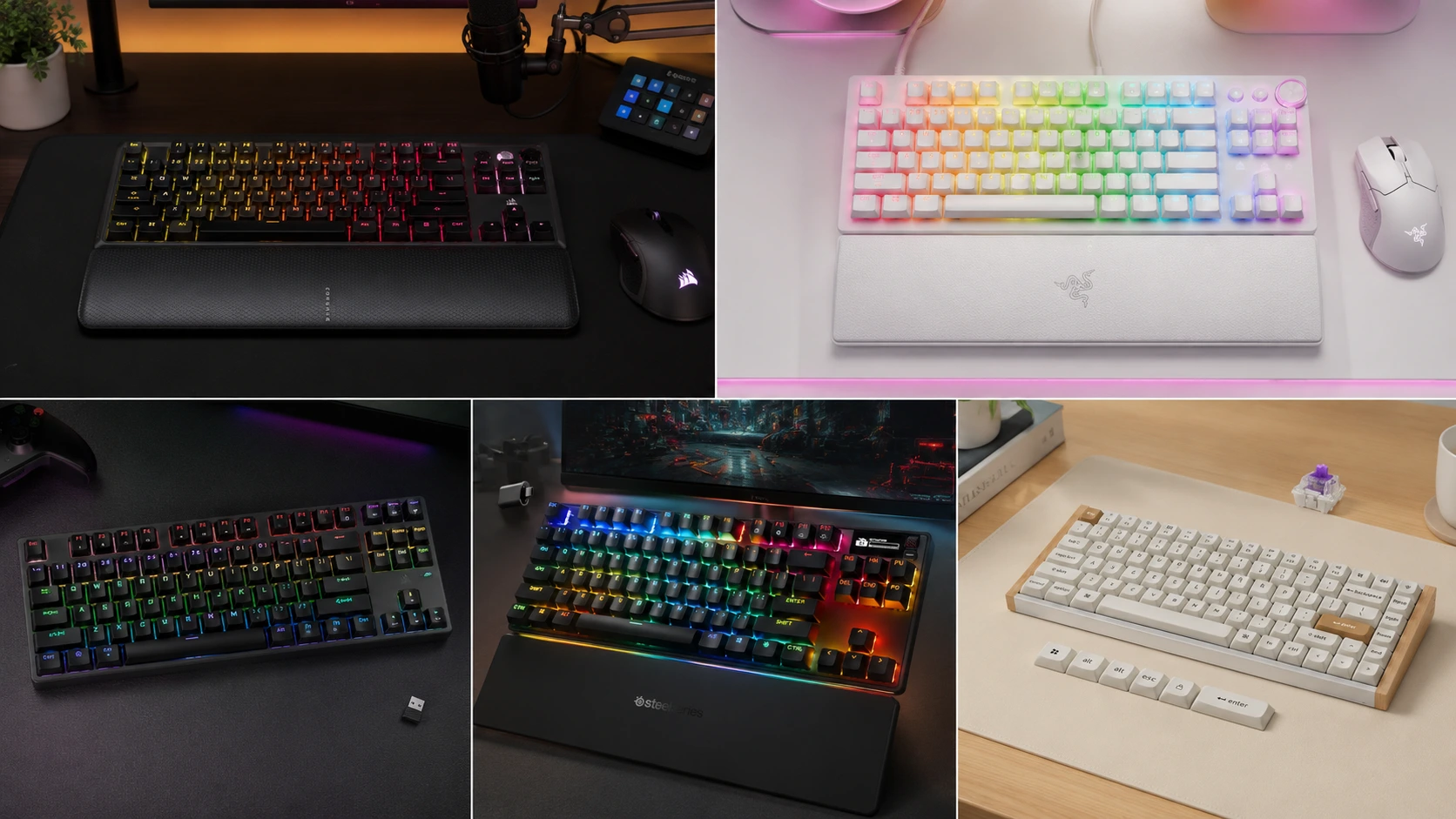
| Wooting 80HE | Overall competitive pick | Lekker Hall Effect, analog, hot-swap | ~$200 | The board pros actually use |
| SteelSeries Apex Pro TKL Gen 3 Wireless | Wireless without compromise | OmniPoint 3.0 magnetic | ~$220 | Cuts the cord, keeps the edge |
| Razer Huntsman V3 Pro TKL | Lowest measured latency | Analog Optical Gen-2 | ~$230 | Fastest signal path, period |
| Corsair K70 PRO TKL | Best value flagship features | Hall effect magnetic | ~$180 | Full HE spec sheet for less |
| Keychron K2 HE | Budget wireless rapid trigger | Gateron Hall Effect | ~$100 | Rapid trigger without the flagship tax |
| Royal Kludge RK87 | Tightest budget | Hot-swap mechanical | ~$50 | Proof you don’t need $200 to compete |
If you’re still weighing whether TKL is even the right call for your setup, this size comparison breakdown is worth five minutes before you buy anything.
Why TKL Specifically — and Why “Best TKL Keyboard for FPS” Isn’t the Same Question as “Best Keyboard”
A 60% board frees up more desk space, sure, but you lose your arrow keys and F-row, and now you’re living on a function layer to hit F5 or check Discord notifications mid-match. A full-size board gives you a number pad you’ll never touch in a match and eats desk real estate you’ll miss the second you drop your sensitivity. TKL is the compromise that isn’t really a compromise — you keep everything you use, you shed everything you don’t. That’s why it’s the dominant format among CS2 pros right now, and it’s the layout I recommend to almost everyone who asks me what to buy for competitive play.
Here’s the catch, though: layout only gets you halfway there. The switch technology under the keycaps is what decides whether your inputs are actually fast and consistent, and that’s where these six boards separate from the pack.
1. Wooting 80HE — Best Overall
Wooting basically forced the entire industry to take hall effect switches seriously, and the 80HE is still the board other manufacturers get measured against. The Lekker HE switches are magnetic, fully analog, and let you set actuation anywhere from 0.1mm to 4.0mm per key. Rapid trigger — where the switch resets the instant you let off pressure instead of waiting for a fixed reset point — is what makes counter-strafing in CS2 feel genuinely different once you’ve adjusted to it.
I’ll be honest about the adjustment period: if you’re coming from Cherry MX Browns or Blues, give yourself a week or two before you judge it. The first few sessions felt twitchy to me, like the board was reading inputs I didn’t mean to send. That went away once my finger pressure calibrated to the shallower actuation.
Pros:
- Best-in-class rapid trigger and adjustable actuation
- Wootility software is deep without being confusing
- Hot-swappable, so you’re not locked into HE switches forever
- The pick of a genuinely large share of CS2 pros
Cons:
- Linear-only switches — no tactile or clicky option if you type a lot
- Stock shortages are real; I’ve seen resellers mark it up 40-60% during drought periods
- No Bluetooth, wired USB-C only
2. SteelSeries Apex Pro TKL Gen 3 Wireless — Best Wireless

Most wireless “gaming” keyboards ask you to give something up — polling rate, switch quality, actuation range — in exchange for cutting the cord. The Apex Pro TKL Gen 3 Wireless doesn’t really ask you to compromise. It keeps SteelSeries’ OmniPoint magnetic switches with adjustable actuation and rapid trigger, and in my testing the 2.4GHz connection held up fine even during rounds where I was moving my hand aggressively across the desk.
I ran this as my daily driver for about three weeks, gaming and working. The OLED smart display for on-the-fly actuation tweaks is a nice touch — I didn’t think I’d use it, and then I found myself adjusting actuation depth between game sessions without ever opening the software.
Pros:
- Full hall effect feature set on a wireless board — genuinely rare
- Aircraft-grade aluminum plate feels like it’ll survive a decade
- OLED display for quick settings changes
- Strong battery life for daily wireless use
Cons:
- Premium price for a wireless board
- Software (SteelSeries GG) is heavier than it needs to be
3. Razer Huntsman V3 Pro TKL 8KHz — Fastest Measured Latency

If you want the number to point to, this is it: Razer’s own lab testing puts click-to-report latency at 0.58ms with the analog optical switches at 0.1mm actuation and 8,000Hz polling. Whether a human being can actually perceive that half-millisecond edge over the Wooting is genuinely debatable — I couldn’t tell you I felt a difference in a blind test — but the underlying engineering is real, and Razer’s software (Synapse) makes tuning per-key actuation about as painless as it gets.
Pros:
- Lowest documented latency in independent testing
- Adjustable actuation from 0.1mm to 4.0mm per key
- Doubletap and dynamic function keys are legitimately useful for FPS binds
- Premium build quality, doesn’t feel like a $230 gimmick
Cons:
- Heavy — around 720g, which matters if you’re precious about desk weight
- Razer Synapse still wants an account login, which some people find annoying
- No meaningful typing feel advantage over cheaper HE boards; you’re paying for the switch tech, not the experience
4. Corsair K70 PRO TKL — Best Value on Flagship Features

This is the one I’d point most people toward if the Wooting’s price or stock situation is putting you off. At around $180, the K70 PRO TKL gives you 8,000Hz polling, 0.1mm-resolution rapid trigger, adjustable actuation, and SOCD resolution through Corsair’s FlashTap system — that’s the setting that decides what happens when you press left and right strafe simultaneously, which matters more than people realize once you start counter-strafing seriously.
The dedicated Game Mode button is the detail I actually appreciated most. One press enables 8K polling, rapid trigger, and locks the Windows key — no diving into iCUE required. For a board that switches between work and gaming on the same desk, that’s genuinely convenient.
Pros:
- Full HE spec sheet undercuts flagship competitors on price
- Dual Actuation lets you bind two separate actions to one key at different press depths
- Included magnetic palm rest — competitors charge extra for this
- One-button Game Mode toggle
Cons:
- iCUE software is a resource hog compared to Wootility
- Build feels slightly less premium than the Wooting or Razer at the top plate
5. Keychron K2 HE — Budget Wireless Rapid Trigger

Keychron proved with the C-series and now the K2 HE that you don’t need to spend flagship money to get hall effect switches and rapid trigger on your desk. At around $100 with 2.4GHz wireless, this is the board I hand to friends who want to try HE switches without committing $200+ before they know if they like the feel.
Here’s my honest caveat: the plastic case doesn’t feel as substantial as the Corsair or SteelSeries, and the software is more basic. But the actual switch performance — actuation range, rapid trigger consistency — tests close enough to the pricier boards that I’d call this the smartest entry point into hall effect gaming right now.
Pros:
- Genuine rapid trigger and adjustable actuation at a budget price
- 2.4GHz wireless included, not locked behind a premium tier
- Gateron HE switches are hot-swappable
- Great value if you’re testing whether HE switches suit your play style
Cons:
- Case and keycaps feel budget next to the flagship boards
- Software lacks the polish of Wootility or SteelSeries GG
6. Royal Kludge RK87 — Tightest Budget

Not everyone needs rapid trigger to play well. If you’re on a genuinely tight budget or you’re not convinced hall effect switches are worth the premium yet, the RK87 is a legitimately good tenkeyless mechanical board for around $50. Tri-mode connectivity (2.4GHz, Bluetooth, wired), hot-swap sockets so you’re not stuck with the stock switches, and a build quality that punches well above its price.
I’ll defend budget boards when they’re good, and this one’s good. It won’t out-duel a Wooting 80HE in a blind actuation test. But most of the players losing rounds aren’t losing them to switch technology — they’re losing them to aim, positioning, and game sense. A good $50 board beats a bad $200 one every single time.
Pros:
- Hot-swappable, so you can upgrade switches later without soldering
- Tri-mode connectivity is unusual at this price
- Solid stock stabilizers for the price tier
- No subscription, no bloated companion software required
Cons:
- Standard mechanical switches, no rapid trigger or adjustable actuation
- Stock switches are serviceable, not exceptional — budget for a lube job or a switch swap eventually
- ABS keycaps will shine at the high-use keys within a year or two
Does Rapid Trigger Actually Matter for Your Game?
Here’s the honest answer: it depends what you’re playing. Rapid trigger genuinely helps in CS2 and Valorant, where counter-strafing rewards a switch that resets the instant you release pressure instead of waiting for a fixed travel point. I noticed the difference most in close-range duels where I was tapping strafe keys rapidly to reset momentum before a flick.
If you’re mostly playing single-player games, MOBAs, or slower-paced shooters, you’re not going to feel that advantage the same way, and I wouldn’t tell you to pay the hall-effect premium just because it’s the trend. A good Cherry MX Red or Gateron switch on a well-built TKL board will serve you fine.
Stabilizers Matter More Than People Think
Nobody talks about this enough. A rattly spacebar or a mushy shift key can throw off your feel on a board that’s otherwise spec’d perfectly. Every board on this list ships with reasonably tuned stabilizers out of the box, but if you’re the type who’ll eventually crack the case open, a cheap band-aid mod or a drop of dielectric grease on the stab wires will get you most of the way to a $300 custom board’s feel for the price of some lube and twenty minutes.
My Actual Recommendation
If money’s genuinely not the constraint and you want the board that the most competitive FPS players have converged on, get the Wooting 80HE. If you need wireless without giving anything up, the SteelSeries Apex Pro TKL Gen 3 Wireless is worth the premium. But if you’re asking me what I’d tell a friend with a normal budget: the Corsair K70 PRO TKL gets you 90% of the flagship experience for less money, and the Royal Kludge RK87 proves you can compete on a fraction of that if switch tech isn’t your priority yet.
For a deeper look at optical switches specifically, I’d also point you to this optical TKL roundup — worth a read if the Razer’s latency numbers caught your attention and you want more optical options compared side by side.
Whatever you land on, remember the layout was never the whole story. It’s the switches, the actuation you actually dial in, and honestly, the hundred hours of practice you put in after the keyboard arrives.
This article contains affiliate links. If you buy through them, I earn a small commission at no extra cost to you. I only recommend keyboards I’ve actually tested. As an Amazon Associate I earn from qualifying purchases.