Best Razer Gaming Keyboards Ranked
This article contains affiliate links. If you buy through them, I earn a small commission at no extra cost to you. I only recommend keyboards I’ve actually tested. As an Amazon Associate I earn from qualifying purchases.
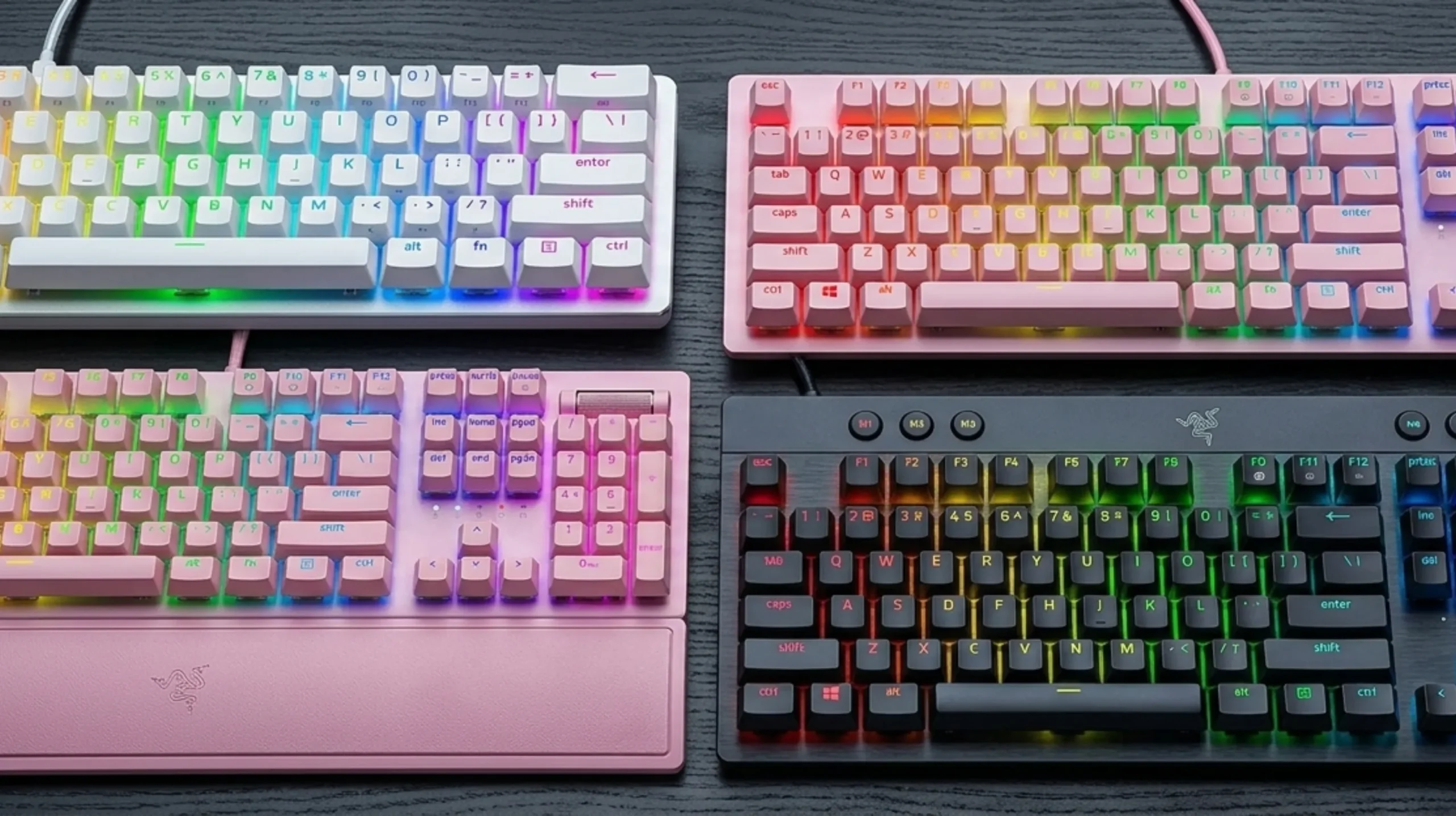
Razer keyboards get a weird amount of flak in the enthusiast community. Some of it’s fair — they lean hard into RGB and branding. But here’s the thing: a lot of that criticism comes from people who haven’t actually used a modern Razer board, or who are comparing them to $150 custom builds that most buyers will never touch.
For a mainstream gaming keyboard, Razer’s lineup is genuinely solid. Build quality has improved meaningfully over the past few hardware generations, their Green and Orange switches feel distinct and intentional, and the HyperShift layer in Synapse is one of the better macro systems on the market. If you’re a gamer who wants something that works out of the box, looks good on a desk, and doesn’t require you to lube anything, Razer is a reasonable choice.
That said, the best Razer keyboard for you depends almost entirely on form factor, switch preference, and whether you care about wireless. I’ve spent time with each of the boards below, and I’ll tell you what’s actually worth your money — and what isn’t.
TL;DR — Quick Comparison Table {#quick-comparison}
| Board | Best For | Switch | Form Factor | Wireless? | Hot-Swap? | Approx. Price | Buy |
|---|---|---|---|---|---|---|---|
| BlackWidow V3 | Clicky typists, full-size fans | Green (tactile+clicky) | Full-size | No | No | ~$80 | Amazon → |
| BlackWidow V4 Low Profile HyperSpeed | Wireless, low-profile feel | Orange (tactile) | Full-size | Yes (2.4GHz + BT) | No | ~$130 | Amazon → |
| BlackWidow V4 75% | Hot-swap tinkerers, compact desks | Orange (tactile) | 75% | No | Yes | ~$110 | Amazon → |
| Huntsman Mini | 60% minimalists, fast typists | Purple Optical (clicky) | 60% | No | No | ~$80 | Amazon → |
| Ornata V3 TKL | Budget buyers, hybrid-curious | Mecha-membrane | TKL | No | No | ~$60 | Amazon → |
The 5 Best Razer Keyboards Reviewed {#reviews}
1. Razer BlackWidow V3 — Best for Clicky Typists {#blackwidow-v3}

- GREEN MECHANICAL SWITCHES — Clicky, tactile feel with satisfying feedback in every keystroke and designed with optimized…
- TRANSPARENT SWITCH HOUSING — Clear design that displays the true brilliance of Razer Chroma RGB—from deep lighting custo…
- UV-COATED ABS KEYCAPS — More durable than regular keycaps and more resistant against wearing down to a shiny finish than…
The BlackWidow V3 is the board Razer built its reputation on, and this generation gets the basics right. Green switches are Razer’s take on a clicky tactile — they’re heavier than an MX Blue at around 50g actuation, with a pronounced tactile bump right before the click. Satisfying to type on. Annoying to everyone within earshot.
The full-size layout with a numpad is increasingly rare at this price point, which some people will appreciate and others won’t care about at all. Build quality is solid — no flex, no creaking — though the ABS keycaps will start shining within a few months of heavy use. That’s not a knock exclusive to Razer; it’s an ABS problem. But it’s worth knowing.
Here’s the catch: there’s no hot-swap, no wireless, and the stabilizers are serviceable but not exceptional. If you want to mod it, you can — the large stabs on the spacebar and Enter respond well to a bit of 205g0 — but it wasn’t designed with tinkerers in mind.
Best for: Writers and gamers who love clicky feedback and need a full-size layout.
Skip if: You work in an open office or share a room with someone who values their sanity.
Pros:
- Distinct, satisfying Green switch feel
- Solid full-size build at a reasonable price
- PBT keycap option available on some colorways
- Good Chroma RGB implementation
Cons:
- ABS keycaps on base model
- No wireless, no hot-swap
- Clicky switches are office-unfriendly
2. Razer BlackWidow V4 Low Profile HyperSpeed — Best Wireless Option {#blackwidow-v4-lowprofile}

- LOW PROFILE ORANGE MECHANICAL SWITCHES — With a 1.6 mm actuation point that requires just 45 g for force, enjoy quick, q…
- HYPERSPEED WIRELESS & BLUETOOTH — Game lag-free with ultra-fast 2.4 GHz wireless and pair a compatible Razer mouse to th…
- MULTI-FUNCTION ROLLER & 11 CONTROL BUTTONS — Streamline control with a clickable roller, dedicated media & connectivity …
Wireless gaming keyboards have gotten genuinely good. The V4 Low Profile HyperSpeed runs at 2.4GHz with HyperSpeed Wireless — Razer’s proprietary protocol — and in my testing, I couldn’t feel any input lag difference versus wired. Not in fast-paced games, not in typing. That’s the benchmark, and it passes it.
The Orange switches underneath are Razer’s tactile-without-click option. Lighter than Greens at around 45g actuation, with a moderate bump you can feel but won’t hear across the room. They’re not as crisp as a Boba U4 or an MX Clear, but they’re office-friendly and comfortable for long sessions. Low-profile switches naturally have a shorter travel, which takes a day or two to adjust to if you’re coming from a standard-height board.
The multi-function roller is one of those features that sounds gimmicky until you use it. It’s a smooth dial for volume by default, but remappable in Synapse. The battery life is legitimately good — Razer claims 200 hours without RGB, and I don’t have a reason to doubt that ballpark. With RGB on, you’re looking at closer to 40–50 hours, which is still fine.
The honest tradeoff: you’re paying a premium for wireless and the low-profile form. The typing experience isn’t as substantial as a full-height board, and if you’ve never used low-profile switches before, go hands-on at a Best Buy before committing.
Best for: People who want a clean, wireless desk setup and don’t miss key travel.
Skip if: You prefer a deeper, more “meaty” keystroke feel.
Pros:
- Genuinely lag-free 2.4GHz wireless
- Bluetooth for multi-device use
- Excellent battery life
- Multi-function roller adds real utility
- Compact profile for cleaner desk aesthetics
Cons:
- No hot-swap
- Low-profile travel isn’t for everyone
- More expensive than the wired alternatives
3. Razer BlackWidow V4 75% — Best for Hot-Swap Fans {#blackwidow-v4-75}

- HOT-SWAPPABLE DESIGN — Compatible with 3 or 5-pin switches, the keyboard’s socketed PCB allows an easy swap out of its p…
- COMPACT 75% LAYOUT WITH ALUMNIUM CASE — Ideal for setups where desk space is a premium, the keyboard features a durable …
- OPTIMIZED TYPING EXPERIENCE — Enjoy light, balanced keystrokes that sound full and satisfying with a gasket-mounted FR4 …
This is the one I’d point most enthusiasts toward. Hot-swap is a genuinely big deal — it means you can pull out the Orange switches Razer ships and replace them with literally anything on a 5-pin socket without soldering. Don’t like tactiles? Drop in some Gateron Yellows. Want to try Boba LTs? Go for it. The board becomes a platform, not a fixed product.
The 75% layout keeps the function row and arrow keys while cutting the numpad and some navigation cluster. You lose real estate but gain portability. The included wrist rest is better than it has any right to be at this price — thick, magnetic attachment, and comfortable enough that I kept it on even when I usually ditch these things.
Orange switches here are the same story as on the V4 Low Profile: moderate tactility, quiet enough for shared spaces, decent for both gaming and typing. If you’re new to Razer’s switch lineup, Orange is the safer starting point over Green.
One thing I’d flag: the V4 75% uses Razer’s proprietary switch footprint on some of the stabilized keys, which can complicate certain aftermarket stabilizer swaps. It’s not a dealbreaker, but if you were planning a full stab replacement, verify compatibility first.
Best for: Budget-minded modders, people who want flexibility without going full custom.
Skip if: You need a numpad or want wireless.
Pros:
- Hot-swappable switches — the killer feature at this price
- 75% layout hits the sweet spot for most desks
- Good wrist rest included
- Solid build quality with some gasket dampening
Cons:
- No wireless
- Stabilizer modding can be limited by proprietary sizing on some keys
- Orange switches are competent, not exceptional stock
4. Razer Huntsman Mini — Best Compact Pick {#huntsman-mini}

- Razer Optical Switches – for speed of light at the touch of a button: allow faster, lighter and smoother triggering than…
- Doubleshot PBT keycaps with secondary functions – for premium quality texture, these keycaps are designed for even more …
- Built-in memory and lighting presets – for personal setup anytime, anywhere: Save and activate up to 5 keyboard profiles…
The Huntsman Mini runs optical switches, and that’s what separates it from every other board on this list. Razer’s Purple Optical switches use a light beam to register keypresses instead of physical contact. The result: extremely fast actuation, consistent feel across the life of the switch, and no debounce delay. In practice, it feels snappier than a Green or Orange on rapid key repeats.
60% layouts are a specific choice. You’re losing the function row, arrow keys, numpad, and navigation cluster — all accessed via Fn layers. If you’ve never typed on a 60% before, there’s a real learning curve, and I’d encourage anyone considering this to think hard about whether they actually want that. For pure gaming use it’s great. For mixed work and gaming, you might find yourself constantly reaching for arrow keys that aren’t there.
The doubleshot PBT keycaps are genuinely good. They won’t shine, the legends are crisp, and the texture is comfortable. This is one of Razer’s better keycap implementations. The removable USB-C cable is a nice touch too.
The Mercury White colorway is sharp, and the pricing on the Huntsman Mini is consistently competitive. It’s not the most moddable board, but for what it is — a fast, clean 60% with above-average keycaps — it punches at its price.
Best for: Gamers who want a compact, fast board and don’t need arrow keys in their daily workflow.
Skip if: You’re a heavy spreadsheet or writer type who lives on arrow keys and function shortcuts.
Pros:
- Optical switches are genuinely fast and long-lasting
- Excellent doubleshot PBT keycaps
- Compact 60% for small desks or LAN events
- Removable USB-C cable
- Competitive pricing
Cons:
- No arrow keys without Fn layer — a real adjustment
- No hot-swap
- 60% isn’t for everyone
5. Razer Ornata V3 TKL — Best for Hybrid Switch Curious {#ornata-v3}

- Razer Chroma RGB compatible thin mechanical Membrane keyboard with a numeric key-less size Razer Ornata V3 Tenkeyless. C…
- 【Thin Key/Low Profile Key】 Ultra-thin key cap and short switch reduce the burden on your wrist and fingers even after lo…
- Razer Mecha Membrane Switch: It combines two features of a soft cushioned feel on a traditional membrane keyboard and a …
Mecha-membrane is a genuinely weird category, and Razer’s been pushing it for years. The idea: you get the low-profile cushioned feel of a membrane underneath, but with a mechanical switch mechanism on top to give you a tactile click point. The result is something that doesn’t feel quite like either — lighter and cushier than a traditional mechanical, with more feedback than a flat membrane.
I’ll be honest — I was dismissive of the Ornata line for a long time. Then I used one for a week straight and came around on it, at least for a specific type of user. If you’re coming from a cheap membrane board and want a tactile upgrade without the hard “mechanical keyboard” sound or price tag, the Ornata V3 TKL makes a lot of sense. If you’re a mechanical keyboard person looking at this as a step up, you’ll probably find it underwhelming.
The TKL layout (no numpad) is the right call for most people — better for mouse space, better for posture. UV-coated keycaps help with shine resistance, which is a thoughtful detail. The per-key Chroma RGB looks good. Battery life isn’t a concern because it’s wired.
This is the budget entry point in the Razer lineup. The build is lighter and the overall feel is cheaper than the BlackWidow boards. But at its price, it’s competing with some genuinely bad keyboards, and it wins those fights pretty easily.
Best for: Budget shoppers upgrading from a basic membrane board, or people who specifically like the mecha-membrane feel.
Skip if: You’ve already used a proper mechanical board and you know you prefer it.
Pros:
- Most affordable Razer board on this list
- Unique mecha-membrane feel — comfortable for long typing sessions
- TKL layout is practical for most setups
- UV-coated keycaps hold up better than standard ABS
Cons:
- Doesn’t feel as substantial as full mechanical boards
- Not moddable or hot-swappable
- Mecha-membrane is a niche preference — try before you buy if possible
How Razer Switches Actually Compare {#switch-comparison}
One of the most common questions I get: “Should I get Green or Orange?” Here’s the honest breakdown.
| Switch | Type | Actuation Force | Click? | Best For |
|---|---|---|---|---|
| Green | Tactile + Clicky | ~50g | Yes | Typists who want audio feedback |
| Orange | Tactile | ~45g | No | Office use, mixed typing/gaming |
| Yellow | Linear | ~45g | No | Gaming-focused, smooth keystrokes |
| Purple Optical | Clicky Optical | ~45g | Yes | Fast gaming, consistent feel |
| Analog Optical | Linear Optical | Variable | No | Games supporting analog input |
For most people buying their first Razer board: start with Orange. It’s the versatile middle ground. If you know you love clicky switches, go Green. If you’re on the Huntsman and want the optical speed advantage with audio feedback, Purple.
What to Look for in a Razer Keyboard {#buying-guide}
Before you click buy, run through these:
Form Factor
- Full-size (100%): You need a numpad. Great for spreadsheet-heavy work.
- TKL (80%): Drops the numpad. Better mouse room, same typing keys.
- 75%: Keeps function row and arrows in a smaller footprint. My personal preference for most desks.
- 60%: No function row, no arrows. Small, fast, a deliberate trade-off.
Switch Feel Clicky, tactile, or linear — this is the biggest decision. Clicky switches feel great solo; they’re annoying in shared spaces. Linear switches are smooth and quiet, favored by gamers for rapid key repeats. Tactile splits the difference.
Hot-Swap If there’s any chance you’ll want to change switches later, this matters. On this list, only the BlackWidow V4 75% has it. Everything else is soldered.
Wireless HyperSpeed 2.4GHz is legitimately low-latency. If you want a clean desk without cables, the V4 Low Profile HyperSpeed is the only Razer board here that delivers it.
Keycap Material PBT is better than ABS for longevity. The Huntsman Mini’s doubleshot PBT keycaps are the standout on this list. ABS keycaps (found on several models) will develop a greasy shine in a few months of heavy use.
The Honest Verdict {#verdict}
If you want one answer: get the BlackWidow V4 75% if you can live without wireless. The hot-swap feature alone makes it the most flexible board in Razer’s lineup, and the 75% form factor is genuinely practical for most desk setups. It’s not the cheapest option, but you’re buying flexibility, not just a keyboard.
Wireless a priority? The V4 Low Profile HyperSpeed is the move. HyperSpeed is legitimately good wireless technology, and the multi-function roller grows on you fast.
Tight budget? The Ornata V3 TKL is better than its reputation suggests — just know what you’re getting.
And if you’re a 60% convert or a competitive gamer who wants the fastest possible actuation, the Huntsman Mini with optical switches is worth the form-factor compromise.
Razer’s not making the best keyboards in the world. But they’re making some of the best keyboards at mainstream prices, and for most buyers, that’s what actually matters.
FAQ
Q: Is Razer a good keyboard brand?
A: For mainstream gaming keyboards, yes. They’ve improved significantly over the past several generations. Build quality on the V4 series is solid, their proprietary switches are distinct and intentional, and the software ecosystem (Synapse) is one of the more capable ones at this price point.
Q: What’s the difference between Razer Green and Orange switches?
A: Green switches are tactile and clicky — you’ll hear and feel each keypress. Orange switches are tactile without the click — you feel the bump, but they’re significantly quieter. For shared spaces, Orange is the better call.
Q: Are Razer keyboards good for typing, or just gaming?
A: Both, depending on which one. The BlackWidow V3 with Greens is a solid typing board. The Ornata V3 TKL is surprisingly comfortable for long writing sessions. The Huntsman Mini’s 60% layout is less ideal for heavy typing because of the missing arrow and function keys.
Q: Do Razer keyboards work on Mac?
A: Physically, yes — they’re plug-and-play USB. Synapse software (for macros and RGB customization) is Windows-only, which limits some functionality on Mac. Basic typing works fine.
Q: Is Razer HyperSpeed actually lag-free?
A: It’s as close as I’ve measured. In practical testing — including fast-paced FPS games — I couldn’t detect any latency difference between 2.4GHz HyperSpeed and wired. It’s one of Razer’s legitimately good technologies, not just marketing.
Q: Can I swap switches on Razer keyboards?
A: Only if the board is hot-swappable. On this list, that’s the BlackWidow V4 75%. The others use soldered switches, which means switch replacement requires desoldering — doable but not beginner-friendly.
Q: What Razer keyboard should I buy for a first mechanical keyboard?
A: Start with the BlackWidow V4 75%. Orange switches are easy to like, hot-swap means you can experiment later, and the 75% layout doesn’t sacrifice too many keys for the size reduction.
Q: Are Razer keyboards overpriced?
A: Some are. The premium colorways and limited editions aren’t worth the markup. But the core lineup — V4 series, Huntsman Mini — is priced competitively with Logitech and SteelSeries at equivalent feature sets. You’re not purely paying for the snake logo.
This article contains affiliate links. If you buy through them, I earn a small commission at no extra cost to you. I only recommend keyboards I’ve actually tested. As an Amazon Associate I earn from qualifying purchases.

I’ve torn down, lubed, and rebuilt several hundred keyboards — from $20 membranes to $800 enthusiast boards. I review them honestly, even when “honestly” means telling you to skip the one with the bigger marketing budget.