Keychron K6 Pro vs Drop ALT Which 65% Actually Wins?

This article contains affiliate links. If you buy through them, I earn a small commission at no extra cost to you. I only recommend keyboards I’ve actually tested. As an Amazon Associate I earn from qualifying purchases.
Every time someone in my inbox asks about their first “real” 65% keyboard, these two boards come up in the same sentence. And every time, roughly half the internet insists the Drop ALT is worth double the price. I’ve spent weeks with both as daily drivers — typing, gaming, opening them up on the desk, cursing at stabilizers — and the honest Keychron K6 vs Drop ALT answer is more interesting than either camp will tell you.
The short of it: one board is a legitimately great value that punches well above its price. The other is a well-built cult favorite that’s aging in some very specific ways. Which one belongs on your desk depends less on the spec sheet and more on how you actually type.
Let’s get into it.
Quick Comparison: Keychron K6 vs Drop ALT At a Glance
If you’re just here for the verdict — this is your table. I’ve broken it down by what you actually want out of a 65%, not by generic spec categories.
| What You Want | Winner | Why It Wins |
|---|---|---|
| Best overall value | Keychron K6 Pro | Roughly half the price, 90% of the feel |
| Best build quality | Drop ALT | Heavier aluminum shell, tank-like on the desk |
| Best for Mac users | Keychron K6 Pro | Native Mac layout, wireless, dedicated toggle |
| Best for wireless | Keychron K6 Pro | Drop ALT is wired only, full stop |
| Best for modders | Drop ALT | Larger community, more mod guides, better resale |
| Best for gaming | Tie, leaning K6 Pro | Both fine — polling rate is the same over USB |
| Best out-of-box sound | Keychron K6 Pro | Ships with foam; ALT needs mods to sound its best |
Bottom line for skimmers: Most people should grab the Keychron K6 Pro on Amazon. If you specifically want a heavier, showpiece board and don’t need wireless, the Drop ALT is still a fine buy — just know what you’re paying for.
Now the details.
The Short Verdict
I ran the K6 Pro as my daily driver for about three weeks. Dropped in some lubed Gateron Yellows, tossed on a PBT keycap set I had lying around, and honestly forgot I was “testing” it. That’s the highest compliment I give a board. The Drop ALT went back into rotation after I hadn’t touched it in a year — and it reminded me why people love it, and why the K6 Pro has quietly stolen its lunch.
Build Quality and Feel
The Drop ALT is a heavier board. Full stop. The high-profile version I’ve been using weighs somewhere in the 3-pound range thanks to the CNC aluminum frame. It doesn’t budge on the desk. Slam a table with your fist and it barely shifts. That heft is the thing owners always mention first, and it’s real.
The Keychron K6 Pro is not as heavy — the aluminum-frame version is roughly 2 pounds — but “not as heavy” isn’t “flimsy.” The chassis is stiff. There’s no creak when I twist it. The gasket-mount version has a bit of give when you bottom out, which some people love and some couldn’t care less about.
Here’s the honest take: the Drop ALT feels more premium in the way a machined watch feels more premium than a Casio. Both tell time. Only one of them makes a thunk when you set it down. If that heft is the deciding factor for you, check the Drop ALT’s current listing here — nothing else in the price range feels quite like it.
Where the ALT starts showing its age is the top plate. Aluminum plates are stiffer than the polycarbonate or FR4 plates that the modern enthusiast crowd has moved to. If you like a hard, poppy typing feel, that’s a plus. If you’re chasing the softer, “creamy” sound that took over in 2023–2024, an aluminum-plated board is fighting you a little. The K6 Pro’s newer construction gives you a slightly more modern typing feel out of the box.
For a broader look at what makes a good 65%, this guide to top 65% keyboard picks covers what to look for beyond just these two.
Switches and Sound
The Drop ALT ships with Cherry MX switches — the Blue version in the listing above being the classic clicky. Cherry MX Blues are the switches that made your college roommate hate you. Loud, tactile, unmistakable click. They’re also the reason Cherry has a permanent seat at the switch table. If clicky is what you want, they’re honest, reliable, and haven’t really been beat.
The Keychron K6 Pro ships with Keychron’s own K Pro switches — the Red variant here is a light linear. They’re a Gateron-manufactured switch tuned for smoothness. In my testing, K Pro Reds are noticeably smoother out of the box than an old Cherry MX Red, and they’re pre-lubed from the factory. Not perfectly. But enough that most people won’t feel the need to open them up and hand-lube each one.
The bigger sound difference isn’t the switches. It’s what’s under them.
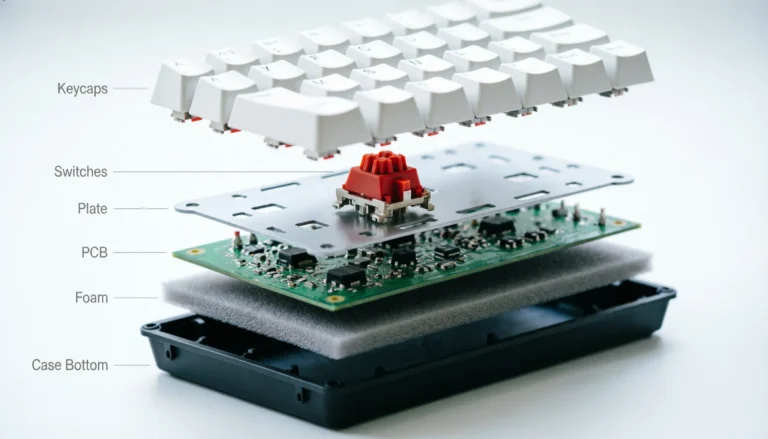
- Drop ALT has an aluminum plate, no foam, and a mostly hollow interior. Out of the box, it pings. That high-pitched metallic ring after each keypress is real, and it’s the number-one thing modders address.
- Keychron K6 Pro ships with layers of case foam, silicone dampeners on the newer batches, and a plate mount that’s already been tuned for sound. It’s not a $300 custom board, but the K6 Pro sounds good the moment you plug it in.
Most people won’t lube their own switches or crack open their board to add foam. If you’re one of those people — and that’s most people — the K6 Pro wins the sound comparison out of the box by a wide margin. You can pick one up here and skip the modding rabbit hole entirely. If you are going to mod, the ALT gives you more to work with and rewards the work.
If sound is your top priority, this rundown of the best sounding mechanical keyboards goes deeper into what actually drives that “thocc” everyone talks about.
Wireless, Battery, and Connectivity
This one’s simple. The Keychron K6 Pro does Bluetooth 5.1 across three devices, plus 2.4GHz on the K Pro version, plus wired USB-C. The Drop ALT is wired only.
If wireless matters to you at all — moving between a laptop and a desktop, cleaning up desk clutter, using the board on the couch — that’s the entire ballgame. The ALT isn’t competing here.
Battery life on the K6 Pro is legitimately good. Keychron rates the 4,000 mAh cell at around 100 hours with RGB off, and in my normal use (RGB on low, mixed Bluetooth and wired) I get about a week and a half between charges. Not iPhone-level “check it every night” — much better.
Here’s the catch on wireless, and the one nobody mentions: Bluetooth adds latency. It’s fine for typing and 95% of games. If you play competitive FPS at a high level, plug it in. I’ve had a couple of micro-lag hiccups reconnecting from sleep, but nothing that ruined a session.
If wireless is a hard requirement for your setup, this ends the debate — the K6 Pro is the buy, and the Drop ALT doesn’t get to answer.
Keycaps, Layout, and Ergonomics
Both boards use a 65% layout — 67 or 68 keys, depending on how you count. You get arrow keys and a small right-side column (Delete, Page Up, Page Down, and so on), and you lose the F-row and the dedicated nav cluster.
If you’ve never used a 65% before, the muscle-memory adjustment takes about a week. F-row lives on a function layer. Home/End are Fn combinations. Once you’re used to it, going back to a full-size feels bloated. If you’re not sure the layout is right for you, this 65% layout guide will save you from returning a board.
Keycaps are where things diverge:
- Drop ALT ships with doubleshot PBT keycaps in the high-profile version — thick, textured, they’ll outlast the board itself. Cherry profile, which is short and slightly sculpted.
- Keychron K6 Pro also ships with doubleshot PBT on the standard configuration, in OEM profile. OEM is taller than Cherry, and the row sculpting is a little more pronounced.
Cherry vs OEM profile is a personal thing. I slightly prefer Cherry for typing feel — my fingers don’t have to travel as far. OEM is what most people have used forever and it’s completely fine. Neither profile is objectively “better.”
For wrists, both boards are relatively low-profile compared to a gaming keyboard with a wrist rest. You’ll want a wrist rest with either one if you type for a living. That’s not a knock on the boards; it’s just how mechanical keyboards work.
Software, QMK, and Programmability
Both boards support QMK/VIA. That means you can remap every key, build custom layers, set up macros, and do it all in a browser without touching firmware. This used to be a Drop-only advantage. It isn’t anymore.
The K6 Pro adds Keychron’s own Launcher software — a web-based tool that’s essentially a friendlier VIA. If you’ve never used VIA before, Launcher is the easier onboarding.
Drop’s Configurator is fine but has been aging. Some users have reported it being less actively updated than VIA. If you plan to seriously customize your keymap, either board will do the job. I lean toward the K6 Pro here just because Keychron has been more consistent about firmware updates.
For deeper customization, this guide to QMK-programmable keyboards is a good next stop.
Gaming Performance
I’ll keep this short because there’s less to say than the marketing suggests.
Both boards use hot-swap sockets, both support N-Key rollover over USB, and both poll at 1000 Hz when wired. Whichever you buy, gaming will feel identical for 99% of players. The K Pro Red switches in the K6 Pro are light and linear — good for fast key repeats, easy to actuate. The Cherry MX Blues in the ALT are clicky and heavier, which most competitive gamers don’t prefer.
If you’re specifically buying for gaming, this rundown of the best switches for gaming has more nuance. In one line: linear switches beat tactile beats clicky for pure gaming, and the specific brand matters less than most people think.
Here’s my mildly contrarian take. “Gaming keyboard” as a category is mostly marketing. A $100 mechanical board with linear switches will out-game a $250 board with per-key RGB and “8000 Hz polling.” Polling rate above 1000 Hz is a spec designed to sell keyboards, not win rounds.
Keychron K6 Pro: Pros and Cons
Pros
- Legitimately great price-to-performance — one of the best 65s under $120
- Wireless (Bluetooth 5.1 across three devices, plus 2.4GHz on the K Pro) and wired USB-C
- Ships sounding great out of the box thanks to case foam and factory-lubed switches
- Full QMK/VIA support, plus the friendlier Keychron Launcher
- Hot-swappable, so you can swap switches without soldering
- Native Mac layout with a dedicated Mac/Windows toggle on the case
Cons
- Lighter than the Drop ALT — some people want more heft
- Aluminum-frame version costs more; the base plastic version feels noticeably cheaper
- RGB is solid but not as blinding as gaming-first boards
- Keychron’s build QC has occasional stabilizer inconsistencies (mine were fine, some batches aren’t)

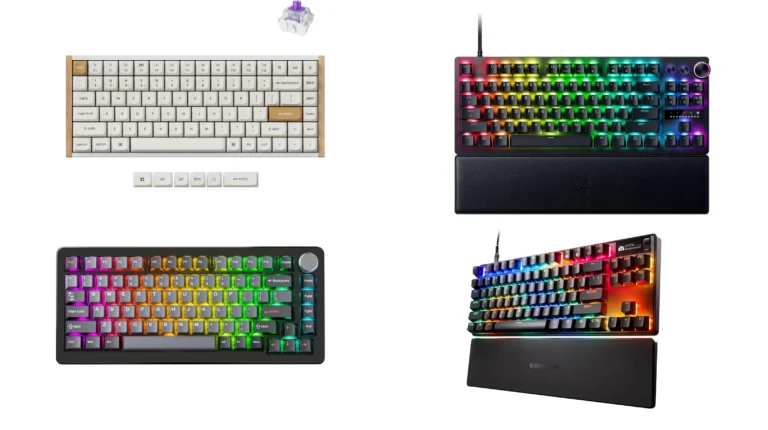
- The Keychron K6 Pro is an innovative custom wireless mechanical keyboard advancing typing experience to a new level. QMK…
- Program keys with Launcher- anyone can master any keys, macro commands or combination keys through Launcher web app with…
- Hot-Swappable with MX mechanical switch – You can hot-swap the K6 Pro with almost all of the 3pin and 5pin MX mechanical…
If the pros list reads like your shortlist — see the current K6 Pro price on Amazon.
Drop ALT: Pros and Cons
Pros
- Excellent aluminum build — dense, premium, doesn’t move on the desk
- Bright, well-implemented RGB with underglow on the high-profile version
- Dual USB-C ports (both sides) for cable-routing flexibility
- Massive community mod scene — case foams, tape mods, keycap sets, all well documented
- Genuine Cherry MX switch options for people who want the classic feel
Cons
- Wired only — no Bluetooth, no 2.4GHz wireless dongle
- Pings noticeably out of the box; needs mods to sound its best
- Costs significantly more, especially the high-profile version
- Drop’s Configurator software has been less actively developed lately
- Some batches ship with stabilizer complaints (fixable, but a pain out of the box)

- A MECH KEYS FAVORITE, NOW IN HIGH PROFILE: The Drop ALT High-Profile is just like the original ALT, but now it comes wit…
- THICKER, HEAVIER FRAME: The ALT High-Profile is constructed from a large block of anodized aluminum, nearly twice as hea…
- CHERRY MX BLUE RGB SWITCHES: This ALT High-Profile model comes equipped with Cherry MX Blue switches, which have a disti…
Who Should Buy the Keychron K6 Pro
If you’re building your first serious mechanical keyboard, you want wireless, you’re on a Mac, or you just want the best value in the 65% category — this is the pick. It’s the board I recommend to friends who ask, and it’s the one I keep coming back to on my own desk. You can grab it here.
It’s also the smarter buy for anyone who won’t mod. Everything the K6 Pro does well, it does well out of the box.
Who Should Buy the Drop ALT
If you specifically want a heavy, premium-feeling desk piece, you love the Cherry MX Blue clicky feel, you’ll actually mod the board to fix the ping, and you’re okay with wired-only — the ALT is still a legitimate choice. It’s a board with real character. Here’s the current listing.
If you’re on the fence about clicky switches, this beginner’s guide to switch types will save you from picking the wrong one and hating your purchase a week later.
The Verdict: Keychron K6 vs Drop ALT
I’ve laid out all the trade-offs, but a comparison article without a verdict is just a spec sheet in prose. So here it is: for most people, most of the time, the Keychron K6 Pro is the smarter buy in the Keychron K6 vs Drop ALT match-up. It costs less, does more (wireless), sounds better out of the box, and hits about 90% of the ALT’s typing experience for well under half the price.
The Drop ALT isn’t a bad keyboard. It’s a well-built board that made sense as an enthusiast pick in 2019 and still feels great to type on. But the value equation has shifted underneath it. Boards like the K6 Pro have caught up on features (hot-swap, VIA), passed it on connectivity (wireless), and matched it on typing feel for a lot less money.
If you already own an ALT and love it, keep it. If you’re deciding today, save the money and put the difference toward a nice PBT keycap set. That’s advice I’d give my brother — so it’s the advice I’m giving you.
👉 My pick: the Keychron K6 Pro on Amazon. 👉 Still want the ALT? Here it is.
This article contains affiliate links. If you buy through them, I earn a small commission at no extra cost to you. I only recommend keyboards I’ve actually tested. As an Amazon Associate I earn from qualifying purchases.