60% vs 65% Keyboards: Which Is Actually Worth Buying?

This article contains affiliate links. If you buy through them, I earn a small commission at no extra cost to you. I only recommend keyboards I’ve actually tested. As an Amazon Associate I earn from qualifying purchases.
Every keyboard enthusiast I know owns a 60% board they don’t use anymore. It’s not broken. It’s not ugly. It sits in a drawer because they got tired of holding Fn every time they needed to move a cursor up a line.
That drawer is the whole 60% vs 65% keyboards debate in one sentence.
I’ve been reviewing input devices for about fourteen years — from the Poker II days through the Ducky One 3 Mini, the KBD67 Lite, the NuPhy Air60, and roughly a dozen custom builds in between. I’ve daily-driven both formats for weeks at a stretch, swapped them onto the same desk with the same switches, and watched a lot of people spend money on the wrong one.
So here’s the honest comparison. No hype about tiny footprints, no romanticizing minimalism you’ll regret in a week. Just what actually happens when you live with these boards.
TL;DR: 60% vs 65% Keyboards at a Glance
If you’re skimming (fair), here’s the quick verdict — sorted by what you actually plan to do with the thing.
| Your Priority | Winner | Why |
|---|---|---|
| Smallest possible footprint | 60% | The floor before you go split or ortho |
| Coding, writing, spreadsheets | 65% | Real arrow keys, no muscle-memory tax |
| Competitive FPS gaming | Toss-up | Both give you plenty of mouse-swing room |
| Travel and backpacking | 60% | Roughly an inch shorter, fits more sleeves |
| First mechanical board | 65% | Way less “wait, how do I…?” pain |
| Under $100 with real features | 65% | More sub-$100 hot-swap options right now |
| Pure minimalist aesthetic | 60% | Nothing else looks this clean on a desk |
Short answer for most people reading this: buy the 65%. Long answer: keep reading.
What a 60% and 65% Keyboard Actually Are
Quick primer, because the naming isn’t intuitive.
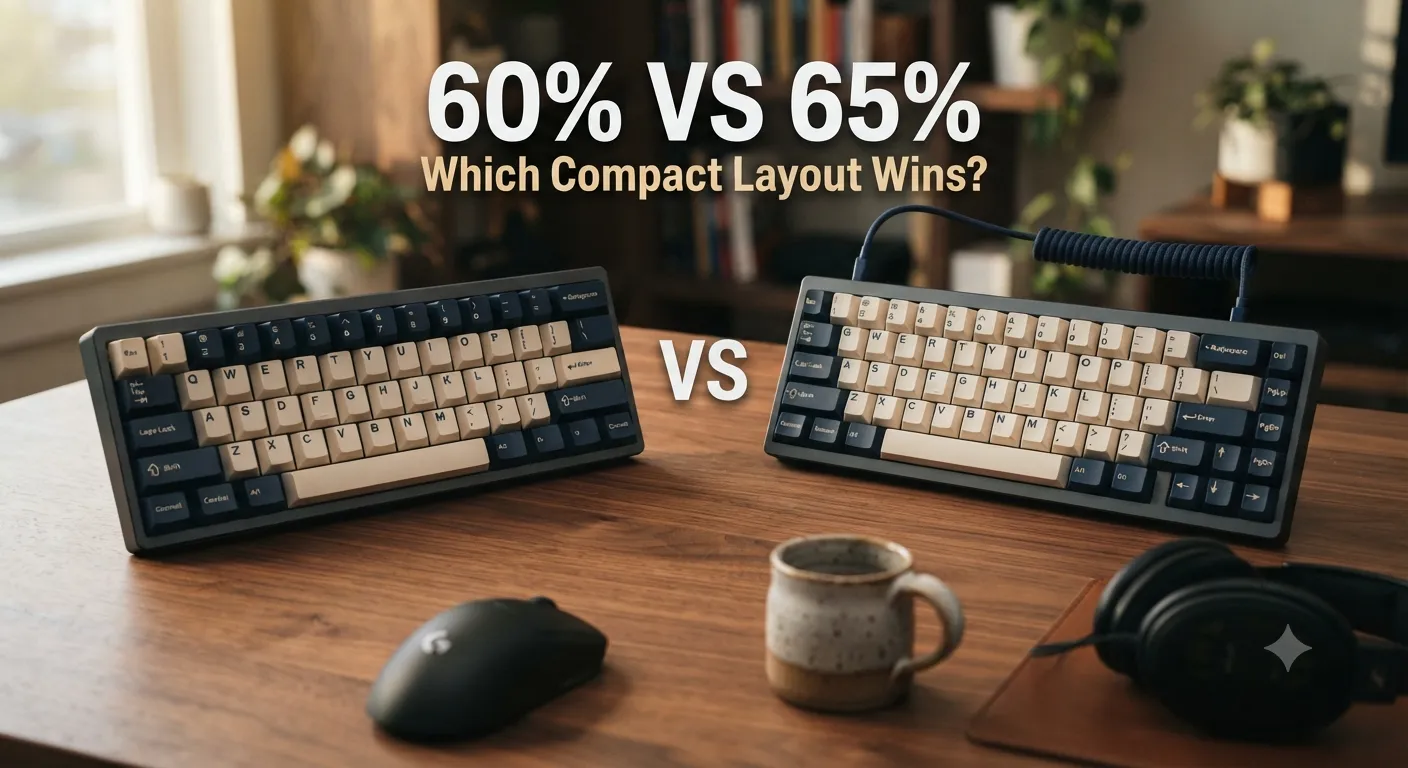
A 60% keyboard has around 61 keys. Alphas, numbers, modifiers — nothing else. No function row, no dedicated arrow keys, no nav cluster. F1 lives on a hidden layer under a modifier. Same for arrows, Home, End, Delete, PrtSc, all of it. Think Ducky One 3 Mini, HHKB, Anne Pro 2, KBDfans Tofu60, GMMK 1.
A 65% keyboard adds one column on the right side. You get dedicated arrow keys plus three or four nav keys — usually Delete, Page Up, Page Down, and Home, though the exact set varies board to board. Total is around 68 keys. Ducky One 3 SF, Keychron K6 and Q2, NuPhy Halo65, KBD67 Lite — all 65%.
That single extra column is 90% of the difference. Everything else — sound, switch feel, build quality — is orthogonal to the layout question. A cheap 65% doesn’t type any better than a nice 60%. What changes is whether you have to hold a modifier every time you want to move up a line.
One quick warning before we go deeper. “60%” and “65%” are loose labels, not standards. A “60% with arrow keys” (yes, that exists, and it’s a HHKB-style split spacebar layout) muddies the water. Some 65% boards drop the right Shift a hair to fit the arrow column and it drives certain typists nuts. Always look at the actual layout diagram before you buy. I’ve seen people order a 65%, get the board, and realize the up arrow sits where their right Shift used to be. Fixable with training, but annoying.
The Real Differences Between 60% vs 65% Keyboards
Beyond the key count, here’s what actually matters once you’re typing.
1. Arrow Keys (The One That Ruins Most 60% Buyers)
This is the main event. On a 65%, arrows are physically there. You reach with your right hand, you hit them, you’re done.
On a 60%, arrows live on a Fn layer — usually Fn + IJKL or Fn + WASD. Some boards let you remap them cleaner, but you’re always holding a modifier. For light browsing, fine. For eight hours of editing docs, writing code, or moving around a spreadsheet, you’ll feel it. I’ve watched more than one friend sell a 60% inside a month over this exact thing.
2. Footprint
A 60% is roughly 11.5 inches wide. A 65% is closer to 12.5. Both are shockingly small next to a full-size, and both leave massive mouse space for low-sensitivity FPS players. The difference between them is real but not dramatic. An inch of desk isn’t life-changing for most people.
3. Learning Curve
Muscle memory is a real cost. A 60% forces you to memorize a whole hidden layer. If you want it tuned right, that’s an evening in VIA or QMK. A 65% mostly works the way your brain already expects — you just don’t have F-keys.
4. Modding and Case Options
Because 60% is the older, more established enthusiast format, you’ll find more cases, more plates, more mod kits, and more group buys. If you want to build a custom from a bare PCB, 60% still has the deepest ecosystem. 65% is catching up fast, and the mainstream retail options are actually better right now, but for pure enthusiast building, 60% has the edge.
For a broader look at custom-friendly boards worth building on, here’s my rundown of the best hot-swap options.
60% Keyboards: Pros and Cons
Pros
- Smallest realistic footprint without going split or ortholinear
- Cleanest look — nothing beats a well-built 60% for pure visual minimalism
- Deepest custom ecosystem — cases, plates, PCBs, and group buys all favor this size
- Great for pure gaming where you rarely touch the function row mid-match
- Extremely portable — slips into almost any laptop sleeve
Cons
- No dedicated arrow keys — the deal-breaker for most people who try it
- Function keys buried on a Fn layer — annoying if you use F5, F11, or F12 often
- Learning curve for the hidden layer, especially if you don’t want to remap
- Rough for coding, spreadsheets, and any nav-heavy work
- You’ll want an evening in VIA to make it truly usable
Best for
Someone who mostly games, mostly types prose, and wants the smallest, cleanest board possible. Also anyone building a custom because they enjoy the process itself.
65% Keyboards: Pros and Cons
Pros
- Dedicated arrow keys — the single feature that saves buyers from regret
- Nav cluster (Delete, Page Up, Page Down, Home) makes real work possible
- Almost as compact as a 60% but massively more usable day-to-day
- Beginner-friendly — muscle memory from a full-size transfers over with minimal pain
- Strong retail options under $100 with hot-swap sockets and PBT keycaps
Cons
- Slightly bigger than a 60% — about an inch wider
- No dedicated function row — you’re still holding Fn for F1–F12
- Layouts vary between boards — one 65% might have PgUp where another has Insert, so check before you buy
- Fewer custom kit options than 60%, though the gap is closing fast
Best for
Basically everyone who wants a compact keyboard but doesn’t want to relearn how to type. Writers, coders, office workers, gamers who alt-tab into work — this is the format.
Head-to-Head: 60% vs 65% Keyboards by Use Case
Gaming
For competitive FPS players, both formats are excellent. You get all the mouse room your low-DPI sensitivity could want. The 60% has a slight portability edge if you travel to LANs, but a 65% gives you real arrow keys for menu navigation and any RTS or RPG that expects them, without the Fn dance.
For MMO or single-player RPG players who lean on hotkeys, function keys, or menu-heavy interfaces, 65% wins by default. Buried F-keys are annoying in League and worse in an MMO where you rebind every hotbar.
One quick note on wireless. Both formats have solid Bluetooth and 2.4GHz options now — the Keychron K6 Pro and NuPhy Halo65 are examples in 65%, and the NuPhy Air60 or ZSA Voyager are the 60% side of that coin. If competitive gaming is your priority, run wired at 1000 Hz polling. If you just want a clean desk, wireless is fine and you won’t feel the latency in anything short of ranked shooters.
If gaming is your main use case, this guide to gaming-focused boards breaks down which specs actually matter versus which ones are marketing noise.
Typing and Writing
65%, no contest. If you write for a living — even just email all day — you’ll use arrows and Delete constantly. I tested a Ducky Mini as my daily writer for two weeks, and my WPM dropped noticeably. Not because the board was slow. Because I kept pausing to remember which layer had End.
Programming
Same story, but louder. Coding is nav-key soup — Home, End, Page Up, Page Down, arrows to move around blocks. Even with a heavily remapped 60%, you’re either holding a modifier constantly or you’ve reinvented Vim bindings. Fine if you already live in Vim. Miserable if you don’t.
Travel and Portability
60% wins here, but the margin is small. A well-made 65% still fits in a laptop bag. If you’re going to conferences or working from cafés a lot, you’ll notice the extra inch less than you think. If you fly with your board every week, that inch starts to matter.
Aesthetics
Subjective, but 60% is the format that made “clean desk setup” a genre. There’s something about that perfect little rectangle that a 65% doesn’t quite hit. If your keyboard has to look a certain way — and no shame, mine does — the 60% is the answer.
For sound and build quality on a budget, my breakdown of value picks covers what’s worth it under $150.
The Honest Tradeoff Nobody Talks About
Here’s the part most reviews skip: regret rate.
Talking to readers, watching returns, and honestly watching my own drawer fill up — 60% buyers regret their purchase more often than 65% buyers. Not because 60% is bad. It isn’t. But it’s a format that demands you change how you use a keyboard, and most people don’t realize how much of their typing depends on nav keys until those keys are gone.
A 65% asks almost nothing of you. You get a slightly smaller board and you give up the function row. That’s it.
A 60% asks you to reprogram muscle memory, spend time in VIA or QMK, and accept a modifier press every time you want to move your cursor.
If you love the process — the customization, the modding, the layers — that’s a fair trade. Some of my favorite boards are 60% and I’d never sell my HHKB. But if you just want a smaller keyboard that gets out of your way, 65% is the safer, smarter buy for probably 80% of the people who ask me about it.
Here’s the catch. If you are one of those 60% lifers, no 65% will feel small enough. You’ll always be looking at that extra column and wishing it were gone. So the honest answer isn’t universal — it’s a question of temperament.
Which One Should You Actually Buy?
Boil it down to three questions:
- Do you use arrows and nav keys a lot in your daily work? → 65%
- Are you willing to spend a weekend remapping in QMK or VIA? → 60% is fine
- Do you care more about the smallest possible footprint than ease of use? → 60%
For most first-time buyers, most office workers, most coders, most people who type more than they game — get the 65%. Keychron K6 Pro, NuPhy Halo65, Ducky One 3 SF, and the Q2 are all solid starting points. A good sub-$150 hot-swap 65% will do everything you need for years.
For the enthusiast crowd, the customizers, the aesthetic-first minimalists, and the pure gamers who want the tiniest possible board — the 60% is still a great format. Just go in knowing you’ll be spending time in the software, and that arrow keys are going to feel weird for about a month.
One last thing. Don’t buy a 60% because it looks cool on Reddit. Buy it because you actually want the constraints. And don’t buy a 65% because it’s the safer bet. Buy it because you actually need those arrows.
Either way — get one with hot-swap sockets and PBT keycaps. That’s non-negotiable. It’s the difference between a board you love in two years and one you sold on Marketplace last October.
This article contains affiliate links. If you buy through them, I earn a small commission at no extra cost to you. I only recommend keyboards I’ve actually tested. As an Amazon Associate I earn from qualifying purchases.