Best Silent Switches for Gaming 5 That Actually Work

This article contains affiliate links. If you buy through them, I earn a small commission at no extra cost to you. I only recommend keyboards I’ve actually tested. As an Amazon Associate I earn from qualifying purchases.
Here’s the truth nobody selling switches wants to lead with: “silent” switches aren’t silent. They’re quieter. Sometimes a lot quieter. But if you’re expecting to type in a library and hear absolutely nothing, you’ve been sold a story. What the best silent switches for gaming actually do is kill the sharp bottom-out slap and the higher-pitched top-out click that carry across a room — the sounds your teammates hear over Discord and your partner hears from the next room at 2 a.m.
I’ve swapped, lubed, and gamed on every switch in this roundup. Some belong on your daily driver. One I’d only recommend if a very specific box gets checked. Let’s get into it.
Quick Comparison Table: Silent Switches for Gaming at a Glance
| Best For | Switch | Type | Actuation | Why It Wins |
|---|---|---|---|---|
| Best Overall Silent Linear | EPOMAKER Nude Rosa | Linear Silent | ~45gf | Smooth, muted, factory-lubed properly |
| Best Silent Tactile for Gaming | DUROCK Silent Shrimp T1 | Tactile Silent | 67gf | Real bump without the click racket |
| Best Budget Silent Switch | ZhouWang Sea Salt Pro | Linear Silent | 47g | 108 switches for the price of a snack |
| Best Low-Profile Silent | GATERON KS-33 Silent 2.0 Red | Low-Profile Linear | 45gf | Slim boards without the plasticky click |
| Best Quiet Tactile for Office/Home | Akko V3 Penguin | Tactile Silent | 50gf | Mild bump, factory-quieted, wallet-friendly |
Any of these will put you meaningfully ahead of stock linears in noise. But they solve different problems, and that’s the point of the table.
What “Silent” Actually Means Inside the Switch
A normal MX-style switch makes two sounds: the crack when you bottom out, and the higher clack when the stem returns and hits the top housing. Silent switches use small rubber or elastomer dampeners molded into the stem — little pads that soak up both impacts. That’s it. That’s the whole trick.
It works. But it also changes the feel. You lose a bit of the crisp, “solid” bottom-out that switch nerds love. Some silent switches feel slightly mushy compared to their non-silent siblings. The best ones minimize that trade-off. The bad ones feel like you’re typing on wet cardboard.
For gaming specifically, a few things actually matter:
- Consistent actuation so double-taps and quick spam feel identical every time.
- Smoothness so you don’t get scratch during fast lateral movement in shooters.
- A stable stem so keycaps don’t wobble under a claw grip.
- Factory lube because unlubed silent switches often sound worse, not better — the dampeners can squeak.
If you want a broader primer on how switches shape the feel of a board, this deeper dive on switch types is worth a read.
The Best Silent Switches for Gaming, Reviewed
1. EPOMAKER Nude Rosa — Best Overall Silent Linear for Gaming
The EPOMAKER Nude Rosa is what most people picture when they say they want a “quiet gaming switch.” It’s a linear, factory pre-lubed, with a soft-but-not-mushy bottom-out and a noticeably muted top-out. I ran a set as my daily driver in a small tri-mode board for about three weeks, and the sound signature is genuinely pleasing — closer to a soft “pock” than a click.
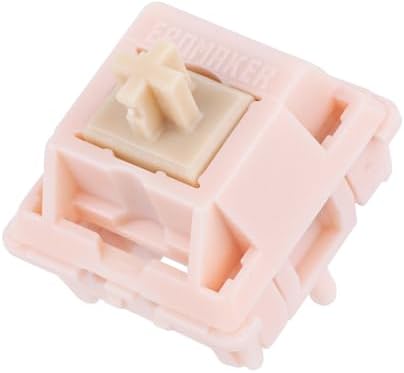
- Peak Silence Meets Effortless Smoothness: Are you tired of the annoying “clacky” sound from mechanical keyboards while t…
- Factory Lubed, Worry-Free Performance: Pre-lubed at the factory and engineered with a specialized structure, the Epomake…
- MX-Compatible & Hot-Swappable: The EPOMAKER Silent Switch features a standard 5-pin design, which strengthens the connec…
For gaming, the ~45gf actuation is right in the sweet spot. Light enough for quick strafing and repeated inputs in shooters, heavy enough that you’re not triggering keys just from resting your fingers.
Pros
- Very smooth out of the box; minimal factory scratch.
- Excellent muted sound signature without feeling dead.
- 5-pin, standard MX-compatible — fits most modern hot-swap boards.
- Great for late-night ranked without waking the house.
Cons
- Only 35 pieces per set, so you’ll need two packs for a full-size board.
- Feels its best in a well-built board — a hollow budget case won’t do them justice.
Verdict: The closest thing to a “just works” premium silent linear. Check the EPOMAKER Nude Rosa here.
2. DUROCK Silent Shrimp T1 — Best Silent Tactile for Gaming
Silent tactiles are hard to do well. Kill the noise wrong and you kill the bump too. DUROCK didn’t. The Silent Shrimp T1 keeps a distinct, medium bump at the top of the stroke and dampens the bottom-out cleanly. It’s one of the very few silent tactiles I’d actually recommend for gaming and not just typing.
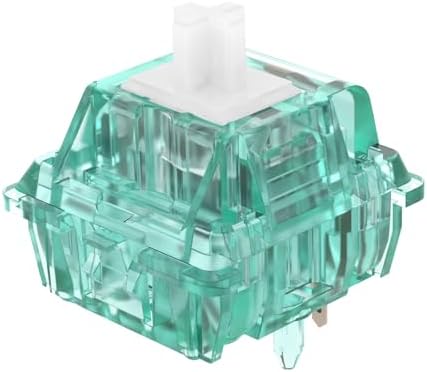
- DUROCK Silent Shrimp is the silent version of DUROCK’s popular T1 Tactile Switch, featuring a translucent turquoise hous…
- DUROCK Shrimp T1 Silent switches uses patent silencing rings to mitigate sound to get that T1 tactility with a significa…
- Well selected imported Premium Polymer Nylon and PC Blend Housing, Smoother POM stem, Gold-plated Springs and Metal Leaf…
67g is on the firmer side. If you’re used to Reds or a light linear, you’ll feel the extra weight. But that weight is why these feel confident — no accidental double-inputs, no floaty return. For MMOs, MOBAs, or anything with heavy keybinding, that tactile confirmation is a real advantage.
Pros
- Rare thing: a silent switch that still feels like a real tactile.
- Firm, stable stem — very little keycap wobble.
- Sold in 90-packs, enough for a full-size board with spares.
- Excellent for mixed work/gaming setups where you type a lot.
Cons
- 67g will feel heavy if you’re coming from lightweight linears.
- Not the cheapest silent tactile on the market.
Verdict: The best silent tactile I’ve tested for gaming, hands down. Grab the DUROCK Silent Shrimps here.
For more on how tactile bumps affect gaming performance, this breakdown is a good companion read.
3. ZhouWang Sea Salt Pro — Best Budget Silent Switch
Here’s a mild myth I like to challenge: cheap silent switches are always garbage. They aren’t. The Sea Salt Pro is proof. You get 108 pre-lubed, dustproof, 5-pin linear silents for what a name-brand set of 45 costs, and the actual typing feel is respectable. Not premium. Respectable.
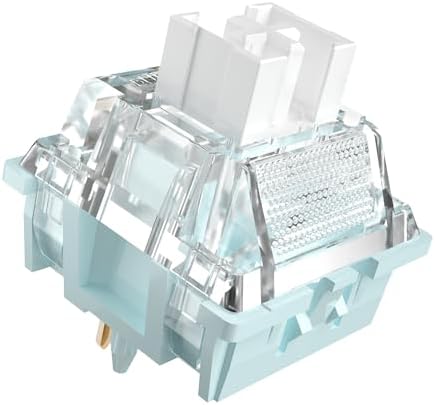
- Linear Silent Switch:Engineered with innovative silent damping structure, eliminates harsh bottom-out noise; delivers si…
- Pre-lubrication:Factory pre-lubed on stem and rails; minimizes scratchy friction, ensures consistent, fluid keystrokes w…
- Stability:Constructed with durable Nylon/PC housing and wear-resistant POM stem; 5-pin PCB mount design locks firmly in …
They’re 47g, so a hair heavier than a stock Gateron Yellow, and they’ve got a slightly more muted but slightly less refined sound than the Nude Rosa. But we’re grading on price. As a first silent switch experiment, or as a full-set option for a secondary board, they’re the smart buy.
Pros
- Ridiculous value — 108 switches, dustproof housings included.
- Pre-lubed reasonably well from the factory.
- Includes LED diffusers, useful if you actually run RGB.
- Smooth enough for FPS gaming; no obvious scratch.
Cons
- Sound isn’t as refined as premium silents — a bit hollower.
- Minor unit-to-unit inconsistency; expect one or two to feel slightly off.
Verdict: The cheapest sensible way into silent switches. Check the Sea Salt Pro set here.
Budget shoppers should also skim this piece on getting the most out of an entry-level board before pulling the trigger.
4. GATERON KS-33 Low Profile Silent 2.0 Red — Best Low-Profile Silent
Low-profile is its own world. If you’ve got a slim board — an ultra-thin Keychron, a low-profile Lofree, or a custom low-pro build — you can’t drop standard MX silents in. You need switches designed for the shorter travel and reduced total height.
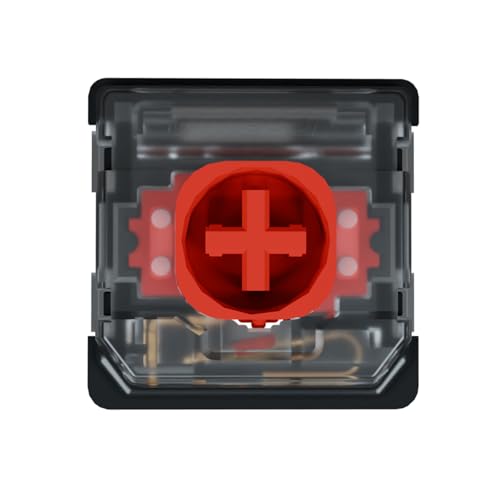
- 𝗣𝗟𝗘𝗔𝗦𝗘 𝗖𝗢𝗡𝗙𝗜𝗥𝗠 𝗖𝗢𝗠𝗣𝗔𝗧𝗜𝗕𝗜𝗟𝗜𝗧𝗬 𝗕𝗘𝗙𝗢𝗥𝗘 𝗣𝗨𝗥𝗖𝗛𝗔𝗦𝗘.KS-33 low-profile switches are designed for keyboards supporting Gateron lo…
- [Keyboard Switches] GATERON KS-33 Low Profile Red Slient 2.0 Keyboard Switches – Gateron custom key switches linear swit…
- [Performance] Gateron Low Profile Red Slient 2.0 45gf linear keyboard switches is produced with a 45gf operating force t…
The GATERON KS-33 Silent 2.0 in Red is a linear, factory pre-lubed low-profile silent. Travel is short, actuation is 45gf, and the muted sound signature is impressive for how thin these are. I built a portable travel board with a set, and it’s the first low-profile that didn’t drive me back to my full-height daily.
Pros
- Solid muted sound signature in a category that usually sounds rattly.
- Smooth for a low-profile switch; factory lube job is decent.
- Short travel is great for fast, twitchy gaming inputs.
- SMD LED cutout for boards that support underglow.
Cons
- 3-pin only — double-check your low-profile PCB for compatibility.
- Low-profile in general has a shorter cushion, so long sessions can be more fatiguing.
Verdict: If your board is low-profile, this is the silent switch to buy. Get the GATERON KS-33 Silent Reds here.
For a wider look at low-profile options, this comparison is worth a scan.
5. Akko V3 Penguin — Best Quiet Tactile for Shared Spaces
The Akko V3 Penguin sits in a weird, useful spot. It’s a silent tactile with a lighter 50gf actuation, and the bump is milder than the Shrimp. That makes it less rewarding as a pure enthusiast tactile — but genuinely great if you want feedback without disturbing the person sitting three feet away.
For gaming, the lighter weight helps if you’re already used to lightweight linears. The mild bump gives a small confirmation without slowing your inputs. Where the Penguin really shines is dual-use boards — you game hard some hours, type hard others, and your officemate has thanked you both times.
Pros
- Lighter than most silent tactiles — no finger fatigue on long sessions.
- Factory pre-lubed with an even, muted sound.
- Standard 5-pin MX-compatible; fits nearly any modern hot-swap board.
- Genuinely office-friendly at 50gf.
Cons
- Bump is subtle — if you love aggressive tactiles, you’ll want something firmer.
- Less “premium” in feel than the DUROCKs.

- Akko Penguin Switch – Inspired by penguin, Akko’s first silent tactile switches come with striking yellow stems, pure wh…
- Silent Tactile – Akko 43gf silent tactile penguin switches produce minimal noise during typing while bringing tactile fe…
- Universal MX Stem that Fits Most Keycaps – Standard MX-style cross (+) stem design ensures compatibility with the vast m…
Verdict: Best silent tactile if you want peace, not maximum bump. Check the Akko V3 Penguins here.
How to Pick the Best Silent Switch for Your Gaming Setup
Here’s the honest framework I use, in order of importance:
- Match the switch to the board. Low-profile board? You need a low-profile switch, full stop. Standard MX board? Any of the other four above will fit.
- Pick your feel first — linear or tactile. Don’t overthink weight until you’ve locked in the type. Linears for pure speed. Tactiles for feedback and typing feel.
- Then choose the weight. 45–50g is the safe zone for most gamers. 60g+ if you rest your fingers heavily or want zero accidental inputs.
- Confirm factory lube. Unlubed silent switches often sound worse than non-silent ones because the dampeners squeak. Every switch on this list is pre-lubed.
- Budget realistically. A great $30 set of silents beats a mediocre $80 set. Don’t chase the label if the feel isn’t there.
Here’s the catch nobody tells you: the switch is only about half of the noise story. Stabilizers, case foam, PCB material, and even your keycaps all shape what your board actually sounds like. You can drop the fanciest silent switches ever made into a hollow, un-modded case and still end up with a hollow, clacky mess. If your goal is genuinely quiet, put a little work into stab lube and a foam layer too. This mod-focused write-up covers the small tweaks that add up.
The Contrarian Take
Most people don’t need silent switches. They need better stabilizers and a foam mod. If your board sounds bad, silent switches are often an expensive way to avoid a $5 fix. Try lubing your stabs first. If it’s still too loud, then swap in one of the sets above — you’ll get compounding gains rather than papering over a fixable problem underneath.
That said, if you’re on a shared desk, gaming at night, or live with someone who does not share your passion for the “thocc,” silent switches are one of the few upgrades that pay for themselves in domestic peace. And unlike RGB, you can actually hear the difference.
Final Verdict: The Best Silent Switches for Gaming, Ranked by Use Case
- Best all-around for gaming: EPOMAKER Nude Rosa. Smooth, muted, no fuss.
- Best silent tactile if you also type a lot: DUROCK Silent Shrimp T1.
- Best value entry point: ZhouWang Sea Salt Pro.
- Best for low-profile boards: GATERON KS-33 Silent 2.0 Red.
- Best for office and shared spaces: Akko V3 Penguin.
Any of these five will meaningfully quiet your gaming setup. Pick the one that matches your board and your play style, do the small mods underneath, and stop chasing the next hype drop. If you’re still deciding between a fresh build or just modding what you already own, this walkthrough will save you a couple hundred bucks.
This article contains affiliate links. If you buy through them, I earn a small commission at no extra cost to you. I only recommend keyboards I’ve actually tested. As an Amazon Associate I earn from qualifying purchases.