Best 65% Gaming Keyboards: Compact, Fast, No Regrets

This article contains affiliate links. If you buy through them, I earn a small commission at no extra cost to you. I only recommend keyboards I’ve actually tested. As an Amazon Associate I earn from qualifying purchases.
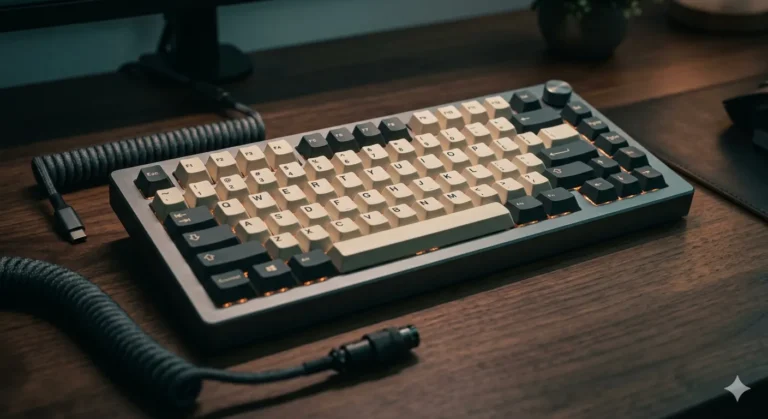
The 65% layout used to feel like a compromise. A tiny board with just enough arrow keys to shut up the people who couldn’t survive without them. That story doesn’t hold anymore. Some of the best 65% gaming keyboards I’ve tested this year land squarely in flagship territory, and a couple of them made me rethink what a small board can actually do.
I’ve spent the last several months rotating 65% boards as my daily driver — from $40 hot-swap oddballs to a Hall Effect board I unboxed twice because I couldn’t quite believe the polling rate on the box was real. This isn’t a spec-sheet roundup. Every keyboard on this list, I’ve typed on for hours, gamed on across shooters and MMOs, and in most cases opened up to check what’s actually inside.
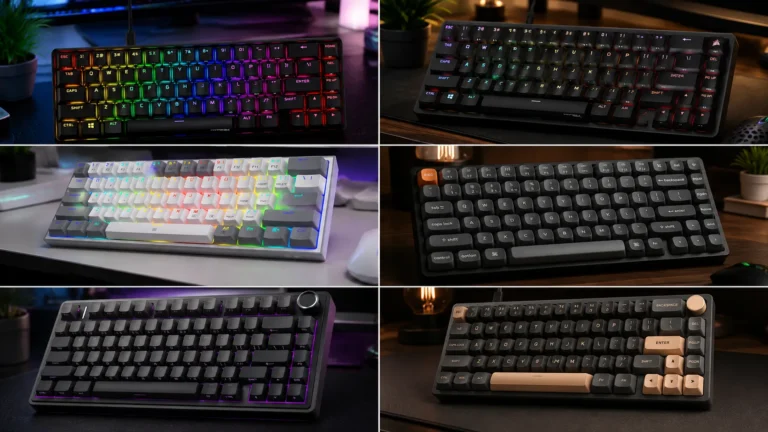
If you want the fastest path to a great board, the table below sorts my picks by what you actually need. Below that, I break down each one, the honest tradeoffs, and a couple of popular models that didn’t earn a spot.
Quick Comparison — Best 65% Gaming Keyboards at a Glance
| Best For | Keyboard | Switch / Key Feature | Where to Buy |
|---|---|---|---|
| Best Overall | HyperX Origins 2 65 | Hot-swap, 8K polling, high-profile | Check Price |
| Best for Competitive FPS | ASUS ROG Falchion Ace HFX | Hall Effect, Rapid Trigger, 8000 Hz | Check Price |
| Best Build & PBT Keycaps | Corsair K65 PRO Mini | OPX optical, iCUE, PBT double-shot | Check Price |
| Best Wireless 65% | Redragon K709 PRO | Gasket mount, hot-swap, quiet linear | Check Price |
| Best Hot-Swap Under $60 | Redragon K631 (Gery) | Hot-swap, quiet red, RGB | Check Price |
| Best Ultra-Budget | 68 Miami 65% | Red switch, LED backlit, wired | Check Price |
Why 65% Is the Real Sweet Spot for Gaming
Here’s the short version: 65% keeps your arrow keys, kills the F-row and the numpad, and gives you a lot of desk real estate back for mouse swings. If you play FPS at low sensitivity — Valorant, CS2, Apex — that extra space genuinely matters. TKL felt small until you actually spend a week in front of a 65%. Then TKL feels like a barge.
You lose the F-row, sure. But every 65% board handles that with a Fn layer that puts F1–F12 exactly where you’d expect. On any board with VIA or QMK, you can remap the whole layout in ten minutes. On the cheaper picks below, the layer is preprogrammed and you’ll learn it in a day.
Ergonomics matter here too. A shorter board pulls your mouse hand closer to your midline, and over an eight-hour day that’s easier on your right shoulder. That’s not gamer-magazine hype. It’s just what happens when your arm isn’t angled out 20 degrees to reach a numpad you never touch. If you’re still not sure whether small is right for you, our keyboard sizing guide breaks it down further.
The Best 65% Gaming Keyboards, Ranked
1. HyperX Origins 2 65 — Best Overall

- Easily Change Up Your Style: When you want to add a new look to your desk, there’s no need to buy a new board. Origins 2…
- Personalize Your Typing Experience: With hot swap 5-pin sockets, you can change the switches and keycaps at any time; no…
- Improved Typing Comfort: Origins 2 keyboards utilize an O-ring mount to provide a light bounce and deeper sound to each …
The HyperX Origins 2 65 is the board I’ve been recommending most this year. It’s not the flashiest option on paper, but it nails the fundamentals in ways cheaper boards fumble — and it does one clever thing none of the others do.
The high-profile case gives you a solid weight and a genuinely rigid typing surface. No case flex, no hollow ping. The hot-swap sockets let you drop in whatever switches you want later without touching a soldering iron. The 8K polling rate is real, not a menu placebo you’ll never feel. And the swappable top housing — a small thing on paper — means you can change the look of the board without buying a new one.
I ran it with the stock HyperX linears for two weeks, then swapped in a set of Gateron Oil Kings for a heavier bottom-out. Both felt great. That flexibility is why this board earns the top spot.
Pros
- 8K polling rate that actually pays off in fast shooters
- Hot-swap sockets — try any 3-pin or 5-pin MX-style switch
- Swappable top housing for personalizing without a new board
- Adjustable-angle feet, still rare in this size
- Quiet, well-tuned stabilizers out of the box
Cons
- Stock keycaps are okay, not great — budget for a PBT set
- Software works but isn’t the prettiest in the category
- Premium price if you don’t care about the swappable housing
Best for: Anyone who wants one board they won’t outgrow. This is the “buy once, cry once” pick.
2. ASUS ROG Falchion Ace HFX — Best for Competitive Play
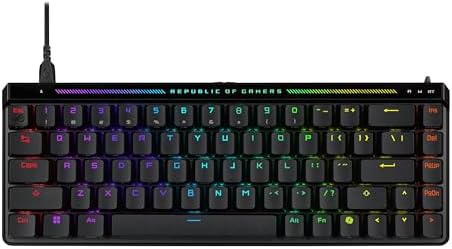
- Pre-lubed ROG HFX Magnetic Switches: These Hall Effect (HE) switches are engineered for a solid feel with ultra fast and…
- Rapid Trigger Toggle & Speed Tap Mode: These features allow rapid key repeats and instant directional changes, allowing …
- Compact and Slim Design: 65% TKL keyboard layout,with almost the same size as a 60% keyboard (12.4″). This maximizes des…
The ASUS ROG Falchion Ace HFX is the board that convinced me Hall Effect is more than a spec-sheet gimmick. Magnetic switches, adjustable actuation from roughly 0.1 mm to 4.0 mm, Rapid Trigger, and Speed Tap — this is the full tournament-mode toolkit, and ASUS crammed it into a genuinely well-built 65% shell.
I tested it in Valorant for a couple of weeks, tuning actuation down to about 0.2 mm on the peek keys and up to 1.5 mm on movement to stop stray inputs. The difference is real. Not “I climbed two ranks” real — anyone who tells you a keyboard does that is selling you something — but the way A and D reset does feel meaningfully faster than a traditional mechanical switch. Stack the 8000 Hz polling on top and input latency drops below any 1K board you’ve used.
Nice extras: a touch panel on the top edge for brightness and volume without opening software, dual USB-C so you can pick which side your cable exits from, and a hard protective cover that turns it into the rare flagship you can actually throw in a backpack.
Pros
- Best-in-class Hall Effect implementation with per-key actuation
- Rapid Trigger and Speed Tap are legitimately useful in competitive FPS
- Dual USB-C ports for cable routing flexibility
- PBT keycaps out of the box (no shine after six months)
- Portable design with included hard cover
Cons
- Premium price
- Armoury Crate is heavier than it needs to be
- If you’re not a competitive shooter, most of what you’re paying for goes unused
Best for: Ranked FPS players who want the newest actuation tech in a portable shell.
3. Corsair K65 PRO Mini — Best Build and PBT Keycaps

- 65% Layout Lets You Play with a Purpose: The compact 65% layout is small enough to fit on any desktop, yet includes the …
- Optical Switches for Laser-Like Inputs: CORSAIR OPX optical-mechanical switches offer insanely smooth, linear, ultra-res…
- Play at AXON-Speed: CORSAIR AXON Hyper-Processing Technology gets your actions from the keyboard to the game up to 8x fa…
The Corsair K65 PRO Mini is one of the sleeper picks in this segment. It runs Corsair’s OPX optical-mechanical switches — linear, fast actuation, no metal contact points to wear down over time. Pair that with double-shot PBT keycaps and Corsair’s tighter-than-most tolerances, and you get a board you can beat on for years without it feeling tired.
I’ve had mine for a year now, and the legends look brand new. That’s the PBT talking. iCUE integration is polished if you already run other Corsair gear, remap and macros are painless, and per-key RGB is bright without going full disco.
Here’s the catch: OPX switches aren’t hot-swappable. What you buy is what you keep. If you like the linear feel, that’s a non-issue. If you’re the kind of person who’s going to want to try tactiles or clickies six months from now, get the HyperX instead.
Pros
- OPX optical-mechanical switches — durable and quick
- PBT double-shot keycaps included (huge at this price)
- iCUE plays nicely with the rest of your Corsair kit
- Detachable USB-C cable, clean per-key RGB
- Excellent build quality with minimal case flex
Cons
- No hot-swap — you’re locked into OPX linears
- iCUE is polarizing (great once configured, annoying to install)
- No wireless option in this SKU
Best for: Corsair-ecosystem folks and anyone who wants a set-and-forget board with real PBT keycaps.
4. Redragon K709 PRO — Best Wireless 65%

- GASKET Design – The body structure differs from traditional screw fixing by using precision-locked covers with gaskets t…
- 3-Mode Connection – Geared with Redragon advanced tri-mode connection technology, USB-C wired, BT 3.0/5.0 & 2.4Ghz wirel…
- Noise Dampening x 5 – Equipped with 3.5mm PO foam, IXPE switch foam, PET sound pad, bottom socket foam, silicone bottom …
The wireless 65% category has gotten crowded, but the Redragon K709 PRO is the one I keep coming back to. It’s a gasket-mount board with hot-swap sockets, quiet linear switches, and rounded PBT keycaps — a feature list you’d expect on something $150 or more. Redragon lands it well under that.
Gasket mount matters more than it sounds. It gives the typing feel a softer, more cushioned bottom-out compared to a tray-mount board, and it dampens the sharp click-clack you get from cheap cases. Combined with the multi-layer noise foam, the K709 PRO is one of the quietest 65% boards I’ve tested — genuinely usable in a shared apartment or on late-night VC sessions.
Battery life has been solid: about a week and a half of mixed use with RGB dimmed in my testing. Bluetooth for casual work, 2.4 GHz dongle when you’re actually gaming.
Pros
- Real gasket mount and noise dampening, not just marketing terms
- Hot-swap sockets for future switch experimentation
- Round PBT keycaps that feel good and don’t shine
- Bluetooth, 2.4 GHz, and wired for maximum flexibility
- Aggressive price for the feature set
Cons
- Software is functional but bare-bones
- 2.4 GHz polling doesn’t compete with wired 8K flagships
- Stock switches are a little muted — swap them if you like a snappier bottom-out
Best for: Anyone who wants wireless without flagship pricing, especially if you type in a shared space.
5. Redragon K631 (Gery) — Best Hot-Swap Value

- YES! TRUE HOT-SWAP – The transformative innovation with 99.8%+ switches compatible free-mod hot swappable Redragon keybo…
- Wired 68 Keys Layout – Redragon 65% layout K631 in wired mode meets the user’s need for separate arrow keys and extra fu…
- Hot-Swappable Red Switches – Hot-swappable with almost all switch types in the market no matter 3-pin or 5-pin. Quiet ba…
If your budget is under $60 but you still want to tinker, the Redragon K631 is the board to buy. Real hot-swap sockets, dedicated arrow keys, RGB, and quiet linear reds — for the kind of money that used to get you a plastic office board with a rattling spacebar.
I tested it against three other budget boards in the same price range and the K631 was the only one that felt like it could grow with the user. Start with the stock linears, dislike them, throw in a set of Akko V3 Cream Blues, and suddenly you’ve got a very different board. That’s the whole point of hot-swap, and most cheap boards either fake it or restrict which switches fit. This one’s plate-mounted PCB accepts pretty much any 3-pin or 5-pin MX-style switch you throw at it.
If you want a starter mod project, our budget keyboard mod walkthrough uses this exact board.
Pros
- Genuine hot-swap that accepts most MX-style switches
- Dedicated arrow keys (not layered under Fn)
- Stabilizers are shockingly decent for the price
- Quiet linear switches are inoffensive out of the box
- Best starter board for modders on a budget
Cons
- ABS keycaps — expect shine within a few months of heavy use
- Wired only
- RGB is fine, not as clean as Corsair or HyperX
- No keycap puller in most bundles
Best for: New modders and anyone building a first custom-feel board on a tight budget.
6. 68 Miami 65% — Best Ultra-Budget Pick

- 【Charming LED Backlight】: Our gaming keyboard has 18 modes of LED backlighting that can shine through the keycaps for a …
- 【Compact Keyboard with Ergonomic Design】: Our 68-key compact keyboard is perfect for those who want a powerful keyboard …
- 【Mechanical Red Switch】: Ussixchare mechanical keyboard features high-quality red switches, these switches are designed …
The 68 Miami is the board I’d hand a nephew who asks, “what should my first mechanical keyboard be?” It’s a 68-key wired board with red linear switches, LED backlighting, and a bright Miami-style keycap set. Usually under $40.
Is it a flagship? Obviously not. But it does the basics well: the reds feel like reds, the case is stiffer than I expected at this price, and the layout is standard enough that you can drop in a nicer keycap set later without hitting compatibility surprises. I threw a $25 PBT dye-sub set on mine and it looked and sounded like a $90 board.
Don’t expect hot-swap, don’t expect gasket mount, and don’t expect miracles from the stabilizers. As a “get started” 65%, though, it punches way above its price.
Pros
- Genuinely affordable entry into the 65% world
- Standard bottom row — easy keycap upgrade path
- Red switches are a safe first-mech choice
- LED backlight is bright enough to be useful
- Compact and light for travel or a secondary rig
Cons
- No hot-swap
- Stabilizers rattle without a quick mod
- ABS keycaps will shine within months
- Single-color backlight, not per-key RGB
Best for: First-time mech buyers, dorm setups, or a cheap second board for the office.
A Couple of 65% Boards That Didn’t Make the Cut
I’ll keep this short. A few popular picks kept turning up in my testing and I couldn’t in good conscience slot them into the ranked list.
The Razer BlackWidow V3 Mini HyperSpeed gets a lot of love, and Razer’s green and yellow switches are fine, but the price-to-feature ratio doesn’t hold up in 2026. You’re paying flagship money for a board without hot-swap and with keycaps that shine within months. The wireless is good; nothing else stands out.
The Ducky One 3 SF is a genuinely lovely board — I own one and I use it. But for pure gaming, the lack of Rapid Trigger, adjustable actuation, or high-poll modes means you’re paying an enthusiast tax for a typing experience, not a competitive edge. If you want a beautiful typing board that also games well, it’s fine. As the best 65% gaming keyboard for the money, it’s not.
The Keychron K6 is a wireless workhorse, but I still hesitate to recommend it for gaming specifically. The 1K polling and older internals put it a step behind the K709 PRO at a similar price.
How to Pick the Right 65% Gaming Keyboard for You
Skip the marketing jargon. Here’s what actually matters when you’re comparing 65% gaming keyboards:
- Switch type. Linear for gaming feel, tactile if you type a lot, clicky only if you don’t share a room. Hall Effect if you’re serious about competitive FPS and want Rapid Trigger.
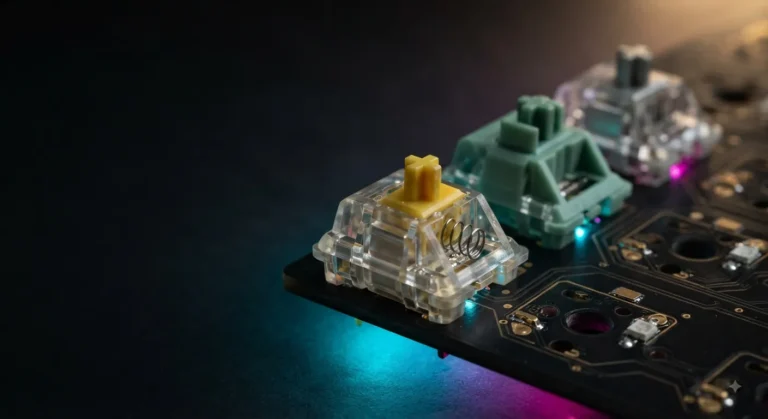
- Hot-swap vs. soldered. If there’s any chance you’ll want to change switches later, buy hot-swap. Almost no downside anymore.
- Keycap material. PBT lasts. ABS shines and eventually feels greasy. Budget accordingly.
- Polling rate. 1K is fine for 99% of people. 4K/8K is a real (if small) improvement in fast shooters, if your monitor and CPU can keep up.
- Wireless. Only worth paying extra if you actually move the board around. For a static desktop setup, wired is one less battery to worry about.
- Software. Try before you commit — iCUE, Armoury Crate, and Synapse are all polarizing. VIA and QMK are open-source and generally friendlier.
If you want the deeper argument on switch feel, our switch guide breaks down linear vs. tactile vs. clicky with the honest tradeoffs.
Final Verdict
Short answer: get the HyperX Origins 2 65. It’s the most complete 65% gaming keyboard on this list, it’ll grow with you thanks to hot-swap, and the swappable housing gives it a longer shelf life than most flagships.
If you play competitive FPS and want the newest actuation tech, the ASUS ROG Falchion Ace HFX is worth the money — and I don’t say that lightly.
If you’re on a tight budget, the Redragon K631 is a smarter buy than any $150 board with fake premium features. And if you just want a solid, cheap first-mech under $40, the 68 Miami will get you there without regret.
The best 65% gaming keyboards are the ones you’ll still be using in three years — not the ones with the loudest marketing. Pick the board that fits your desk, your budget, and the games you actually play. The layout has finally caught up with the hype.
This article contains affiliate links. If you buy through them, I earn a small commission at no extra cost to you. I only recommend keyboards I’ve actually tested. As an Amazon Associate I earn from qualifying purchases.